
GEEKVAPE Aegis Mini 2 (M100)
GeekVape M100 Aegis Mini 2 Kit User Manual
Model: Aegis Mini 2 (M100) | Brand: GEEKVAPE
1. Inleiding
Welcome to the user manual for your GeekVape M100 Aegis Mini 2 Kit. This device is a powerful and durable e-cigarette vaporizer designed for an optimal vaping experience. It features a robust 2500mAh internal battery, capable of delivering up to 100W of power, and is paired with the GeekVape Z Nano 2 Tank, compatible with GeekVape B Series Coils.
The M100 Aegis Mini 2 is built with advanced durability, boasting an IP68 rating for water and dust resistance, along with innovative shock resistance. Its A-lock design prevents accidental firing, ensuring a stable and safe output. The device also features a clear 1.08-inch full screen display for easy operation and monitoring.
Belangrike veiligheidsnota: This product does not contain nicotine or tobacco. Sale is prohibited to persons under 18 years of age. By ordering this product, you certify that you are over 18 years old.
2. Pakketinhoud
Merk asseblief die blokkie vir die volgende items:
- 1 x GeekVape M100 Aegis Mini 2 Mod
- 1 x GeekVape Z Nano 2 Tank (3.5ml)
- 1 x GeekVape B Series 0.2ohm Coil (Pre-installed)
- 1 x GeekVape B Series 0.6ohm Coil (Spare)
- 1 x Drip Tip
- 1 x Coil Tool
- 1 x Spare Parts Pack
- 1 x Spare Glass Tube
- 1 x USB Tipe-C-kabel

Image: The GeekVape M100 Aegis Mini 2 Kit, its packaging, and all included accessories laid out.
3. Produk verbyview
Familiarize yourself with the main components of your GeekVape M100 Aegis Mini 2 Kit.

Beeld: Voorkant view of the assembled GeekVape M100 Aegis Mini 2 Kit in classic black.
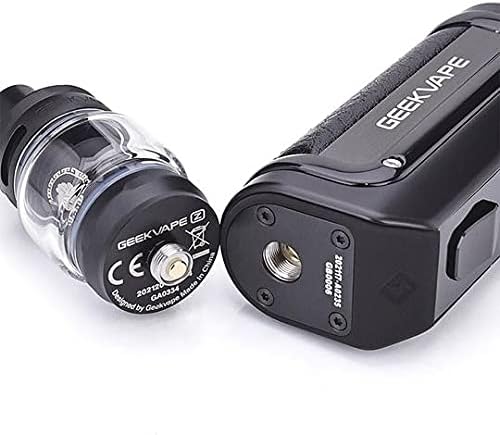
Beeld: Nabyskoot view of the 510 connection point on the mod and the base of the Z Nano 2 Tank.

Beeld: 'n Gedetailleerde view of the 1.08-inch full screen display showing power, resistance, amperage, voltage, and puff counter.

Image: Several GeekVape B Series Coils, highlighting their mesh design and resistance markings.
4. Opstelgids
4.1. Installing the Coil
- Unscrew the base of the Z Nano 2 Tank from the main tank section.
- Carefully push the GeekVape B Series Coil into the designated slot in the tank base. Ensure it is seated firmly.
- Prime the Coil: Before reassembling, apply a few drops of e-liquid to the cotton wicking ports of the new coil. This saturates the cotton and prevents dry hits.
- Screw the tank base back onto the tank section.
4.2. Filling the E-liquid
- Locate the top cap of the Z Nano 2 Tank.
- Twist the top cap a quarter turn counter-clockwise to remove it, revealing the fill ports.
- Insert the nozzle of your e-liquid bottle into one of the fill ports (avoid the center airflow hole).
- Slowly fill the tank with e-liquid up to the maximum fill line.
- Replace the top cap by aligning it and twisting clockwise until secure.
- Belangrik: After filling a new coil, let the tank stand upright for at least 5-10 minutes to allow the e-liquid to fully saturate the coil. This prevents burning the coil.
4.3. Laai die toestel
- Locate the Type-C charging port on the side of the M100 Mod, usually protected by a silicone flap.
- Open the silicone flap.
- Connect the provided USB Type-C cable to the device and the other end to a 5V/2A wall adapter or a compatible USB port.
- The screen will display the charging status. The battery icon will indicate charging progress.
- Once fully charged, disconnect the cable and close the silicone flap to maintain IP68 rating.

Image: Close-up of the GeekVape M100 Mod showing the Type-C charging port with its protective cover open.
5. Bedryfsinstruksies
5.1. Skakel aan/af
- Om die toestel te draai ON: Press the fire button 5 times rapidly within 2 seconds. The screen will light up.
- Om die toestel te draai AF: Press the fire button 5 times rapidly within 2 seconds. The screen will display "System Off".
5.2. Adjusting Wattage
- Once the device is on, use the "+" en "-" adjustment buttons located below the screen to increase or decrease the wattage.
- Die wattage range is typically 5W to 100W. Adjust according to your coil's recommended wattage range for optimal performance and coil longevity.
5.3. A-Lock Function
- The M100 features an A-lock switch on the side of the device.
- Skuif die skakelaar af to lock the device, preventing accidental presses and firing. This is useful when carrying the device in a pocket or bag.
- Skuif die skakelaar up to unlock the device and resume normal operation.
5.4. Vaping
- With the tank filled and coil primed, and the device powered on and unlocked, press and hold the fire button while inhaling from the drip tip.
- Release the fire button when you finish inhaling.
6. Onderhoud
6.1. Coil Replacement
- Coils typically need to be replaced every 1-2 weeks, depending on usage and e-liquid type.
- A burnt taste, reduced vapor production, or diminished flavor are signs that the coil needs replacement.
- Follow the steps in Section 4.1 to replace the coil.
6.2. Tank Cleaning
- To clean the tank, disassemble it by removing the top cap, glass tube, and coil.
- Rinse all components (except the coil) with warm water. For a deeper clean, use a mild dish soap and rinse thoroughly.
- Maak seker dat alle dele heeltemal droog is voordat dit weer aanmekaargesit word.
6.3. Skoonmaak van toestelle
- Wipe the mod body with a soft, damp cloth to remove any dust or e-liquid residue.
- Keep the charging port clean and free of debris.
- Do not submerge the entire device in water, despite its IP68 rating, unless specifically instructed for cleaning. The rating is for accidental exposure.
7. Probleemoplossing
| Probleem | Moontlike oorsaak | Oplossing |
|---|---|---|
| Toestel skakel nie aan nie | Low battery; Device off; Faulty device | Charge the device; Press fire button 5 times rapidly; Contact support if issue persists. |
| No vapor production | Coil not installed correctly; No e-liquid; Low battery; Wattage too low; Coil burnt out | Ensure coil is seated; Fill tank; Charge device; Increase wattage; Replace coil. |
| Burnt taste | Coil not primed; Coil burnt out; E-liquid level too low; Wattage te hoog | Prime new coil; Replace coil; Refill tank; Reduce wattage. |
| E-liquid leaking from tank | Coil not installed correctly; O-rings damaged/missing; Tank overfilled; Airflow not closed during filling | Reinstall coil; Check/replace O-rings; Do not overfill; Ensure top cap is secure. |
| "Atomizer Short" or "No Atomizer" error | Coil not making contact; Faulty coil; Tank not screwed on properly | Reseat coil; Try a new coil; Ensure tank is screwed on firmly but not overtightened. |
8. Spesifikasies
| Kenmerk | Detail |
|---|---|
| Handelsmerk | GEEKVAPE |
| Model | Aegis Mini 2 (M100) Kit |
| Kleur | Classic Black (Noir Classique) |
| Afmetings (L x B x H) | 30 x 10 x 70 mm (approximate for mod) |
| Gewig | 100 Grams (approximate) |
| Battery kapasiteit | 2500 mAh (Internal) |
| Uitset Wattage | Maksimum 100 watt |
| Laaipoort | Tipe-C, 5V/2A |
| Tenk Volume | 3.5 Milliliters (Z Nano 2 Tank) |
| Coil Compatibility | GeekVape B Series Coils |
| Vertoon skerm | 1.08 inch Full Screen |
| Duursaamheidsgradering | IP68 Water & Dust Resistance, Shock Resistance |
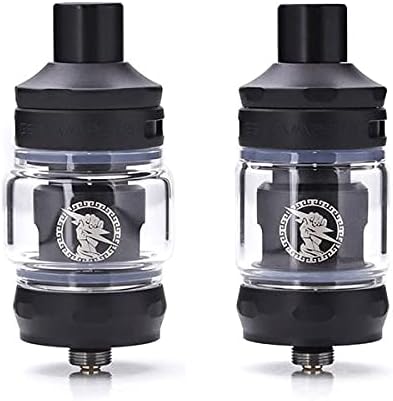
Image: The GeekVape M100 Aegis Mini 2 Kit being splashed with water, illustrating its IP68 water resistance.
9. Veiligheidsinligting
Please read and adhere to the following safety guidelines to ensure safe operation of your device:
- Keep the device away from extreme temperatures, direct sunlight, and moisture (beyond its IP68 rating).
- Moenie beskadigde batterye of laaiers gebruik nie.
- Moenie die toestel uitmekaar haal as wat in hierdie handleiding aangedui word nie.
- Hou buite bereik van kinders en troeteldiere.
- Use only genuine GeekVape coils and accessories.
- Gooi die toestel en sy komponente verantwoordelik weg volgens plaaslike regulasies.
- This product is intended for adult smokers and vapers only.
10. Waarborg en Ondersteuning
For warranty information and customer support, please refer to the warranty card included in your package or visit the official GEEKVAPE website. If you encounter any issues not covered in this manual, please contact the retailer or manufacturer's customer service for assistance.
Bewaar asseblief u aankoopbewys vir enige waarborgaansprake.
Ask a question about this manual
Ask about setup, troubleshooting, compatibility, parts, safety, or missing instructions. Manuals+ will review the question and use this page’s manual context to help answer it.