
Inleiding
This manual provides detailed instructions for the proper use and care of your Loluka Blue Wireless Over Ear Headphones. These headphones feature Bluetooth 5.1 for stable connectivity, IPX6 waterproofing for durability during activities, and noise-cancelling microphones for clear calls. Please read this manual thoroughly before using your headphones to ensure optimal performance and longevity.
1. Opstelling
1.1 Wat is in die boks
Nadat u die boks uitgepak het, maak asseblief seker dat alle komponente teenwoordig is:
- Loluka Wireless Earbuds
- Laaikas
- USB-C-laaikabel
- Multiple Sizes of Silicone Ear Tips (S/M/L)
- Detachable Earhooks (2 pairs)
- Vinnige Begingids

Prentbeskrywing: This image shows all items included in the product package: the Loluka headphones, charging case, USB-C charging cable, multiple sizes of silicone ear tips, detachable earhooks, and a quick start guide.
1.2 Aanvanklike laai
Before first use, fully charge the headphones and charging case. Connect the provided USB-C cable to the charging case and a power source. The indicator lights on the case will show charging status.
- Charging Time for Case: Approximately 1-2 hours.
- Earbud Playtime: Up to 6-7 hours on a single charge.
- Total Playtime with Charging Case: Up to 28 hours.

Prentbeskrywing: This visual highlights the extended battery life, showing the headphones provide 7 hours of use per charge, with the charging case offering an additional 3 full charges for a total of 28 hours of playback. A USB-C charging cable is also visible.
1.3 Bluetooth -koppeling
- Maak seker dat die oorfone gelaai is.
- Maak die laaikas oop. Die oorfone sal outomaties aanskakel en in paringsmodus gaan.
- Aktiveer Bluetooth op jou toestel (slimfoon, tablet, ens.) en soek vir beskikbare toestelle.
- Select "MS-T20" from the list to connect. Once connected, a voice prompt will confirm successful pairing.

Prentbeskrywing: The image displays the automatic pairing process, where the headphones (identified as 'MS-T20') connect to a mobile device via Bluetooth, simplifying initial setup.
1.4 Dra van die oorfone
The headphones are designed for comfort and stability, featuring detachable earhooks and various ear tip sizes.
- Oorwenke: Choose the silicone ear tips (S/M/L) that provide the best seal and comfort for your ears. A good seal enhances sound quality and noise isolation.
- Detachable Earhooks: For secure fit during intense activities like sports or workouts, attach the earhooks. For casual listening, the earhooks can be removed.

Prentbeskrywing: This image illustrates the versatility of the headphones, demonstrating how the detachable earhooks can be used for secure fit during activities like fitness, cycling, and running, or removed for a more casual listening experience.

Prentbeskrywing: A person is shown wearing the Loluka headphones, illustrating their ergonomic design and comfortable fit around the ear, suitable for extended wear.
2. Bedryfsinstruksies
2.1 Krag aan/af
- Krag aan: Open the charging case, and the earbuds will automatically power on. Alternatively, press and hold the touch control area on either earbud for 2 seconds.
- Skakel af: Place the earbuds back into the charging case and close the lid. Alternatively, press and hold the touch control area on either earbud for 5 seconds.
2.2 Raak kontroles
The headphones feature intuitive touch controls on each earbud. Refer to the diagram below for specific functions:
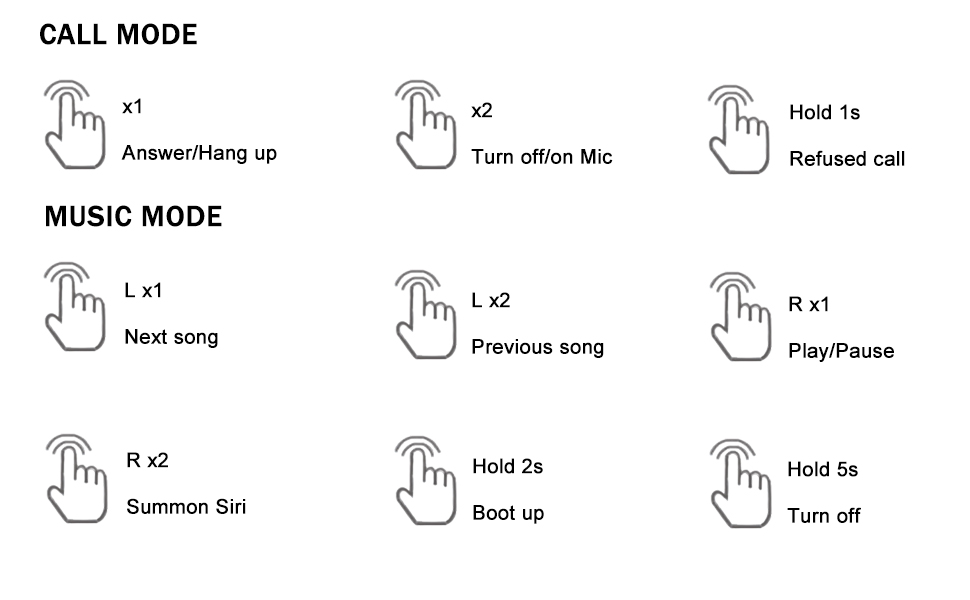
Prentbeskrywing: A detailed diagram outlining the touch control functions for the headphones, including single, double, and long presses for answering calls, controlling music playback, and activating voice assistants.
- Beantwoord/hang af: Single tap (x1) on either earbud.
- Weier oproep: Druk en hou (1s) op enige oordopjes.
- Turn On/Off Mic: Double tap (x2) on either earbud during a call.
- Speel/onderbreek musiek: Single tap (R x1) on the right earbud.
- Volgende liedjie: Single tap (L x1) on the left earbud.
- Vorige liedjie: Double tap (L x2) on the left earbud.
- Summon Voice Assistant (Siri, Google Assistant, etc.): Double tap (R x2) on the right earbud.
3. Onderhoud
3.1 Skoonmaak
Gereelde skoonmaak help om klankgehalte en higiëne te handhaaf:
- Vee die oorfone en laaikassie versigtig af met 'n sagte, droë, pluisvrye lap.
- Verwyder die oordoppe en maak dit skoon met sagte seep en water, droog dit dan deeglik af voordat jy dit weer vasmaak.
- Vermy die gebruik van skuurmiddels, alkohol of chemiese skoonmaakmiddels.
3.2 Waterbestandheid (IPX6)
The headphones are rated IPX6 waterproof, meaning they are protected against high-pressure water jets from any direction. This makes them suitable for workouts and use in rainy conditions.
- Moenie die oorfone in water dompel nie.
- Maak seker dat die laaipoort droog is voor laai.
- Die laaikas is nie waterdig nie.

Prentbeskrywing: The image depicts the headphones and case with water splashes, emphasizing their IPX6 waterproof rating, which protects them from sweat and rain.
3.3 Berging
When not in use, store the headphones in their charging case to protect them from dust, damage, and to keep them charged.
4. Probleemoplossing
As jy probleme met jou oorfone ondervind, raadpleeg asseblief die volgende algemene oplossings:
- Geen klank- of verbindingsprobleme nie:
1. Maak seker dat beide oorfone gelaai is.
2. Turn off and then turn on Bluetooth on your device.
3. Delete "MS-T20" from your device's Bluetooth list and re-pair.
4. Ensure the earbuds are within the 10-meter Bluetooth range of your device. - Laai probleme:
1. Verify the USB-C cable is securely connected to both the charging case and the power source.
2. Ensure the charging contacts on the earbuds and inside the case are clean and free of debris.
3. Make sure the charging case itself has power. - Swak klankgehalte:
1. Try different sizes of ear tips to ensure a proper seal in your ear canal.
2. Ensure the earbuds are correctly positioned in your ears.
3. Clean any earwax or debris from the ear tips and speaker mesh. - Knoppies reageer nie:
1. Ensure you are pressing the correct touch control area.
2. Apply firm but not excessive pressure for touch commands.
5. Spesifikasies
| Kenmerk | Spesifikasie |
|---|---|
| Model Naam | Loluka Earbuds with hook |
| Verbindingstegnologie | Draadloos (Bluetooth) |
| Bluetooth weergawe | 5.1 |
| Bluetooth-reeks | 10 meter |
| Waterweerstandvlak | IPX6 waterdig |
| Batterylewe (Oorfone) | 6-7 uur |
| Totale batterylewe (met omhulsel) | 28 ure |
| Laaityd (kas) | 1-2 Hours (Type-C) |
| Tipe oudiobestuurder | Dinamiese bestuurder |
| Geraasbeheer | Sound Isolation (Environmental Noise Reduction for calls) |
| Tipe beheer | Raak, Stem |
| Versoenbare toestelle | Bluetooth-enabled smartphones, tablets, etc. |
| Item gewig | 2.71 ons |
| Produk afmetings | 3.9 x 2.44 x 1.2 duim |
6. Waarborg en Ondersteuning
For warranty information and customer support, please refer to the documentation included with your purchase or contact Loluka customer service through the retailer where the product was purchased. Please retain your proof of purchase for warranty claims.