
Inleiding
The Fitfiu Fitness MC-460 treadmill is engineered for effective and convenient home cardio workouts. Its compact, foldable design allows for intensive daily walking and running sessions without requiring excessive space. Equipped with a quiet 2200W motor and an adjustable speed range up to 15 km/h, it provides a comfortable and engaging exercise experience. The 46 x 122 cm running surface is designed to support your joints during use. This manual provides essential information for the safe assembly, operation, and maintenance of your MC-460 treadmill.

Image: The Fitfiu Fitness MC-460 Foldable Treadmill in its unfolded, ready-to-use state, showcasing sy slanke ontwerp en beheerpaneel.
Veiligheidsinstruksies
Before using the Fitfiu Fitness MC-460 treadmill, please read and understand all safety instructions. Failure to follow these instructions may result in injury or damage to the equipment.
- Raadpleeg 'n dokter voordat u enige oefenprogram begin.
- Hou kinders en troeteldiere weg van die trapmeul tydens gebruik.
- Ensure the emergency stop key is properly attached to your clothing before starting your workout.
- Plaas die trapmeul op 'n plat, stabiele oppervlak met voldoende speling daaromheen (ten minste 2 meter agter en 0.6 meter aan elke kant).
- Moenie die loopband gebruik as dit 'n beskadigde koord of prop het nie, of as dit nie behoorlik werk nie.
- Dra gepaste atletiese skoene en klere.
- Moenie op of van die trapmeul trap terwyl die band beweeg nie.
- Maximum user weight for this treadmill is 100 kg.
Pakketinhoud
Verify that all components are present and undamaged before assembly and use.
- Fitfiu Fitness MC-460 Treadmill main unit
- Noodstopsleutel
- Kragkoord
- Gebruikershandleiding (hierdie dokument)
- Assembly Tools (if required for minor setup)
- Lubricant for running belt
Opstelling
The Fitfiu Fitness MC-460 treadmill comes largely pre-assembled. Follow these steps for initial setup:
- Uitpak: Verwyder die loopband versigtig uit sy verpakking. Bewaar die verpakking vir toekomstige berging of vervoer.
- Ontvou: Place the treadmill on a flat surface. Gently lift the console and handlebars until they lock into the upright position. Ensure all locking mechanisms are securely engaged.
- Plasing: Position the treadmill on a firm, level surface. Ensure there is at least 2 meters of clear space behind the treadmill and 0.6 meters on each side for safety.
- Kragverbinding: Steek die kragkabel in 'n geaarde elektriese aansluiting (220-240V).
- Noodstopsleutel: Attach the emergency stop key to the designated slot on the console. Always clip the other end of the key to your clothing before starting your workout.
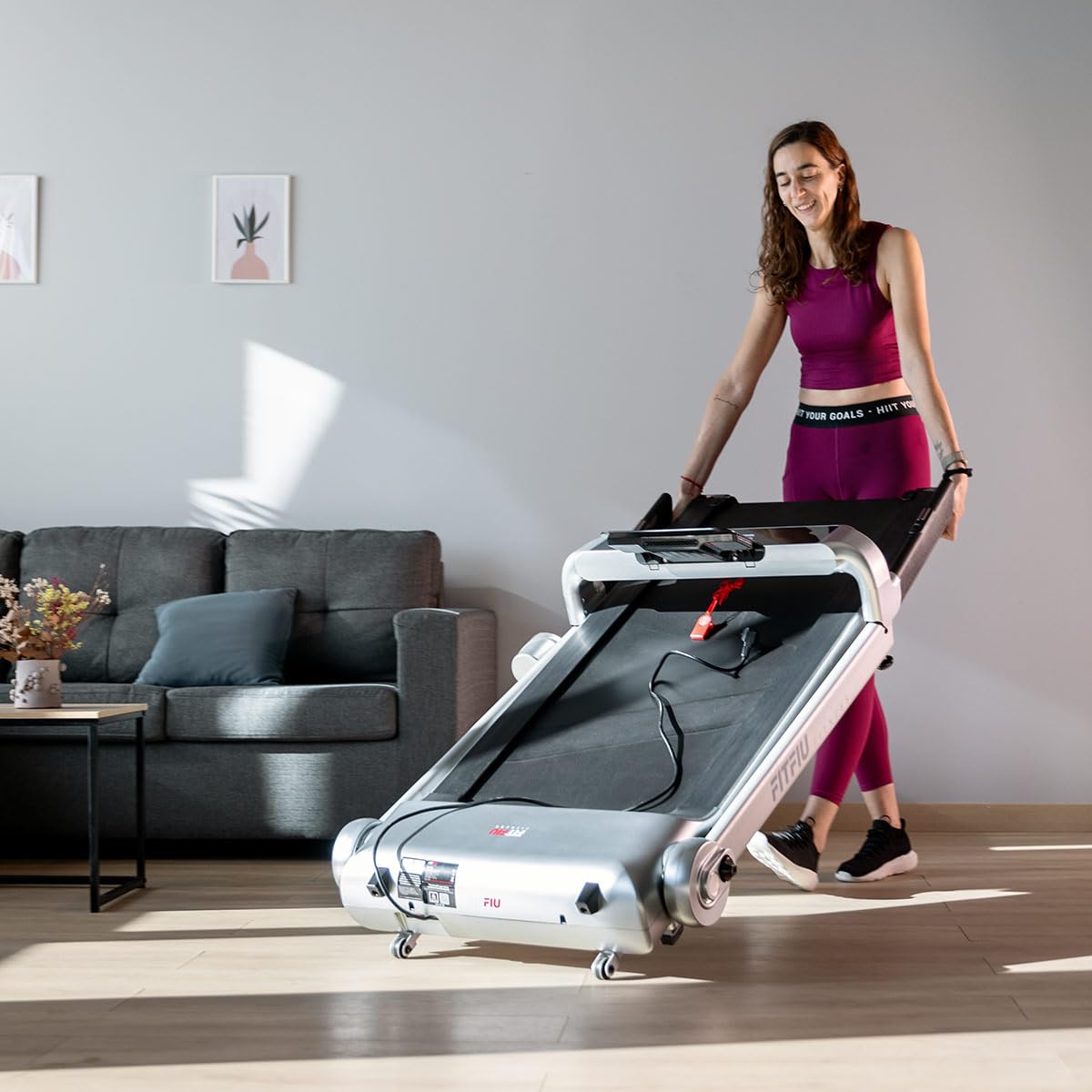
Image: The Fitfiu Fitness MC-460 Treadmill fully unfolded and ready for use, showing the running deck and upright console.
Bedryfsinstruksies
Maak jouself vertroud met die beheerpaneel en funksies voordat jy met jou oefensessie begin.
Beheerpaneel oorview

Image: Close-up of the Fitfiu Fitness MC-460 treadmill's control panel, featuring the LCD display, touch buttons, and tablet holder.
- LCD-skerm: Shows real-time workout data including Speed, Time, Distance, and Calories burned.
- Begin/Stop-knoppies: Located on the console and handlebars for easy access.
- Spoedverstelling: Use the '+' and '-' buttons on the console or handlebars to adjust speed. Four preset speed buttons are also available for quick changes.
- Tablet/Foonhouer: Securely place your device for entertainment during your workout.
- USB-poort: Connect a USB device for charging or playing audio through the built-in speakers.
- Bluetooth-verbinding: Pair your device via Bluetooth to stream music through the treadmill's speakers or connect to compatible fitness apps for tracking your performance.

Image: Detail of the treadmill handlebar showing the integrated Start and Stop buttons for convenient operation.
Begin 'n oefensessie
- Ensure the emergency stop key is in place and clipped to your clothing.
- Stap op die trapmeul en plaas jou voete op die syrelings.
- Press the 'START' button. The belt will begin moving at a low speed.
- Gradually increase the speed to your desired level using the '+' button or preset speed buttons.
- Carefully step onto the moving belt and begin your exercise.
Stop 'n oefensessie
- Press the 'STOP' button. The belt will gradually slow down and come to a complete stop.
- Alternatively, pull the emergency stop key to immediately stop the treadmill in an emergency.
- Sodra die band gestop het, stap van die trapmeul af.
Onderhoud
Gereelde onderhoud verseker die lang lewensduur en optimale prestasie van jou loopband.
- Skoonmaak: Vee die loopbandoppervlaktes af met advertensiesamp lap na elke gebruik. Vermy skuurmiddels.
- Smering: The running belt requires periodic lubrication to reduce friction and wear. Refer to the specific instructions provided with your lubricant. Typically, this involves lifting the belt and applying lubricant to the deck underneath. Frequency depends on usage, but generally every 3-6 months.
- Bandspanning en -belyning: Check the running belt tension and alignment regularly. If the belt feels loose or drifts to one side, adjust it according to the instructions in the full manual (not provided here, but typically involves adjusting screws at the rear of the treadmill).
- Motordeksel: Periodically vacuum dust and debris from under the motor cover to prevent overheating. Ensure the treadmill is unplugged before performing this.
Probleemoplossing
Hier is oplossings vir algemene probleme wat jy mag teëkom:
| Probleem | Moontlike oorsaak | Oplossing |
|---|---|---|
| Treadmill begin nie | Power cord unplugged, emergency stop key not in place, circuit breaker tripped. | Check power connection, ensure emergency stop key is fully inserted, reset circuit breaker. |
| Hardloopband gly of huiwer | Band te los, onvoldoende smering. | Adjust belt tension (refer to full manual), lubricate the running deck. |
| Ongewone geraas tydens operasie | Loose components, motor issues, worn belt. | Check and tighten all visible bolts and screws. If noise persists, contact customer support. |
| Vertoning werk nie | Loose cable connection, power issue. | Check all cable connections to the console. Ensure power supply is stable. |
Spesifikasies
Detailed technical specifications for the Fitfiu Fitness MC-460 Treadmill.

Image: Diagram illustrating the dimensions of the Fitfiu Fitness MC-460 Treadmill in both unfolded and folded states.
| Kenmerk | Spesifikasie |
|---|---|
| Handelsmerk | Fitfiu Fitness |
| Model | MC-460 |
| Motor Krag | 2200 W |
| Voltage | 220-240V |
| Maksimum spoed | 15 km/h |
| Hardloopoppervlak | 46 x 122 cm |
| Tipe vertoon | LCD (Speed, Time, Distance, Calories) |
| Veiligheidsfunksie | Magnetic Emergency Stop System |
| Konnektiwiteit | Bluetooth, USB |
| Maksimum gebruikersgewig | 100 kg |
| Recommended Max User Height | 1.80 m |
| Ontvoude afmetings (L x B x H) | 80 x 124 x 158 cm |
| Gevoude afmetings (L x B x H) | 80 x 158 x 32 cm |
| Produk Gewig | 48 kg |
| Raammateriaal | Staallegering |
| Kragbron | Elektries met koord |
| Kleur | Liggrys |
| Aanbevole gebruik | Residensieel |
| Vergadering benodig | No (Minimal setup) |
Berging
The Fitfiu Fitness MC-460 treadmill features a vertical folding system and transport wheels for convenient storage and mobility.
- Vou: Ensure the treadmill is turned off and unplugged. Gently lift the running deck until it locks into the vertical position.
- Beweeg: Once folded, tilt the treadmill slightly to engage the front transport wheels. You can then easily roll it to your desired storage location.
- Bergplek: Store the treadmill in a dry, clean area away from direct sunlight and extreme temperatures.

Image: The Fitfiu Fitness MC-460 Treadmill in its folded, upright position, demonstrating its space-saving design.

Image: A person easily moving the folded Fitfiu Fitness MC-460 Treadmill using its integrated transport wheels.
Waarborg en Ondersteuning
For warranty information, please refer to the documentation provided at the time of purchase or contact your retailer. For technical support, spare parts, or service inquiries, please contact Fitfiu Fitness customer service through their official website or the contact details provided in your purchase documentation. Please have your model number (MC-460) and proof of purchase ready when contacting support.