
1. Inleiding
The Xiaomi Mi Smart Band 6 is an advanced fitness tracker designed to help you monitor your health and activity levels. Featuring a vibrant 1.56-inch AMOLED display, comprehensive health monitoring capabilities including heart rate and blood oxygen (SpO2) tracking, and a wide array of sport modes, the Mi Smart Band 6 is your ideal companion for a healthier lifestyle. This manual provides essential information on setting up, operating, maintaining, and troubleshooting your device.

Figuur 1.1: The Xiaomi Mi Smart Band 6, a sleek black fitness tracker with a vibrant display showing time, date, weather, and health metrics.
2. Opstelling
2.1 Aanvanklike laai
Before first use, fully charge your Mi Smart Band 6. Connect the magnetic charging cable to the charging pins on the back of the band and plug the USB end into a power adapter or computer USB port. The band will display a charging animation.

Figuur 2.1: The magnetic charging connection point on the back of the Mi Smart Band 6, showing the charging pins and the magnetic charger attached.
2.2 Koppel met jou slimfoon
- Laai die af Mi Fit or Mi Wear app vanaf jou slimfoon se appwinkel (Google Play Winkel vir Android, Apple App Store vir iOS).
- Open the app and log in with your Xiaomi account, or create a new one.
- Maak seker dat Bluetooth op jou slimfoon geaktiveer is.
- In the app, navigate to 'Profile' > 'Add device' > 'Band'.
- Follow the on-screen instructions to search for and pair with your Mi Smart Band 6. Confirm the pairing request on the band's screen.
2.3 Wearing the Band
Wear the Mi Smart Band 6 comfortably on your wrist, about one finger's width above your wrist bone. Ensure the sensor on the back is in contact with your skin for accurate heart rate and SpO2 measurements. Do not wear it too tightly or too loosely.
3. Operating Your Mi Smart Band 6
3.1 Vertoon en Navigasie
The Mi Smart Band 6 features a 1.56-inch AMOLED full-screen display with 326 ppi resolution, offering a 50% larger display area compared to its predecessor. This allows for clearer viewing of images and text, and easy checking of messages, calls, and notifications.

Figuur 3.1: A visual comparison highlighting the 50% larger display area of the Mi Smart Band 6, showing more information at a glance.
Swipe up or down to navigate through menus and features. Swipe left or right to quickly access common functions like music control or weather.
3.2 Gesondheidsmonitering
- SpO2 (Bloedsuurstof) Monitering: The band can detect your blood oxygen saturation, providing insights into your respiratory health.
- Hartslagmonitering: The 24-hour heart rate monitoring system pays attention to your cardiac health, with alerts for abnormal heart rates.
- Slaapmonitering: Accurately records sleep duration, deep sleep, light sleep, and REM sleep based on heart rate changes. It provides scientific advice to help develop regular sleeping habits.
- PAI (Persoonlike Aktiwiteitsintelligensie): A 7-day PAI score provides a comprehensive assessment of your physical activity.
- Stresmonitering: Hou jou stresvlakke deur die dag dop.
- Asemhalingsoefeninge: Begeleide asemhalingsoefeninge om jou te help ontspan en stres te verminder.
- Vroulike menstruele siklusopsporing: Monitor and predict menstrual cycles.

Figuur 3.2: The Mi Smart Band 6 displaying a blood oxygen saturation reading (SpO2) of 96%, indicating healthy oxygen levels.
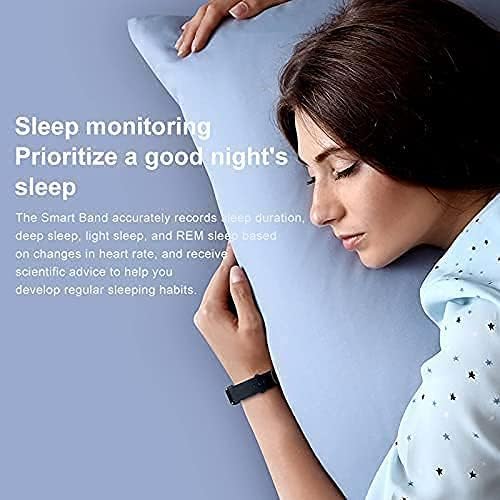
Figuur 3.3: A person sleeping with the Mi Smart Band 6 on their wrist, illustrating the sleep monitoring feature.
3.3 Fiksheidsopsporing
The Mi Smart Band 6 supports 30 sport modes, acting as your personal wrist coach. It automatically recognizes six fitness modes: outdoor running, treadmill, walking, outdoor cycling, elliptical, and rowing machine.
- Supported Sport Modes: Outdoor running, walking, dancing, treadmill, outdoor cycling, elliptical, rowing machine, HIIT, basketball, boxing, Zumba, Pilates, ice skating, badminton, street dance, and more.

Figuur 3.4: Icons representing various sport modes available on the Mi Smart Band 6, including Basketball, Boxing, Zumba, HIIT, Core Training, Pilates, Ice Skating, Badminton, and Street Dance.
3.4 Ander kenmerke
- 5ATM Waterweerstand: The band is water-resistant up to 50 meters, making it suitable for swimming pools or surfing on the beach. It supports five different swimming styles for accurate tracking.
- Kennisgewings: Receive text messages, calls, and app notifications directly on your wrist.
- Kamerabeheer: Use the band as a remote shutter for your smartphone camera.
- Musiekbeheer: Beheer musiekweergawe op jou slimfoon.
- alarms: Stel stil vibrerende alarms.

Figuur 3.5: The Mi Smart Band 6 with water droplets, illustrating its 50-meter water resistance capability.
4. Onderhoud
4.1 Skoonmaak van die band
Regularly clean your Mi Smart Band 6 and its strap to prevent skin irritation and maintain hygiene. Use a soft, damp cloth to wipe the device. For the strap, especially the black antibacterial Ag+ strap, you can use mild soap and water. Ensure the band is completely dry before wearing it again.
4.2 Batterylewe en Laai
The Mi Smart Band 6 offers impressive battery life:
- Tot 14 dae in die normale modus.
- Tot 19 dae in power-saving mode.
Charge the device using the magnetic charging cable as described in Section 2.1. Avoid exposing the charging pins to water or corrosive liquids.
5. Probleemoplossing
If you encounter issues with your Mi Smart Band 6, refer to the following common troubleshooting steps:
- Band skakel nie aan nie: Maak seker dat die band volledig gelaai is. Koppel dit vir ten minste 10 minute aan die laaier.
- Kan nie met slimfoon koppel nie:
- Ensure Bluetooth is enabled on your phone and the band is within range.
- Restart both your smartphone and the Mi Smart Band 6.
- Vee die Bluetooth-kasgeheue op jou foon (Android) uit of vergeet die toestel in Bluetooth-instellings (iOS) en probeer weer koppel.
- Ensure the Mi Fit/Mi Wear app is updated to the latest version.
- Onakkurate hartklop/SpO2-lesings: Ensure the band is worn correctly, snug but not too tight, and the sensor is clean and in direct contact with your skin. Avoid excessive movement during measurements.
- Kennisgewings verskyn nie: Check app notification settings on your smartphone and within the Mi Fit/Mi Wear app to ensure they are enabled for the desired applications. Ensure the band is connected via Bluetooth.
- Skerm reageer nie: Try restarting the band by connecting it to the charger. If the issue persists, contact customer support.
6. Spesifikasies
| Kenmerk | Spesifikasie |
|---|---|
| Handelsmerk | XIAOMI |
| Modelnommer | Mi Band 6 |
| Vertoon grootte | 1.56 duim |
| Tipe vertoon | AMOLED |
| Kleur | Swart |
| Bedryfstelsel | Android Wear 1.0 (Versoenbaar) |
| Konnektiwiteit | USB, Bluetooth |
| Draadlose kommunikasie standaard | Bluetooth |
| Spesiale kenmerke | Text Messaging, Activity Tracker, Heart Rate Monitor, SpO2 Monitor, Sleep Monitor |
| Versoenbare toestelle | Slimfoon |
| Battery samestelling | Litium-polimeer |
| Waterweerstand | 5 OTM (tot 50 meter) |
| Geheue berging kapasiteit | 16 MB |
| Item Vorm | Reghoekig |
| Vervaardiger | Xiaomi |
| Land van oorsprong | Duitsland |
7. Waarborg en Ondersteuning
For information regarding product warranty, returns, or technical support, please refer to the official Xiaomi webwebwerf of kontak u plaaslike gemagtigde handelaar. Bewaar u bewys van aankoop vir waarborgeise.
Aanlyn ondersteuning: Visit the official Xiaomi support page for FAQs, software updates, and contact information.