
Inleiding
Thank you for choosing the Bytech BYMSWR104BK 3 Button Gaming Mouse. This manual provides essential information for setting up, operating, and maintaining your new gaming mouse. Please read this manual thoroughly before use to ensure optimal performance and longevity of your device.
Kenmerke
- Precision Mouse: Designed for accurate tracking and responsive control.
- Verstelbare DPI: Customize sensitivity for various gaming and productivity needs.
- Three Responsive Buttons: Includes left-click, right-click, and scroll wheel/middle-click for efficient operation.
- Kleurvolle agterlig: Features multi-color LED lighting with 7 distinct color modes for an enhanced aesthetic experience.
- Ergonomiese ontwerp: Shaped to fit comfortably in your palm, reducing fatigue during extended use.
Spesifikasies
| Handelsmerk | Bytech |
| Modelnommer | BYMSWR104BK |
| Aantal knoppies | 3 |
| Bewegingsresolusie | 1,000 DPI |
| Kleurmodusse | 7 Colors (Multi-color Backlight) |
| Kabellengte | 5 voet |
| Skakel gradering | 1 miljoen kliks |
| Item gewig | 4.9 onse |
| Pakket afmetings | 7.17 x 4.06 x 2.68 duim |
| Kleur | Swart |
| Kragbron | Elektries met koord (USB) |
| Hardeware Platform | PC |
Pakketinhoud
- 1 x Bytech BYMSWR104BK Wired Gaming Mouse
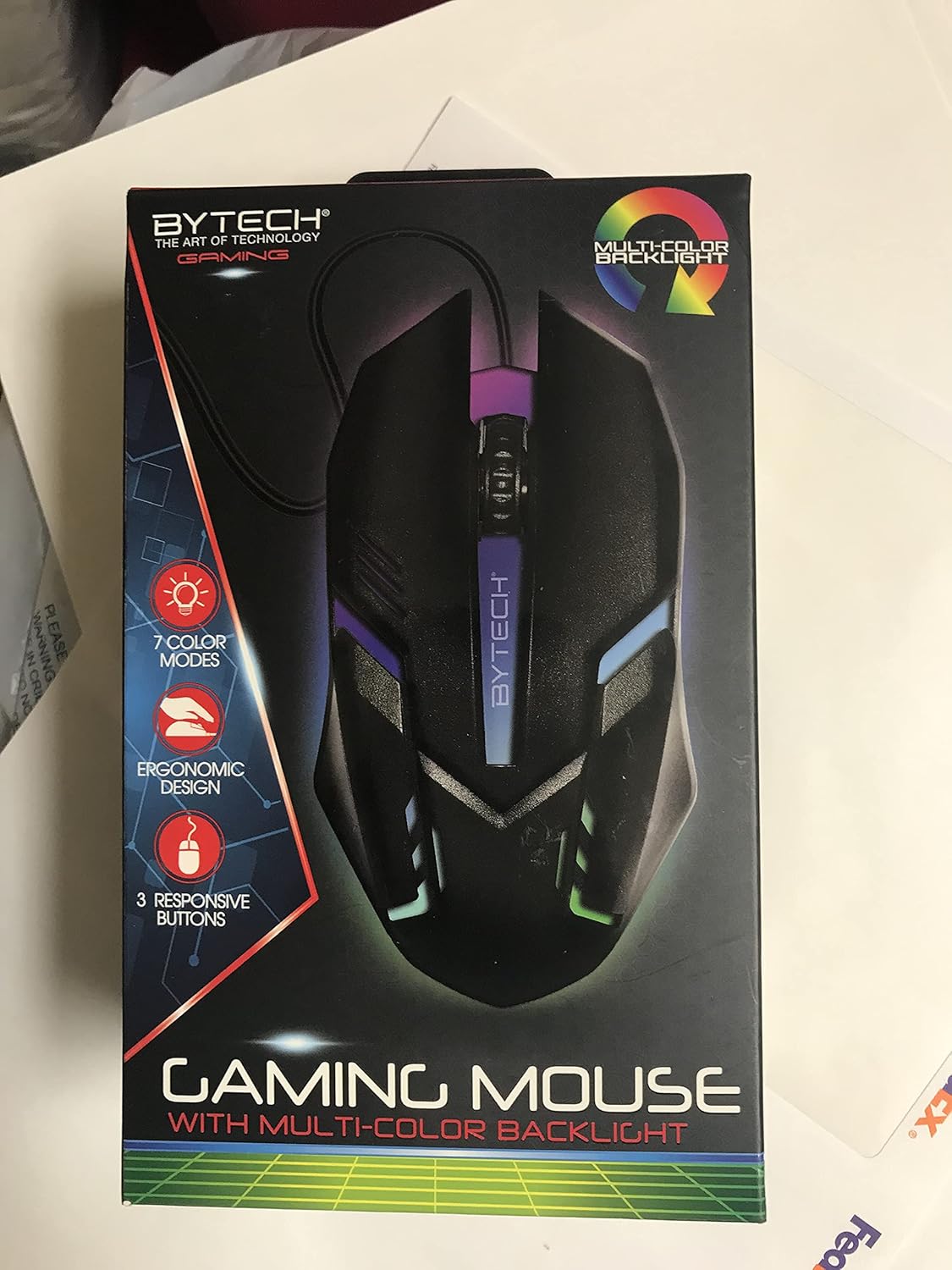
Beeld: Voorkant view of the Bytech BYMSWR104BK Gaming Mouse in its retail packaging, highlighting its multi-color backlight and ergonomic design.
Opstelling
- Pak uit: Carefully remove the gaming mouse from its packaging.
- Koppel: Locate an available USB port on your computer (PC, laptop, etc.). Insert the USB connector of the Bytech BYMSWR104BK Gaming Mouse firmly into the USB port.
- Bestuurder installasie: The mouse is plug-and-play. Your operating system should automatically detect and install the necessary drivers. This process may take a few moments.
- Gereed om te gebruik: Once the drivers are installed, the mouse will be ready for immediate use. The multi-color backlight will illuminate.

Beeld: Agter view of the Bytech BYMSWR104BK Gaming Mouse retail packaging, detailing features, specifications, and universal compatibility.
Bedryfsinstruksies
Basiese werking
- Linker knoppie: Primêre klikfunksie, tipies gebruik vir die seleksie van items, oopmaak files, or interacting with software.
- Regter knoppie: Sekondêre klikfunksie, maak gewoonlik kontekskieslyste oop of bied addisionele opsies.
- Scroll Wheel (Middle Button): Scroll up or down to navigate documents and web pages. Pressing the scroll wheel acts as a middle-click button, often used for opening links in new tabs or auto-scrolling.
DPI aanpassing
The Bytech BYMSWR104BK Gaming Mouse features adjustable DPI settings. While specific buttons for DPI adjustment are not explicitly listed on the packaging, many gaming mice allow DPI changes through a dedicated button (often located near the scroll wheel) or through software. Refer to your computer's mouse settings or Bytech's official website for advanced customization options if available.
LED backlight
The mouse features a dynamic multi-color LED backlight with 7 different color modes. These lights will automatically cycle through the modes once the mouse is connected and powered on. There is no manual control for changing modes on the mouse itself.
Onderhoud
- Skoonmaak: Gebruik 'n sagte, droë lap om die oppervlak van die muis af te vee. Vir hardnekkige vuiligheid, vee dit effens af.ampMaak die lap skoon met water of 'n sagte skoonmaakoplossing. Vermy die gebruik van harde chemikalieë of skuurmiddels.
- Sensor sorg: Hou die optiese sensor aan die onderkant van die muis skoon en vry van stof of puin om akkurate dophou te verseker.
- Kabelbestuur: Vermy skerp buigings of oormatige trek aan die USB-kabel om skade te voorkom.
- Berging: Wanneer dit nie gebruik word nie, bêre die muis in 'n skoon, droë omgewing weg van uiterste temperature.

Beeld: Sykant view of the Bytech BYMSWR104BK Gaming Mouse retail packaging, showcasing the multi-color backlight effect.
Probleemoplossing
| Probleem | Moontlike Oplossing |
|---|---|
| Muis reageer nie |
|
| Wysertjie wisselvallig of beweeg nie glad nie |
|
| LED-agtergrond werk nie |
|
Waarborg en Ondersteuning
Waarborg: This Bytech product comes with a 12-month warranty from the date of purchase. Please retain your proof of purchase for warranty claims.
Kontakinligting:
- Adres: 2585 West 13th Street, Brooklyn, NY 11223, USA
- Webwebwerf: www.bytechintl.com
⚠ WAARSKUWING: Hierdie produk kan jou blootstel aan chemikalieë, insluitend DEHP, wat aan die staat Kalifornië bekend is om kanker, geboortedefekte of ander reproduktiewe skade te veroorsaak. Vir meer inligting gaan na www.P65Warnings.ca.gov.

Beeld: Onderkant view of the Bytech BYMSWR104BK Gaming Mouse retail packaging, showing contact information, warranty details, and California Proposition 65 warning.