
microSHIFT RD-M619L
microSHIFT Advent Agterderailleur Gebruikershandleiding
Model: RD-M619L
Inleiding
The microSHIFT Advent Rear Derailleur is engineered for reliable and consistent performance in a wide range of cycling applications. Designed with a focus on durability and precise shifting, this 9-speed long cage derailleur is an ideal component for commuter or touring bikes utilizing a 1x gearing system. Its direct path cable routing ensures smooth and responsive gear changes across the entire cassette range.
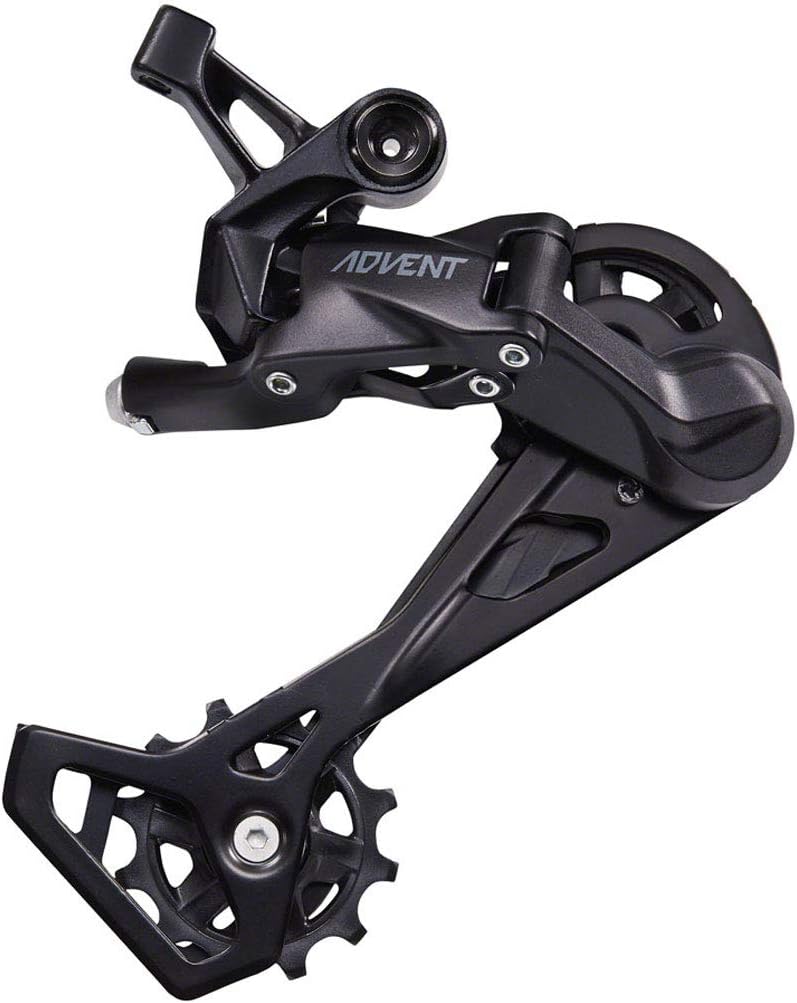
Figure 1: The microSHIFT Advent 9-Speed Long Cage Rear Derailleur in black, showcasing its robust construction and pulley system designed for efficient chain management.
Opstelling en installasie
Proper installation is crucial for optimal performance and longevity of your microSHIFT Advent Rear Derailleur. It is recommended that installation be performed by a qualified bicycle mechanic.
Gereedskap benodig:
- Hex Key Set (e.g., 5mm)
- Kabelsnyers
- Momentsleutel (aanbeveel)
- Bicycle Grease
Installasie stappe:
- Montering van die Derailleur: Apply a thin layer of grease to the derailleur hanger threads. Thread the derailleur into the hanger by hand, ensuring it is straight. Tighten to the manufacturer's specified torque (typically 8-10 Nm) using a hex key.
- Ketting installasie: Install the bicycle chain, ensuring it is the correct length for your drivetrain setup.
- Kabelroetering: Route the shift cable from the shifter to the derailleur. The Advent derailleur features direct path cable routing. Ensure the cable runs smoothly without kinks or excessive bends. Secure the cable to the derailleur's cable bolt.
- Limietskroefverstelling:
- Low Limit (L-screw): Adjust the L-screw so that the upper guide pulley aligns directly under the largest cog when the chain is on the largest cog. This prevents the chain from shifting into the spokes.
- High Limit (H-screw): Adjust the H-screw so that the upper guide pulley aligns directly under the smallest cog when the chain is on the smallest cog. This prevents the chain from shifting off the smallest cog.
- B-Spanningsaanpassing: With the chain on the largest cog and smallest chainring (if applicable), adjust the B-tension screw to set the gap between the upper guide pulley and the largest cog. A gap of 5-6mm is generally recommended, but refer to specific microSHIFT guidelines for optimal performance.
- Indexing Adjustment: Fine-tune the shifting by adjusting the barrel adjuster on the shifter or derailleur (if present). Shift through all gears, ensuring smooth and precise transitions.
Bedryfsinstruksies
The microSHIFT Advent Rear Derailleur is designed for intuitive and reliable shifting. It is compatible exclusively with microSHIFT ADVENT shifters.
Ratte skakel:
- To shift to a larger cog (easier gear), press the larger shift lever on your ADVENT shifter.
- To shift to a smaller cog (harder gear), press the smaller shift lever on your ADVENT shifter.
- Always pedal forward while shifting to ensure smooth chain movement and prevent damage to the drivetrain components.
- Avoid shifting under heavy load, such as climbing a steep hill, as this can cause stress on the chain and derailleur.
Onderhoud
Regular maintenance will extend the life and ensure the optimal performance of your microSHIFT Advent Rear Derailleur.
Skoonmaak:
- After each ride, especially in wet or dirty conditions, wipe down the derailleur body and pulleys with a clean cloth.
- For a deeper clean, use a degreaser specifically designed for bicycle components. Apply to a brush or cloth, clean the pulleys and cage, then rinse thoroughly with water and dry.
Smering:
- Periodically apply a small amount of bicycle chain lubricant to the pivot points of the derailleur and the pulley wheel bearings. Avoid over-lubricating, as this can attract dirt.
- Lubricate your chain regularly according to your riding conditions.
Inspeksie:
- Regularly check for bent derailleur hangers, which can cause poor shifting.
- Inspect the pulley wheels for wear or damage. Worn pulleys can lead to noisy operation and poor shifting.
- Ensure all bolts are securely tightened, but do not overtighten.
- Check the shift cable for fraying or corrosion. Replace if necessary.
Probleemoplossing
This section addresses common issues you might encounter with your microSHIFT Advent Rear Derailleur.
| Probleem | Moontlike oorsaak | Oplossing |
|---|---|---|
| Swak of inkonsekwente verskuiwing |
|
|
| Chain rubbing or noisy operation |
|
|
| Ketting val van kleinste/grootste tandwiel af |
|
|
Spesifikasies
| Kenmerk | Detail |
|---|---|
| Handelsmerk | mikroSHIFT |
| Modelnommer | RD-M619L |
| Aandrywingsnelhede | 9-spoed |
| Cage Length | Long Cage |
| Largest Cog Compatibility | 11-42T |
| Chain Wrap Capacity | 47 tande |
| Mount Tipe | Rear Direct Mount / Braze-On Mount |
| Kleur | Swart |
| Materiaal | Steel cage with aluminum outer link (Steel and Aluminum) |
| Gewig | 0.38 kilogram |
| Shifter Compatibility | microSHIFT ADVENT shifters only |
| Clutch Mechanism | No clutch for ultra-smooth shifting |
Waarborg en Ondersteuning
For detailed warranty information regarding your microSHIFT Advent Rear Derailleur, please refer to the official microSHIFT webwebwerf of kontak hul kliëntediens direk. Waarborgbepalings en -voorwaardes kan per streek en kleinhandelaar verskil.
For technical support, installation assistance, or any product-related inquiries, please visit the microSHIFT official support page or consult with an authorized microSHIFT dealer or bicycle mechanic.
Ask a question about this manual
Ask about setup, troubleshooting, compatibility, parts, safety, or missing instructions. Manuals+ will review the question and use this page’s manual context to help answer it.