
LAMA LX02 (A13-Nero)
LAMA Bluetooth Sport Headphones User Manual
Model: LX02 (A13-Nero)
Brand: LAMA
1. Inleiding
Thank you for choosing LAMA Bluetooth Sport Headphones. This manual provides essential information for setting up, operating, and maintaining your new headphones. Please read it carefully before use to ensure optimal performance and longevity of the product.

Image 1.1: LAMA Bluetooth Sport Headphones (Model LX02, A13-Nero).
2. Pakketinhoud
Kontroleer asseblief die pakket vir die volgende items:
- LAMA Bluetooth Sport Headphones
- USB-laaikabel (tipe-C)
- Multiple pairs of interchangeable ear tips (S/M/L)
- Gebruikershandleiding
3. Produk verbyview
The LAMA Bluetooth Sport Headphones feature an ergonomic neckband design with in-ear earbuds, integrated controls, and a Type-C charging port.

Image 3.1: Control Panel Layout and Functions.
- Skakel knoppie: Skakel aan / af.
- 'C' Key: Game/Music Mode Switch, Sound Effect Switch, Voice Assistant activation.
- Funksie sleutels: Play/Pause, Answer/Hang Up Call, Redial, Reject Call.
- Volume sleutels: Volume Up/Down, Previous/Next Song.

Image 3.2: Magnetic Earbud Design for secure storage.
4. Opstelling
4.1 Aanvanklike laai
Before first use, fully charge the headphones. Connect the provided USB Type-C charging cable to the charging port on the control panel and a suitable USB power source. The battery indicator lights will show the charging status.
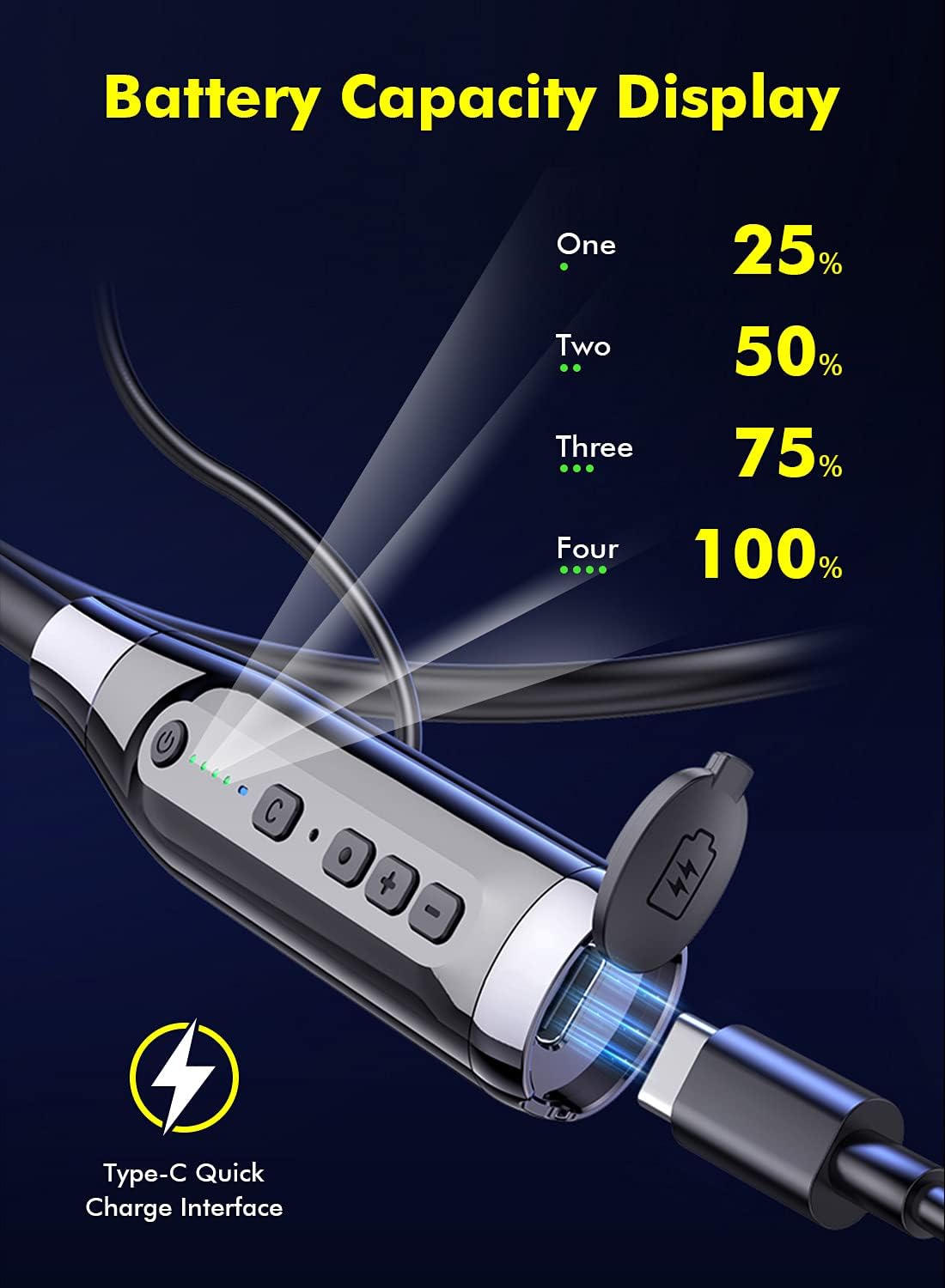
Image 4.1: Battery Capacity Display and Type-C Charging Port.
- Laaityd: Ongeveer 2 uur vir 'n volle lading.
- Battery Life: Up to 100 hours of continuous play time on a full charge.
4.2 Aan-/afskakel
- Krag aan: Long press the Switch Button (1) for 2 seconds.
- Skakel af: Long press the Switch Button (1) for 3 seconds.
4.3 Bluetooth -koppeling
- Maak seker dat die oorfone afgeskakel is.
- Long press the Switch Button (1) for 2 seconds to power on. The LED indicator will flash, indicating pairing mode.
- Aktiveer Bluetooth op jou toestel (slimfoon, tablet, ens.) en soek vir beskikbare toestelle.
- Select "LAMA LX02" (or similar name) from the list of found devices.
- Sodra dit gekoppel is, sal die LED-aanwyser ophou flikker en solied blou bly.
5. Bedryfsinstruksies
5.1 Musiekweergawe
- Speel/pouse: Single click the Function Key (3).
- Volume op: Click the "+" Volume Key (4).
- Volume af: Click the "-" Volume Key (4).
- Volgende liedjie: Long press the "-" Volume Key (4).
- Vorige liedjie: Long press the "+" Volume Key (4).
5.2 Oproepbestuur
- Beantwoord/beëindig oproep: Single click the Function Key (3).
- Verwerp oproep: Long press the Function Key (3) for 1 second.
- Herbel laaste nommer: Double click the Function Key (3).
5.3 Sound Effect and Mode Switching

Image 5.1: Three Sound Effect Switches (Bass, Voice, 3D Balance).
- Switch Sound Effect (Bass/Voice/3D Balance): Double click the 'C' Key (2).
- Wissel spel-/musiekmodus: Single click the 'C' Key (2).

Image 5.2: Game/Music Mode with Low Latency Feature.
5.4 Stemassistent
- Aktiveer Stemassistent (Siri, Google Assistent, ens.): Long press the 'C' Key (2) for 1 second.
6. Onderhoud
6.1 Skoonmaak
- Vee die oorfone af met 'n sagte, droë lap.
- Moenie skuur skoonmaakmiddels of oplosmiddels gebruik nie.
- Regularly clean ear tips to prevent wax buildup, which can affect sound quality.
6.2 Berging
- Bêre die oorfone op 'n koel, droë plek weg van direkte sonlig en uiterste temperature.
- The magnetic earbuds help prevent tangling and secure the headphones when not in use.
6.3 Waterbestandheid (IPX5)
The headphones are rated IPX5 water-resistant, meaning they can withstand splashes and sweat. They are suitable for sports and outdoor activities.

Image 6.1: IPX5 Water Resistance for active use.
Belangrik: IPX5 rating does not mean the headphones are waterproof for submersion. Do not immerse them in water.
7. Probleemoplossing
| Probleem | Moontlike oorsaak | Oplossing |
|---|---|---|
| Oorfone skakel nie aan nie. | Lae battery. | Laai die oorfone ten volle. |
| Kan nie met toestel koppel nie. | Bluetooth is off on device; headphones not in pairing mode; too far from device. | Ensure Bluetooth is enabled on your device. Put headphones in pairing mode. Move closer to the device (within 10 meters). |
| Geen geluid of lae volume nie. | Volume too low; headphones not connected; ear tips blocked. | Adjust volume on headphones and device. Reconnect headphones. Clean ear tips. |
| Die klankgehalte is swak. | Poor connection; incorrect sound effect mode. | Ensure stable Bluetooth connection. Try switching sound effect modes (Bass, Voice, 3D Balance). |
| Mikrofoon werk nie. | Microphone blocked; device settings. | Ensure microphone is not covered. Check device's audio input settings. |
8. Spesifikasies
- Model: LX02
- Handelsmerk: LAMA
- Verbinding: Bluetooth 5.0
- Battery kapasiteit: 1000 mAh
- Laai tyd: Ongeveer 2 uur
- Deurlopende speeltyd: Tot 100 uur
- Laaipoort: USB Type-C (supports QC 3.0, QC2.0, QC1.0 fast charging protocols)
- Waterweerstand: IPX5
- Beheer metode: Voice, Button
- Mikrofoon: Integrated, Stereo technology
- Materiaal: Plastiek
- Gewig: 200 g
- Bykomende kenmerke: Noise Cancellation, Lightweight, Magnetic Design, Multiple Sound Effects (Bass, Voice, 3D Balance), Game/Music Low Latency Mode.
9. Veiligheidsinligting
- Moenie die produk uitmekaar haal of verander nie.
- Keep away from extreme temperatures, humidity, and corrosive substances.
- Vermy langdurige luister teen hoë volumes om gehoorskade te voorkom.
- Do not use headphones while driving or in situations where you need to be aware of your surroundings.
- Gooi batterye en elektroniese komponente verantwoordelik weg volgens plaaslike regulasies.
10. Waarborg en Ondersteuning
LAMA products come with a standard manufacturer's warranty. For detailed warranty information, product support, or service inquiries, please refer to the warranty card included in your package or visit the official LAMA webwebwerf.
For customer service, please contact your retailer or the LAMA support team.
Ask a question about this manual
Ask about setup, troubleshooting, compatibility, parts, safety, or missing instructions. Manuals+ will review the question and use this page’s manual context to help answer it.