
YESWELDER LYG-22800F
YESWELDER LYG-22800F Auto Darkening Welding Helmet User Manual
Model: LYG-22800F | Brand: YESWELDER
1. Inleiding
This manual provides essential information for the safe and effective use of your YESWELDER LYG-22800F Auto Darkening Welding Helmet. Please read these instructions thoroughly before operation and retain for future reference. This helmet is designed to protect your eyes and face from sparks, spatter, and harmful radiation under normal welding conditions.

Image: The YESWELDER LYG-22800F Auto Darkening Welding Helmet, showcasing its sleek black design and large viewing skerm.
2. Veiligheidsinligting
Always prioritize safety when welding or grinding. Failure to follow these safety guidelines can result in serious injury.
- Oogbeskerming: This helmet provides protection against ultraviolet (UV) and infrared (IR) radiation, sparks, and spatter. However, it is not suitable for laser welding.
- Impakbeskerming: The helmet is designed to protect against moderate impact. Always wear appropriate primary eye protection (safety glasses) underneath the helmet.
- Ventilasie: Ensure adequate ventilation in your work area to avoid inhaling hazardous fumes and gases.
- Inspeksie: Before each use, inspect the helmet for any damage, cracks, or loose parts. Replace damaged components immediately.
- Temperatuurreeks: Do not use the helmet outside its specified operating temperature range.
- Wysigings: Never modify the helmet or its components. Unauthorized modifications can compromise safety.
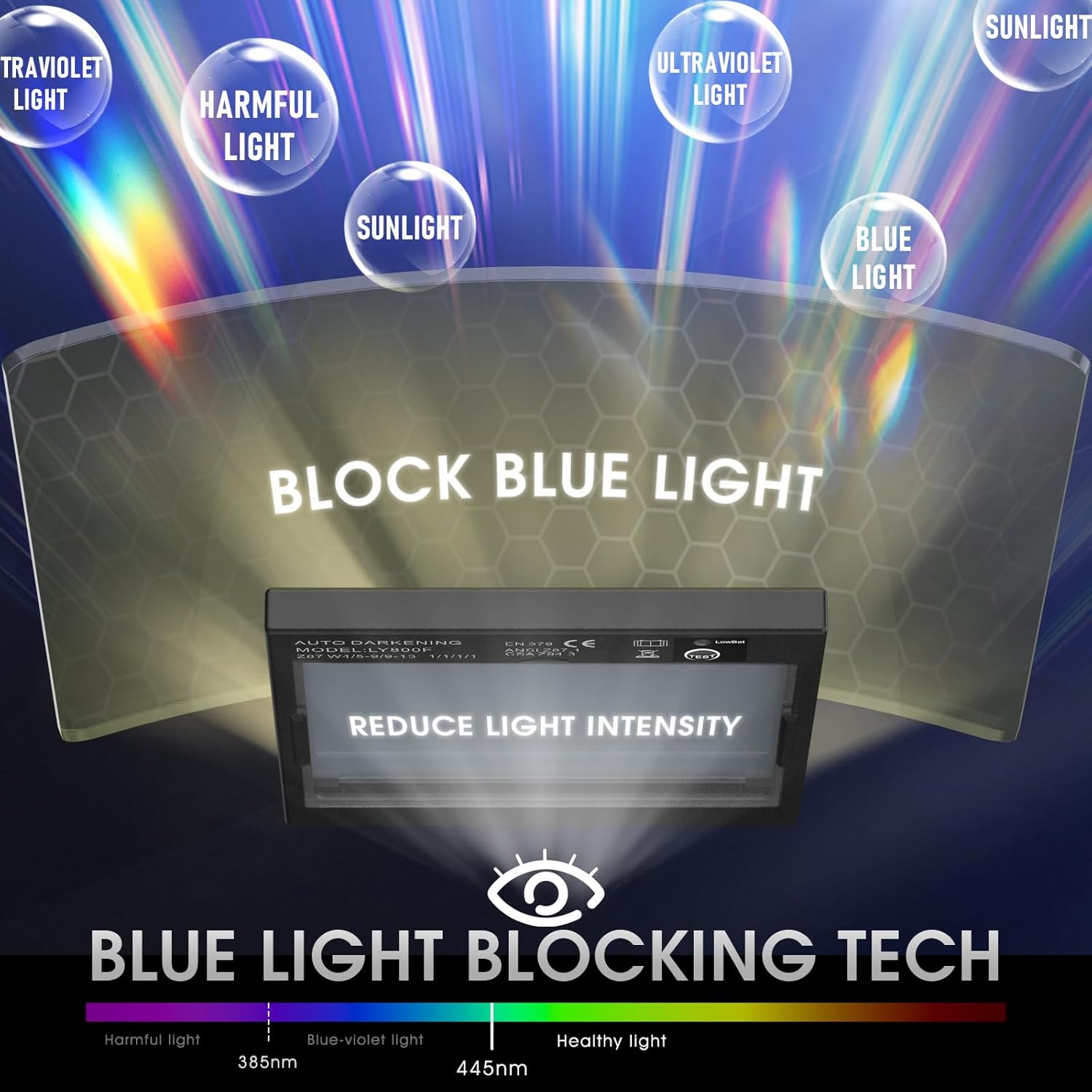
Image: Diagram illustrating the helmet's blue light blocking technology, protecting against harmful light spectrums.
3. Produkkenmerke
- Groot Viewing Screen: Equipped with a 3.94" x 3.66" viewing window, featuring 1/1/1/1 optical clarity lenses and true color technology for enhanced visual experience.
- Faster Auto Darkening: Features 4 advanced sensors, switching from light to dark in 1/30,000 seconds to protect eyes from harmful rays during welding.
- Superior Safety and Comfort: Constructed from 100% recyclable upgraded PP material for durability and protection. Includes an ergonomically designed adjustable headgear with breathable padding for comfort during extended use.
- Lang dienslewe: Powered by solar panel technology and a replaceable CR2450 lithium battery, promoting energy conservation.

Beeld: Oorview of the helmet's advantages: True Color, Fast Darkening, PP-Strong Material, Anti-Blue Ray, and Replaceable Battery.

Image: A visual comparison demonstrating the improved clarity and real color view provided by the upgraded true color lenses compared to traditional green-tinted lenses.

Image: Close-up of the helmet's large viewing lens, highlighting its dimensions of 3.93" x 3.66".

Image: Illustration of the helmet's hard shell, highlighting its resistance to falls, impacts, corrosion, and flames.
4. Pakketinhoud
Your YESWELDER LYG-22800F Welding Helmet package includes:
- 1 x YESWELDER LYG-22800F Auto Darkening Welding Helmet
- 2 x Replacement Outer Lenses
- 1 x CR2450 Lithium Battery (pre-installed or included separately)
- 1 x Opbergsak
- 1 x Gebruikershandleiding (hierdie dokument)


Images: The welding helmet, replacement lenses, CR2450 battery, and storage bag included in the package.
5. Opstelling
5.1 Aanpassing van die hoofbedekking
Proper adjustment of the headgear is crucial for comfort and stability. The headgear allows for circumference, angle, and distance adjustments.
- Circumference Adjustment: Use the knob at the back of the headgear to adjust the fit around your head. Turn clockwise to tighten, counter-clockwise to loosen.
- Hoek verstelling: Adjust the forward tilt of the helmet using the side mechanisms to ensure optimal viewing hoek.
- Afstand aanpassing: Adjust the distance between your face and the lens for clear vision and comfort.

Image: The comfortable headgear, highlighting its adjustable nature and features like sweatproof, antiskid, and damp proof design.

Image: Close-up of the headgear's angle adjustment mechanism, demonstrating how to set the forward tilt of the helmet.

Image: Close-up of the headgear's distance adjustment mechanism, illustrating how to set the distance between the face and the lens.
5.2 Batteryinstallasie/Kontrole
The helmet is powered by a solar panel and a replaceable CR2450 lithium battery. Ensure the battery is correctly installed and functional before use.
- Locate the battery compartment, usually on the inside of the auto-darkening filter (ADF) cartridge.
- Insert the CR2450 battery with the correct polarity.
- Press the "TEST" button on the ADF to verify the auto-darkening function. The lens should momentarily darken.
Video: A demonstration of the YESWELDER M800H Welding Helmet's features, including the auto-darkening function and controls. This video is relevant for understanding the general operation of YESWELDER auto-darkening helmets.
6. Bedryfsinstruksies
6.1 Moduskeuse
The helmet supports various modes for different applications:
- Maalmodus: Set to Shade 4. The lens remains light, suitable for grinding tasks without auto-darkening.
- Snymodus: Adjustable shade range from 5 to 9, suitable for plasma cutting and similar operations.
- Lassingsmodus: Adjustable shade range from 9 to 13, ideal for TIG, MIG, and Arc welding.

Image: The helmet's versatility across various applications: MIG, Stick, TIG welding, as well as cutting and grinding.

Image: Close-up of the helmet's control panel, detailing the knobs for Delay, Shade, and Sensitivity adjustments.
6.2 Aanpassing van instellings
- Skadubeheer: Rotate the "SHADE" knob to select the appropriate shade level (4-5/9-9/13) for your welding or cutting process. Refer to welding standards for recommended shade levels.
- Sensitiwiteitsbeheer: Adjust the "SENSITIVITY" knob to accommodate different lighting conditions and prevent the lens from flashing on and off. Turn towards "HI" for weak arcs and "LO" for strong arcs.
- Vertragingsbeheer: Use the "DELAY" knob to set the time it takes for the lens to return to its clear state after welding. "MIN" provides a fast return, while "MAX" provides a slow return, useful for preventing eye fatigue from afterglow.
Video: A demonstration of the YESWELDER M800H Welding Helmet's auto-darkening and adjustment features. This video is relevant for understanding the general operation of YESWELDER auto-darkening helmets.
Video: 'n Oorview of the YESWELDER M800H Series Auto Darkening Welding Helmet, showcasing its design and functionality. This video is relevant for understanding the general operation of YESWELDER auto-darkening helmets.
Video: A short demonstration of the VORITO Welding Helmet VR-B12, highlighting its auto-darkening feature and true color view. This video is useful for illustrating the auto-darkening function.
7. Onderhoud
7.1 Skoonmaak
- Maak die helmdop skoon met sagte seep en water. Vermy harde oplosmiddels.
- Wipe the auto-darkening filter (ADF) and protective lenses with a soft, clean cloth. Do not use abrasive materials or cleaning solutions that could scratch the lens.
7.2 Lensvervanging
Replace the outer and inner protective lenses regularly, especially if they become scratched, pitted, or cloudy, to maintain clear vision and protection.
- Carefully remove the old protective lens by unclipping or sliding it out of its frame.
- Insert a new protective lens, ensuring it is securely seated.
7.3 Batteryvervanging
If the low battery indicator illuminates or the ADF fails to darken, replace the CR2450 battery.
- Open the battery compartment on the ADF.
- Remove the old CR2450 battery and insert a new one, observing polarity.
- Test the ADF function using the "TEST" button.
8. Probleemoplossing
| Probleem | Moontlike oorsaak | Oplossing |
|---|---|---|
| Die lens word nie donkerder wanneer die boog getref word nie. | Low battery; Sensors blocked; Incorrect sensitivity setting; ADF damaged. | Replace battery; Clean sensors; Adjust sensitivity; Replace ADF. |
| Lens remains dark after welding. | Incorrect delay setting; Low battery. | Adjust delay to a faster setting; Replace battery. |
| Swak sigbaarheid. | Scratched/dirty protective lenses; Incorrect shade setting. | Clean or replace lenses; Adjust shade. |
| Die helm voel ongemaklik of onstabiel. | Improper headgear adjustment. | Adjust headgear circumference, angle, and distance. |
9. Spesifikasies
| Kenmerk | Detail |
|---|---|
| Modelnommer | LYG-22800F |
| Viewing gebied | 3.94" x 3.66" |
| Optiese helderheid | 1/1/1/1 |
| Boogsensors | 4 |
| Skakeltyd | 1/30,000 seconds (Light to Dark) |
| Skadu reeks | Grind Mode: DIN 4; Cut Mode: DIN 5-9; Weld Mode: DIN 9-13 |
| Kragtoevoer | Sonsel en vervangbare CR2450 litiumbattery |
| Materiaal | PP (polipropileen) |
| Item gewig | 998 g |
| Produk afmetings | 50.8 x 60.96 x 88.9 cm |
10. Waarborg en Ondersteuning
Your YESWELDER LYG-22800F Auto Darkening Welding Helmet comes with a 1 jaar waarborg vanaf die aankoopdatum, wat vervaardigingsfoute dek.
For technical assistance, troubleshooting, or warranty claims, please contact YESWELDER customer support. Our team is available for 24/7 kliëntediens om jou by te staan.
Visit the official YESWELDER webwebwerf vir meer inligting en kontakbesonderhede: YESWELDER Store