
1. Inleiding
Thank you for choosing the Galax Quasar GX600-WH Gaming PC Case. This manual provides essential information for the proper installation, operation, and maintenance of your new PC case. Please read this manual thoroughly before beginning installation to ensure optimal performance and safety.
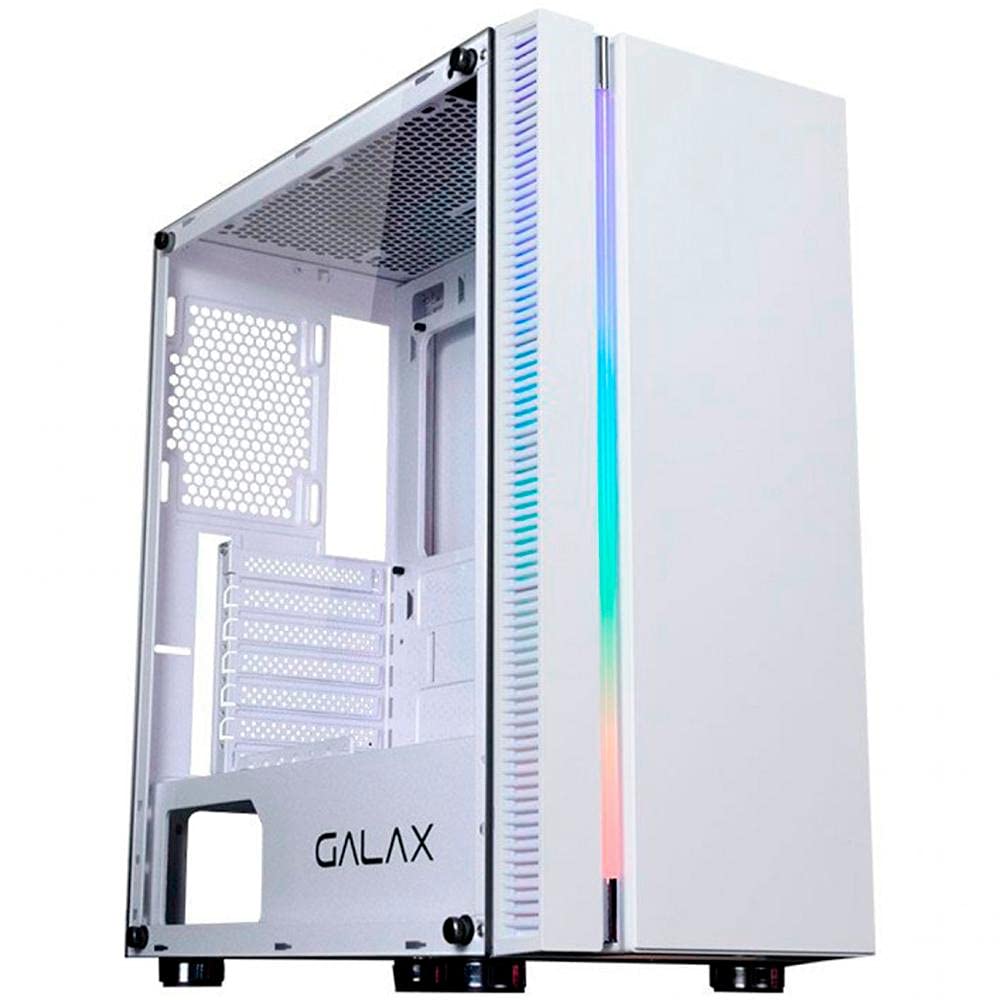
Figuur 1.1: Voorkant view of the Galax Quasar GX600-WH Gaming PC Case, showcasing its integrated RGB lighting and minimalist design.
2. Veiligheidsinligting
Neem asseblief die volgende veiligheidsmaatreëls in ag om skade aan die produk te voorkom en gebruikersveiligheid te verseker:
- Ontkoppel altyd die kragtoevoer van die muursok voordat u enige komponente binne die rekenaarkas installeer of verwyder.
- Handle the tempered glass panel with care. It is fragile and can break if dropped or subjected to impact.
- Avoid placing the PC case in direct sunlight, near heat sources, or in areas with high humidity.
- Verseker behoorlike ventilasie om oorverhitting te voorkom. Moenie die luggate blokkeer nie.
- Hou klein onderdele en skroewe weg van kinders.
3. Pakketinhoud
Verifieer dat alle items in die pakket teenwoordig is:
- Galax Quasar GX600-WH Mid Tower PC Case
- Toebehoreboks (skroewe, afstandhouers, kabelbinders)
- Gebruikershandleiding (hierdie dokument)
Note: Fans are not included with this product and must be purchased separately.
4. Produk verbyview
4.1. Sleutel kenmerke
- Integrated RGB lighting on the front panel.
- Simple and minimalist design.
- Tempered glass side panel for component display.
- Front panel connectivity: 1x USB 3.0, 2x USB 2.0, 1x 3.5mm Audio, 1x 3.5mm Microphone.
- Rubber grommets for cable management.
- PSU shroud cutout to display power supply model.
- Magnetic dust filter on the top panel.
4.2. Komponentidentifikasie
Familiarize yourself with the main parts of the PC case:
- Front Panel with RGB Lighting
- Sypaneel van gehard glas
- Steel Side Panel (right side)
- Top Panel with Magnetic Dust Filter
- Rear Panel (I/O shield cutout, PCI-E slots)
- Front I/O Ports (USB, Audio)
- PSU-omhulsel
- Drive Bays (2.5" and 3.5")
Figuur 4.1: Internal layout of the GX600-WH case, highlighting motherboard tray, drive bays, and cable routing options.
5. Opstelling en installering
Follow these steps to install your PC components:
5.1. Voorbereiding van die Saak
- Plaas die kas op 'n plat, stabiele oppervlak.
- Remove the tempered glass side panel by unscrewing the thumb screws and carefully pulling it away. Set it aside on a soft, non-abrasive surface.
- Remove the steel side panel by unscrewing the thumb screws and sliding it backward.
5.2. Moederbord Installasie
- Install the I/O shield into the cutout on the rear panel of the case.
- Align your ATX, Micro-ATX, or Mini-ITX motherboard with the pre-installed standoffs. Additional standoffs may be required for certain motherboard sizes; install them as needed.
- Bevestig die moederbord met die meegeleverde skroewe.
5.3. Installasie van die kragtoevoereenheid (PSU)
- Position the PSU into the dedicated compartment at the bottom rear of the case.
- Ensure the PSU fan faces downwards (if the case has a bottom vent) or upwards (if no bottom vent).
- Bevestig die PSU met skroewe van die agterkant van die kas.
5.4. Installasie van stoorskyf
- 2.5" Drives (SSDs): Locate the 2.5" drive mounts behind the motherboard tray or on the PSU shroud. Secure the SSDs using the provided screws.
- 3.5" Drives (HDDs): Locate the 3.5" drive cage. Slide the HDDs into the trays and secure them, typically with tool-less clips or screws.
5.5. Expansion Card (GPU, etc.) Installation
- Verwyder die nodige PCI-E-gleufdeksels van die agterkant van die kas.
- Insert your expansion card (e.g., graphics card) into the appropriate PCI-E slot on the motherboard.
- Maak die kaart met 'n skroef vas.
5.6. Fan and Radiator Installation (Optional)
The GX600-WH supports various fan and radiator configurations:
- Top: Up to 2x 120mm fans or a 240mm radiator.
- Voor: Up to 2x 120mm fans, 1x 140mm fan, or a 240mm radiator.
- Agter: 1x 120mm fan or a 120mm radiator.
Install fans/radiators using the appropriate screws, ensuring correct airflow direction.
5.7. Kabelbestuur
Route all cables (PSU, data, front panel) through the rubber grommets and cable tie points behind the motherboard tray to maintain a clean interior and optimize airflow.
Figuur 5.1: Illustration of the cable routing space behind the motherboard tray, demonstrating the use of rubber grommets for neat cable management.
6. Bedryfsinstruksies
6.1. Aansluiting van randapparatuur
Once all internal components are installed and secured, replace both side panels. Connect your monitor, keyboard, mouse, and other peripherals to the appropriate ports on your motherboard's I/O shield and graphics card.
6.2. Aanskakel
- Koppel die kragkabel aan jou PSU en dan aan 'n muuraansluiting.
- Draai die kragskakelaar op die PSU na die "AAN"-posisie.
- Press the power button on the front panel of the GX600-WH case. The integrated RGB lighting should illuminate, and your system should begin to boot.
Figuur 6.1: Gedetailleerd view of the front I/O panel, showing the power button, USB 3.0, USB 2.0, and audio jacks.
7. Onderhoud
Regular maintenance helps prolong the life of your PC components and ensures optimal performance.
- Stoffilters: The top panel features a magnetic dust filter. Regularly remove and clean it with water or a soft brush. Ensure it is completely dry before reattaching.
- Binne skoonmaak: Periodically open the side panels and use compressed air to remove dust buildup from fans, heatsinks, and other components.
- Buitenste skoonmaak: Vee die buite-oppervlaktes af met 'n sagte, damp lap. Vermy skuurmiddels of oplosmiddels. Vir die geharde glas, gebruik 'n glasskoonmaker en 'n mikrofiberlap.
8. Probleemoplossing
As jy probleme met jou rekenaarkas ondervind, raadpleeg die volgende algemene probleme en oplossings:
| Probleem | Moontlike oorsaak | Oplossing |
|---|---|---|
| Rekenaar skakel nie aan nie. | PSU switch off, power cables loose, front panel connector issue. | Ensure PSU switch is ON. Check all power connections (24-pin, 8-pin CPU, GPU). Verify front panel power button connector is correctly attached to the motherboard. |
| Front panel USB ports not working. | USB header cable not connected or incorrectly connected to motherboard. | Check the USB 3.0 and USB 2.0 header cables are securely connected to the correct pins on your motherboard. |
| Front panel audio jacks not working. | HD Audio cable not connected or incorrectly connected to motherboard. | Ensure the HD Audio cable is securely connected to the correct audio header on your motherboard. |
| RGB-beligting werk nie. | RGB cable not connected to motherboard or controller. | Verify the RGB cable from the front panel is connected to a compatible RGB header on your motherboard or an external RGB controller. |
9. Spesifikasies
| Kenmerk | Detail |
|---|---|
| Soort saak | Mid Tower |
| Materiaal | SGCC Steel, Tempered Glass |
| Kleur | Wit |
| Moederbord ondersteuning | ATX, Mikro ATX, Mini ITX |
| Uitbreidingsgleuwe | 7 Horizontal PCI-E |
| Rybaaie | 2x 2.5", 2x 3.5" |
| Voorste I / O-poorte | 1x USB 3.0, 2x USB 2.0, 1x 3.5mm Audio, 1x 3.5mm Microphone |
| Aanhangerondersteuning (Bo) | 2 x 120 mm |
| Waaierondersteuning (voor) | 2x 120mm or 1x 140mm |
| Waaierondersteuning (agter) | 1 x 120 mm |
| Radiatorondersteuning (Bo) | Tot 240 mm |
| Radiatorondersteuning (Voor) | Tot 240 mm |
| Radiatorondersteuning (Agter) | 120 mm |
| Maksimum GPU-lengte | 345 mm |
| Max CPU Cooler Hoogte | 160 mm |
| Afmetings (L x B x H) | 474 mm x 257 mm x 488 mm |
| Item gewig | 6.25 kg |
Figuur 9.1: Technical drawing illustrating the dimensions of the Galax Quasar GX600-WH case.
10. Waarborg en Ondersteuning
The Galax Quasar GX600-WH PC Case comes with a 12 maande waarborg vanaf die aankoopdatum. Hierdie waarborg dek vervaardigingsdefekte en materiaalfoute onder normale gebruik.
Die waarborg dek nie:
- Damage caused by improper installation, accident, abuse, misuse, natural disaster, or unauthorized modification.
- Cosmetic damage, including but not limited to scratches, dents, and broken plastic on ports, that does not affect functionality.
- Normale slytasie.
For technical support or warranty claims, please contact your local Galax distributor or retailer with your proof of purchase.