
PowMr ML2440
PowMr 40A MPPT Sonkraglaaibeheerder Gebruikershandleiding
Model: ML2440
1. Inleiding
This manual provides essential information for the safe and efficient operation of your PowMr 40A MPPT Solar Charge Controller, model ML2440. Please read this manual thoroughly before installation and use to ensure optimal performance and longevity of the product.
2. Veiligheidsinstruksies
- Ensure all wiring is correctly connected and secured to prevent short circuits or damage.
- Always connect the battery to the charge controller first, then the solar panels, and finally the load. Disconnect in the reverse order.
- Do not attempt to repair or modify the controller yourself. Contact qualified personnel for service.
- Installeer die beheerder in 'n goed geventileerde area, weg van vlambare materiale en direkte sonlig.
- Dra gepaste persoonlike beskermende toerusting (PPE) wanneer u met elektriese stelsels werk.
- Verseker die stelsel voltage matches the controller's specifications (12V/24V auto-detection).
3. Produk verbyview
The PowMr 40A MPPT Solar Charge Controller is designed to efficiently manage power from your solar panels to charge various battery types, including Lithium, Sealed, Gel, and Flooded batteries. It features Maximum Power Point Tracking (MPPT) technology for optimized solar energy harvesting, automatic 12V/24V system voltage detection, and a clear LCD display for monitoring system status.
Figuur 3.1: Voorkant view of the PowMr 40A MPPT Solar Charge Controller.
This image shows the main unit of the PowMr 40A MPPT Solar Charge Controller, highlighting its compact design and integrated LCD screen.
The controller supports a maximum solar input voltage of 100V and a maximum input power of 1100W for a 24V system (550W for 12V). It also includes temperature compensation for accurate charging across varying environmental conditions.

Figuur 3.2: Temperature compensation feature.
This image illustrates the temperature compensation capability of the controller, ensuring optimal battery charging performance in both hot and cold environments.
4. Installasie en bedrading
Proper installation is crucial for the safe and efficient operation of your solar charge controller. Follow these steps carefully.
4.1 Bedradingsdiagram

Figuur 4.1: Wiring diagram for the PowMr MPPT Solar Charge Controller.
This diagram illustrates the correct connection order for the battery, solar panels, DC load, and optional inverter. A temperature sensor is also shown.
4.2 Verbindingstappe
- Connect Battery First: Connect the battery to the charge controller's battery terminals. Ensure correct polarity. The controller will auto-detect 12V or 24V system voltage.
- Verbind sonpanele: Connect the solar panels to the PV input terminals. Ensure correct polarity. The controller will begin charging if sufficient sunlight is available.
- Connect DC Load (Optional): If using a DC load directly from the controller, connect it to the load terminals.
- Connect Inverter (Optional): If using an inverter, connect it to the battery terminals (not directly to the load terminals of the controller).
- Koppel temperatuursensor: For accurate temperature compensation, connect the provided temperature sensor to the designated port on the controller and place the sensor near the battery.
Disconnection Order: To disconnect the system, always follow the reverse order: Disconnect load, then solar panels, then battery.
5. Bedryfsinstruksies
This section details how to monitor and configure your charge controller using its integrated LCD display and the optional Bluetooth mobile application.
5.1 LCD-skerm oorview

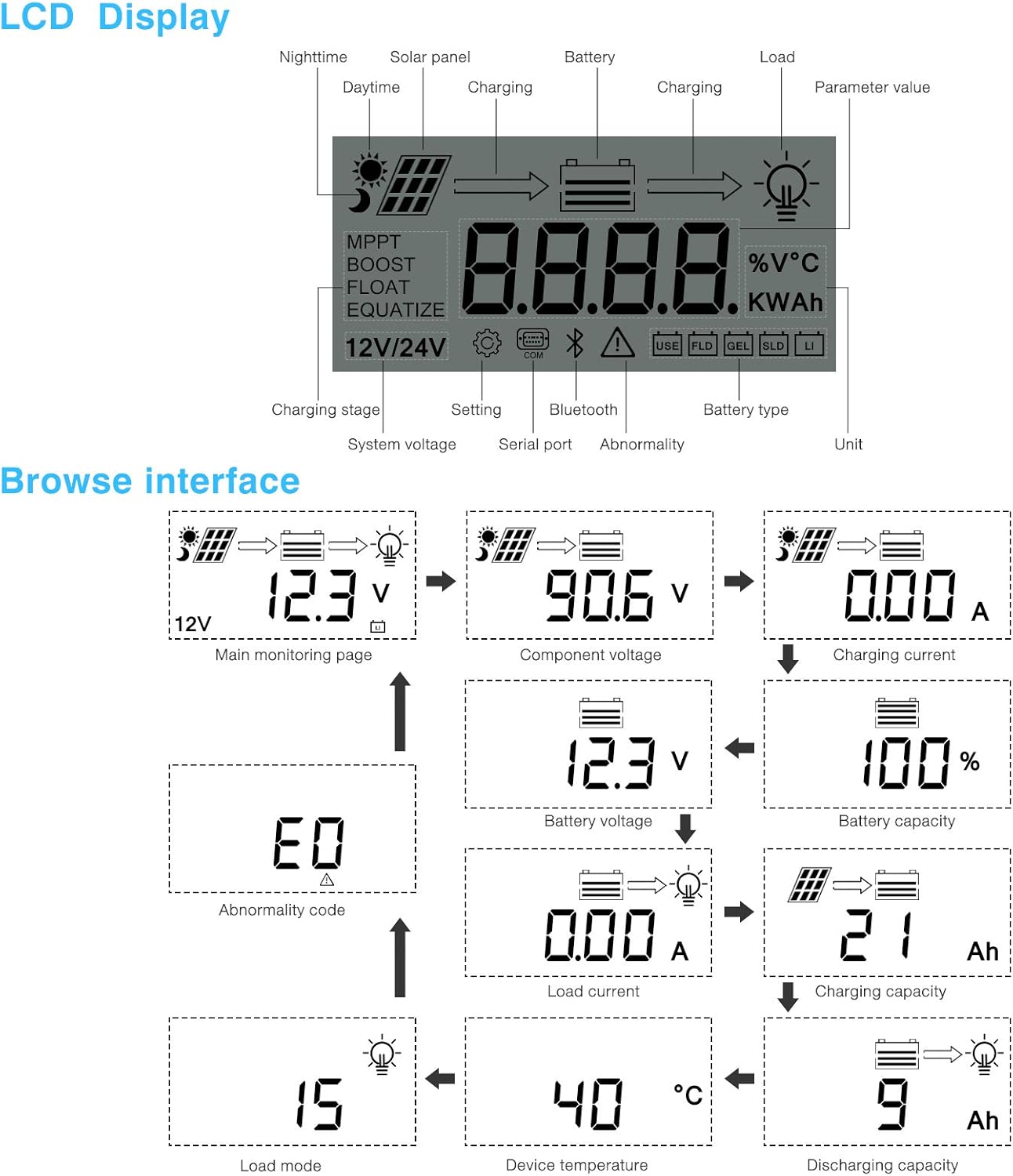
Figuur 5.1: LCD Display and Browse Interface.
This image shows the various icons and parameters displayed on the LCD screen, along with the navigation flow through different monitoring pages.
The LCD provides real-time information about your solar system. Key indicators include:
- Laai Stage: MPPT, Boost, Float, Equalize.
- Stelsel Voltage: 12V/24V auto-detected.
- Battery tipe: Icons for Lithium (Li), Sealed (SLD), Gel (GEL), Flooded (FLD).
- Status aanwysers: Solar panel activity, battery charging, load status, abnormality.
- Parameterwaarde: Vertoon voltage, current, capacity, temperature, etc.
Use the buttons below the LCD to navigate through different screens to view parameters such as main monitoring page, component voltage, laaistroom, battery voltage, battery capacity, load current, charging capacity, device temperature, discharging capacity, abnormality codes, and load mode.
5.2 Bluetooth Mobile Application
The controller supports an optional Bluetooth module (BT-1) for remote monitoring and parameter adjustment via a mobile application (available for Apple iOS and Android devices). The Bluetooth module connects to the RS232 port on the controller.

Figuur 5.2: Controller with optional Bluetooth module.
This image displays the PowMr MPPT Solar Charge Controller alongside its optional BT-1 Bluetooth communication module and connecting cable.

Figuur 5.3: BT-1 Bluetooth module.
'n Gedetailleerde view of the BT-1 Bluetooth module, which enables wireless communication with the solar charge controller for remote monitoring and settings adjustments.

Figuur 5.4: Bluetooth Mobile Interface Display.
This image shows various screens from the mobile application, including real-time monitoring, data records, energy records, and parameter settings.
The mobile application allows you to:
- Monitor real-time system data (voltage, current, power, temperature).
- View historical data and energy records.
- Adjust various charging parameters and battery settings.
- Stel die fabrieksinstellings terug.
6. Onderhoud
Regular maintenance ensures the longevity and optimal performance of your charge controller.
- Skoonmaak: Periodically clean the controller's exterior with a dry cloth to remove dust and debris. Ensure ventilation openings are clear.
- Verbindings: Annually check all wiring connections for tightness and corrosion. Loose connections can cause overheating and poor performance.
- Omgewing: Ensure the installation environment remains within the specified operating temperature range and is free from excessive moisture or dust.
7. Probleemoplossing
This section provides guidance for common issues. Refer to the LCD display for abnormality codes.
- Geen skerm/geen krag:
- Kontroleer batteryverbindings en maak seker die batteryvolume istage is binne die bedryfsbestek.
- Verify that the battery fuse (if installed) is intact.
- Geen laai:
- Ensure solar panels are connected correctly and receiving sufficient sunlight.
- Gaan sonpaneel voltage en huidige.
- Verify that the battery is not fully charged or in a protection state.
- Load Not Working:
- Check load connections and ensure the load current does not exceed the controller's rating.
- Verifieer dat die battery voltage is bo die lae voltage disconnect (LVD) setting.
- Check for any abnormality codes on the LCD related to load output.
- Abnormality Codes (e.g., "E0"):
- Refer to the specific abnormality code displayed on the LCD. Consult the full product manual or manufacturer's support for detailed explanations and solutions for each code.
8. Spesifikasies
Technical specifications for the PowMr 40A MPPT Solar Charge Controller (Model ML2440).

Figuur 8.1: Product Specifications Table.
This table provides detailed technical parameters for the ML2420, ML2430, and ML2440 models. The ML2440 column is relevant for this 40A controller.
| Parameter | Value (ML2440) |
|---|---|
| Model | ML2440 |
| Stelsel voltage | 12V / 24V outomaties |
| Geen lasverlies | 0.7 W tot 1.2 W |
| Battery voltage | 9 tot 35 V |
| Maks. soninvoer voltage | 100V (25°C), 90V (-25°C) |
| Maks. kragpunt voltage reeks | Battery voltage +2V tot 75V |
| Gegradeerde laaistroom | 40A |
| Gegradeerde lasstroom | 20A |
| Maks. kapasitiewe lasvermoë | 10000uF |
| Maks. insetkrag vir fotovoltaïese stelsel | 550W/ 12V, 1100W/ 24V |
| Omskakeling doeltreffendheid | ≤ 98% |
| MPPT dop doeltreffendheid | > 99% |
| Temperatuurvergoedingsfaktor | -3.0mv/ °C/ 2V (default) |
| Bedryfstemperatuur | -35°C tot +45°C |
| Beskermingsgraad | IP32 |
| Gewig | 2 kg |
| Kommunikasie metode | RS232 |
| Hoogte | ≤ 3000m |
| Produk afmetings | 238*173*72.5 mm |
9. Waarborg en Ondersteuning
For warranty information, please refer to the documentation included with your product packaging or visit the official PowMr website. If you encounter any issues not covered in this manual or require further assistance, please contact PowMr customer support.
PowMr Official Webwebwerf: Visit the PowMr Store on Amazon
Verwante Dokumente - ML2440
 |
PowMr Solar Charge Controller Troubleshooting Guide A concise troubleshooting guide for PowMr MPPT solar charge controllers, addressing common issues like no display, power-on problems, voltage discrepancies, and charging failures. Includes step-by-step solutions and contact information for warranty support. |
 |
PowMr MPPT Solar Charger Controller Quick Installation Guide This guide provides quick installation instructions for the PowMr MPPT Solar Charger Controller. It details the essential steps for connecting your battery and solar panel, important wiring precautions, and an overview of the controller's button operations for 12V, 24V, 36V, and 48V battery systems. Learn how to set up your solar charging system safely and efficiently. |
 |
PowMr Keeper-reeks MPPT-sonlaaibeheerderhandleiding Gebruikershandleiding vir die PowMr Keeper-reeks MPPT-sonlaaibeheerder, wat installasie, werking, kenmerke, tegniese data en foutbestuur vir modelle MPPT 20A-40A dek. |
 |
Solar Charge Controller Gebruikershandleiding User manual for the 10A-100A Solar Charge Controller, covering installation, operation, troubleshooting, and technical specifications. |
 |
Keeper-reeks MPPT-sonlaaibeheerder gebruikershandleiding Gebruikershandleiding vir die Keeper-reeks maksimum kragpuntopsporing (MPPT) sonkraglaaibeheerder, modelle MPPT 20A-40A. Verskaf gedetailleerde inligting oor die produk oorview, voorkoms, bedrading, werking, beskerming, algemene foute en tegniese spesifikasies. |
 |
PowMr HHJ-60A MPPT Solar Charge Controller User Manual Comprehensive user manual for the PowMr HHJ-60A MPPT Solar Charge Controller, detailing installation, operation, safety guidelines, troubleshooting, and technical specifications for solar power systems. |
Ask a question about this manual
Ask about setup, troubleshooting, compatibility, parts, safety, or missing instructions. Manuals+ will review the question and use this page’s manual context to help answer it.