
Lepro PR410082-RGB-JP
Lepro 5m RGB LED Strip Light Instruction Manual
Model: PR410082-RGB-JP
Inleiding
Thank you for choosing the Lepro 5m RGB LED Strip Light. This product is designed to provide versatile and vibrant lighting for various indoor applications. Featuring high-brightness SMD5050 LEDs, a wide range of colors, and easy installation, it enhances the ambiance of any space. Please read this manual carefully before installation and use to ensure proper operation and safety.
Wat is in die boks
Verifieer dat alle komponente teenwoordig is voordat u met die installasie begin:
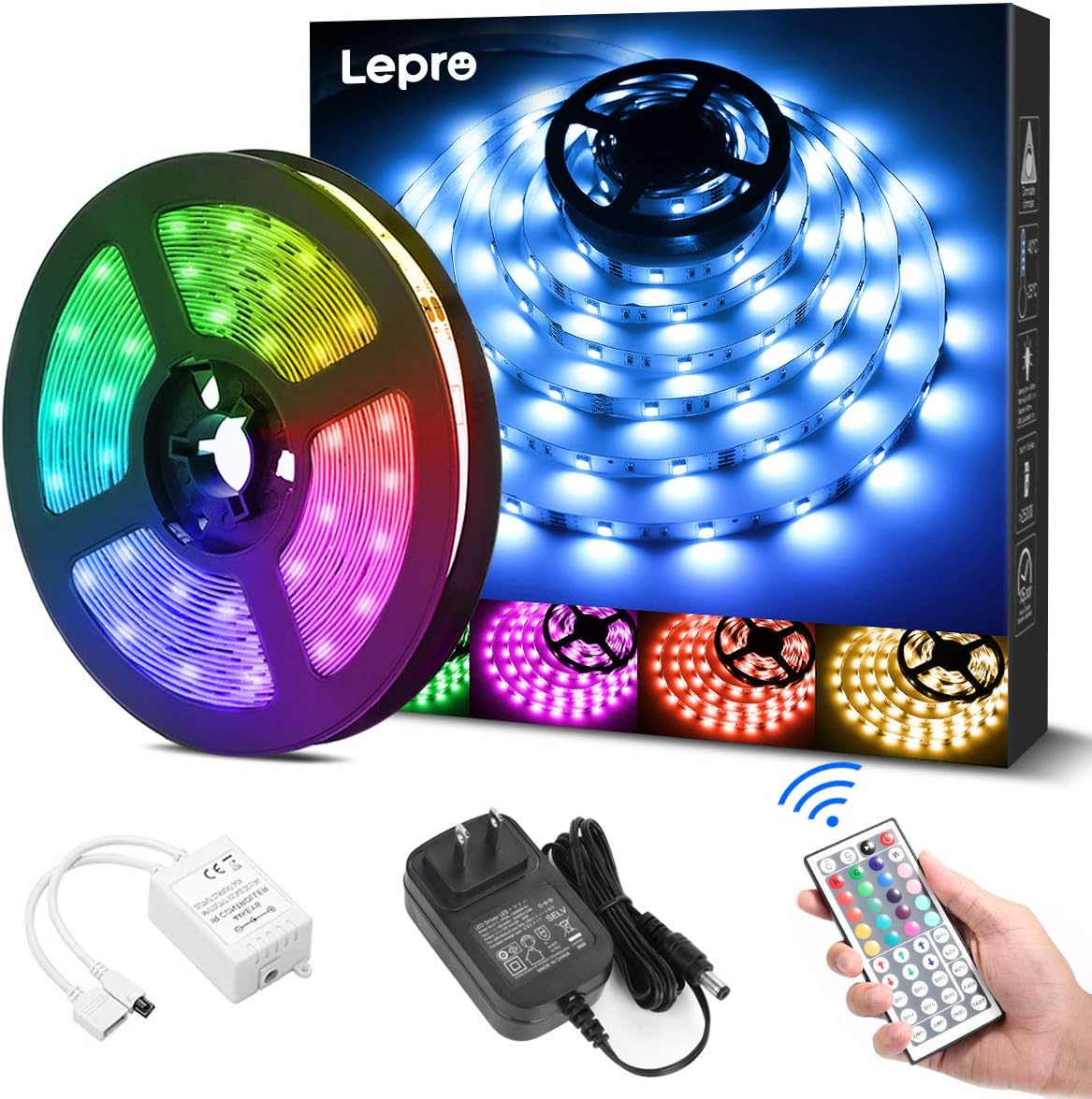
- LED Strip Light (5 meters) x 1
- DC12V Power Adapter x 1
- Connection Receiver x 1
- Afstandbeheer x 1
- Instruction Manual (Japanese) x 1
Veiligheidsinligting
- Hierdie produk is ontwerp vir slegs binnenshuise gebruikMoenie aan water of hoë humiditeit blootstel nie.
- Maak seker dat die kragtoevoer ontkoppel is voor installasie of instandhouding.
- Use only the provided DC12V power adapter. Using an incompatible power supply may damage the product or pose a fire hazard.
- Do not bend the LED strip sharply or apply excessive force, as this may damage the circuit.
- Hou buite bereik van kinders.
- Indien enige deel van die produk beskadig is, staak gebruik onmiddellik en kontak ondersteuning.
Opstelling
Follow these steps for proper installation of your LED strip light:
- Berei die oppervlak voor: Clean the desired installation surface thoroughly. Ensure it is dry, smooth, and free of dust or oil for optimal adhesive performance.
- Meet en sny (opsioneel): If a shorter length is required, cut the LED strip along the designated cut marks (indicated by a scissor icon) using scissors. Let wel: Only cut at these specific marks. Cutting elsewhere will damage the strip. Cut sections cannot be reconnected without additional connectors (sold separately).
- Dien die strook toe: Peel off the backing from the 3M adhesive tape on the back of the LED strip. Carefully press the strip onto the cleaned surface, ensuring firm contact along its entire length.
- Verbind komponente: Connect the LED strip to the connection receiver, ensuring the arrows on both components align. Then, connect the DC12V power adapter to the receiver.
- Krag aan: Plug the power adapter into a suitable power outlet. Remove the insulation sheet from the remote control before first use. Point the remote control towards the receiver and press the power button to turn on the lights.


Bedryfsinstruksies
The LED strip light is controlled using the included 44-key remote control. Ensure the remote is pointed towards the receiver for effective operation.
Afstandbeheer funksies:
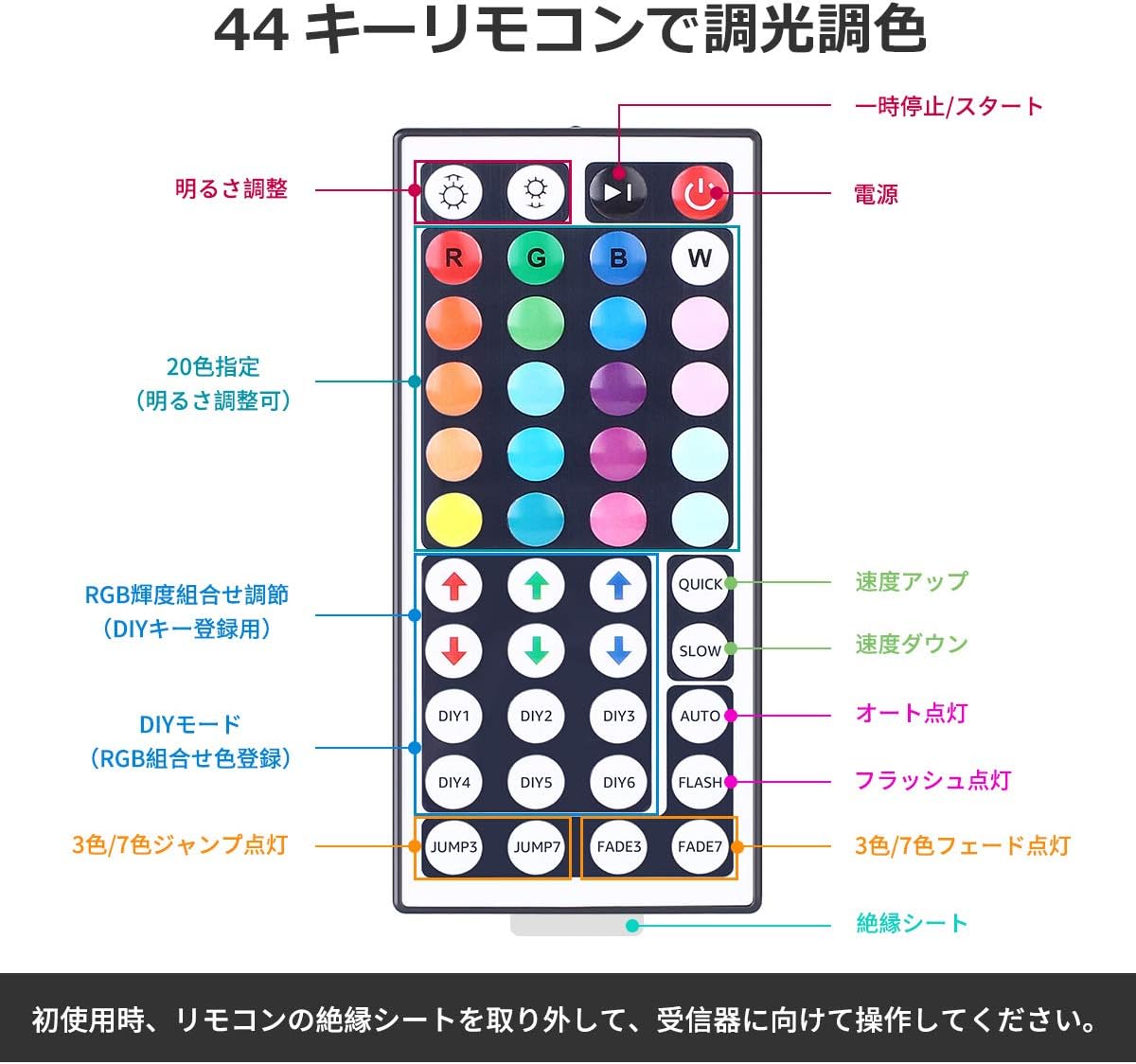
- Krag aan/af: Druk die rooi aan/af-knoppie om die ligte aan of af te skakel.
- Helderheid aanpassing: Gebruik die op en af pyltjie knoppies (labeled 'Brightness Adjust') to increase or decrease the light intensity.
- Kleurkeuse: Kies uit 20 voorafbepaalde kleure by pressing the corresponding color buttons.
- Selfdoen-modusse: Die DIY1-DIY6 knoppies allow you to create and save custom colors by adjusting the Red, Green, and Blue intensity using the RGB arrow buttons.
- Dinamiese modusse:
- VINNIG/STADIG: Pas die spoed van dinamiese modusse aan.
- VOERTUIG: Cycles through all dynamic modes automatically.
- FLITS: Flits deur kleure.
- JUMP3/JUMP7: Jumps between 3 or 7 colors.
- FADE3/FADE7: Vervaag tussen 3 of 7 kleure.
Onderhoud
- Skoonmaak: Ensure the power is off and unplugged before cleaning. Gently wipe the LED strip with a dry, soft cloth. Do not use harsh chemicals or abrasive cleaners.
- Berging: If storing the strip for an extended period, ensure it is clean and dry. Roll it loosely to prevent damage to the LEDs or circuit. Store in a cool, dry place away from direct sunlight.
- Kleefmiddelversorging: The 3M adhesive is strong, but repeated removal and reapplication may reduce its effectiveness.
Probleemoplossing
| Probleem | Moontlike oorsaak | Oplossing |
|---|---|---|
| LED-strook brand nie. | 1. Power adapter not plugged in. 2. Remote control insulation sheet not removed. 3. Connections are loose or incorrect. 4. Remote control battery is dead. | 1. Ensure power adapter is securely plugged into an outlet. 2. Remove the clear plastic insulation sheet from the remote control battery compartment. 3. Check all connections, ensuring arrows align between the strip and receiver. 4. Replace the remote control battery (CR2025 or equivalent). |
| Die afstandbeheer reageer nie. | 1. Remote not pointed at receiver. 2. Obstruction between remote and receiver. 3. Remote control battery is dead. | 1. Point the remote directly at the receiver. 2. Remove any objects blocking the line of sight. 3. Vervang die afstandbeheerbattery. |
| Some sections of the strip are not lighting up. | 1. Damage to the LED strip. 2. Incorrect cutting. | 1. Inspect the strip for physical damage. If damaged, contact support. 2. Ensure cuts were made only at designated marks. |
Spesifikasies
- Modelnommer: PR410082-RGB-JP
- Handelsmerk: Lepro
- Ligbrontipe: LED (SMD5050)
- LED Hoeveelheid: 150 LEDs (30 LEDs per meter)
- Strooklengte: 5 XNUMX meter
- Kragverbruik: 18 W
- Invoer Voltage: DC12V 1.5A
- Kleuropsies: RGB (20 preset colors + DIY modes)
- Beheer metode: 44-key IR Remote Control
- Binne/buite gebruik: Binneshuise
- Spesiale kenmerke: Dimmable, Cuttable, 3M Adhesive, PSE Certified
- Pakketgrootte: 13.1 x 10.7 x 6.7 cm; 230 g

Waarborg en Ondersteuning
This Lepro LED Strip Light comes with a 2 jaar waarborg. If you encounter any issues or have questions regarding the product, please contact Lepro JP customer support through the retailer's platform. Provide your order details and a description of the issue for prompt assistance.
For further assistance, you can visit the official Lepro store on Amazon: Lepro Amazon Winkel