
Inleiding
Thank you for choosing the PHEANOO D6 Sound Bar System. This 2.1 channel soundbar with a dedicated wired subwoofer is designed to enhance your audio experience, providing clear dialogue, powerful bass, and immersive sound for your home entertainment. This manual provides detailed instructions for setup, operation, maintenance, and troubleshooting to ensure optimal performance and longevity of your device.
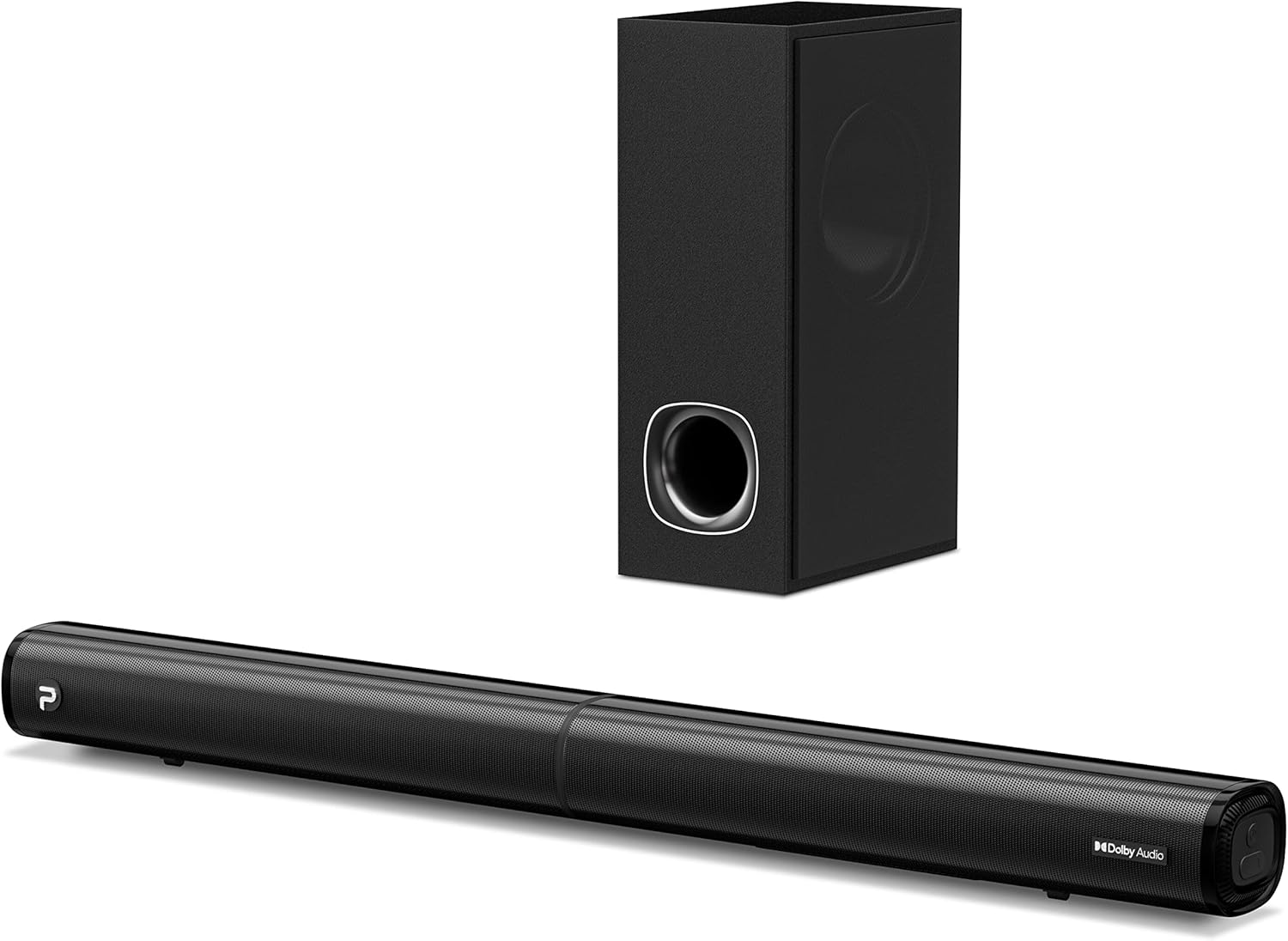
Image: The PHEANOO D6 Sound Bar and its accompanying wired subwoofer, showcasing hul slanke swart ontwerp.
Wat is in die boks
Kontroleer asseblief die inhoud van die pakket noukeurig. Indien enige items ontbreek of beskadig is, kontak kliëntediens.
- Soundbar and Wired Subwoofer
- HDMI kabel
- RCA klank kabel
- Wall Mount Kit (screws and anchors)
- Afstandsbediening (batterye nie ingesluit nie)
- Kragadapter

Image: All components included in the PHEANOO D6 Sound Bar package, laid out for clear identification, including the soundbar, subwoofer, cables, remote, and wall mount kit.
Opstelling
1. Assembling the Soundbar (Detachable Design)
The PHEANOO D6 soundbar features a unique detachable design for flexible placement. Follow these steps to assemble it:
- Align the audio connector from one half of the soundbar with the corresponding port on the other half.
- Gently push the two halves together until they click into place.
- Twist the two halves to secure the connection, ensuring the soundbar is firmly assembled.

Image: A three-step visual guide demonstrating how to connect the two halves of the detachable soundbar, ensuring proper alignment and secure locking.
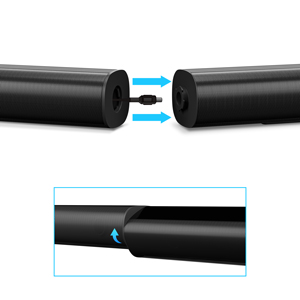
Beeld: 'n Nabyskoot view of the soundbar's detachable connection point, showing the male and female connectors.
2. Koppel die subwoofer
Connect the wired subwoofer to the soundbar using the dedicated subwoofer cable. Ensure the connection is secure.
3. Plasingsopsies
You can place the soundbar on a tabletop or mount it on a wall.
- Tafelbladplasing: Place the soundbar directly in front of your TV, ensuring it does not obstruct the TV's remote sensor.
- Muurmontering: Use the included wall mount kit. It is recommended to measure and mark the drilling points accurately, rather than relying solely on the paper stencil, to ensure a level installation.
4. Klankverbindings
The PHEANOO D6 offers multiple connectivity options. Choose the best one for your device:
- HDMI (ARC): For the best audio quality and control, connect an HDMI cable from the soundbar's HDMI (ARC) port to your TV's HDMI (ARC) port. This allows your TV remote to control the soundbar's volume.
- Opties: Connect an optical cable from the soundbar's Optical port to your TV's Optical Digital Audio Out port.
- AUX: Use the 3.5mm AUX cable to connect to devices with a 3.5mm audio output.
- Bluetooth 5.0: For wireless connection, pair your device via Bluetooth.

Image: The rear panel of the PHEANOO D6 Sound Bar, highlighting the HDMI (ARC), Bluetooth, Optical, and AUX input ports with corresponding icons.

Beeld: 'n Gedetailleerde view of the soundbar's input panel, showing the AUX, Optical, and HDMI (ARC) ports clearly labeled.
5. Kragverbinding
Connect the power adapter to the soundbar and then plug it into a wall outlet.
Bedryfsinstruksies
Afstandbeheer
The included remote control allows you to manage all functions of the soundbar. Insert two AAA batteries (not included) into the remote before use.

Image: The remote control for the PHEANOO D6 Sound Bar, showing its buttons and an indicator light.
Krag aan/af
Press the power button on the remote or the soundbar to turn the unit on or off.
Invoerkeuse
Press the "Input" button on the remote to cycle through available input sources: HDMI (ARC), Optical, AUX, and Bluetooth.
Bluetooth-koppeling
Om 'n Bluetooth-toestel te koppel:
- Select Bluetooth input on the soundbar. The indicator light will flash.
- Enable Bluetooth on your device (smartphone, tablet, etc.) and search for "PHEANOO D6".
- Select the soundbar from the list to pair. Once connected, the indicator light will be solid.

Image: A smartphone displaying a music app, wirelessly connected to the PHEANOO D6 Sound Bar via Bluetooth, indicated by a Wi-Fi like symbol.
Klankmodusse
The soundbar offers various sound modes to optimize your listening experience:
- Dialoogmodus: Enhances vocal clarity, making speech easier to understand.
- Musiekmodus: Optimized for music playback, providing balanced audio.
- Fliekmodus: Delivers an immersive cinematic experience with enhanced effects.
- 3D-modus: Creates a wider, more enveloping soundstage.

Image: Icons representing different sound modes: Dialogue, Music, Movie, and 3D, indicating the soundbar's versatility.
Bas verstelling
Use the dedicated bass control buttons on the remote to increase or decrease the subwoofer's output level to your preference.

Image: A close-up of the subwoofer, with a visual effect suggesting powerful bass emanating from it.
Dolby Digital Support
The PHEANOO D6 Sound Bar supports Dolby Digital decoding, providing a rich and dynamic audio experience for compatible content.

Image: A living room setup with the soundbar and TV, overlaid with a grid pattern indicating premium 3D surround sound powered by Dolby Audio.

Image: The Dolby Audio logo accompanied by visual representations of sound waves, emphasizing the enhanced audio quality.
Roku TV gereed
This soundbar is certified to work seamlessly with your Roku TV. Enjoy smooth setup, easy access to sound settings, and compatibility with any Roku TV remote.

Image: A television screen displaying the "Roku TV Ready" setup interface, with the PHEANOO Soundbar and subwoofer positioned below it, illustrating seamless integration.
Onderhoud
- Skoonmaak: Gebruik 'n sagte, droë lap om die oppervlaktes van die klankbalk en subwoofer skoon te maak. Moenie vloeibare skoonmaakmiddels of aërosols gebruik nie.
- Ventilasie: Verseker behoorlike ventilasie rondom die klankbalk en subwoofer om oorverhitting te voorkom. Moenie enige ventilasie-openinge blokkeer nie.
- Berging: Indien die eenheid vir 'n lang tydperk gestoor word, ontkoppel dit van die kragtoevoer en bêre dit op 'n koel, droë plek.
Probleemoplossing
| Probleem | Moontlike oorsaak | Oplossing |
|---|---|---|
| Geen krag nie | Kragkabel nie gekoppel nie; Kragaansluiting werk nie. | Maak seker dat die kragkabel stewig gekoppel is. Probeer 'n ander kragaansluiting. |
| Geen klank nie | Verkeerde invoer gekies; Volume te laag; Kabels nie behoorlik gekoppel nie. | Select the correct input source. Increase volume. Check all audio cable connections. |
| Bluetooth-saambinding het misluk | Klankbalk nie in paringsmodus nie; Toestel te ver; Interferensie. | Ensure soundbar is in Bluetooth input and indicator is flashing. Move device closer. Turn off other Bluetooth devices. |
| Swak klankgehalte | Incorrect sound mode; Source audio quality is low. | Try different sound modes (Music, Movie, Dialogue). Ensure the audio source is high quality. |
| Afstandbeheer werk nie | Batteries dead or incorrectly inserted; Obstruction between remote and soundbar. | Vervang batterye en maak seker dat die polariteit korrek is. Verwyder enige obstruksies. |
For more detailed troubleshooting, refer to the official Troubleshooting Guide PDF available on the product page or contact PHEANOO customer support.
Spesifikasies
| Kenmerk | Detail |
|---|---|
| Model | D6 |
| Handelsmerk | PHEANOO |
| Tipe luidspreker | Klankbalk met bedrade subwoofer |
| Kanaalkonfigurasie | 2.1 CH |
| Verbindingstegnologie | HDMI (ARC), Bluetooth 5.0, Optical, AUX |
| Bluetooth-reeks | Tot 100 meter (ongeveer 328 voet) |
| Luidspreker Maksimum uitsetkrag | 240 Watt |
| Produk Afmetings (Klankbalk) | 29.5 cm B x 2.4 cm H x 2.8 cm D |
| Item gewig | 11.57 pond |
| Tipe beheerder | Afstandbeheer |
| Spesiale kenmerke | Dolby Digital Decoding, Dialogue Enhancement, Bass Adjustable, Detachable Design, Roku TV Ready |
Waarborg en Ondersteuning
The PHEANOO D6 Sound Bar System comes with a Beperkte waarborg. Please refer to the warranty card included in your package for specific terms and conditions.
For technical support, warranty claims, or further assistance, please visit the official PHEANOO website or contact their customer service department. You can also find additional resources like the Gebruikersgids (PDF) en Probleemoplossingsgids (PDF) aanlyn.