
1. Inleiding
The Livoo TES242 is a versatile device that integrates a Bluetooth speaker, a 15W fast wireless charger, and an LED ambient light. This manual provides essential information for the safe and efficient use of your device. Please read it thoroughly before operation and retain it for future reference.
2. Veiligheidsinstruksies
- Moenie die toestel aan water, vog of uiterste temperature blootstel nie.
- Hou die toestel weg van hittebronne, direkte sonlig en vlambare materiale.
- Use only the provided USB cable for power. Ensure the power adapter (not included) meets the required specifications (e.g., 5V/2A or higher for optimal charging).
- Moenie probeer om die toestel uitmekaar te haal, te herstel of te wysig nie. Dit sal die waarborg ongeldig maak en kan skade of besering veroorsaak.
- Hou buite bereik van kinders.
- Avoid placing metal objects or cards with magnetic strips (e.g., credit cards) on the wireless charging pad, as this may damage the device or the objects.
3. Pakketinhoud
Kontroleer asseblief die pakket vir die volgende items:
- Livoo TES242 LED Speaker with Wireless Charger
- USB-kragkabel
- Gebruikershandleiding (hierdie dokument)
4. Produk verbyview
Familiarize yourself with the components and controls of your Livoo TES242 device.
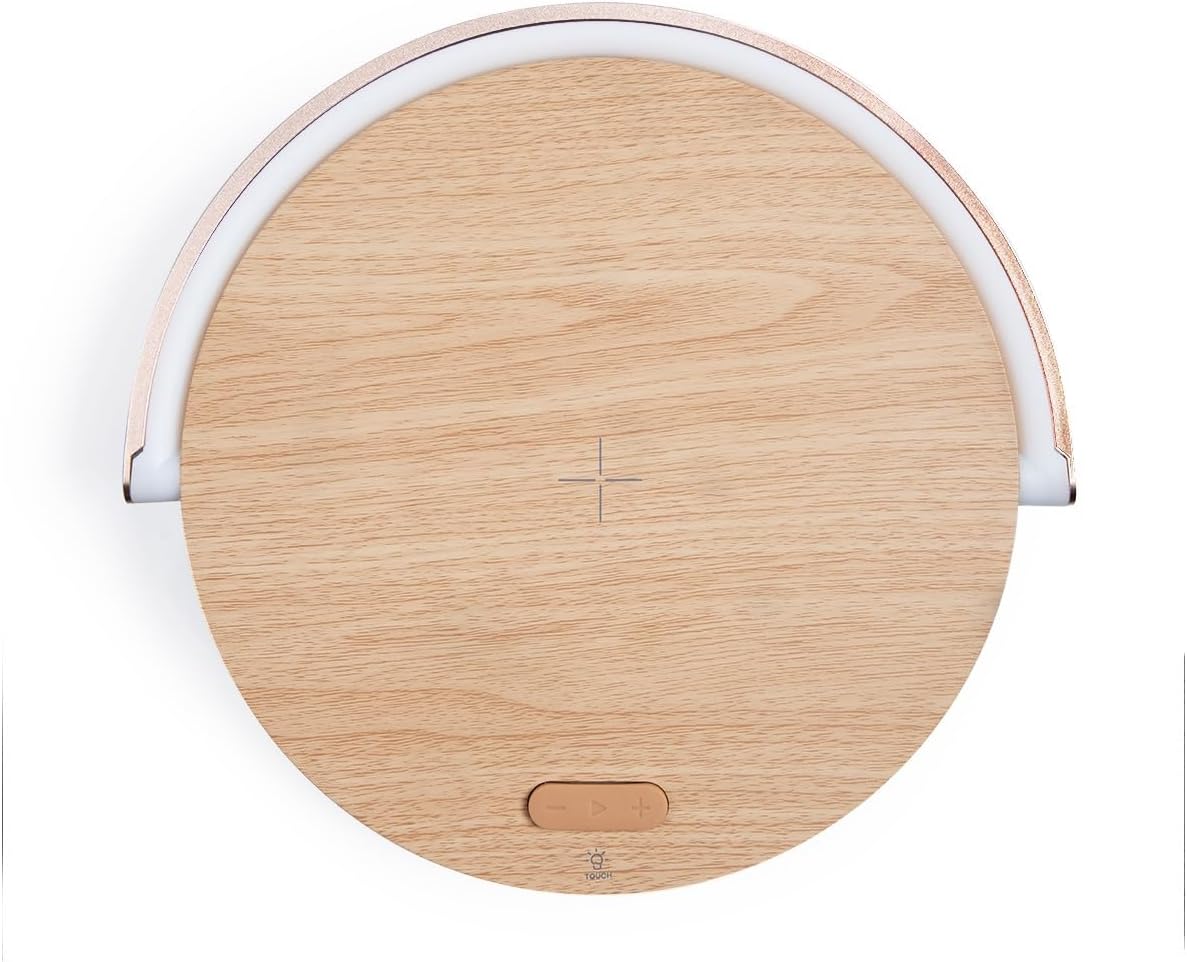
Figuur 4.1: Bo View van die Toestel. This image shows the top surface of the Livoo TES242, highlighting the central cross symbol for wireless charging alignment and the control buttons located below it.

Figure 4.2: Device with Phone on Charging Pad. 'n Hoekige view illustrating a smartphone positioned on the wireless charging pad, with the LED light arch illuminated, demonstrating the device in use.
Kontroles en aanwysers:
- Draadlose laaiblok: Central area on the top surface for QI-compatible device charging.
- LED Light Arch: Provides ambient lighting, pivots for direction adjustment.
- Touch Button (Light Control): Located on the base, cycles through LED light modes.
- Bluetooth-luidspreker: Integrated speaker for audio output.
- USB-C-invoerpoort: Om die kragkabel aan te sluit.
5. Opstelling
5.1 Kragverbinding
- Connect the small end of the provided USB power cable to the USB-C input port on the Livoo TES242.
- Connect the larger end of the USB cable to a compatible USB power adapter (e.g., a smartphone charger, minimum 5V/2A recommended for optimal performance, not included).
- Plug the power adapter into a wall outlet. The device will power on automatically or can be turned on by pressing a power button if available (refer to product overview for specific button locations).
5.2 Aanvanklike heffing
For optimal battery performance, it is recommended to fully charge the Livoo TES242 before its first use. The device has a built-in 1500 mAh Li-ion battery, providing up to 4 hours of audio playback on a full charge.
6. Bedryfsinstruksies
6.1 Bluetooth -koppeling
To connect your smartphone or other Bluetooth-enabled device:
- Ensure the Livoo TES242 is powered on. It will automatically enter Bluetooth pairing mode, indicated by an audible prompt or flashing light (if applicable).
- Aktiveer Bluetooth op jou slimfoon of oudiotoestel en soek vir beskikbare toestelle.
- Kies "TES242" of "Livoo Speaker" from the list of found devices.
- Once connected, a confirmation sound will be heard from the speaker. You can now play audio through the speaker.
- Die effektiewe Bluetooth-reikwydte is tot 10 meter (33 voet).
6.2 Draadlose laaifunksie
The Livoo TES242 features a 15W fast wireless charging pad:
- Ensure the Livoo TES242 is connected to a power source.
- Place your QI-compatible smartphone or device directly onto the center of the charging pad. Align your device with the cross symbol for optimal charging.
- Charging will begin automatically. Your device's screen or charging indicator will confirm that it is charging.
- For fast charging, ensure your power adapter supports the required output (e.g., 9V/1.67A).
6.3 LED-ligmodusse
The integrated LED light arch offers three ambient lighting modes:
- Locate the "Touch" button on the base of the device.
- Tap the "Touch" button to cycle through the available light modes: Natuurlike Lig, Wit Lig, en Geel Lig.
- The LED arch can be manually pivoted to adjust the direction of the light as desired.
7. Onderhoud
- Skoonmaak: Use a soft, dry cloth to clean the surface of the device. Do not use liquid cleaners, aerosols, or abrasive chemicals, as these may damage the finish or internal components.
- Berging: Wanneer dit nie vir lang tye gebruik word nie, bêre die toestel op 'n koel, droë plek, weg van direkte sonlig en uiterste temperature.
- Batterysorg: Om die batterylewe te verleng, vermy om die battery gereeld heeltemal te ontlaai. Laai die toestel gereeld, selfs al word dit nie voortdurend gebruik nie.
8. Probleemoplossing
If you encounter issues with your Livoo TES242, please refer to the following common problems and solutions:
| Probleem | Moontlike oorsaak | Oplossing |
|---|---|---|
| Toestel skakel nie aan nie. | No power connection or depleted battery. | Ensure the USB cable is securely connected to both the device and a working power adapter. Charge the device for at least 30 minutes. |
| Kan nie via Bluetooth koppel nie. | Speaker not in pairing mode, Bluetooth off on source device, or out of range. | Ensure the speaker is powered on and in pairing mode. Turn Bluetooth off and on again on your source device. Move the source device closer to the speaker (within 10m). Forget "TES242" from your device's Bluetooth list and try pairing again. |
| Draadlose laai werk nie. | Phone not QI-compatible, misaligned, or thick phone case. | Verify your phone supports QI wireless charging. Re-position the phone centrally on the charging pad, aligning it with the cross symbol. Remove any thick phone cases that might interfere with charging. Ensure the speaker is connected to a sufficient power source. |
| Swak klankgehalte of ontkoppelings. | Weak Bluetooth signal or interference. | Move your paired device closer to the speaker. Ensure there are no large obstructions between the speaker and your device. Avoid placing the speaker near other electronic devices that may cause interference. |
9. Spesifikasies
Technical details for the Livoo TES242 LED Speaker with Wireless Charger:
| Kenmerk | Spesifikasie |
|---|---|
| Handelsmerk | Livoo |
| Modelnommer | TES242 |
| Verbindingstegnologie | Bluetooth |
| Luidspreker uitset krag | 5 W |
| Bluetooth-reeks | Tot 10 meter |
| Draadlose laaistandaard | Qi |
| Draadlose laaikrag | 15 W Fast Charge |
| Max Output (Wireless Charging) | 9 V / 1.67 A |
| Versoenbare toestelle | Smartphones, Bluetooth-enabled audio devices |
| LED lig modusse | 3 (Natural, White, Yellow) |
| Battery Tipe | Li-ion |
| Battery kapasiteit | 1500 mAh |
| Oudio-terugspeeltyd | Tot 4 uur |
| Kragbron | USB-kabel (ingesluit) |
| Uitset Voltage | 5 Volt (DC) |
| Amperageer | 1.67 A |
| Totale USB-poorte | 1 |
| Interne Materiaal | Akrielnitril Butadieen Styreen (ABS) |
| Kleur | Hout |
| Draagbaar | Ja |
| Land van oorsprong | Frankryk |
10. Waarborg en Ondersteuning
The Livoo TES242 LED Speaker with Wireless Charger comes with a 2 jaar waarborg vanaf die aankoopdatum. Hierdie waarborg dek vervaardigingsdefekte onder normale gebruik.
For technical support, warranty claims, or further assistance, please contact your retailer or visit the official Livoo webwebwerf vir kliëntediensinligting.