
1. Inleiding
Thank you for choosing the CREATE WINDCALM M Ceiling Fan. This manual provides essential information for the safe installation, operation, and maintenance of your new ceiling fan. Please read this manual thoroughly before installation and keep it for future reference.

Image 1.1: The CREATE WINDCALM M Ceiling Fan, showcasing its sleek design, accompanying remote control, and the smartphone app interface for smart control.
2. Veiligheidsinstruksies
Volg altyd basiese veiligheidsmaatreëls wanneer u elektriese toestelle installeer en gebruik om die risiko van brand, elektriese skok en persoonlike besering te verminder.
- Maak seker dat die kragtoevoer ontkoppel is voor installasie of instandhouding.
- Installation should be performed by a qualified electrician or a competent person.
- The mounting structure must be capable of supporting the fan's weight.
- Moenie voorwerpe in die waaierlemme steek terwyl die waaier aan die gang is nie.
- Hou kinders en troeteldiere weg van die waaier tydens werking.
- This fan is suitable for indoor and outdoor covered areas.
3. Pakketinhoud
Pak alle komponente versigtig uit en kontroleer die lys hieronder. Indien enige items ontbreek of beskadig is, kontak kliëntediens onmiddellik.
- Ceiling Fan Motor Unit
- Waaierlemme (3x)
- Montagebeugel
- Afstandbeheer
- Monteringshardeware (skroewe, ankers, wassers)
- Instruksie Handleiding
4. Opstelling en installering
Volg hierdie stappe vir behoorlike installasie. Professionele installasie word aanbeveel.
- Berei die monteerplek voor: Ensure the ceiling joist or support structure can hold the fan's weight (approximately 6.22 kg).
- Installeer die monteerbeugel: Secure the mounting bracket to the ceiling using the provided screws and anchors. Ensure it is firmly attached.
- Bedrading: Connect the fan's electrical wires to your household wiring according to local electrical codes. The fan operates on 240 Volts. Ensure correct connection of Live (L), Neutral (N), and Ground (Earth) wires.
- Heg die waaiereenheid aan: Carefully lift the fan motor unit and attach it to the mounting bracket. Many models include a hook to temporarily hang the fan while wiring.
- Installeer waaierblaaie: Attach the three fan blades to the motor unit using the provided screws. Ensure all screws are tightened securely.

Beeld 4.1: Gedetailleerd view of the fan's central unit, showing the robust construction and points for blade attachment.

Image 4.2: The ceiling fan seamlessly integrated into a room, demonstrating its aesthetic appeal and compact design.
5. Operasie
Your CREATE WINDCALM M Ceiling Fan can be controlled via the included remote control or the CREATE mobile application (for Wi-Fi enabled models).
5.1. Afstandbeheer funksies
- Krag aan/af: Skakel die waaier aan of af.
- Spoedbeheer: Adjusts fan speed through 6 settings.
- Afteller: Stel die waaier om outomaties af te skakel na 1, 2 of 4 uur.
- Somer/Wintermodus: Changes the direction of blade rotation.
5.2. Summer/Winter Operation
The fan features a reversible motor for year-round comfort.
- Somermodus (Teen die kloksgewyse rotasie): Pushes cool air downwards, creating a refreshing breeze. This mode helps to cool the room by circulating air.
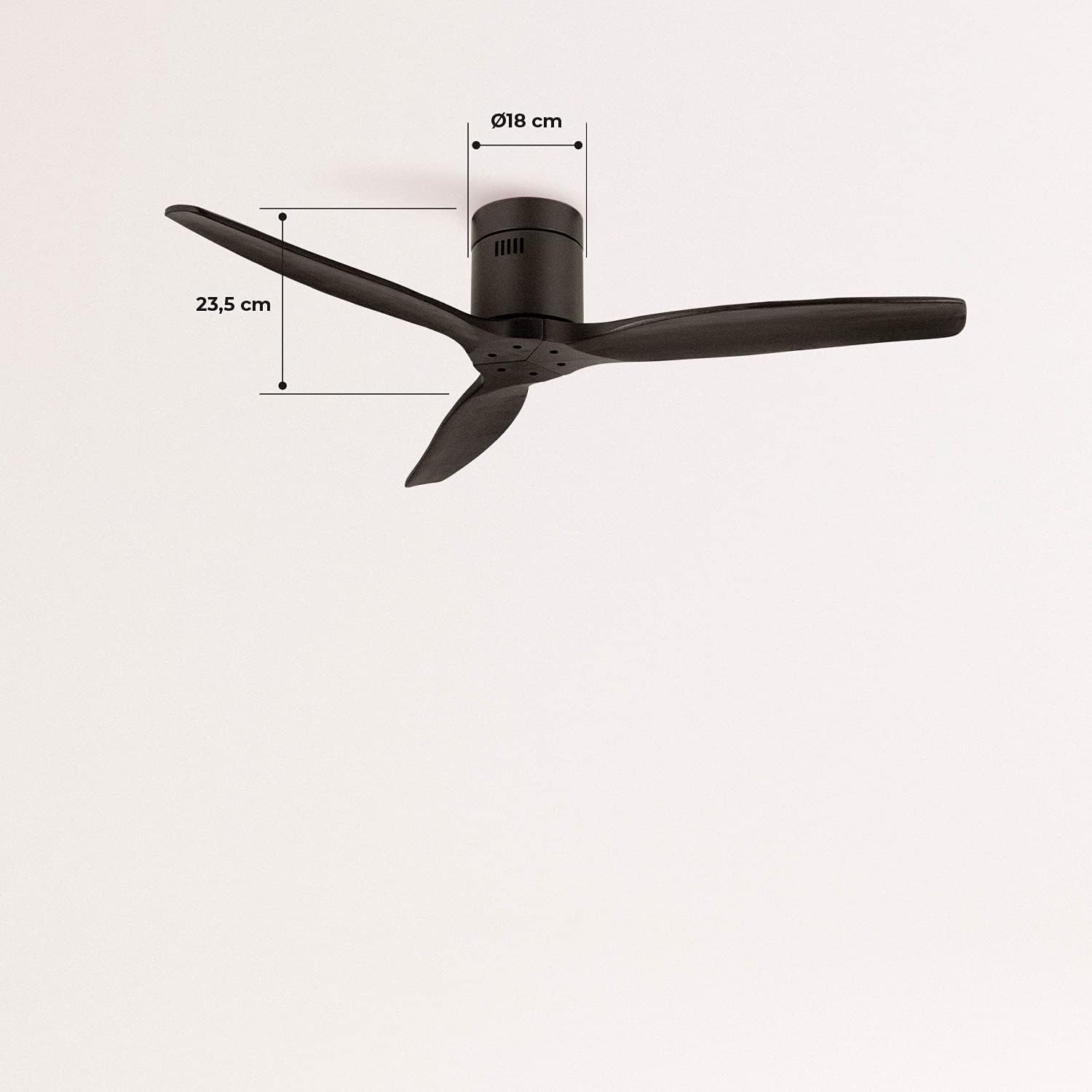
Image 5.1: Visual representation of the fan's airflow in Summer Mode, where cool air is directed downwards.
- Wintermodus (Kloksgewyse rotasie): Draws cool air upwards, circulating warm air trapped near the ceiling downwards. This helps to distribute heat more evenly, reducing heating costs.

Image 5.2: Visual representation of the fan's airflow in Winter Mode, where warm air is recirculated from the ceiling.
5.3. Wi-Fi and App Control (Smart Option)
If your model includes the Wi-Fi option, download the CREATE app to control and program your fan from your smartphone. Follow the in-app instructions for pairing your device.
6. Onderhoud
Gereelde onderhoud verseker optimale werkverrigting en lang lewensduur van jou waaier.
- Skoonmaak: Stof die waaierblaaie en motorhuis gereeld af met 'n sagte, damp lap. Moenie skuur skoonmaakmiddels of oplosmiddels gebruik nie.
- Bladinspeksie: Kontroleer gereeld dat alle lemskroewe styf vas is. Los lemme kan wiebel en geraas veroorsaak.
- Motor smering: Die waaier se GS-motor is permanent gesmeer en benodig geen addisionele olie nie.
7. Probleemoplossing
As jy probleme met jou waaier ondervind, raadpleeg die volgende algemene probleme en oplossings:
| Probleem | Moontlike oorsaak | Oplossing |
|---|---|---|
| Waaier skakel nie aan nie | No power supply; Remote control battery low; Incorrect wiring. | Check circuit breaker; Replace remote battery; Verify wiring connections. |
| Fan wiebel | Los lemskroewe; Ongebalanseerde lemme; Los monteringsbeugel. | Tighten all blade screws; Ensure blades are correctly installed; Check mounting bracket for secure attachment. |
| Oormatige geraas | Loose components; Motor issue. | Check all screws and connections; If noise persists, contact customer support. |
| Afstandbeheer werk nie | Battery low/dead; Remote not paired. | Replace battery; Refer to remote pairing instructions in the full manual (if applicable). |
| Wi-Fi-verbindingsprobleme | Incorrect network password; Router too far; App issues. | Verify Wi-Fi password; Move router closer or use a Wi-Fi extender; Reinstall app or check for updates. |
8. Spesifikasies
| Kenmerk | Spesifikasie |
|---|---|
| Handelsmerk | SKEP |
| Modelnommer | 93531_182750 |
| Kleur | Swart |
| Styl | Sonder Lig |
| Kragbron | Elektries met koord |
| Voltage | 240 Volt |
| Wattage | 40 Watt |
| Lugvloei | 210 Cubic meters per minute |
| Geraasvlak | 50 dB |
| Bladlengte | 66 sentimeter |
| Deursnee | 132 sentimeter |
| Produk afmetings | 132D x 132B x 23.5H cm |
| Item gewig | 6.22 kilogram |
| Spesiale kenmerk | Liggewig |

Image 8.1: Key dimensions of the fan, including its 132 cm diameter and 66 cm blade length.

Image 8.2: Additional dimensions, highlighting the fan's height of 23.5 cm and the 18 cm diameter of the motor housing.
9. Waarborg en Ondersteuning
Your CREATE WINDCALM M Ceiling Fan comes with a standard warranty. For specific warranty terms and conditions, please refer to the documentation included with your purchase or visit the official CREATE website. In case of any issues or for technical support, please contact CREATE customer service. The seller, CREATE, offers support and assistance for product-related inquiries.