
1. Inleiding
Dankie vir die aankoopasing the Ledwood Drop 400 Wireless LED Speaker. This manual provides essential information for setting up, operating, and maintaining your speaker. Please read it carefully before use to ensure proper functionality and to maximize your listening experience.
2. Veiligheidsinligting
- Moenie die luidspreker aan water, vog of uiterste temperature blootstel nie.
- Vermy om die luidspreker te laat val of aan sterk impakte te onderwerp.
- Moenie probeer om die luidspreker self uitmekaar te haal of te herstel nie. Kontak gekwalifiseerde dienspersoneel.
- Hou die luidspreker weg van hittebronne en direkte sonlig.
- Gebruik slegs die meegeleverde kragadapter vir laai.
- Maak die luidspreker skoon met 'n sagte, droë lap. Moenie skuurmiddels gebruik nie.
3. Pakketinhoud
Kontroleer asseblief dat alle items in die pakket teenwoordig is:
- 1 x Ledwood Drop 400 Wireless LED Speaker
- 1 x kragadapter
- 1 x 3.5mm AUX Input Cable
- 1 x afstandbeheer
- 1 x bedrade mikrofoon
- 1 x Gebruikershandleiding (hierdie dokument)
4. Produk verbyview
The Ledwood Drop 400 is a powerful wireless speaker featuring dynamic LED lighting and multiple connectivity options.
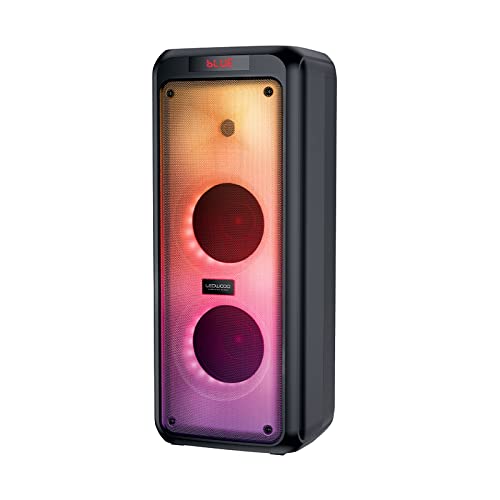
Figuur 4.1: Voorkant view of the Ledwood Drop 400 speaker, showcasing its LED light panel.
Beheerpaneel en poorte

Figure 4.2: Top control panel with input ports and function buttons.
The top panel includes controls for power, volume, mode selection, playback, and inputs for USB, SD card, AUX, and two microphones. A digital display indicates the current mode or status.
5. Opstelling
5.1 Laai die luidspreker
- Connect the provided power adapter to the DC IN port on the speaker.
- Steek die adapter in 'n standaard stopcontact.
- The charging indicator will illuminate. The speaker is fully charged when the indicator changes color or turns off (refer to the speaker's display for specific indications).
- 'n Volle lading bied ongeveer 6 uur se speeltyd.
5.2 Aan-/afskakel
- To power on, press and hold the Power button on the control panel or remote control.
- To power off, press and hold the Power button again.
6. Bedryfsinstruksies
6.1 Bluetooth -koppeling
- Power on the Ledwood Drop 400 speaker. It will automatically enter Bluetooth pairing mode, indicated by a flashing 'BLUE' on the display and an audible prompt.
- Aktiveer Bluetooth op jou slimfoon, tablet of ander Bluetooth-geaktiveerde toestel.
- Soek vir available devices and select "Ledwood Drop 400" from the list.
- Once connected, the speaker will provide an audible confirmation, and 'BLUE' on the display will stop flashing.
- Jy kan nou klank vanaf jou toestel deur die luidspreker speel.
6.2 USB/SD-kaartterugspeel
- Insert a USB flash drive or an SD card (pre-loaded with MP3 audio files) into the respective port on the speaker's control panel.
- The speaker will automatically switch to USB or SD card mode and begin playing the audio files.
- Use the Play/Pause, Next Track, and Previous Track buttons on the speaker or remote control to manage playback.
6.3 AUX-invoer
- Koppel die een kant van die meegeleverde 3.5 mm AUX-kabel aan die AUX IN-poort op die luidspreker.
- Connect the other end to the headphone jack or audio output of your external audio device.
- Press the Mode button on the speaker or remote control until 'AUX' is displayed.
- Speel klank vanaf jou eksterne toestel. Volume kan via beide die luidspreker en die eksterne toestel beheer word.
6.4 FM -radio
- Press the Mode button on the speaker or remote control until 'FM' is displayed.
- To auto-scan and save available FM stations, press and hold the Play/Pause button. The speaker will scan and store stations automatically.
- Use the Next Track and Previous Track buttons to navigate through the saved stations.
6.5 Gebruik van mikrofoon
- Connect the wired microphone (or another compatible microphone) to one of the MIC IN ports on the speaker.
- Adjust the microphone volume using the dedicated MIC VOL knob on the control panel.
- The microphone can be used in any audio mode (Bluetooth, USB, SD, AUX, FM).
6.6 LED-ligmodusse
The Ledwood Drop 400 features dynamic LED lighting with 4 different modes.
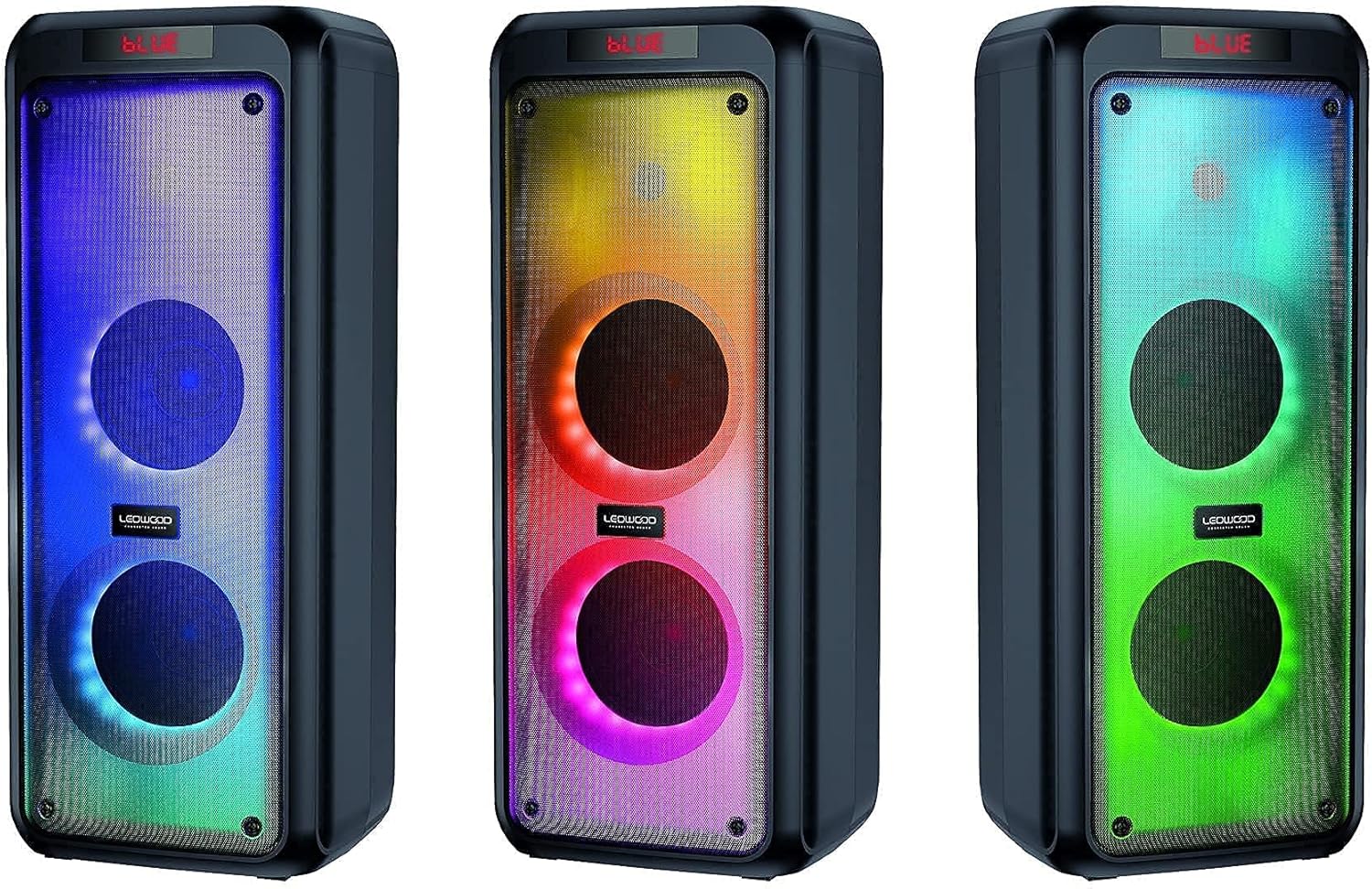
Figuur 6.1: Examples of the speaker's LED light modes.
- Press the LED button on the control panel or remote control to cycle through the available light modes.
- Press the LED button again to turn off the lights.
6.7 Ware Draadlose Stereo (TWS) Funksie
The TWS function allows you to pair two Ledwood Drop 400 speakers together for a stereo sound experience.
- Ensure both Ledwood Drop 400 speakers are powered on and in Bluetooth mode, but not connected to any device.
- On one of the speakers (this will be the primary speaker), press and hold the TWS button (if available) or a designated pairing button (refer to specific button labels on your speaker).
- The primary speaker will search for the secondary speaker. Once connected, both speakers will emit an audible confirmation.
- Koppel nou jou Bluetooth-toestel aan die primêre luidspreker soos beskryf in afdeling 6.1. Oudio sal in stereo deur beide luidsprekers speel.
7. Onderhoud
7.1 Skoonmaak
- Skakel altyd die luidspreker af en ontkoppel dit voordat u dit skoonmaak.
- Gebruik 'n sagte, droë, pluisvrye lap om die buite-oppervlaktes af te vee.
- Moenie vloeibare skoonmaakmiddels, aërosols of oplosmiddels gebruik nie.
7.2 Berging
- Bêre die luidspreker op 'n koel, droë plek weg van direkte sonlig en uiterste temperature.
- Indien dit vir 'n lang tydperk gestoor word, laai die battery gereeld (bv. elke 3 maande) om die battery se gesondheid te handhaaf.
8. Probleemoplossing
| Probleem | Moontlike oorsaak | Oplossing |
|---|---|---|
| Luidspreker skakel nie aan nie. | Battery is depleted. Power adapter not connected. | Charge the speaker using the provided power adapter. Ensure the adapter is securely connected to both the speaker and a working power outlet. |
| Geen geluid van die luidspreker nie. | Volume too low. Incorrect mode selected. Device not connected. | Increase speaker volume and source device volume. Ensure the correct input mode (Bluetooth, AUX, USB, SD, FM) is selected. Re-pair Bluetooth device or check cable connections. |
| Bluetooth-toestel kan nie koppel nie. | Luidspreker nie in paringsmodus nie. Toestel te ver. Steuring. | Ensure speaker is in Bluetooth pairing mode (flashing 'BLUE'). Move device closer to the speaker. Turn off other Bluetooth devices to reduce interference. Try restarting both devices. |
| FM-radio-ontvangs is swak. | Weak signal. Speaker position. | Reposition the speaker to improve reception. Extend any external antenna if available. |
| Mikrofoon werk nie. | Microphone not connected properly. MIC VOL too low. | Ensure microphone is fully inserted into the MIC IN port. Increase the MIC VOL knob. |
9. Spesifikasies
- Handelsmerk: Ledwood
- Model: Dalk 400
- Verbindingstegnologie: Bluetooth, USB
- Spesiale kenmerke: FM Radio, LED Light Effects
- Aanbevole gebruike: Vir rekenaar, Vir slimfoon of tablet
- Versoenbare toestelle: Skootrekenaar, slimfoon
- Kleur: Swart
- Beheer metode: Afstandbeheer
- Kragbron: Elektriese kabel
- Gemiddelde batterylewe: 6 uur
- Kraguitset: 400 W (40 W RMS)
- Afmetings: 24 x 25 x 64 cm (ongeveer)
- ASIN: B0972SSC4J
10. Waarborg en Ondersteuning
For warranty information or technical support, please refer to the warranty card included with your product or contact Ledwood customer service directly. Contact details can typically be found on the official Ledwood webwebwerf of op die produkverpakking.