
1. Inleiding
The BAOFENG UV-5R Pro is a high-performance, multi-functional two-way radio designed for reliable communication. It features long battery life, strong communication capabilities, flexible programming options, and multiple power adjustments, making it suitable for both professional and amateur radio enthusiasts. This manual provides essential information for the proper setup, operation, and maintenance of your device.
2. Pakketinhoud
Please check the package carefully to ensure all items are present and in good condition. If any items are missing or damaged, contact your retailer.
- 1 × BAOFENG UV-5R Pro 8W Radio
- 1 × 3800mAh Li-ion Battery (Model: BL-5L)
- 1 × Support CHIRP Programming Cable
- 1 × Radio Case
- 1 × Handheld Microphone (MIC-01)
- 1 × kragadapter
- 1 × gordelklem
- 1 × handband
- 1 × User's Manual (this document)
3. Produk verbyview
Familiarize yourself with the main components of your BAOFENG UV-5R Pro radio and its accessories.

Figuur 3.1: BAOFENG UV-5R Pro Radio. This image displays the front of the UV-5R Pro radio, showing the display screen, keypad, and various function buttons. The antenna is attached at the top.
3.1. Handmikrofoon

Figuur 3.2: Handheld Microphone (Model: MIC-01). This image shows the handheld microphone accessory, which connects to the radio for external audio input and output. It features a speaker, microphone, and a coiled cable that can stretch up to 60 inches.
The included handheld microphone (MIC-01) provides convenient external control for transmitting and receiving audio. It features a speaker, microphone, and a push-to-talk (PTT) button. The coiled cable allows for flexible use.
3.2. Programming Cable

Figuur 3.3: Programming Cable. This image illustrates the USB programming cable used to connect the radio to a computer for channel and setting configuration via software like CHIRP.
The programming cable allows you to connect your UV-5R Pro radio to a computer for advanced configuration using compatible software, such as CHIRP. This enables customization of channels, frequencies, and other operational parameters.
3.3. 3800mAh Li-ioon battery

Figuur 3.4: 3800mAh Li-ion Battery (Model: BL-5L). This image shows the high-capacity Li-ion battery pack designed for the UV-5R Pro, providing extended operational time.
The radio is powered by a high-capacity 3800mAh Li-ion battery (Model: BL-5L), offering extended usage time. Proper battery installation and charging are crucial for optimal performance.
3.4. Radio Case
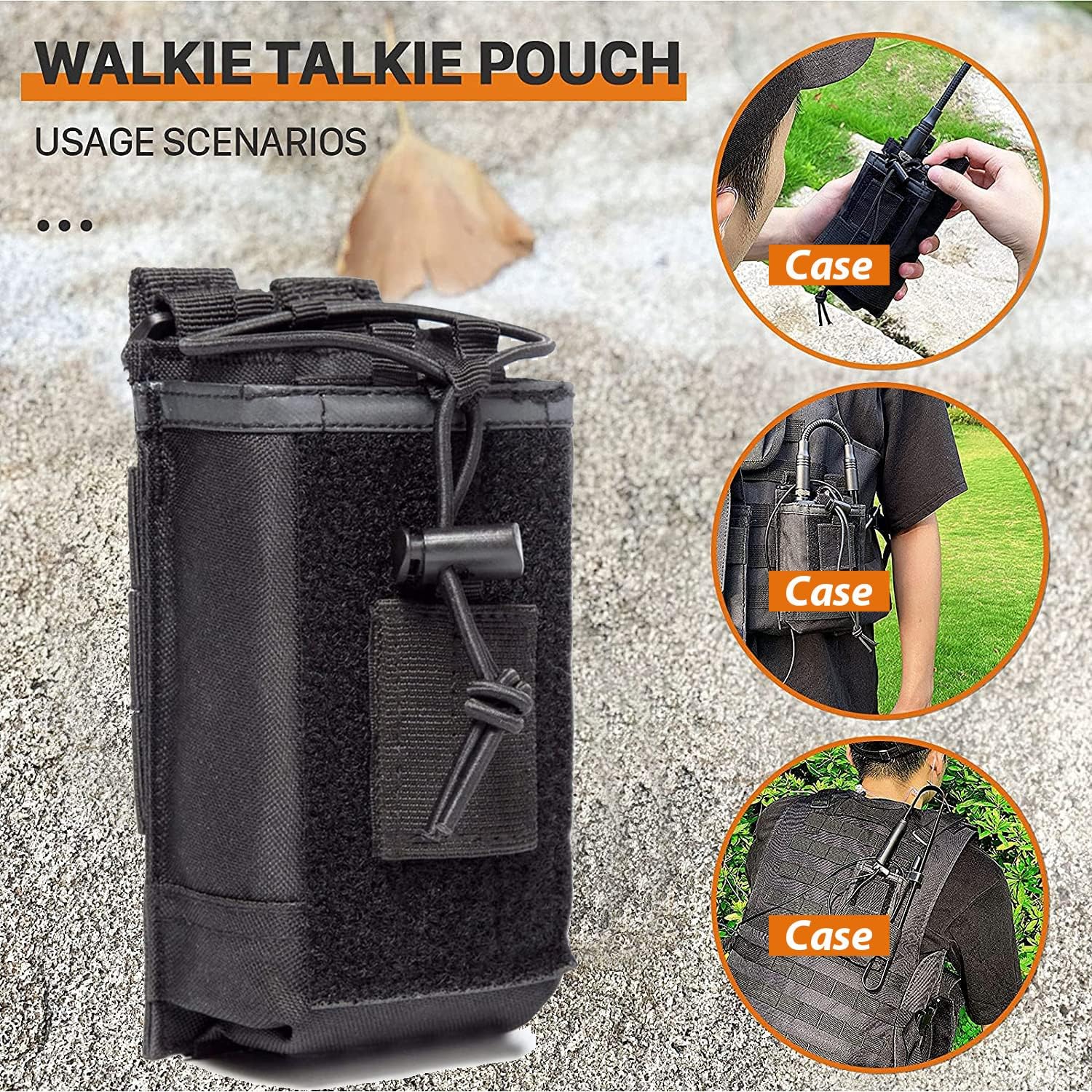
Figuur 3.5: Radio Case/Pouch. This image displays the included radio case, designed for secure and convenient carrying of the UV-5R Pro radio, suitable for various usage scenarios.
A durable radio case is included to protect your device during transport and use. It can be attached to belts or tactical gear for easy access.
4. Opstelling
4.1. Battery Installasie
- Rig die batterypak met die groewe aan die agterkant van die radio.
- Skuif die batterypak opwaarts totdat dit in plek klik.
- Om te verwyder, druk die battery-vrystellingshendel (gewoonlik aan die onderkant van die battery) en skuif die battery afwaarts.
4.2. Antenna-aanhegting
- Skroef die antenna kloksgewys in die konnektor bo-op die radio totdat dit vingervas is. Moenie te styf vasdraai nie.
- Ensure the antenna is securely attached before operation to prevent damage and ensure optimal signal.
4.3. Laai die battery
- Koppel die kragadapter aan die laaibasis.
- Steek die kragadapter in 'n AC-aansluiting.
- Place the radio with the battery installed into the charging base. The charging indicator light will typically turn red while charging and green when fully charged.
- A full charge typically takes 4-5 hours. Do not overcharge the battery for extended periods.
5. Bedryfsinstruksies
5.1. Aan/Af en Volumebeheer
- Krag aan: Rotate the volume knob (located on top of the radio) clockwise until you hear a click.
- Skakel af: Rotate the volume knob counter-clockwise until you hear a click.
- Volume aanpassing: Rotate the volume knob clockwise to increase volume and counter-clockwise to decrease volume.
5.2. Kanaalkeuse
- The UV-5R Pro supports both Frequency Mode (VFO) and Channel Mode (MR).
- Druk die VFO/MR knoppie om tussen modusse te wissel.
- In Kanaalmodus, gebruik die OP/AF arrow keys or the keypad to select a stored channel.
- In Frequency Mode, enter the desired frequency directly using the keypad.
5.3. Uitsending en Ontvangs
- Om te oordra, druk en hou die PTT (Push-To-Talk) button on the side of the radio or the handheld microphone. Speak clearly into the microphone.
- Los die PTT knoppie om die uitsending te stop en terug te keer na ontvangmodus.
- Maak seker dat jy op 'n gepaste frekwensie of kanaal is voordat jy uitsaai.
5.4. Kraguitsetaanpassing
The UV-5R Pro offers multiple power output options (High, Medium, Low) up to 8W. This allows you to adapt to communication needs at different distances and environments, conserving battery life when high power is not required.
- Access the power setting through the radio's menu. Consult the on-screen menu for specific navigation steps.
- Select the desired power level (High, Medium, or Low).
5.5. Programming with CHIRP Software
For advanced channel management and customization, use the included programming cable and CHIRP software. CHIRP is a free, open-source program that allows you to manage your radio's memory channels, frequencies, and other settings from your computer.
- Install the necessary drivers for the programming cable on your computer.
- Laai die nuutste weergawe van CHIRP-sagteware af en installeer dit.
- Connect the programming cable to your computer's USB port and to the radio's accessory port.
- Skakel die radio aan.
- Launch CHIRP and follow the software's instructions to read data from the radio, make changes, and write data back to the radio.
Note: Detailed instructions for CHIRP software can be found on the official CHIRP webwebwerf of deur aanlyn hulpbronne.
6. Onderhoud
- Skoonmaak: Gebruik 'n sagte, damp lap om die radio se buitekant skoon te maak. Moenie harde chemikalieë of skuurmiddels gebruik nie.
- Batterysorg: Bêre die battery op 'n koel, droë plek wanneer dit nie gebruik word nie. Vermy dit om die battery gereeld volledig te ontlaai om sy lewensduur te verleng.
- Antenna: Maak seker dat die antenna-verbinding skoon en vry van puin is. Vermy die buiging of spanning van die antenna.
- Berging: Wanneer die radio vir lang tydperke gestoor word, verwyder die battery en bêre dit apart.
7. Probleemoplossing
| Probleem | Moontlike oorsaak | Oplossing |
|---|---|---|
| Radio skakel nie aan nie. | Battery is laag of nie korrek geïnstalleer nie. | Laai die battery of installeer dit stewig weer. |
| Kan nie oordra of ontvang nie. | Verkeerde frekwensie/kanaal, antenna nie gekoppel nie, of lae battery. | Verify frequency/channel, ensure antenna is secure, charge battery. |
| Swak klank kwaliteit. | Swak sein, verkeerde squelch-instelling, of beskadigde mikrofoon/luidspreker. | Adjust squelch, move to a better signal area, check microphone/speaker connections. |
| Programmeringsprobleme met CHIRP. | Incorrect cable drivers, wrong COM port, or radio not in programming mode. | Install correct drivers, select proper COM port in CHIRP, ensure radio is on. |
8. Spesifikasies
| Kenmerk | Detail |
|---|---|
| Handelsmerk | BAOFENG |
| Modelnommer | UV-5R Pro |
| Kleur | Swart |
| Aantal kanale | 999 |
| Spesiale kenmerke | Dual Band, Long Range, Multiple Power Output Options (up to 8W) |
| Frekwensiereeks | VHF/UHF (420-450MHz) |
| Maksimum praatbereik | 8 Miles (approximate, depends on terrain and conditions) |
| Voltage | 7.4 Volt |
| Waterweerstandvlak | Waterbestand |
| Battery Tipe | 3800mAh Li-ion (Model: BL-5L) |
| Battery Gemiddelde Lewe | 18 Hours (typical usage) |
| Item gewig | 250 gram |
| Impedansie | 50 ohm |
| Tuner Tipe | UHF/VHF |
| Vervaardiger | Fujian Baofeng Elektronika Co, Ltd |
9. Waarborg en Ondersteuning
BAOFENG offers a comprehensive warranty program for your UV-5R Pro radio:
- Radioliggaam: 2 jaar waarborg.
- Bykomstighede: 1 jaar waarborg.
- Retourbeleid: 30-dae terugkeerbeleid sonder rede.
- Nawaarborgdiens: Onderhoudsdienste is beskikbaar teen u koste na die waarborgtydperk.
For any questions, technical assistance, or warranty claims, please contact BAOFENG customer support through the Amazon platform for a prompt response within 12 hours. Please provide your product model and purchase details when contacting support.