
Inleiding
Thank you for choosing the PILOT 720p Vehicle Dash Cam. This manual provides detailed instructions for the proper installation, operation, and maintenance of your new dash camera. Please read this manual thoroughly before use to ensure optimal performance and longevity of the device.
This dash cam is designed to record video footage while driving, offering features such as 720p HD resolution, a wide viewing angle, motion detection, and loop recording. It comes with an 8GB Micro SD card and a universal window mount for convenient setup.
Pakketinhoud
Verifieer asseblief dat al die items wat hieronder gelys word, in u pakket ingesluit is:
- Dash Cam Unit
- 8GB mikro SD kaart
- Suigbeker-berg
- USB-motorlaaier
- USB Charger and Sync Cable
- Gebruikershandleiding (hierdie dokument)
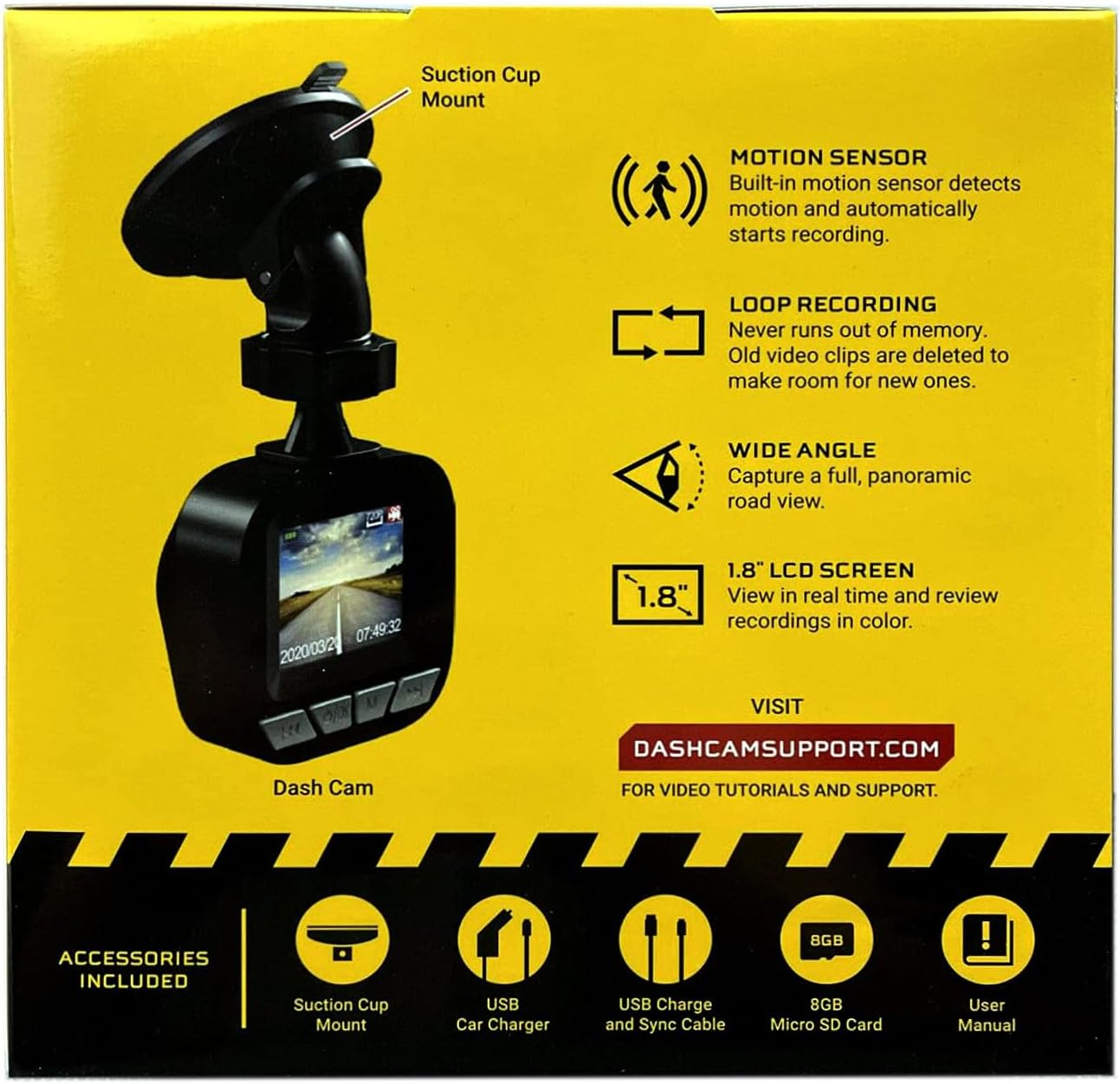
Image: The dash cam unit, suction cup mount, USB car charger, USB charge and sync cable, 8GB Micro SD card, and user manual are shown, along with a summary of key features like motion sensor, loop recording, wide angle, and 1.8" LCD screen.
Produk Kenmerke
- Resolusie: 720p HD video-opname.
- Skermgrootte: 1.8-inch LCD display for real-time viewing en afspeel.
- Viewhoek: Wide-angle lens to capture a broad road view.
- Bewegingsensor: Built-in sensor detects motion and automatically initiates recording.
- Loop opname: Automatically overwrites older video clips when the memory card is full, ensuring continuous recording.
- Mikrofoon: Ingebou vir klankopname.
- Berging: Supports Micro SD cards up to 32GB (8GB card included).
- Krag: Built-in rechargeable Lithium-ion battery and USB 2.0 port for charging.
Opstelgids
1. Die invoeging van die mikro-SD-kaart
Locate the Micro SD card slot on the side or bottom of the dash cam. Gently insert the included 8GB Micro SD card into the slot until it clicks into place. Ensure the card is inserted correctly to avoid damage. The dash cam supports cards up to 32GB.
2. Monteer die Dash Cam
- Clean the desired area on your vehicle's windshield where you intend to mount the dash cam. Ensure the surface is dry and free of dust.
- Attach the suction cup mount to the dash cam unit.
- Press the suction cup firmly against the windshield and flip the lever to secure it in place.
- Verstel die hoek van die dash cam om 'n helderheid te verseker view of the road ahead, avoiding any obstructions.

Beeld: 'n Nabyskoot view of the front of the PILOT dash cam, showing the camera lens and the "PILOT" brand logo. This illustrates the main unit for mounting.
3. Aansluitkrag
Connect the USB car charger to your vehicle's 12V power outlet (cigarette lighter socket). Then, connect the USB charger and sync cable from the car charger to the USB port on the dash cam. The dash cam will typically power on automatically when the vehicle starts and power is supplied.
Bedryfsinstruksies
Krag aan/af
- Outomatiese: The dash cam will power on and begin recording automatically when connected to a power source and the vehicle ignition is turned on. It will power off automatically when the vehicle is turned off and power is disconnected.
- handleiding: To manually power on or off, press and hold the power button (usually located on the side or bottom of the unit) for a few seconds.
Opname Modes
- Deurlopende lusopname: The dash cam records video in continuous loops (e.g., 1, 3, or 5-minute segments). When the Micro SD card is full, the oldest unlocked files will be overwritten by new recordings. This ensures you always have the most recent footage.
- Bewegingsopsporing opname: When enabled in the settings, the dash cam will automatically start recording if it detects motion in front of the camera while the vehicle is parked and the dash cam is powered on. This feature is useful for monitoring your vehicle when stationary.
Viewing Opnames
The 1.8-inch LCD screen allows you to view leef footage en review recorded videos directly on the device. Use the navigation buttons (typically labeled 'Menu', 'Up', 'Down', 'OK') to browse through the menu options and playback recorded files. Refer to the on-screen interface for specific navigation prompts.
Datum en Tyd Stamp
Ensure the date and time are set correctly in the dash cam's settings menu. This is crucial for accurate record-keeping of video footage.
Onderhoud
- Maak die lens skoon: Maak die kameralens gereeld skoon met 'n sagte, pluisvrye lap om duidelike videokwaliteit te verseker. Vermy skuurmiddels of harde chemikalieë.
- SD-kaartbestuur: It is recommended to format the Micro SD card periodically (e.g., once a month) within the dash cam's settings menu. This helps maintain card performance and prevents data corruption. Back up any important footage voor formatering.
- Batterysorg: The built-in Lithium-ion battery is primarily for emergency recording and saving settings. For continuous operation, keep the dash cam connected to the vehicle's power supply. Avoid exposing the device to extreme temperatures for extended periods.
- Firmware -opdaterings: Check the manufacturer's support webwerf (DASHCAMSUPPORT.COM) periodically for any available firmware updates to improve performance and add new features.
Probleemoplossing
| Probleem | Moontlike Oplossing |
|---|---|
| Dashcam skakel nie aan nie. |
|
| Dash cam turns off frequently during driving. |
|
| Video footage is vaag of onduidelik. |
|
| Dash cam is not recording. |
|
Spesifikasies
| Kenmerk | Detail |
|---|---|
| Resolusie | 720p HD |
| Skerm grootte | 1.8 duim |
| Viewing Hoek | Wide Angle (135 Degrees Field Of View) |
| Bewegingsensor | Ingeboude |
| Loop opname | Ingeboude |
| Mikrofoon | Ingeboude |
| USB-poort | USB 2.0 |
| Battery | Ingeboude herlaaibare litiumioon |
| Geheuekaartondersteuning | Micro SD up to 32GB (8GB included) |
| Item gewig | 8 onse |
| Verbindingstegnologie | USB |
| Montage tipe | Venster Mount |
Ondersteuning
For additional assistance, video tutorials, or further support, please visit the official support webwebwerf:
Please have your product model information ready when contacting support.