
1. Inleiding
Thank you for choosing the PROXTEND X502 Full HD Webcam. This manual provides detailed instructions to help you set up, operate, and maintain your webcam for optimal performance. The X502 is designed to deliver clear 1080p video at 30 frames per second, featuring an omni-directional microphone and automatic low light correction for various lighting conditions.
2. Pakketinhoud
Verifieer asseblief dat alle items in u pakket teenwoordig is:
- PROXTEND X502 Full HD Webcam (PX-CAM007)
- Integrated Universal Mounting Clip
- Gebruikershandleiding (hierdie dokument)
3. Opstelling
Follow these steps to set up your PROXTEND X502 Webkamera:
- Montering van die Webkamera:
Die webcam features an integrated universal mounting clip. You can place the webcam on top of your computer monitor, laptop screen, or a flat surface. Adjust the clip to securely hold the webcam in position. The webcam also supports mini tripod mounting (tripod not included).
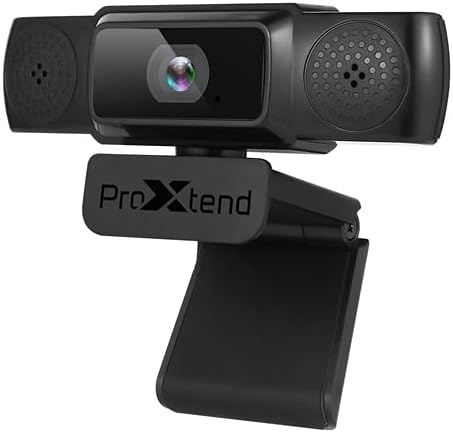
Image: The PROXTEND X502 Full HD Webcam shown with its universal mounting clip, suitable for monitors or flat surfaces.
- Koppel aan jou rekenaar:
Koppel die USB-kabel van die webkamera in 'n beskikbare USB-poort op jou rekenaar in. webcam is plug-and-play, meaning your operating system should automatically detect and install the necessary drivers. No additional software installation is typically required.
- Driver Installation Verification:
After connecting, allow a few moments for your computer to recognize the device. You can verify successful installation in your operating system's Device Manager (Windows) or System Information (macOS) under 'Cameras' or 'Imaging Devices'.
4. Bedryfsinstruksies
Sodra die webcam is set up, you can begin using it with various applications:
- Die keuse van die Webkamera:
Open your preferred video conferencing, streaming, or recording application (e.g., Zoom, Microsoft Teams, Skype, OBS Studio). Navigate to the application's video and audio settings. Select "PROXTEND X502" as your camera and microphone input device.

Beeld: Voorkant view of the PROXTEND X502 Full HD Webcam, highlighting the lens and integrated microphones.
- Videokwaliteit:
Die webcam automatically adjusts for optimal image quality, including auto-focus and auto low light correction. Ensure adequate lighting for the best video performance. The 1920x1080p resolution at 30fps provides clear and smooth video.
- Klankgehalte:
The integrated omni-directional microphone captures sound from all directions. Position yourself appropriately to ensure your voice is clearly picked up. Most applications allow you to adjust microphone input levels in their audio settings.
5. Kenmerke
Key features of the PROXTEND X502 Full HD Webcam include:
- 1 / 2.7 ”CMOS-beeldsensor
- 2 megapixels
- Resolution: 1920x1080 at 30 frames per second
- Omni-directional mikrofoon
- Universele monteringsklem
- Mini Tripod Support
- Outomatiese regstelling by lae lig
6. Spesifikasies
Detailed technical specifications for the PROXTEND X502 Full HD Webkamera:

Image: A visual representation of the PROXTEND X502 Full HD Webcam's key features and technical specifications.
| Kenmerk | Spesifikasie |
|---|---|
| Beeldsensor | 1/2.7" CMOS Image Sensor |
| Megapixels | 2 MP |
| Maksimum resolusie | 1920x1080 |
| Video-resolusie | 1920x1080 |
| Maks FPS | 30 fps |
| Video-dekoderingsformaat | H.264/MJPG |
| Blootstelling modus | Outo |
| Witbalans | Outo |
| Wins | Outo |
| Lae ligkompensasie | Outo |
| Viewing Hoek | 77° |
| Brandpuntsafstand | 10 cm tot in die oneindige |
| Fokus Tipe | Outo |
| Mikrofoon | Omni-rigting |
| Oudio Sampling Koers | 1 Kanaal 16bit 16K 32K 44.1K 48K |
| Oudio-formaat | PCM, versoenbare UAC 1.0 |
| Koppelvlak | USB 2.0 |
| Kabellengte | 1.5 m |
| Versoenbare bedryfstelsel | Windows XP, Windows 7 (32bit/64bit), Windows 8, Windows 10, Android V5.0 or higher OS, MAC OS 10.6 or higher |
| Produk afmetings | 12.7 x 7.62 x 5.08 cm |
| Produk Gewig | 453.59 g |
7. Probleemoplossing
If you encounter issues with your PROXTEND X502 Webkamera, probeer die volgende oplossings:
- Geen Beeld/Video:
- Maak seker dat die USB-kabel stewig aan beide die webkamera en jou rekenaar.
- Probeer 'n ander USB-poort op jou rekenaar.
- Herbegin jou rekenaar.
- Check your application's settings to ensure the PROXTEND X502 is selected as the video input.
- Verify that no other application is currently using the webkam.
- Geen klank/mikrofoon werk nie:
- Ensure the PROXTEND X502 is selected as the microphone input in your application's audio settings.
- Gaan jou rekenaar se klankinstellings na om seker te maak dat die mikrofoon geaktiveer is en nie gedemp is nie.
- Adjust the microphone input level in your system or application settings.
- Swak videogehalte:
- Ensure sufficient lighting in your environment.
- Maak die webcam lens gently with a soft, lint-free cloth.
- Check your internet connection speed if streaming, as bandwidth can affect video quality.
8. Onderhoud
Om die lang lewe en optimale prestasie van jou te verseker webkamera:
- Skoonmaak: Vee die liggies af webcam lens with a soft, dry, lint-free cloth. Avoid using harsh chemicals or abrasive materials.
- Berging: Stoor die as dit nie gebruik word nie webkamera op 'n skoon, droë plek weg van uiterste temperature en direkte sonlig.
- Hantering: Vermy die val van die webcam or subjecting it to strong impacts.
9. Waarborg en Ondersteuning
The PROXTEND X502 Full HD Webkamera kom met 'n 7 jaar waarborg, ensuring peace of mind regarding your purchase. For warranty claims, technical support, or any inquiries not covered in this manual, please refer to the contact information provided with your product packaging or visit the official PROXTEND webwebwerf.
10. Nakomingsinligting
This device complies with relevant regulatory standards for electronic equipment. For detailed compliance information, please refer to the product packaging or the official PROXTEND webwebwerf.