
ThruNite Catapult Mini Black CW
ThruNite Catapult Mini LED Flashlight Instruction Manual
Model: Catapult Mini Black CW
Produk verbyview
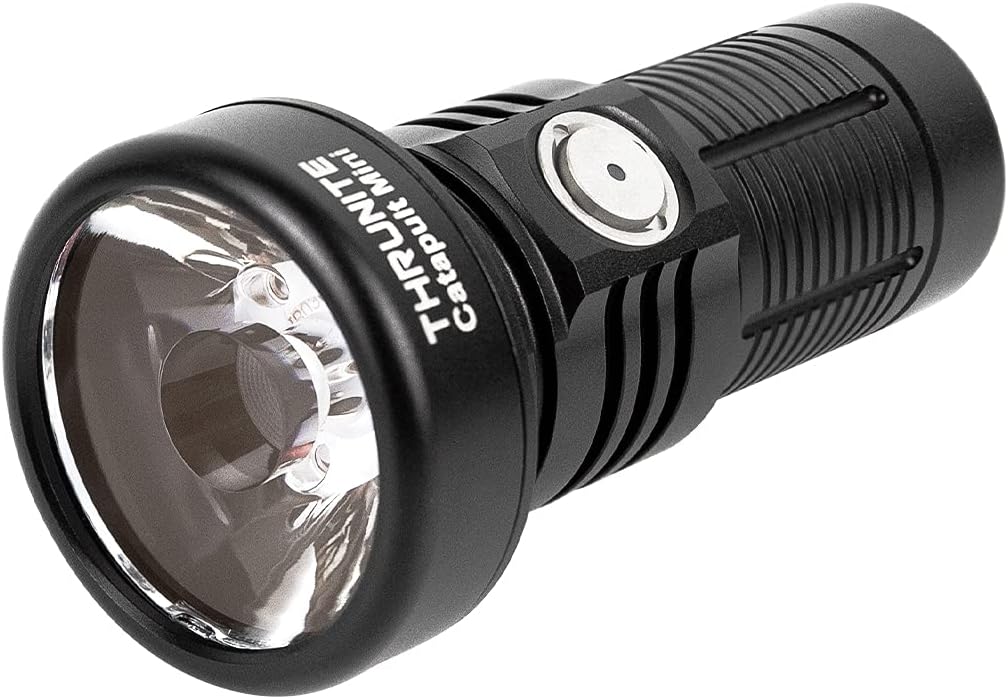
The ThruNite Catapult Mini is a compact yet powerful LED flashlight designed for long-distance illumination. It features a rechargeable battery, multiple brightness levels, and a durable, waterproof aluminum alloy body, making it suitable for various outdoor and emergency applications.

Image: The ThruNite Catapult Mini flashlight, showcasing its compact design and main body.
Wat is in die boks
- Catapult Mini flashlight *1
- Battery *1 (pre-installed)
- USB-C Charging Cord *1
- Lanyard *1
- Spare O-ring *1

Image: All components included in the ThruNite Catapult Mini package: flashlight, lanyard, USB-C charging cable, and spare O-rings.
Produkkomponente

Beeld: 'n Ontplofte view diagram of the flashlight, showing its internal components including the rechargeable battery, switch, aluminum alloy body, OSRAM LED, PMMA TIR lens, and waterproof O-ring.
- Herlaaibare battery: Provides power for extended runtime.
- Skakelaar: Multi-function side switch for operation and mode selection.
- Aluminiumlegering liggaam: Duursame en liggewig konstruksie.
- OSRAM LED: High-performance light source.
- PMMA TIR Lens: Designed for optimal light throw and beam intensity.
- Waterproof O-ring: Ensures IPX8 water resistance.
- USB-C-laaipoort: Integrated port for convenient recharging.
- Battery aanwyser: Toon huidige batteryvlak.
Opstelling
- Aanvanklike heffing: Before first use, fully charge the flashlight. Ensure the light head and tail cap are screwed down tightly before charging.

Image: Diagram showing arrows indicating to screw down the light head and tail cap tightly for proper operation and charging.
- Laai: Connect the included USB-C charging cord to the flashlight's USB-C port and a power source. The battery indicator will show charging status.
Beeld: Nabyskoot views of the USB-C charging port and the battery indicator light on the flashlight's side switch.
Bedryfsinstruksies
The ThruNite Catapult Mini features a single side switch for all operations.

Image: A hand holding the ThruNite Catapult Mini, demonstrating its ergonomic design and easy access to the side switch.
Basiese werking:
- Skakel AAN/UIT: Single click the side switch to turn the light ON/OFF.
- Verander modusse: When the light is ON, press and hold the side switch to cycle through Low, Medium, and High modes. Release the switch to select the desired mode.
- Firefly Mode: When the light is OFF, press and hold the side switch for 1 second to activate Firefly mode (0.5 lumens).
- Turbo-modus: Double click the side switch from any mode (except lock-out) to activate Turbo mode (680 lumens).
- Strobemodus: Triple click the side switch from any mode to activate Strobe mode. Single click to return to the previous mode.
- Lock-out/Unlock: When the light is OFF, press and hold the side switch for 3 seconds to enter lock-out mode. The light will flash once to indicate lock-out. To unlock, press and hold the side switch for 3 seconds. The light will turn on in Firefly mode.
Battery aanwyser:
Die aanwyserliggie op die syskakelaar verskaf intydse batterystatus:
- Blou: Batteryvlak > 21%
- Pers: Batteryvlak 11-20%
- Rooi: Batteryvlak < 10%
Video: A night shot comparison demonstrating the long-throw capabilities of the ThruNite Catapult Mini flashlight against other models, highlighting its focused beam at a distance of 230 feet.
Onderhoud
- Regularly clean the threads and O-rings with a clean cloth.
- Lubricate the O-rings periodically with silicone grease to maintain water resistance.
- If the flashlight is not used for an extended period, remove the battery to prevent leakage.
- Keep the lens clean to ensure optimal light output.

Image: The ThruNite Catapult Mini flashlight being exposed to water, illustrating its IPX8 waterproof rating.
Probleemoplossing
Algemene kwessies en oplossings:
- Lig gaan nie aan nie:
- Check if the battery is inserted correctly with the positive (+) end facing the head of the flashlight.
- Ensure the light head and tail cap are screwed on tightly.
- The flashlight might be in lock-out mode. Press and hold the side switch for 3 seconds to unlock.
- The battery might be depleted. Recharge the battery.
- Light flickers or modes change unexpectedly:
- Clean the contact points of the battery and the flashlight with an alcohol swab.
- Ensure the O-rings are properly lubricated and not damaged.
- Tighten the light head and tail cap.
- Laai kwessie:
- Verifieer dat die USB-C-kabel stewig aan beide die flitslig en die kragbron gekoppel is.
- Probeer 'n ander USB-C-kabel of kragadapter.
- Ensure the light head and tail cap are screwed down tightly.
Spesifikasies
| Kenmerk | Detail |
|---|---|
| Handelsmerk | ThruNite |
| Model | Catapult Mini Black CW |
| Spesiale kenmerk | Draagbaar, herlaaibaar |
| Kragbron | Battery aangedrewe |
| Ligbrontipe | LED |
| Materiaal | Aluminium |
| Produk afmetings | 3.18" D x 1.3" B x 1.3" H |
| Lig pad afstand | 598 meter |
| Helderheid | 680 Lumen (maksimum) |
| Battery Tipe | 1 Litium-ioonbattery (ingesluit) |
| Item gewig | 3.09 onse |
| Waterweerstandvlak | Waterdig (IPX8) |
| Impak weerstand | 1.5 meter |
Performance Table (General Mode):
| Modus | Uitset | Looptyd | Afstand | Intensiteit |
|---|---|---|---|---|
| Turbo | 680 lumen | 70 min | 598 meter (maksimum) | 89600 cd (maks.) |
| Hoog | 235 lumen | 80 min | ||
| Medium | 96 lumen | 4 uur | ||
| Laag | 21 lumen | 12 uur | ||
| Vuurvliegie | 0.5 lumen | 106 uur | ||
| Strobe | 680 lumen | 30 min |
Waarborg & Ondersteuning
ThruNite products are designed for durability and performance. For warranty information, product support, or service inquiries, please visit the official ThruNite webwebwerf of kontak hul kliëntediens direk. Bewaar u aankoopbewys as bewys van aankoop.
Vir meer inligting, besoek die ThruNite Store on Amazon.
Ask a question about this manual
Ask about setup, troubleshooting, compatibility, parts, safety, or missing instructions. Manuals+ will review the question and use this page’s manual context to help answer it.