
1. Inleiding
Thank you for choosing the Hoco W27 Cat Ear Bluetooth Headphones. These headphones combine advanced Bluetooth 5.0 technology with a unique glowing cat ear design, offering a versatile audio experience. They support Bluetooth, TF card, and AUX playback modes, making them compatible with a wide range of mobile phones and tablets. This manual provides detailed instructions for setup, operation, maintenance, and troubleshooting to ensure you get the most out of your device.
2. Produk verbyview
Familiarize yourself with the components of your Hoco W27 headphones.
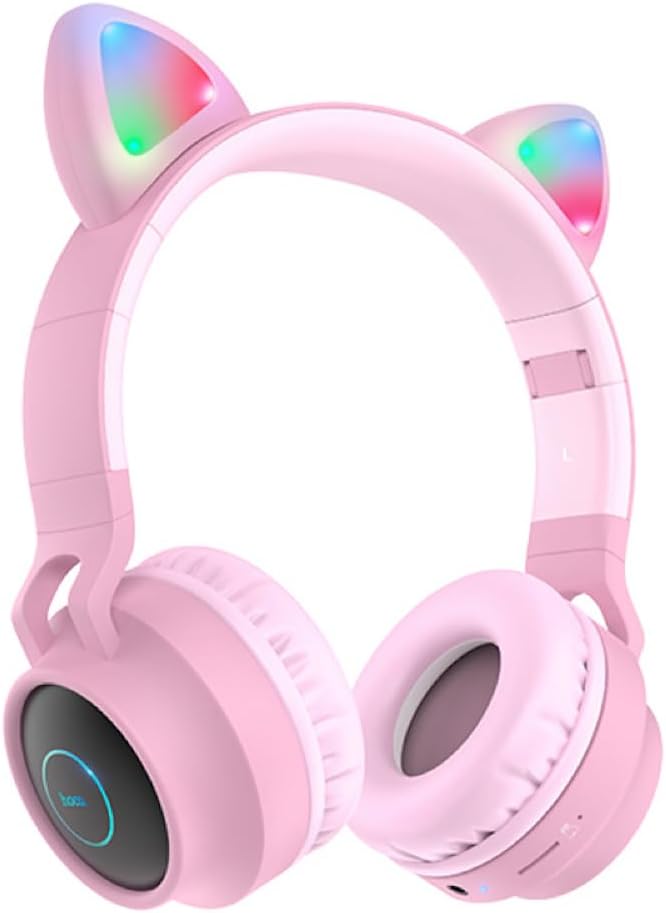
Figuur 2.1: Voorkant view of the Hoco W27 Cat Ear Bluetooth Headphones in pink, showcasing the glowing cat ears and over-ear design.

Figuur 2.2: Kant view of the Hoco W27 headphones, highlighting the control buttons on the left earcup, including volume, track control, and mode switch.

Figuur 2.3: Van onder na onder view of the Hoco W27 headphones, showing the adjustable headband and the placement of the control panel on the earcup.
3. Opstelling
3.1 Laai die oorfone
Before first use, fully charge the headphones. The built-in 300mAh battery requires approximately 2 hours for a full charge.
- Connect the charging cable (usually USB-C or Micro-USB, depending on model) to the charging port on the headphones.
- Koppel die ander kant van die kabel aan 'n USB-kragbron (bv. rekenaar se USB-poort, muuradapter).
- The indicator light will show charging status (e.g., red light while charging, off or blue when fully charged).
3.2 Bluetooth -koppeling
The Hoco W27 headphones feature Bluetooth 5.0 for stable and efficient wireless connection.
- Maak seker dat die oorfone afgeskakel is.
- Press and hold the Power button until the indicator light flashes blue and red alternately, indicating pairing mode.
- Aktiveer Bluetooth op jou toestel (slimfoon, tablet, rekenaar) en soek vir beskikbare toestelle.
- Select "Hoco W27" or a similar name from the list of found devices.
- Once connected, the indicator light will typically flash blue slowly or turn off, and you will hear a confirmation tone.
3.3 TF Card Mode
The headphones support TF (MicroSD) card playback.
- Insert a TF card with your desired audio files into the TF card slot on the headphones.
- The headphones should automatically switch to TF card playback mode. If not, press the Mode button to cycle through modes until TF card mode is active.
3.4 AUX-modus
For wired connection, use the AUX mode.
- Connect one end of a 3.5mm audio cable (not always included) to the AUX port on the headphones.
- Koppel die ander kant aan die klank-uitvoeraansluiting van jou toestel.
- The headphones will automatically switch to AUX mode. Note that controls on the headphones may be limited in this mode, and playback is controlled by the connected device.
4. Bedryfsinstruksies
4.1 Krag aan/af
- Krag aan: Press and hold the Power button for approximately 3 seconds until the indicator light turns on and you hear a power-on prompt.
- Skakel af: Press and hold the Power button for approximately 3-5 seconds until the indicator light turns off and you hear a power-off prompt.
4.2 Musiekweergawe
- Speel/pouse: Press the Multi-function button (often the Power button or a dedicated Play/Pause button) once.
- Volgende snit: Press and hold the Volume Up (+) button or a dedicated Next Track button.
- Vorige snit: Press and hold the Volume Down (-) button or a dedicated Previous Track button.
- Volume op: Druk kort op die Volume Op (+) knoppie.
- Volume af: Druk kort op die Volume Verlaag (-) knoppie.
The headphones offer up to 5 hours of continuous music playback on a full charge.
4.3 Oproepfunksies
- Beantwoord/beëindig oproep: Druk een keer die multifunksieknoppie tydens 'n inkomende oproep.
- Verwerp oproep: Press and hold the Multi-function button for approximately 2 seconds during an incoming call.
- Herbel laaste nommer: Double-press the Multi-function button when not on a call.
4.4 Moduswisseling
Press the 'M' (Mode) button to cycle between Bluetooth, TF Card, and AUX playback modes.
4.5 Cat Ear Lights
The glowing cat ear design adds a unique aesthetic. The lights typically activate automatically when the headphones are powered on. Refer to the product packaging or specific model features for details on controlling the lights, if a dedicated button exists.
4.6 Voice Prompt Switch
To switch the voice prompt language or disable prompts:
- When the headphones are nie gekoppel nie to a device, double-click the 'M' (Mode) button. You will hear a beep, indicating a change in the voice prompt setting.
5. Onderhoud
Proper care ensures the longevity of your headphones.
- Skoonmaak: Use a soft, dry, lint-free cloth to clean the surfaces of the headphones. Do not use abrasive cleaners, solvents, or spray directly onto the headphones.
- Berging: Store the headphones in a cool, dry place away from direct sunlight and extreme temperatures. If storing for an extended period, ensure they are partially charged.
- Batterysorg: To preserve battery life, avoid fully discharging the headphones frequently. Charge them regularly, even if not in use for a long time.
- Vermy vog: Moenie die oorfone aan water of oormatige vog blootstel nie.
6. Probleemoplossing
If you encounter issues with your Hoco W27 headphones, try the following solutions:
| Probleem | Moontlike oorsaak | Oplossing |
|---|---|---|
| Oorfone skakel nie aan nie. | Lae battery. | Laai die oorfone vir ten minste 30 minute. |
| Kan nie via Bluetooth koppel nie. | Oorfone nie in paringsmodus nie; toestel Bluetooth af; te ver van toestel. | Ensure headphones are in pairing mode (flashing red/blue). Turn device Bluetooth off and on. Move headphones closer to device. |
| Geen geluid uit oorfone nie. | Volume too low; incorrect mode; loose AUX cable; corrupted TF card files. | Increase volume on headphones and device. Ensure correct mode (Bluetooth, TF, AUX). Re-insert AUX cable. Check TF card files. |
| Swak klankgehalte. | Interferensie; lae battery; afstand vanaf toestel. | Move away from sources of interference. Charge headphones. Reduce distance between headphones and device. |
| Cat ear lights not working. | Headphones off; specific light control setting. | Ensure headphones are powered on. Check if there's a dedicated button for lights (refer to product specifics). |
7. Spesifikasies
Key technical specifications for the Hoco W27 Cat Ear Bluetooth Headphones:
| Kenmerk | Spesifikasie |
|---|---|
| Bluetooth weergawe | 5.0 (JL AC6925F chip) |
| Battery kapasiteit | 300mAh |
| Laai tyd | Ongeveer 2 uur |
| Call / Music Time | Tot 5 uur |
| Bystandtyd | Tot 200 uur |
| Luidspreker deursnee | 40 mm |
| Afmetings (L*B*H) | 203 x 175 x 80 mm (8 x 6.9 x 3.1 duim) |
| Gewig | 182 g (6.4 onse) |
| Ondersteunde modusse | Bluetooth, TF-kaart, AUX |
| Ontwerpkenmerk | Glowing cat ear shape |
| Oorplasing | Oor Oor |
| Geraasbeheer | Geen |
8. Veiligheidsinligting
Please read and follow these safety guidelines for safe operation:
- Moenie die produk uitmekaar haal, herstel of wysig nie. Dit kan brand, elektriese skok of algehele skade aan die produk veroorsaak.
- Keep the headphones away from extreme temperatures, direct sunlight, and high humidity.
- Avoid exposing the headphones to water or other liquids.
- Do not use the headphones at excessively high volumes for prolonged periods, as this may cause hearing damage.
- Hou buite bereik van kinders.
9. Waarborg en Ondersteuning
For warranty information and customer support, please refer to the documentation provided with your purchase or contact the retailer where you purchased the Hoco W27 headphones. Keep your proof of purchase for any warranty claims.