
SNOEPIE 31011162
Gebruikershandleiding
Candy CSTG272DVE/1-S Toploader Washing Machine
Model: 31011162
1. Inleiding
Thank you for choosing the Candy CSTG272DVE/1-S Toploader Washing Machine. This manual provides essential information for the safe and efficient use of your appliance. Please read it carefully before installation and first use, and keep it for future reference.
This appliance is designed for domestic use only, specifically for washing machine-washable textiles in a household environment. Any other use is considered improper and potentially dangerous.
2. Veiligheidsinligting
Algemene Veiligheidswaarskuwings
- Ontkoppel altyd die toestel van die kragtoevoer voordat u skoonmaak of onderhoud uitvoer.
- Hierdie toestel kan gebruik word deur kinders vanaf 8 jaar en ouer en persone met verminderde fisiese, sensoriese of geestelike vermoëns of gebrek aan ondervinding en kennis as hulle toesig of instruksies ontvang het oor die gebruik van die toestel op 'n veilige manier en die gevare verstaan betrokke.
- Kinders moet onder toesig wees om te verseker dat hulle nie met die toestel speel nie.
- Do not pull on the power cord to unplug the appliance. Always grasp the plug firmly and pull it out of the socket.
- Maak seker dat die kragkabel nie vasgevang of beskadig word tydens installasie nie.
- Moenie die toestel in adamp plek of waar dit aan waterspatsels blootgestel kan word.
- Never open the door forcefully or use it as a step.
- Moenie items was wat met vlambare vloeistowwe vuil is nie.
- Hou troeteldiere weg van die toestel.
Installasieveiligheid
- Die toestel moet deur 'n gekwalifiseerde persoon geïnstalleer word in ooreenstemming met plaaslike regulasies.
- Remove all transit bolts and packing materials before use. Failure to do so can cause significant damage.
- Ensure the appliance is level and stable to prevent excessive vibration and noise during operation.
- Connect the water inlet hose to a cold water tap. Do not use old hoses.
- The drain hose must be properly secured to prevent leaks.
3. Produk verbyview
Maak jouself vertroud met die hoofkomponente van jou wasmasjien.

Figuur 3.1: Voorkant view of the Candy CSTG272DVE/1-S Toploader Washing Machine. The image shows the white appliance with the top-loading lid closed, and the control panel visible at the top front.
Beheerpaneel

Figuur 3.2: Close-up view of the control panel. It features a central program selector knob, a digital display, and various touch buttons for options like temperature, spin speed, delay start, and Smart Touch connectivity.
The control panel allows you to select wash programs, adjust settings, and monitor the washing cycle.
- Programkeuseknop: Word gebruik om die verlangde wasprogram te kies.
- Vertoon: Toon oorblywende tyd, foutkodes en gekose opsies.
- Knoppies:
- Temperatuurkeuse
- Keuse van spinspoed
- Vertraag Begin
- Options (e.g., pre-wash, extra rinse)
- Begin / Pouse
- Smart Touch (for app connectivity)
4. Opstelling en installering
Uitpak
- Verwyder die toestel versigtig uit sy verpakking.
- Remove all transit bolts from the rear of the machine. These bolts secure the drum during transport and must be removed before operation. Keep them for future transport.
- Remove any polystyrene blocks or other packing materials from inside the drum.
Posisionering
Place the washing machine on a firm, flat surface. Ensure there is adequate space around the appliance for ventilation and access.
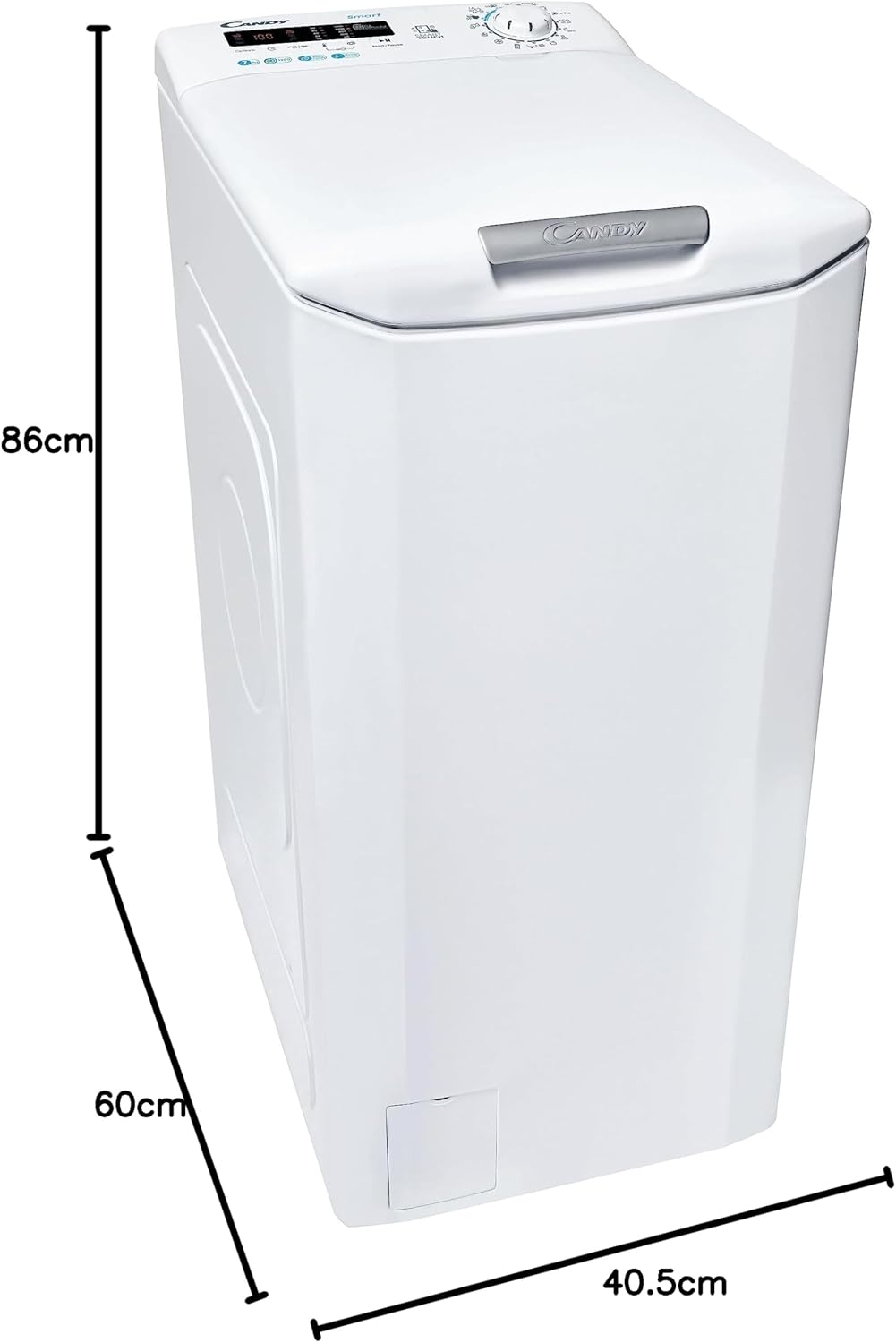
Figure 4.1: Diagram showing the dimensions of the washing machine: 86cm height, 60cm depth, and 40.5cm width. Ensure your installation space accommodates these measurements.
Maak die toestel gelyk
Use a spirit level to ensure the machine is perfectly level. Adjust the adjustable feet at the bottom of the machine until it is stable and does not rock.
Wateraansluiting
- Connect the supplied water inlet hose to the cold water tap. Ensure the connection is tight to prevent leaks.
- Place the drain hose into a standpipe or over the edge of a sink, ensuring it is securely fixed to prevent it from falling out during draining. The height of the drain point should be between 60 cm and 100 cm from the floor.
Elektriese aansluiting
- Steek die kragkabel in 'n geaarde elektriese aansluiting.
- Verseker die voltage and frequency of your power supply match the specifications on the appliance's rating plate.
- Moenie verlengkoorde of veelvuldige adapters gebruik nie.
5. Bedryfsinstruksies
Voor Eerste Gebruik
Run a short wash cycle without laundry to clean the drum and remove any manufacturing residues. Use a small amount of detergent.
Laai wasgoed
- Sorteer wasgoed volgens materiaalsoort, kleur en graad van vuilheid.
- Open the top lid and then the drum flaps.
- Plaas wasgoed losweg in die drom en maak seker dat dit nie oorlaai word nie. Die maksimum kapasiteit is 7 kg.
- Close the drum flaps and then the top lid securely.
Byvoeging van wasmiddel en bymiddels
Open the detergent dispenser drawer, usually located on the top panel. Add detergent to the main wash compartment and fabric softener to the designated compartment. Refer to detergent packaging for recommended dosages.
Kies 'n wasprogram
Turn the Program Selector Knob to choose the desired wash program. The display will show the default temperature and spin speed for that program.
The machine offers 17 standard cycles. Common programs include:
- Katoen
- Sintetiese
- Delikate
- Wol/Handwas
- Vinnige Was
- Spoel af
- Draai
Aanpassing van opsies
Use the touch buttons on the control panel to adjust the following:
- Temperatuur: Press the temperature button to cycle through available temperatures.
- Draai spoed: Press the spin speed button to select the desired RPM (up to 1200 rpm).
- Vertraag begin: Press this button to set a delay for the start of the wash cycle.
- Smart Touch: This feature allows you to control and monitor your washing machine via the Candy Simply-Fi app on your smartphone. Follow the app instructions for pairing.
Begin die wassiklus
Press the "Start/Pause" button to begin the selected wash program. The display will show the remaining time.
Pausing and Cancelling a Program
- To pause a program, press the "Start/Pause" button. Press it again to resume.
- To cancel a program, turn the Program Selector Knob to the "OFF" position, then select a new program or turn the machine off.
Einde van siklus
At the end of the cycle, the display will show "End" or similar. The door will unlock after a short delay. Remove laundry promptly to prevent creasing.
6. Onderhoud en Skoonmaak
Gereelde onderhoud verseker optimale prestasie en verleng die lewensduur van u toestel.
Skoonmaak van die buitekant
Vee die buite-oppervlaktes af met 'n sagte, damp lap. Moenie skuur skoonmaakmiddels of oplosmiddels gebruik nie.
Skoonmaak van die skoonmaakmiddeldispenser
Periodically remove the detergent dispenser drawer and rinse it under running water to remove any detergent residue. Clean the housing with a brush.
Maak die filter skoon
The filter should be cleaned regularly to prevent blockages. Locate the filter cover at the bottom front of the machine. Place a shallow container underneath to catch any residual water. Unscrew the filter slowly to drain water, then remove and clean it under running water. Reinsert and tighten securely.
Drom skoonmaak
Run a hot wash cycle (e.g., 60°C or 90°C Cotton program) with no laundry and a small amount of detergent or a specialized washing machine cleaner to prevent odors and build-up.
Winterberging
If the machine is to be stored in an unheated area, drain all water from the hoses and pump to prevent freezing damage.
7. Probleemoplossing
Voordat u die diens kontak, kyk na die volgende algemene probleme en oplossings.
| Probleem | Moontlike oorsaak | Oplossing |
|---|---|---|
| Masjien begin nie | Geen krag nie; Deur nie toe nie; Program nie gekies nie; Begin/Pause nie gedruk nie. | Check power plug and fuse; Ensure door is firmly closed; Select a program; Press Start/Pause. |
| Water vul nie | Waterkraan toe; Toevoerslang geknik; Waterdruk te laag. | Maak waterkraan oop; Maak slang reguit; Kontroleer huishoudelike waterdruk. |
| Masjien dreineer nie | Drain hose kinked/blocked; Filter blocked; Drain pump fault. | Check and clear drain hose; Clean pump filter; Contact service if issue persists. |
| Oormatige vibrasie/geraas | Vervoersboute nie verwyder nie; Masjien nie gelyk nie; Ongelyke lading. | Remove transit bolts; Adjust feet to level machine; Redistribute laundry evenly. |
| Wasmiddelresidu in dispenser | Insufficient water pressure; Detergent clumping; Dispenser dirty. | Check water pressure; Use less detergent or liquid detergent; Clean dispenser. |
For error codes displayed on the screen, refer to the Candy Simply-Fi app or the manufacturer's website for specific meanings and solutions.
8. Spesifikasies
| Kenmerk | Spesifikasie |
|---|---|
| Handelsmerk | SNOEPIE |
| Model | CSTG272DVE/1-S (31011162) |
| Tik | Toploader Washing Machine |
| Kapasiteit | 7 kilogram |
| Maksimum rotasiespoed | 1200 RPM |
| Geraasvlak | 78 dB |
| Installasie tipe | Vrye staande |
| Afmetings (H x B x D) | 86 cm x 40.5 cm x 60 cm |
| Gewig | 56 kg |
| Voltage | 220 Volt |
| Beheerkonsole | Knoppies |
| Aantal standaard siklusse | 17 |
| Spesiale kenmerke | Slim konneksie |
| Materiaal | Staal Plastiek |
9. Waarborg en Ondersteuning
Your Candy CSTG272DVE/1-S Washing Machine comes with a manufacturer's warranty. Please refer to the warranty card included with your appliance for specific terms and conditions, including warranty period and coverage details.
For technical assistance, spare parts, or to schedule a service appointment, please contact Candy customer support. Have your appliance's model number (31011162) and serial number ready when contacting support.
You may also find additional resources and FAQs on the official Candy webwebwerf: www.candy-group.com
Ask a question about this manual
Ask about setup, troubleshooting, compatibility, parts, safety, or missing instructions. Manuals+ will review the question and use this page’s manual context to help answer it.