
Inleiding
Dankie vir die aankoopasing the LEDWOOD ACCESS100 Portable Bluetooth Speaker. This manual provides detailed instructions for setting up, operating, and maintaining your speaker to ensure optimal performance and longevity. Please read this manual thoroughly before using the product.

Image: The LEDWOOD ACCESS100 portable Bluetooth speaker, showcasing its cylindrical design and integrated carrying strap.
Pakketinhoud
Maak seker dat al die items wat hieronder gelys word, in jou pakket teenwoordig is:
- 1 x LEDWOOD ACCESS100 Bluetooth Speaker
- 1 x Charging Cable (USB-A to Micro-USB)
- 1 x Audio Cable (3.5mm AUX)
- 1 x Gebruikershandleiding
- 1 x Dra band

Image: The LEDWOOD ACCESS100 speaker shown within its retail packaging box.
Produk verbyview
Kontroles en poorte
Maak jouself vertroud met die luidspreker se kontroles en verbindingspoorte:

Beeld: 'n Gedetailleerde view of the speaker's control panel, showing buttons and input ports.
- MicroSD -kaartgleuf: Insert a MicroSD card for direct music playback.
- USB-poort: Steek 'n USB-geheuestokkie in vir direkte musiekweergawe.
- DC 5V-laaipoort: Koppel die laaikabel hier aan.
- AUX-invoer: Connect external audio devices using the 3.5mm audio cable.
- Vorige snit / Volume af (V-): Druk kort vir vorige snit, druk lank om die volume te verlaag.
- Volgende snit / Volume op (V+): Druk kort vir die volgende snit, druk lank om die volume te verhoog.
- Kragknoppie: Long press to power on/off. Short press to play/pause in Bluetooth/USB/MicroSD mode.
- Modus (M) Knoppie: Short press to switch between Bluetooth, AUX, USB, MicroSD, and FM Radio modes.
- Play/Pause / TWS Button: Short press to play/pause. Long press to activate TWS pairing (in Bluetooth mode).
Opstelling
Laai die luidspreker
Laai die luidspreker volledig voor die eerste gebruik.
- Connect the provided USB charging cable to the DC 5V port on the speaker.
- Koppel die ander kant van die USB-kabel aan 'n USB-kragadapter (nie ingesluit nie) of 'n rekenaar se USB-poort.
- Die laai-aanwyserliggie sal tydens laai brand en afskakel wanneer dit volledig gelaai is.
Skakel aan/af
- Om aan te skakel, druk lank op die Kragknoppie totdat jy 'n hoorbare aanwysing hoor.
- Om af te skakel, druk lank op die Kragknoppie weer totdat die luidspreker afskakel.
Bedryfsinstruksies
Bluetooth modus
The speaker enters Bluetooth pairing mode automatically when powered on, or when selected via the Mode button.
- Ensure the speaker is powered on and in Bluetooth mode (indicated by an audible prompt).
- Aktiveer Bluetooth op jou slimfoon, tablet of ander versoenbare toestel.
- Soek vir "LEDWOOD ACCESS100" in your device's Bluetooth settings and select it to pair.
- Once paired, you will hear a confirmation sound. You can now play audio from your device through the speaker.
- Kontroles:
- Kort druk Kragknoppie om te speel / te onderbreek.
- Kort druk V- for Previous Track.
- Kort druk V+ for Next Track.
- Lang druk V- to Decrease Volume.
- Lang druk V+ to Increase Volume.

Image: An icon representing wireless connectivity, indicating Bluetooth functionality.
True Wireless Stereo (TWS) funksie
The TWS function allows you to pair two LEDWOOD ACCESS100 speakers together for a stereo sound experience.
- Ensure both ACCESS100 speakers are powered on and in Bluetooth mode, but not yet connected to any device.
- Op een van die luidsprekers (dit sal die primêre luidspreker wees), druk lank die Play/Pause / TWS Button. You will hear an indication sound.
- The two speakers will automatically search and pair with each other. Once successfully paired, you will hear a confirmation sound.
- Now, connect your smartphone or tablet to the primary speaker via Bluetooth as described in the "Bluetooth Mode" section.
- Oudio sal nou in stereo deur beide luidsprekers speel.

Image: An icon representing True Wireless Stereo (TWS) functionality, showing two interconnected loops.
AUX-modus
Use the AUX mode to connect devices without Bluetooth capability.
- Koppel die een kant van die 3.5 mm-klankkabel aan die AUX-invoerpoort op die luidspreker.
- Koppel die ander kant aan die klankuitset-aansluiting van jou eksterne toestel (bv. MP3-speler, rekenaar).
- Druk die Modus (M)-knoppie repeatedly until you hear the "AUX mode" prompt.
- Beheer terugspeel en volume direk vanaf jou gekoppelde toestel.
USB / MicroSD Card Mode
Play music directly from a USB flash drive or MicroSD card.
- Insert a USB flash drive into the USB port or a MicroSD card into the MicroSD card slot.
- The speaker will automatically switch to the corresponding mode and begin playing music. If not, press the Modus (M)-knoppie to select USB or MicroSD mode.
- Kontroles:
- Kort druk Kragknoppie om te speel / te onderbreek.
- Kort druk V- for Previous Track.
- Kort druk V+ for Next Track.
- Lang druk V- to Decrease Volume.
- Lang druk V+ to Increase Volume.
FM-radiomodus
Luister na jou gunsteling FM-radiostasies.
- Druk die Modus (M)-knoppie repeatedly until you hear the "FM Radio" prompt.
- To automatically scan and save available stations, long press the Play/Pause / TWS Button. The speaker will scan and store stations.
- Om tussen gestoorde stasies te wissel, druk kort op die V- or V+ knoppies.
- Lang druk V- to Decrease Volume.
- Lang druk V+ to Increase Volume.
Onderhoud
- Skoonmaak: Gebruik 'n sagte, droë lap om die luidspreker se oppervlak skoon te maak. Moenie skuurmiddels of oplosmiddels gebruik nie.
- Berging: Bêre die luidspreker op 'n koel, droë plek weg van direkte sonlig en uiterste temperature.
- Batterysorg: Om die batterylewe te verleng, vermy om die luidspreker gereeld heeltemal te ontlaai. Laai dit gereeld, selfs al word dit nie vir lang tye gebruik nie.
- Waterweerstand: Hierdie spreker is NIE waterdig. Vermy blootstelling aan water of oormatige vog.
Probleemoplossing
| Probleem | Moontlike oorsaak | Oplossing |
|---|---|---|
| Luidspreker skakel nie aan nie. | Lae battery. | Laai die luidspreker volledig. |
| Geen geluid van die luidspreker nie. | Volume te laag; verkeerde modus; toestel nie gekoppel nie. | Increase volume on speaker and connected device. Ensure correct mode (Bluetooth, AUX, USB, MicroSD, FM). Re-pair Bluetooth device or check cable connection. |
| Bluetooth-saambinding misluk. | Luidspreker nie in paringsmodus nie; toestel te ver; interferensie. | Ensure speaker is in Bluetooth pairing mode. Move device closer to speaker (within 10 meters). Turn off other Bluetooth devices. |
| TWS-paring misluk. | Luidsprekers nie in TWS-paringsmodus nie; te ver uitmekaar. | Ensure both speakers are in Bluetooth mode and not connected to any device. Long press the TWS button on one speaker. Keep speakers close during pairing. |
| USB/MicroSD playback issues. | Ongesteun file format; corrupted media; incorrect mode. | Verseker klank files are in a supported format (e.g., MP3). Try a different USB drive or MicroSD card. Press Mode button to select correct input. |
| Swak FM-radio-ontvangs. | Swak sein; omgewingsinmenging. | Move the speaker to a different location. Re-scan for stations. |
Spesifikasies
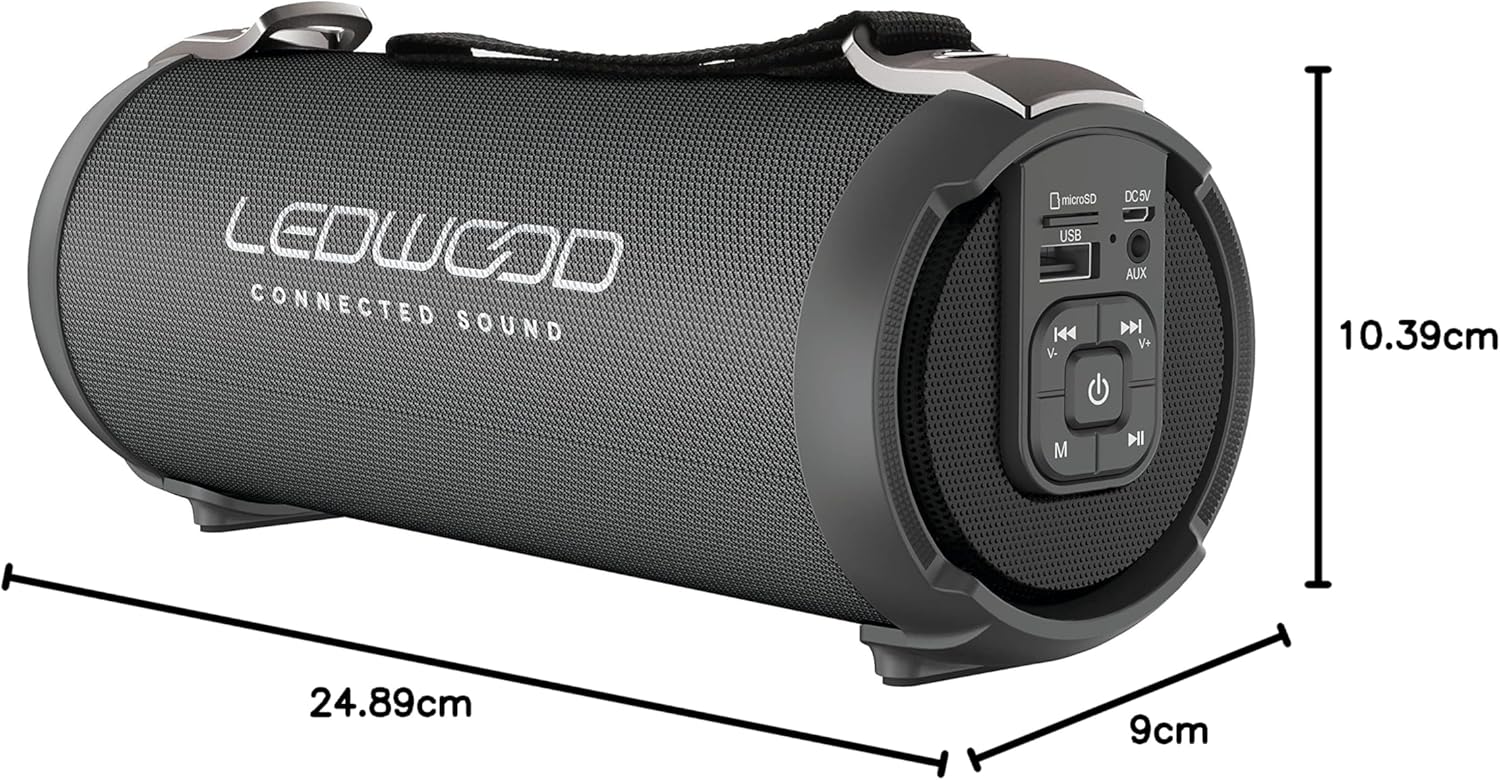
Image: The LEDWOOD ACCESS100 speaker with its length, width, and height dimensions indicated.
| Kenmerk | Detail |
|---|---|
| Model Naam | TOEGANG100 |
| Handelsmerk | Ledwood |
| Verbindingstegnologie | Bluetooth |
| Wireless Range | Tot 10 meter (33 voet) |
| Klankuitvoermodus | Stereo (2.0-kanaal) |
| Speaker Output Power (RMS) | 8.5 Watt |
| Piek kraguitset | 100 Watt |
| Spesiale kenmerke | USB Port, MicroSD Card Slot, AUX Input, FM Radio, TWS Function |
| Kragbron | Battery Powered (rechargeable via USB cable) |
| Produkafmetings (L x B x H) | 24.9 cm x 9 cm x 10.4 cm (9.8 x 3.5 x 4.1 duim) |
| Gewig | 820 gram (1.8 lbs) |
| Kleur | Swart |
| Waterdig | Nee |
| Versoenbare toestelle | Slimfone, tablette |
Veiligheidsinligting
- Moenie die luidspreker blootstel aan uiterste temperature, direkte sonlig of hoë humiditeit nie.
- Do not disassemble, repair, or modify the speaker yourself. This will void the warranty.
- Hou die luidspreker weg van kinders en troeteldiere.
- Gebruik slegs die meegeleverde laaikabel of 'n gesertifiseerde ekwivalent.
- Vermy om vir lang tye teen hoë volumes te luister om gehoorskade te voorkom.
- Gooi die produk en sy battery verantwoordelik weg volgens plaaslike regulasies.
Waarborg en Ondersteuning
This product comes with a standard manufacturer's warranty. For detailed warranty terms and conditions, please refer to the warranty card included in your package or contact Ledwood customer support.
For technical support, troubleshooting assistance, or general inquiries, please visit the official Ledwood webwebwerf of kontak hul kliëntediensafdeling. Kontakbesonderhede kan tipies op die produkverpakking of die handelsmerk se amptelike webwebwerf.