
1. Inleiding
The Magewell Ultra Encode SDI (Model 53050) is a versatile live stream encoder designed for professional AV applications. It supports high-quality H.264, H.265 (HEVC), and NDI|HX encoding, along with multiple streaming protocols. This manual provides detailed instructions for setting up, operating, maintaining, and troubleshooting your Ultra Encode SDI device.
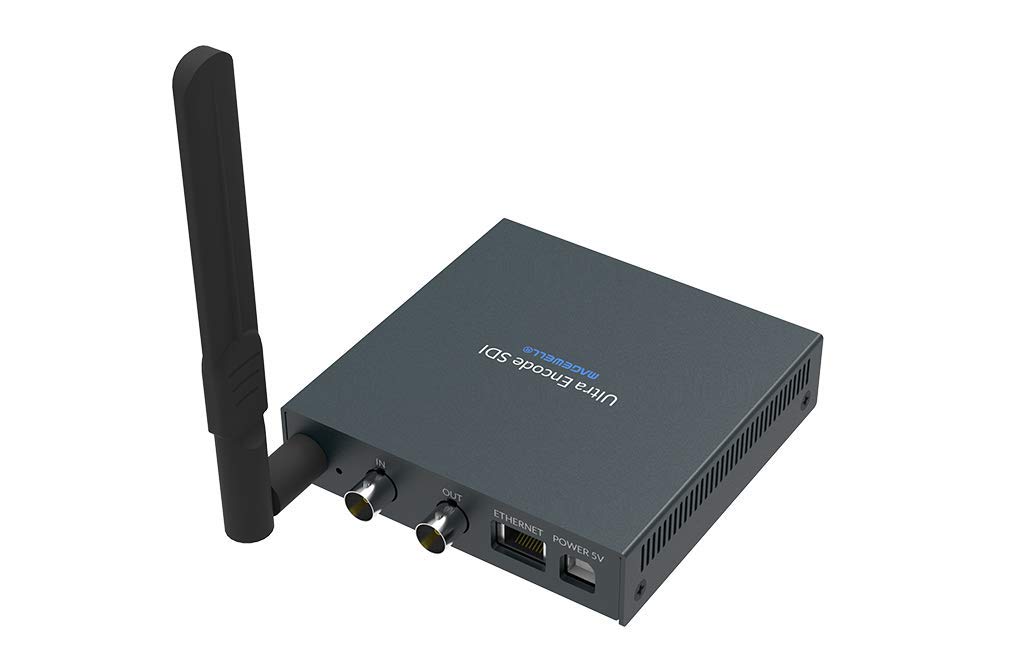
Figure 1.1: Magewell Ultra Encode SDI (Model 53050) device.
2. Pakketinhoud
Please verify that all items listed below are included in your package. If any items are missing or damaged, contact your vendor or Magewell support.
- Magewell Ultra Encode SDI (Model 53050) Unit
- Power Adapter (with regional plugs)
- USB 2.0 Type B cable
- Wi-Fi-antenne
- T-bracket
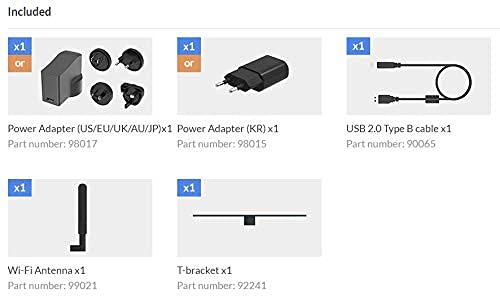
Figure 2.1: Included accessories with the Ultra Encode SDI.
3. Produk verbyview
The Ultra Encode SDI features various ports and indicators for connectivity and status monitoring. Familiarize yourself with these components before setup.
3.1 Front/Side Panel

Figure 3.1: Front/Side panel with audio ports, status LEDs, and USB port.
- LYNSTAAN: 3.5 mm oudio-uitvoer.
- LYN IN: 3.5 mm oudio-invoer.
- PWR LED: Krag aanwyser.
- IN LED: Input signal status.
- LIVE LED: Streaming status.
- ETH LED: Ethernet connection status.
- Wi-Fi LED: Wi-Fi-verbindingstatus.
- OPSIE: USB port for optional accessories or configuration.
3.2 Agterpaneel

Figure 3.2: Rear panel with video, network, and power connections.
- IN (SDI): SDI/3G video input.
- OUT (SDI): SDI/3G loop-through output.
- ETHERNET: RJ45-poort vir bedrade netwerkverbinding.
- POWER 5V: Kraginvoerpoort.
3.3 Poortdiagram

Figure 3.3: Comprehensive port and indicator diagram.
4. Opstelling
Follow these steps to set up your Magewell Ultra Encode SDI device.
4.1 Fisiese verbindings
- Koppel krag: Steek die meegeleverde kragadapter in die KRAG 5V port on the rear panel and then into a power outlet. The PWR LED on the front panel should illuminate.
- Connect Video Input: Connect your SDI/3G video source to the IN (SDI) port on the rear panel. If you need to loop the signal through, connect a cable from the OUT (SDI) port to your monitoring device.
- Koppel oudio (opsioneel): If using analog audio, connect your audio source to the LYN IN port and your audio monitoring device to the LYNSTAAN hawe.
- Koppel netwerk:
- bedraad: Connect an Ethernet cable from your network router or switch to the Ethernet port on the rear panel. The ETH LED should illuminate.
- Draadloos: Screw the provided Wi-Fi antenna onto the antenna socket. You will configure the Wi-Fi connection via the web koppelvlak. Die Wi-Fi LED will indicate connection status.
4.2 Aanvanklike konfigurasie (Web Koppelvlak)
The Ultra Encode SDI is configured via a web-gebaseerde koppelvlak. Om toegang daartoe te verkry:
- Ensure your computer is on the same network as the Ultra Encode SDI.
- Use a network scanning tool or check your router's connected devices list to find the IP address of the Ultra Encode SDI. Alternatively, some devices may have a default IP or a discovery tool.
- Maak oop a web browser and enter the device's IP address in the address bar.
- Log in using the default credentials (refer to the device's quick start guide or Magewell documentation for default username and password).
- Van die web interface, you can configure network settings (including Wi-Fi), video/audio input parameters, encoding settings, and streaming destinations.
5. Bedryfsinstruksies
The Ultra Encode SDI offers flexible encoding and streaming capabilities.
5.1 Enkodering-instellings
- The device supports H.264 and H.265 (HEVC) video encoding. Select the desired codec and adjust parameters such as bitrate (up to 16Mbps), resolution, and frame rate via the web koppelvlak.
- Audio encoding options are also available for optimal quality and compatibility.
5.2 Streaming Protocols
The Ultra Encode SDI supports various streaming protocols:
- RTMP/RTMPS: Commonly used for live streaming to platforms like YouTube, Facebook, and Twitch. Configure the server URL and stream key in the web koppelvlak.
- HLS: HTTP Live Streaming for adaptive bitrate delivery.
- SRT: Secure Reliable Transport protocol for low-latency, high-quality video transport over unreliable networks.
- NDI|HX: NewTek's NDI|HX encoding for IP production workflows. Enable and configure NDI|HX output in the web koppelvlak.
5.3 Configurable Presets
The device includes configurable presets for easy streaming to popular platforms:
- Access the presets section in the web koppelvlak.
- Select a platform (e.g., Facebook, Twitch, YouTube) and enter your stream key or login details as prompted.
- Activate the preset to begin streaming.
6. Onderhoud
Proper maintenance ensures the longevity and optimal performance of your Ultra Encode SDI.
- Skoonmaak: Gebruik 'n sagte, droë lap om die buitekant van die toestel skoon te maak. Vermy vloeibare skoonmaakmiddels of skuurmiddels.
- Ventilasie: Maak seker dat die toestel in 'n goed geventileerde area geplaas word om oorverhitting te voorkom. Moenie ventilasie-openinge blokkeer nie.
- Firmware -opdaterings: Periodically check the Magewell official website for firmware updates. Updating the firmware can provide new features, performance improvements, and bug fixes. Follow the instructions provided by Magewell for safe firmware updates.
- Berging: Wanneer dit nie vir lang tye gebruik word nie, bêre die toestel op 'n koel, droë plek weg van direkte sonlig en uiterste temperature.
7. Probleemoplossing
Hierdie afdeling spreek algemene probleme aan wat jy mag teëkom.
- Geen krag:
- Maak seker dat die kragadapter stewig aan die toestel en 'n werkende kragpunt gekoppel is.
- Verify the power adapter is the correct one supplied with the device.
- No Video Input:
- Check the SDI cable connection between the source and the device's IN (SDI) hawe.
- Confirm the video source is active and outputting a compatible SDI signal.
- Gaan die IN LED status.
- Geen netwerkverbinding:
- For wired connection, ensure the Ethernet cable is properly connected and the ETH LED is active.
- For Wi-Fi, ensure the antenna is attached, and Wi-Fi settings are correctly configured in the web interface. Check the Wi-Fi LED's.
- Verify your network router is functioning correctly.
- Kan nie toegang kry nie Web Interface:
- Ensure your computer is on the same network as the encoder.
- Verify the IP address of the encoder.
- Probeer om jou blaaier se kasgeheue skoon te maak of 'n ander blaaier te gebruik.
- Streaming Issues (Buffering, Disconnections):
- Kontroleer jou internetverbinding se spoed en stabiliteit.
- Reduce the encoding bitrate in the web interface if your network bandwidth is limited.
- Verify streaming server URL and stream key are correct.
- Gaan die LEEF LED status.
For further assistance, refer to the Magewell support webwebwerf of kontak hul tegniese ondersteuningspan.
8. Spesifikasies
| Kenmerk | Spesifikasie |
|---|---|
| Handelsmerk | Magewell |
| Model | 53050 |
| Produk afmetings | 10.5 x 10.6 x 2.5 cm |
| Item gewig | 596 g (0.6 kilogram) |
| Video-invoer | SDI/3G Input |
| Video-uitset | SDI/3G Loop |
| Oudio-invoer | Line-In (3.5mm) |
| Oudio-uitset | Line-Out (3.5mm) |
| Enkodering formate | H.264, H.265 (HEVC), NDI|HX |
| Maksimum bitsnelheid | Tot 16 Mbps |
| Stroomprotokolle | RTMP, RTMPS, HLS, SRT |
| Netwerkverbinding | Ethernet (RJ45), Wi-Fi (802.11ac) |
| Kragtoevoer | 12 Volt (DC) |
| Versoenbare toestelle | Laptop (for configuration) |
| Spesiale kenmerke | Wireless connectivity, Configurable presets for streaming platforms |
9. Waarborg en Ondersteuning
For information regarding product warranty, technical support, and service, please refer to the official Magewell website or contact your authorized Magewell dealer. Keep your purchase receipt as proof of purchase for warranty claims.
Magewell Official Webwebwerf: www.magewell.com