
Inleiding
This manual provides comprehensive instructions for the installation, operation, and maintenance of your Feit Electric Smart Flood Security Light. Please read this manual thoroughly before installation and retain it for future reference.
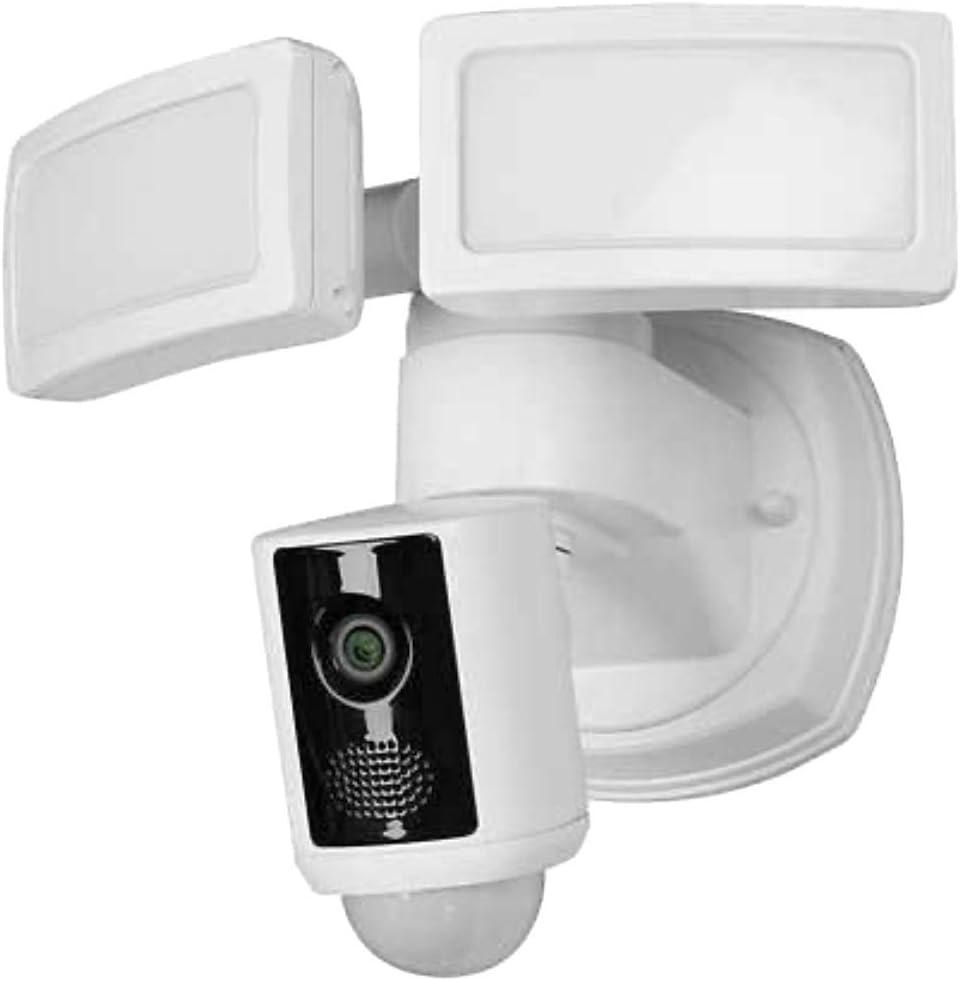
Beeld: Voorkant view of the Feit Electric Smart Flood Security Light, showing the two adjustable LED floodlights and the central camera unit.
Belangrike veiligheidsinligting
- Always turn off power at the circuit breaker before installation or servicing.
- Installasie moet deur 'n gekwalifiseerde elektrisiën uitgevoer word as u onseker is oor elektriese bedrading.
- Maak seker dat alle verbindings veilig en behoorlik geïsoleer is.
- This product is designed for outdoor use and must be installed in accordance with local electrical codes.
- Moenie aan 'n dimmer skakelaar koppel nie.
Pakketinhoud
Verifieer dat alle komponente teenwoordig is voordat u met die installasie begin:
- Feit Electric Smart Flood Security Light (Model: SEC3000/CAM/WIFI)
- Monteer hardeware
- Gebruikershandleiding
- 128 GB microSD card (pre-installed or included separately)

Image: Packaging box for the Feit Electric Smart Flood Security Light, illustrating key features and contents.
Opstelling en installasie
1. Voorinstallasie
- Skakel af: Locate your circuit breaker and turn off the power to the existing floodlight or junction box where you plan to install the new unit.
- Verwydering van bestaande armatuur: Carefully remove your existing floodlight fixture.
- Wi-Fi-tjek: Ensure you have a strong 2.4GHz Wi-Fi signal at the installation location. This device only supports 2.4GHz networks.
2. Physical Installation (Flush Mount)
- Monteerplaat: Attach the provided mounting plate to your junction box using the included screws.
- Bedrading: Koppel die elektriese drade:
- Koppel die swart draad van die toebehore na die swart (live) wire from the junction box.
- Koppel die wit draad van die toebehore na die wit (neutrale) draad vanaf die aansluitkas.
- Koppel die groen (ground) wire from the fixture to the grond wire from the junction box.
- Monteer bevestiging: Secure the floodlight fixture to the mounting plate. Ensure a tight seal to prevent water intrusion.
- Adjust Lights & Camera: Adjust the two LED light heads and the central camera unit to your desired angles.
3. App Setup and Wi-Fi Connection
- Krag aan: Restore power at the circuit breaker. The floodlight should illuminate briefly.
- Laai die app af: Download the Feit Electric app from your mobile device's app store.
- Skep rekening: Maak die toepassing oop en skep 'n nuwe gebruikersrekening of meld aan as jy reeds een het.
- Voeg toestel by: Follow the in-app instructions to add your new Smart Flood Security Light. This typically involves selecting the device type and connecting to your 2.4GHz Wi-Fi network.
- Saambinding: The app will guide you through the pairing process, which may involve scanning a QR code on the device or using a sound pairing method.
Bedryfsinstruksies
Your Feit Electric Smart Flood Security Light is controlled primarily through the Feit Electric mobile application.
Sleutel kenmerke en funksies:
- 1080P HD-video: View live video streams and recorded footage in high definition.
- Bewegingsopsporing: The camera detects motion up to 32 feet and across a 270-degree field of view. You will receive push notifications on your mobile device when activity is detected.
- Nagvisie: Die kamera skakel outomaties oor na nagsigmodus in lae ligtoestande.
- Tweerigting-klank: Use the app to speak through the floodlight's speaker and listen through its microphone, allowing for communication with visitors or deterring intruders.
- 100-Decibel Siren: Activate a loud siren remotely via the app to scare off unwanted guests.
- Verstelbare beligting: Control the ultra-bright 3000-lumen LED lights (5000K color temperature) directly from the app.
- Plaaslike berging: The included 128 GB microSD card stores up to 10 days (240 hours) of continuous recording. Footage is accessible 24/7 via the mobile app. No subscription fees are required for local storage.
- Capture & Share: Capture still images or video clips from live or recorded footage and share them directly from your mobile device.

Beeld: Nabyskoot view of the Feit Electric Smart Flood Security Light, highlighting the camera lens and LED panels.
Onderhoud
- Skoonmaak: Maak die kameralens en ligpanele gereeld skoon met 'n sagte, damp lap. Moenie harde chemikalieë of skuur skoonmaakmiddels gebruik nie.
- Firmware -opdaterings: Ensure your Feit Electric app and device firmware are up to date for optimal performance and security. Updates are typically managed through the app.
- MicroSD kaart: The 128 GB microSD card will automatically overwrite older footage once full. If you wish to save specific recordings, download them to your mobile device.
- Waterverseëling: Regularly inspect the seal around the mounting area to ensure it remains watertight, especially in areas prone to heavy rain. Applying silicone sealant around the mount can enhance protection against water intrusion.
Probleemoplossing
| Probleem | Moontlike oorsaak | Oplossing |
|---|---|---|
| Toestel koppel nie aan Wi-Fi nie | Incorrect Wi-Fi band (only 2.4GHz supported), weak signal, incorrect password. | Ensure you are connecting to a 2.4GHz network. Move the router closer or install a Wi-Fi extender. Double-check your Wi-Fi password. Restart the device and your router. |
| No video recording or playback | MicroSD card issue, app glitch, power cycle needed. | Ensure the microSD card is properly inserted. Power cycle the floodlight (turn off/on at breaker). Check app settings for recording preferences. |
| Bewegingsbespeuring werk nie | Sensitivity settings too low, obstruction, app settings. | Adjust motion sensitivity in the Feit Electric app. Ensure the camera's view is clear of obstructions. Verify motion detection is enabled in app settings. |
| Ligte gaan nie aan nie | No power, light sensor obstruction, app control. | Check power at the circuit breaker. Ensure the light sensor is not obstructed. Control the lights manually via the Feit Electric app. |
Spesifikasies
- Model: SEC3000/CAM/WIFI
- Handelsmerk: Feit Electric
- Video resolusie: 1080P HD
- Veld van View: 270 degrees (motion detection)
- Bewegingsopsporingreeks: Tot 32 voet
- Lig uitset: 3000 Lumen
- Kleur temperatuur: 5000K (daglig)
- Energie gebruik: 39 Watt
- Lewensure: 50,000 45.7 uur / XNUMX jaar
- Voltage: 120 Volt
- Wi-Fi ondersteuning: 2.4GHz Networks Only
- Plaaslike berging: 128 GB MicroSD card included (up to 10 days / 240 hours recording)
- Materiaal: Vlekvrye staal
- Kleur: Wit
- Produkafmetings (L x B x H): 8 x 10 x 10 duim
- Item gewig: 3.59 pond
- Installasie metode: Spoelberg
- Spesiale kenmerke: Motion Sensor, Two-Way Audio, Siren, Night Vision
Waarborg inligting
Specific warranty details for your Feit Electric Smart Flood Security Light are typically provided with the product packaging or can be found on the official Feit Electric webwebwerf. Bewaar asseblief u bewys van aankoop vir waarborgeise.
Kliënte ondersteuning
For technical assistance, troubleshooting, or further information regarding your Feit Electric Smart Flood Security Light, please visit the official Feit Electric website or contact their customer support directly. Contact information is usually available in the product packaging or on their webwebwerf.