
1. Produk verbyview en Verenigbaarheid
This Fintie hard shell protective case is designed to safeguard your Microsoft Surface Laptop Go. It provides comprehensive protection against daily wear, scratches, and minor impacts.
Verenigbaarheid: Hierdie saak is spesifiek ontwerp vir die 12.4-inch Microsoft Surface Laptop Go 3 (2023 Release), Surface Laptop Go 2 (2022 Release), and Surface Laptop Go (2020 Release). Compatible models include 2013 and 1943.
Belangrik: Hierdie saak is nie versoenbaar nie with 13.5-inch Microsoft Surface Laptops, Surface Books, 12.3-inch Surface Pros, 10-inch Surface Gos, or any other devices. Please verify your laptop's model number before installation.

Image 1: Compatibility chart illustrating the correct 12.4-inch Microsoft Surface Laptop Go model (2013/1943) for this case, and examples of incompatible laptop sizes.
2. Installasie-instruksies
The Fintie protective case consists of two separate pieces: one for the top lid and one for the bottom base of your laptop. Installation is designed to be straightforward.
- Prepare your laptop: Ensure your Microsoft Surface Laptop Go is clean and free of dust or debris.
- Installeer die boonste deksel: Align the top piece of the case with the lid of your laptop. Gently press along the edges until you hear a soft click, indicating the clips have engaged securely.
- Install the bottom cover: Align the bottom piece of the case with the base of your laptop. Ensure all ports and vents are correctly aligned. Press firmly around the edges until the clips snap into place.
The case is designed for easy attachment and removal. If you need to remove the case, gently unclip the edges, starting from one corner, to avoid damaging your device or the case.
3. Kenmerke en werking
3.1. Beskermende Ontwerp
This heavy-duty hard shell case is constructed from impact-resistant PC material, providing all-around protection for your Surface Laptop Go. It guards against accidental scuffs, drops, falls, scratches, and other potential damages.

Beeld 2: Ontplof view illustrating the multi-layered protection of the case, including a hard exterior, anti-scratch layer, and shock-absorbent lining.

Image 3: Visual comparison demonstrating the added impact protection provided by the case, particularly around the corners of the laptop.
3.2. Anti-Fingerprint Matte Coating
The case features a matte-coated surface designed to resist fingerprints and smudges, maintaining a clean appearance.

Image 4: Demonstration of the anti-fingerprint matte coating on the Fintie case compared to a standard glossy surface.
3.3. Built-in Foldable Kickstand
The integrated foldable kickstand allows you to elevate your laptop to an ergonomic typing angle, which can improve comfort during extended use.
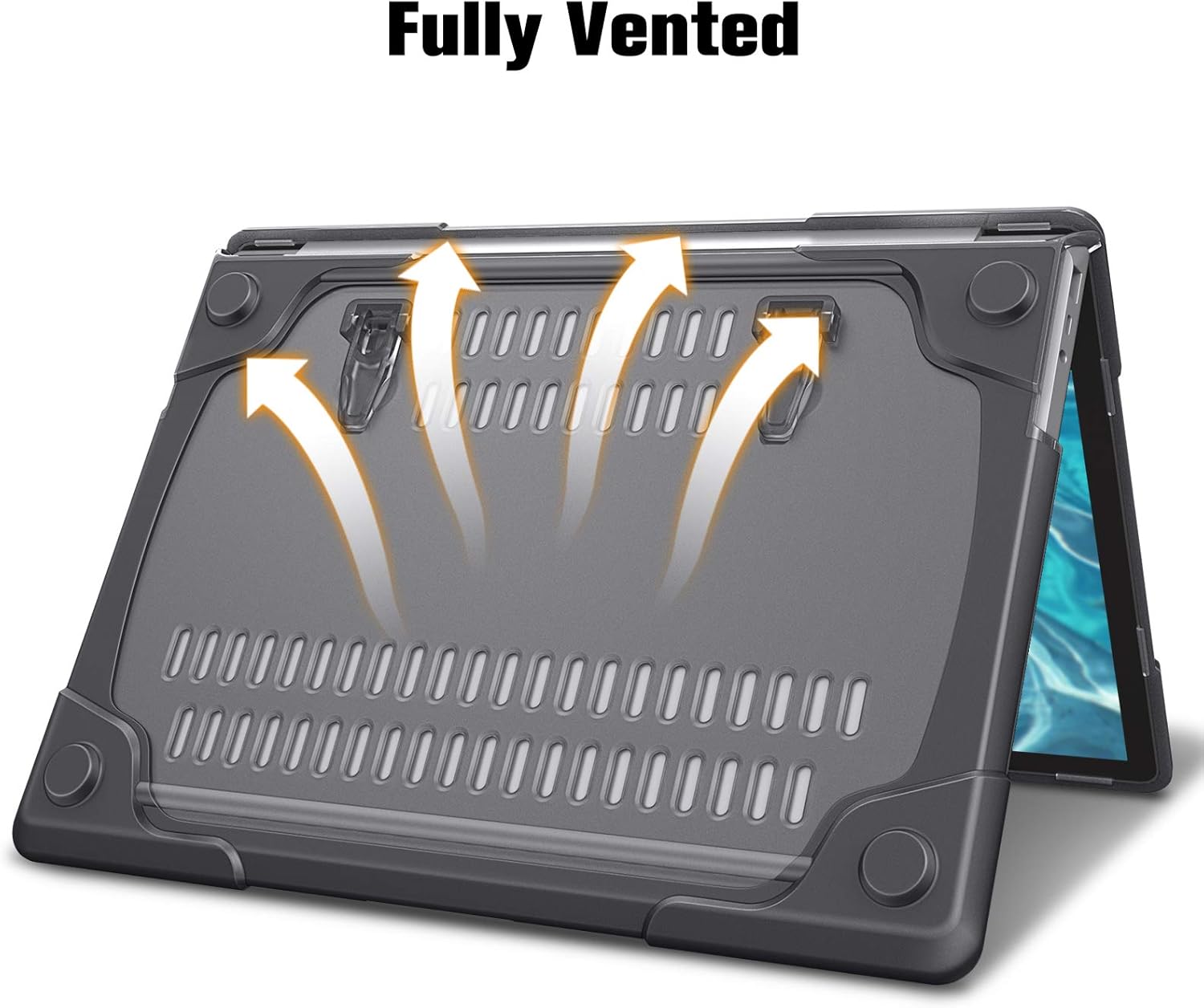
Image 5: A user demonstrating the built-in foldable kickstand, providing an ergonomic typing angle for the laptop.
3.4. Fully Vented Design
The bottom cover of the case features a fully vented design to ensure safe heat disbursement, preventing your laptop from overheating during operation.

Image 6: Underside of the case with visible ventilation slots, designed to facilitate heat dissipation from the laptop.
4. Onderhoud
To keep your Fintie protective case in optimal condition, follow these simple maintenance guidelines:
- Skoonmaak: Vee die kas gereeld af met 'n sagte, damp cloth. For stubborn smudges, a mild soap solution can be used, followed by wiping with a clean, dry cloth.
- Vermy harde chemikalieë: Do not use abrasive cleaners, solvents, or strong chemical agents, as these can damage the matte finish and material of the case.
- Berging: Wanneer dit nie gebruik word nie, bêre die houer op 'n koel, droë plek weg van direkte sonlig of uiterste temperature.
- Inspeksie: Periodically check the clips and overall integrity of the case to ensure it remains securely attached and provides adequate protection.
5. Probleemoplossing
If you encounter any issues with your Fintie protective case, consider the following:
- Case not fitting properly:
- Double-check your laptop's model number against the compatibility information in Section 1. Ensure it is a 12.4-inch Microsoft Surface Laptop Go (Models 2013/1943).
- Ensure all clips are fully engaged. Sometimes a firm, even press around the edges is needed for the case to snap into place completely.
- Remove the case and re-attempt installation, ensuring correct alignment of the top and bottom pieces.
- Case feels loose or unsnaps:
- Verify that the case is correctly installed and all clips are securely fastened.
- Inspect the clips for any signs of damage or wear. If clips are broken, the case may need replacement.
For further assistance, please contact Fintie customer support.
6. Spesifikasies
| Kenmerk | Detail |
|---|---|
| Handelsmerk | FINTIE |
| Modelnommer | AMAP001 |
| Versoenbare toestelle | Microsoft Surface Laptop Go 3 (2023), 2 (2022), 1 (2020) - 12.4 inch |
| Materiaal | Plastic (Hard impact-resistant PC exterior) |
| Kleur | Grys |
| Vormfaktor | Harde omhulselkas |
| Spesiale kenmerke | Built-in Foldable Kickstand, Fully Vented, Anti-fingerprint Matte Coating |
| Itemafmetings (L x B x H) | 11.42 x 8.27 x 0.59 duim |
| Item gewig | 0.35 kilogram |
| UPC | 840173959886 |
7. Waarborg en Ondersteuning
Fintie products are designed for quality and durability. For specific warranty information regarding your product, please refer to the documentation included with your purchase or visit the official Fintie webwebwerf.
If you require technical support, have questions about installation, or need assistance with any product-related issues, please contact Fintie customer service through their official channels. Contact information can typically be found on the Fintie webwebwerf of op die produkverpakking.
Aanlyn ondersteuning: Visit the Fintie Store on Amazon