
1. Inleiding
This manual provides essential information for the proper setup and operation of your ZdalaMit AKB75155301 replacement remote control. This remote is designed to function as a direct replacement for specific LG Sound Bar models without requiring any programming or pairing.
2. Opstelling: Batteryinstallasie
To begin using your remote control, you must first install the batteries.
- Vind die batterykompartement aan die agterkant van die afstandbeheer.
- Skuif die batteryklepdeksel afwaarts of in die rigting wat deur 'n pyl aangedui word om dit oop te maak.
- Insert two (2) 1.5V AAA alkaline batteries, ensuring that the positive (+) and negative (-) terminals align correctly with the markings inside the compartment.
- Replace the battery compartment cover by sliding it back into position until it clicks securely.

Figuur 2.1: Voorkant view of the ZdalaMit AKB75155301 remote control. The battery compartment is located on the back.
Let wel: Batteries are not included with the remote control. Always use new AAA alkaline batteries for optimal performance. Do not mix old and new batteries, or different types of batteries.
3. Bedryfsinstruksies
Once batteries are installed, the remote control is ready for immediate use with compatible LG Sound Bar models. Point the remote directly at your sound bar when operating.
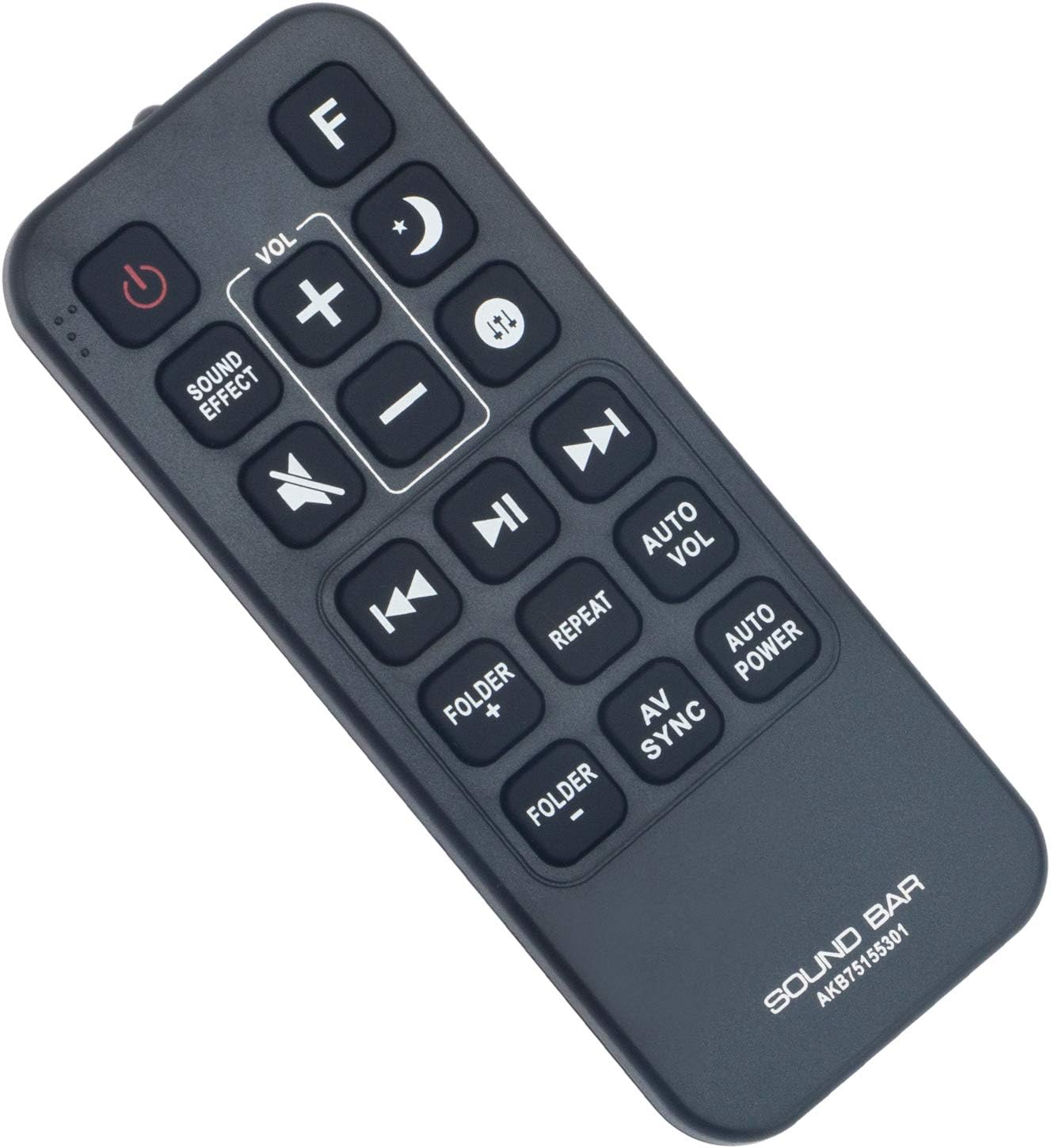
Figuur 3.1: Close-up view of the remote control buttons for operation.
Sleutel funksies:
- Krag (⏻): Skakel die klankbalk aan of af.
- Klankeffek: Cycles through available sound modes or effects.
- VOL + / -: Verhoog of verlaag die volumevlak.
- Stil (🔇): Demp of ontdemp die klank.
- Previous (⏮): Skips to the previous track or chapter.
- Play/Pause (⏯): Speel of onderbreek mediaterugspeel.
- Next (⏭): Spring na die volgende snit of hoofstuk.
- Folder + / -: Navigates through folders (if supported by the sound bar).
- Herhaal: Toggles repeat playback mode.
- Auto Vol: Activates or deactivates automatic volume leveling.
- AV-sinkronisering: Adjusts audio-video synchronization.
- Outomatiese krag: Controls automatic power on/off features.
- F: Function button, typically used to switch input sources.
- Moon/Sleep (🌙): May activate sleep timer or night mode.
- Up/Down Arrows (⇵): Navigation or specific function depending on sound bar model.
4. Verenigbaarheid
This ZdalaMit AKB75155301 replacement remote control is compatible with the following LG Sound Bar models:
- LG SJ5 Sound Bar
- LG SJ5Y Sound Bar
- LG SJ5Y-S Sound Bar
- LG SPJ5B-W Sound Bar
- LG SPJ4B-W Sound Bar
5. Spesifikasies
| Handelsmerk | ZdalaMit |
| Model Naam | AKB75155301 |
| Verbindingstegnologie | Infrarooi (IR) |
| Tipe beheerder | Knoppie beheer |
| Aantal knoppies | 18 |
| Kragtoevoer | 2 x AAA-batterye (nie ingesluit nie) |
| Maksimum reeks | 33 voet (10 meter) |
| Versoenbare toestelle | LG Sound Bars (specific models listed above) |
| Item gewig | 35 gram |
| Itemafmetings (L x B x H) | 4.37" x 1.79" x 0.55" (11.1cm x 4.55cm x 1.4cm) |
6. Probleemoplossing
- Afstandsbediening reageer nie:
- Ensure batteries are installed correctly with the correct polarity (+/-).
- Vervang ou batterye met nuwe AAA alkaliese batterye.
- Check for any obstructions between the remote control and the sound bar's IR receiver.
- Ensure you are within the maximum operating range (33 feet) and pointing the remote directly at the sound bar.
- Spesifieke knoppies werk nie:
- Some functions may be specific to certain sound bar models or require the sound bar to be in a particular mode. Refer to your LG Sound Bar's original manual for specific function details.
7. Onderhoud
- Clean the remote control regularly with a soft, dry cloth. Do not use liquid cleaners or abrasive materials.
- Avoid exposing the remote control to extreme temperatures, direct sunlight, or high humidity.
- Indien die afstandbeheerder nie vir 'n lang tydperk gebruik gaan word nie, verwyder die batterye om lekkasie en potensiële skade te voorkom.
8. Waarborg en Ondersteuning
This ZdalaMit remote control comes with a 1 jaar waarborg vanaf die aankoopdatum.
For any queries or support needs regarding your remote control, please contact the ZdalaMit customer service. Refer to your purchase documentation for specific contact information.