
Produk verbyview
The Hoco ES41 TWS (True Wireless Stereo) Bluetooth Headset provides a wireless audio experience with clear sound. This manual will guide you through the setup, operation, and maintenance of your ES41 headset.
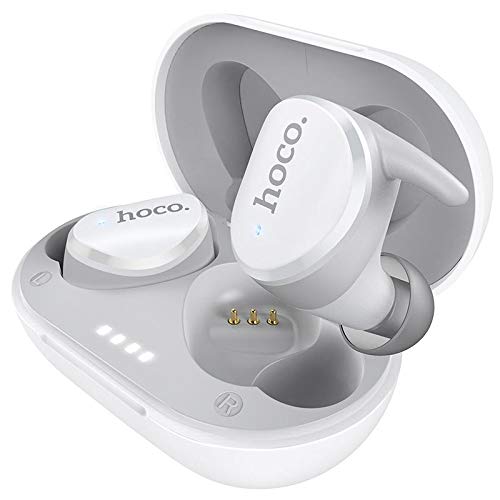
Image: The Hoco ES41 TWS Bluetooth Wireless Headset, showing both earbuds and the charging case in white.
Pakketinhoud
Kontroleer asseblief die pakket vir die volgende items:
- Hoco ES41 TWS Wireless Earbuds (Left and Right)
- Draadlose laaikas
- USB-laaikabel (Mikro-USB)
- Gebruikershandleiding

Beeld: Voor en agter view of the Hoco ES41 retail packaging, displaying the product and key features.
Opstelling
1. Laai die oorfone en houer
Laai die laaikas en oorfone volledig voor die eerste gebruik.
- Koppel die meegeleverde USB-laaikabel aan die laaipoort op die kas en aan 'n USB-kragbron.
- The indicator lights on the charging case will illuminate to show charging status.
- Plaas die oorfone in die laaikas. Maak seker dat hulle korrek geplaas is; die oorfone sal outomaties begin laai.
- Charging time for the headset is approximately 1 hour. The charging case takes approximately 2.5 hours to fully charge.

Image: The Hoco ES41 earbuds placed inside the open charging case, showing the LED indicator lights for battery status.
2. Koppel met 'n Bluetooth-toestel
The ES41 headset uses Bluetooth 5.0 for a stable connection.
- Aanvanklike paring:
- Maak die laaikas oop. Die oorfone sal outomaties aanskakel en in paringsmodus gaan.
- Aktiveer Bluetooth op jou toestel (slimfoon, tablet, ens.).
- Soek vir Bluetooth devices and select "Hoco ES41" from the list.
- Sodra dit gekoppel is, sal jy 'n bevestigingstoon hoor, en die oorfone se aanwyserliggies sal verander.
- Herverbinding:
- After initial pairing, the earbuds will automatically connect to the last paired device when removed from the charging case and Bluetooth is enabled on the device.
Bedryfsinstruksies
Krag aan/af
- Krag aan: Open the charging case, or long-press the touch area on both earbuds for approximately 3 seconds.
- Skakel af: Place the earbuds back into the charging case and close the lid, or long-press the touch area on both earbuds for approximately 5 seconds.
Musiek afspeel
- Speel/pouse: Tik een keer op die aanraakarea op enige oordopjes.
- Volgende snit: Dubbeltik op die aanraakarea op die regteroorfoon.
- Vorige snit: Dubbeltik op die aanraakarea op die linkeroorfoon.
Belbestuur
- Beantwoord/beëindig oproep: Tik een keer op die aanraakarea op enige oordopjes.
- Verwerp oproep: Long-press the touch area on either earbud for 2 seconds.
Stemassistent
- Aktiveer stemassistent: Triple-tap the touch area on either earbud.
Onderhoud
- Skoonmaak: Gebruik 'n sagte, droë lap om die oorfone en laaikas skoon te maak. Moenie harde chemikalieë of skuurmiddels gebruik nie.
- Berging: Wanneer dit nie gebruik word nie, bêre die oorfone in hul laaikassie om hulle te beskerm en gelaai te hou. Bêre op 'n koel, droë plek weg van direkte sonlig en uiterste temperature.
- Waterweerstand: Die oorfone is nie waterdig nie. Vermy blootstelling aan water, sweet of hoë humiditeit.
Probleemoplossing
- Oordopjes koppel nie met mekaar nie:
Place both earbuds back into the charging case, close the lid, then open it again. This should reset their connection.
- Oorfone koppel nie aan toestel nie:
Ensure Bluetooth is enabled on your device. Forget "Hoco ES41" from your device's Bluetooth settings and attempt to pair again.
- Geen geluid uit een oorfone nie:
Check if both earbuds are charged. Try placing them back in the case and taking them out again. If the issue persists, try resetting the earbuds (refer to the full manual if available for specific reset instructions).
- Laai kwessies:
Ensure the charging cable is securely connected and the power source is active. Clean the charging contacts on both the earbuds and the case with a dry cotton swab.
Spesifikasies
| Kenmerk | Spesifikasie |
|---|---|
| Model Naam | ES41 |
| Bluetooth weergawe | 5.0 |
| Bluetooth-skyfie | JL6936D |
| Laaikas batterykapasiteit | 400mAh |
| Single Headset Battery Capacity | 40mAh |
| Gesels-/musiektyd | 5 uur |
| Bystandtyd | 200 uur |
| Headset Laai Tyd | 1 uur |
| Laaikas Laaityd | 2.5 uur |
| Totale gewig | 37g |
| Single Headset Weight | 4g |
| Beheer metode | Raak |
| Verbindingstegnologie | Draadloos |
| Oorfone vorm faktor | In Oor |
| Materiaal | Plastiek |
| Versoenbare toestelle | Selfone |
Waarborg en Ondersteuning
For warranty information and technical support, please refer to the documentation provided with your purchase or contact HOCO customer service. Keep your proof of purchase for warranty claims.