
Bytech BY-AU-BS-152-BK
Bytech True Wireless Bluetooth Boost Link True Speaker Gebruikershandleiding
Model: BY-AU-BS-152-BK
Inleiding
Dankie vir die aankoopasing the Bytech True Wireless Bluetooth Boost Link True Speaker. This manual provides essential information for setting up, operating, and maintaining your new speakers. Please read this manual thoroughly before use to ensure proper operation and to maximize your listening experience. These speakers feature True Wireless Stereo (TWS) functionality, Bluetooth connectivity, FM Radio, and Bass Boost for rich audio.
Veiligheidsinligting
- Do not expose the speakers to extreme temperatures, humidity, or direct sunlight.
- Vermy om die luidsprekers te laat val of aan harde impakte bloot te stel.
- Do not disassemble, repair, or modify the speakers yourself. Refer all servicing to qualified personnel.
- Hou die luidsprekers weg van water en ander vloeistowwe.
- Gebruik slegs die gespesifiseerde laaikabel en kragadapter.
- Maak die luidsprekers skoon met 'n sagte, droë lap. Moenie skuurmiddels of oplosmiddels gebruik nie.
- Listen at moderate volume levels to avoid hearing damage.
Pakketinhoud

Image: The Bytech Boost Link True Wireless Speakers shown in their retail packaging, highlighting the two speakers and the Bluetooth connectivity feature.
Kontroleer asseblief dat alle items teenwoordig en in goeie toestand is:
- 2 x Bytech Boost Link True Wireless Speakers
- 1 x Laaikabel (USB)
- 1 x Gebruikershandleiding (hierdie dokument)
Produk verbyview

Beeld: 'n Nabyskoot van voor view of the two Bytech Boost Link True Wireless Speakers, showing the speaker grilles and control buttons at the bottom.
Familiarize yourself with the speaker's components and controls:
- Luidsprekerrooster: Protects the speaker driver.
- Beheerknoppies:
- Kragknoppie: Power On/Off, Play/Pause.
- Modusknoppie: Switch between Bluetooth, FM Radio, etc.
- Vorige snit/volume af-knoppie: Kort druk vir vorige snit, lank druk vir volume af.
- Volgende snit/volume op-knoppie: Druk kort vir die volgende snit, druk lank vir volume hoër.
- Laaipoort: Vir die koppeling van die USB-laaikabel.
- LED-aanwyser: Shows power status, charging status, and pairing status.
Opstelling
Laai die luidsprekers
Before first use, fully charge both speakers. Connect the supplied USB charging cable to the charging port on each speaker and plug the other end into a USB power adapter (not included) or a computer's USB port. The LED indicator will show charging status and turn off or change color when fully charged.
Skakel aan/af
- Om aan te skakel: Press and hold the Power button on each speaker until the LED indicator lights up and you hear a power-on prompt.
- Om af te skakel: Press and hold the Power button on each speaker until the LED indicator turns off and you hear a power-off prompt.
Bedryfsinstruksies
Bluetooth Pairing (Single Speaker Mode)
- Ensure the speaker is powered on and in Bluetooth pairing mode (LED indicator will flash).
- Aktiveer Bluetooth op jou toestel (slimfoon, tablet, skootrekenaar) en soek vir beskikbare toestelle.
- Select "BYTECH BOOST LINK" (or similar name) from the list.
- Once paired, the LED indicator will stop flashing and remain solid, and you will hear a confirmation sound.
True Wireless Stereo (TWS) Pairing (Two Speakers)
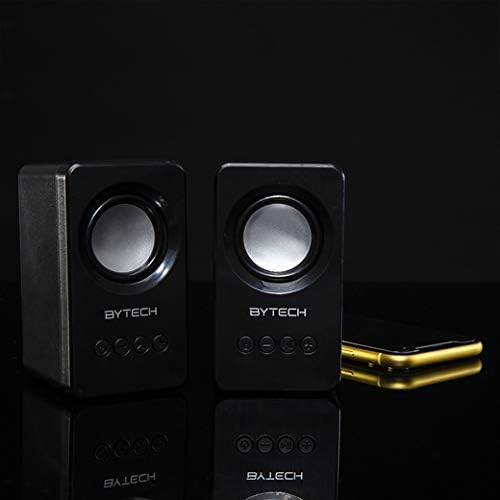
Image: The two Bytech Boost Link True Wireless Speakers positioned next to a smartphone, symbolizing their ability to connect wirelessly to each other and a device for stereo sound.
For a true stereo sound experience, you can pair both speakers together:
- Power on both Bytech Boost Link speakers. Do not connect them to your Bluetooth device yet.
- The speakers will automatically attempt to pair with each other. You will hear a confirmation sound when they are successfully linked for TWS. One speaker will become the master (left channel) and the other the slave (right channel).
- Once TWS paired, the master speaker will enter Bluetooth pairing mode (LED flashing).
- On your device, enable Bluetooth and search for "BYTECH BOOST LINK". Connect to this single entry.
- Both speakers will now play audio in stereo.
- Let wel: If the speakers do not automatically pair, try double-pressing the Mode button on one of the speakers to initiate TWS pairing.
FM-radio werking
- Power on the speaker(s).
- Druk die Modus button repeatedly until you hear the FM radio prompt.
- Om outomaties te skandeer en stasies te stoor, druk en hou die Speel / Pouse button. The speaker will scan and store available FM stations.
- Gebruik die Vorige Snit en Volgende Snit knoppies om tussen gestoorde stasies te navigeer.
Oudio-terugspeel en volumebeheer
- Speel/pouse: Druk kort op die Power-knoppie.
- Volgende snit: Short press the Next Track/Volume Up button.
- Vorige snit: Short press the Previous Track/Volume Down button.
- Volume op: Long press the Next Track/Volume Up button.
- Volume af: Long press the Previous Track/Volume Down button.
Onderhoud
- Skoonmaak: Use a soft, dry, lint-free cloth to clean the surface of the speakers. Do not use liquid cleaners, aerosols, or solvents.
- Berging: Wanneer dit nie vir lang tye gebruik word nie, bêre die luidsprekers op 'n koel, droë plek weg van direkte sonlig en uiterste temperature.
- Batterysorg: To prolong battery life, avoid fully discharging the battery frequently. Charge the speakers regularly, even if not in use.
Probleemoplossing
| Probleem | Moontlike oorsaak | Oplossing |
|---|---|---|
| Luidspreker skakel nie aan nie. | Lae battery. | Laai die luidspreker volledig. |
| Kan nie via Bluetooth koppel nie. | Luidspreker nie in paringsmodus nie; Toestel Bluetooth af; Te ver van toestel af. | Maak seker dat die luidspreker-LED flikker; Skakel Bluetooth op jou toestel aan; Beweeg die luidspreker nader aan die toestel (binne 10 meter). |
| Geen klank nie. | Volume too low; Speaker not connected; Incorrect mode. | Increase volume on speaker and device; Re-pair Bluetooth; Ensure correct mode (Bluetooth/FM). |
| TWS-paring misluk. | Speakers already connected to a device; Speakers too far apart. | Disconnect speakers from any device; Power off and on both speakers, then try TWS pairing again; Ensure speakers are close to each other. |
| Swak FM-radio-ontvangs. | Swak sein; Interferensie. | Relocate the speaker to an area with better reception; Extend the charging cable (can act as an antenna). |
Spesifikasies
- Model: DEUR-AU-BS-152-BK
- Handelsmerk: Bytech
- Verbindingstegnologie: Draadloos (Bluetooth)
- Klankuitsetmodus: Omring
- Tipe luidspreker: Omringklank
- Spesiale kenmerke: Wireless Bluetooth, Bass Boost, FM Radio, True Wireless Stereo (TWS)
- Aanbevole gebruike: Vir musiekspelers
- Versoenbare toestelle: Skootrekenaar, tablet, slimfoon
- Kontroleurstipe: On-device buttons
- Pakket afmetings: 20.7 x 16 x 9 cm
- Gewig: 560 g
Waarborg en Ondersteuning
Bytech products are designed and manufactured to the highest quality standards. For information regarding warranty coverage, technical support, or service inquiries, please refer to the warranty card included with your purchase or visit the official Bytech webwebwerf. Bewaar asseblief u bewys van aankoop vir waarborgeise.
For further assistance, please contact Bytech customer support.