
1. Inleiding
Thank you for choosing the Langsdom GT4 Dual Driver Earbuds. These wireless earbuds are designed to provide a superior audio experience with dual dynamic drivers, Bluetooth 5.0 connectivity, and convenient touch controls. This manual will guide you through the setup, operation, and maintenance of your new earbuds.
2. Pakketinhoud
Kontroleer asseblief die pakket vir die volgende items:
- Langsdom GT4 Dual Driver Earbuds (Left and Right)
- Laaikas
- USB-C-laaikabel
- Soft Ear Caps (S, M, L sizes)
- Gebruikershandleiding

Image: Contents of the Langsdom GT4 earbud package, including earbuds, charging case, USB-C cable, and various ear tip sizes.
3. Produk verbyview
The Langsdom GT4 earbuds feature advanced technology for an immersive audio experience.
3.1 Dual Dynamic Drivers
Each earbud is equipped with two 8mm dynamic drivers, providing enhanced bass and clear treble for a rich sound profile.

Image: Diagram illustrating the dual 8mm dynamic drivers within the Langsdom GT4 earbuds, highlighting superior audio sound with AAC and SBC support.
3.2 Bluetooth 5.0 Technology
Utilizing Bluetooth 5.0, the earbuds offer a stable and fast connection, ensuring high-quality audio transmission and compatibility with various devices.
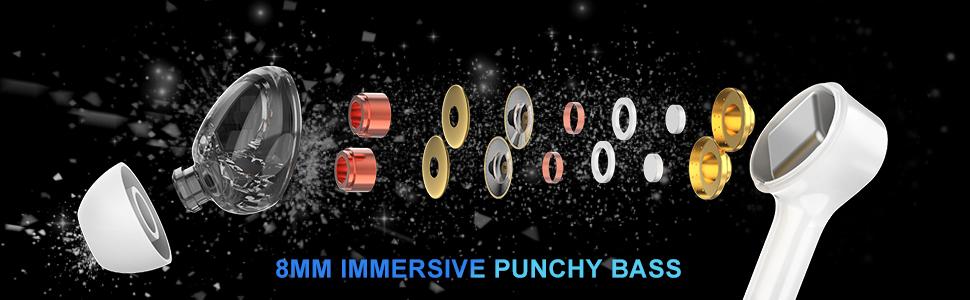
Image: Close-up of the Bluetooth 5.0 chip inside the earbud, emphasizing HD call quality, wide compatibility, and long battery life.
3.3 Lang batterylewe
The earbuds provide up to 5 hours of playtime on a single charge, with the charging case extending total playtime to approximately 30 hours.
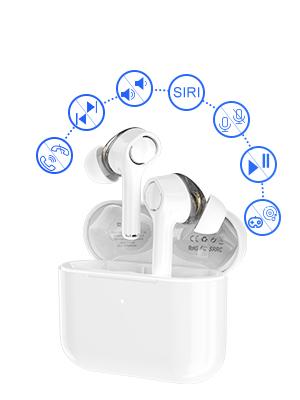
Image: Graphic showing the Langsdom GT4 earbuds and charging case, indicating 1.2 hours charging time, 5 hours play time, and 30 hours total endurance time.
3.4 Ergonomiese Ontwerp
Designed for comfort and stability, each earbud weighs only 4g and comes with three sizes of silicone ear tips to ensure a secure fit for extended wear.

Image: A person wearing the Langsdom GT4 earbuds, demonstrating their comfortable and secure fit.
4. Opstelinstruksies
4.1 Laai die oordopjes en houer
- Plaas die oorfone in die laaikas. Maak seker dat hulle korrek geplaas is.
- Koppel die USB-C-laaikabel aan die laaipoort op die omhulsel en aan 'n kragbron.
- The indicator light on the charging case will show charging status. A full charge takes approximately 1.2 hours for the earbuds and case.
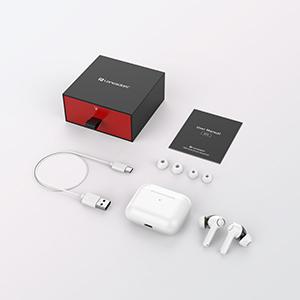
Image: Close-up of the USB-C charging port on the Langsdom GT4 charging case, with a charging cable connected.
4.2 Koppeling met 'n Toestel
- Maak die deksel van die laaikas oop. Die oordopjes sal outomaties aanskakel en saambindmodus gaan.
- Aktiveer Bluetooth op jou toestel (slimfoon, tablet, ens.).
- Soek vir "GT4" in the list of available Bluetooth devices and select it to connect.
- Sodra dit gekoppel is, sal jy 'n bevestigingstoon hoor, en die oorfone sal gereed wees vir gebruik.
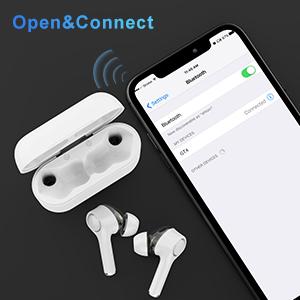
Image: A smartphone screen showing the Bluetooth settings with "GT4" selected for pairing, next to the open charging case with earbuds.
5. Bedryfsinstruksies
5.1 Raak kontroles
The Langsdom GT4 earbuds feature intuitive touch controls. Gently tap the touch sensitive area on either earbud to perform the following actions:
| Aksie | Linkeroordop (L) | Regter oordopjes (R) |
|---|---|---|
| Speel / Pouse | 1 Tik op | 1 Tik op |
| Volume op | - | 2 Krane |
| Volume af | 2 Krane | - |
| Volgende Liedjie | Lang druk 3s | - |
| Vorige Liedjie | - | Lang druk 3s |
| Beantwoord/beëindig oproep | 1 Tik op | 1 Tik op |
| Verwerp oproep | 2 Krane | 2 Krane |
| Activate Voice Assistant (Siri/Google) | 3 Krane | 3 Krane |
| Game Mode / Exit Game Mode | 3 Krane | - |
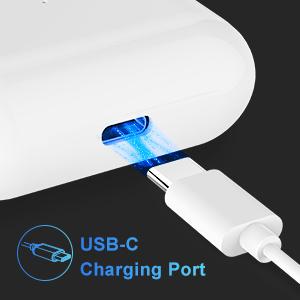
Image: Diagram illustrating the various touch control functions on the Langsdom GT4 earbuds, including play/pause, volume, call management, and voice assistant activation.
5.2 Music and Game Modes
The GT4 earbuds offer a dual-mode function for optimized audio performance based on your activity.
- Musiekmodus: Provides rich stereo bass and clear sound for an immersive listening experience.
- Spelmodus: Reduces latency for synchronized audio and video, enhancing your gaming experience.
To switch between modes, tap the left earbud 3 times.

Image: Graphic comparing Music Mode (low latency, stereo bass) and Gaming Mode (zero delay, synchronization) for the Langsdom GT4 earbuds.
6. Onderhoud
- Maak die oordopjes en laaikas gereeld skoon met 'n sagte, droë lap.
- Vermy die blootstelling van die oordopjes aan uiterste temperature, humiditeit of vloeistowwe.
- Bêre die oorfone in hul laaikassie wanneer dit nie gebruik word nie om hulle te beskerm en die batterylewe te behou.
- Do not attempt to disassemble or repair the earbuds yourself. Contact customer support for assistance.
7. Probleemoplossing
| Probleem | Oplossing |
|---|---|
| Oorknoppies koppel nie | Ensure earbuds are charged. Turn off and on Bluetooth on your device. Forget "GT4" from your device's Bluetooth list and re-pair. |
| Slegs een koptelefoon werk | Place both earbuds back in the charging case, close the lid, then open it again. Ensure both earbuds are charged. |
| Lae volume of swak klankgehalte | Adjust volume on both earbuds and your device. Ensure ear tips are properly sealed in your ear. Clean any debris from the earbud speakers. |
| Oorknoppies laai nie | Check the charging cable and power source. Ensure earbuds are correctly seated in the charging case. Clean charging contacts on earbuds and case. |
| Connectivity issues (disconnections) | Ensure your device is within the Bluetooth range (33-50 feet). Avoid obstacles between earbuds and device. Try resetting the earbuds (refer to manufacturer's specific reset instructions if available, otherwise re-pair). |
8. Spesifikasies
- Model: GT4
- Verbinding: Draadloos (Bluetooth 5.0)
- Bestuurder grootte: Dual 8mm Dynamic Drivers per earbud
- Speeltyd: Tot 5 uur (oordopjes), tot 30 uur (met laaikas)
- Laai tyd: Ongeveer 1.2 uur
- Laaipoort: USB-C
- Beheer tipe: Raak Beheer
- Oordop Gewig: 4 gram (elk)
- Materiaal: Plastiek
- Afmetings: 1.97 x 0.71 x 1.57 duim (Produk)
9. Amptelike Produkvideo
Video: 'n Amptelike produkvideovertoningasing the Langsdom GT4 Dual Driver Earbuds, demonstrating features like auto-pairing, dual drivers, Bluetooth 5.0, secure fit, and long battery life.
10. Waarborg en Ondersteuning
Langsdom products come with a standard manufacturer's warranty. For detailed warranty information, product support, or service inquiries, please refer to the warranty card included in your package or visit the official Langsdom webwebwerf.
Kontakinligting: Please refer to the contact details provided on the product packaging or the official Langsdom webwebwerf vir kliëntediens.