
Logitech C505/C505e
Logitech C505/C505e HD Wired Business Webcam gebruikershandleiding
Model: C505/C505e
1. oorview
The Logitech C505/C505e HD Wired Business Webcam is designed to enhance your video communication experience. It provides crisp, smooth, and colorful widescreen HD 720p video with a 60° diagonal field of view. Die webcam features fixed focus and automatic light correction, adapting to various lighting conditions. Its single, omnidirectional microphone incorporates noise-reduction technology, supporting clear conversations up to 3 meters away, even in noisy environments. The extra-long USB-A cable and universal clip offer flexible placement options on your computer or up to 7 feet away.
2. Opstelinstruksies
Setting up your Logitech C505/C505e webcam is a straightforward plug-and-play process. No additional software installation or charging is required.
- Koppel die Webkamera: Steek die USB-A-kabel van die webcam into an available USB port on your desktop or laptop computer.
- Plaas die Webkamera: Use the universal clip to securely mount the webcam on your monitor, laptop screen, or place it on a flat surface. The extra-long cable allows for flexible positioning.
- Kies die Webkamera: Jou rekenaar behoort outomaties die webcam. If you have multiple cameras or microphones, you may need to select the "Logitech C505/C505e" in your application's settings (e.g., video conferencing software, recording applications) or your operating system's device settings.

Image: The Logitech C505/C505e webcam easily clips onto a monitor for convenient placement.
3. Bedryf die Webnok
Once connected, the Logitech C505/C505e is ready for use with most video conferencing and recording applications.
- Videokwaliteit: Die webcam delivers HD 720p video at 30 frames per second, providing clear visuals for your calls and recordings.
- Veld van View: 'N Diagonale veld van 60 ° view ensures you are framed appropriately without capturing excessive background.
- Vaste fokus: The fixed focus lens maintains sharpness for subjects within its optimal range, simplifying operation.
- Outomatiese ligkorreksie: Die webcam automatically adjusts to the lighting conditions of your environment, helping to ensure you appear well-lit even in varying light. Optimal lighting conditions will yield the best video quality.
- Mikrofoon: The integrated omnidirectional microphone with noise-reduction technology is designed to capture your voice clearly from up to 3 meters away, minimizing background distractions.

Image: The Logitech C505/C505e provides HD 720p widescreen video for clear communication.
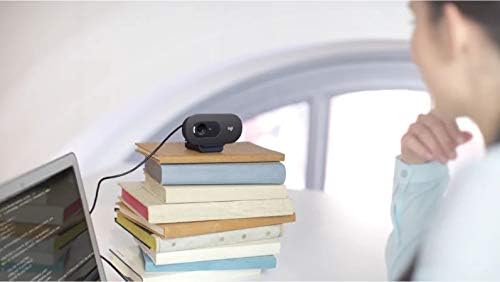
Image: Flexible placement options allow the webcam to be positioned on various surfaces.
4. Onderhoud
To ensure optimal performance and longevity of your Logitech C505/C505e webkamera, volg hierdie eenvoudige onderhoudsriglyne:
- Maak die lens skoon: Vee die liggies af webkameralens met 'n sagte, pluisvrye lap. Vermy die gebruik van harde chemikalieë of skuurmiddels wat die lens kan krap.
- Berging: Stoor die as dit nie gebruik word nie webkamera op 'n skoon, droë plek weg van uiterste temperature en direkte sonlig.
- Kabelversorging: Avoid sharply bending or crimping the USB cable to prevent internal damage.
5. Probleemoplossing
If you encounter issues with your Logitech C505/C505e webkamera, probeer die volgende stappe vir probleemoplossing:
- Geen video/klank:
- Maak seker dat die USB-kabel stewig in beide die webkamera en jou rekenaar.
- Probeer die webcam na 'n ander USB-poort.
- Check your application's settings (e.g., Zoom, Microsoft Teams) to confirm the Logitech C505/C505e is selected as the active camera and microphone.
- Verify your operating system's privacy settings allow applications to access the camera and microphone.
- Swak videogehalte:
- Verseker voldoende beligting in jou omgewing. webcam performs best with good illumination.
- Maak die webkameralens met 'n sagte lap.
- Check for any obstructions in front of the lens.
- Swak oudiogehalte:
- Verseker die webcam's microphone is selected in your application and system audio settings.
- Verminder agtergrondgeraas in jou omgewing.
- Ensure you are within the 3-meter optimal range of the microphone.
- Webkamera nie herken nie:
- Herbegin jou rekenaar.
- Gaan jou rekenaar se Toestelbestuurder (Windows) of Stelselinligting (macOS) na om te sien of die webcam is listed. You may need to update or reinstall drivers, though typically the webcam is plug-and-play.
6. Spesifikasies
| Handelsmerk | Logitech |
| Modelnommer | Logitech C505/C505e |
| Video-opname-resolusie | 720p |
| Video-resolusie | 720p |
| Verbindingstegnologie | Bedraad (USB-A) |
| Fokus Tipe | Vaste fokus |
| Viewing Hoek | 60 grade |
| Mikrofoon | Omnidirectional with Noise-Reduction |
| Bedryfstelsel | Multiple (Windows 8 or later, macOS 10.10 or later, ChromeOS) |
| Ingeboude media | USB Cable, Universal Clip |
| Kenmerke | Automatic Light Correction, Low Light Performance |
7. Waarborg en Ondersteuning
Vir gedetailleerde waarborginligting en tegniese ondersteuning, besoek asseblief die amptelike Logitech-ondersteuning webwebwerf. Jy kan drywers, algemene vrae en kontakbesonderhede vir kliëntediens daar vind.