
Inleiding
This manual provides detailed instructions for the installation, operation, maintenance, and troubleshooting of the ADVANTECH PS8-500FATX-GB 80+ Gold Flex ATX Power Supply. This power supply unit (PSU) is designed to deliver stable and efficient power to your system, featuring 500W output with 3.3V, 5V, 12V, and -12V outputs, and RoHS compliance.
Veiligheidsinligting
Please read all safety instructions carefully before installing or operating the power supply. Failure to follow these instructions may result in electric shock, fire, or damage to the product and connected equipment.
- Ensure the power supply is disconnected from the AC power source before installation or maintenance.
- Moenie die kragtoevoer oopmaak nie casing. Hoë volumetage components inside pose a risk of electric shock.
- Installeer die kragtoevoer in 'n goed geventileerde area om oorverhitting te voorkom.
- Use only the cables provided or approved by ADVANTECH for this power supply.
- Hierdie produk is slegs ontwerp vir binnenshuise gebruik.
Pakketinhoud
Verifieer dat alle items in die pakket teenwoordig is:
- ADVANTECH PS8-500FATX-GB Power Supply Unit
- AC kragkabel
- Monteer skroewe
- Gebruikershandleiding (hierdie dokument)
Opstelling en installasie
Follow these steps to properly install the power supply into your system:
- Berei jou stelsel voor: Ensure your computer system is powered off and disconnected from the AC outlet. Open the computer case.
- Verwyder ou PSU (indien van toepassing): Disconnect all cables from the old power supply. Unscrew and remove the old PSU from the chassis.
- Installeer nuwe PSU: Carefully place the ADVANTECH PS8-500FATX-GB into the power supply bay of your computer case. Ensure the fan is facing the correct direction for optimal airflow (usually facing down or out of the case). Secure the PSU with the provided mounting screws.
- Connect Main Power Cables:
- Connect the 20+4 pin ATX main power connector to the motherboard.
- Connect the 4+4 pin EPS/ATX 12V connector to the motherboard CPU power socket.
- Verbind randapparatuurkabels: Connect SATA power connectors to hard drives, SSDs, and optical drives. Connect PCIe power connectors to graphics cards if required. Connect Molex connectors to other peripherals as needed.
- Kabelbestuur: Route cables neatly to improve airflow and aesthetics.
- Maak die kas toe en koppel die wisselstroom aan: Close your computer case. Connect the AC power cord to the power supply and then to a wall outlet or surge protector.
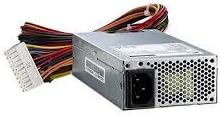
Prent 1: The ADVANTECH PS8-500FATX-GB 500W Flex ATX Power Supply, showing its compact form factor and various power connectors. This image illustrates the physical appearance of the unit and its attached cabling.
Bedryfsinstruksies
Once installed, operating the power supply is straightforward:
- Krag aan: After connecting all necessary cables and the AC power cord, press the power button on your computer case. The power supply will automatically provide power to your system.
- Skakel af: Shut down your computer through the operating system. The power supply will enter a low-power state. For complete power disconnection, switch off the power supply's main switch (if present) or unplug the AC power cord.
- Monitering: Modern motherboards and operating systems often provide tools to monitor power supply voltages. Refer to your motherboard manual for details.
Onderhoud
Behoorlike onderhoud verseker die lang lewensduur en optimale werkverrigting van u kragtoevoer:
- Stof skoonmaak: Periodically clean the power supply fan and vents to prevent dust buildup, which can impede airflow and cause overheating. Use compressed air for this purpose, ensuring the system is powered off and unplugged.
- Kabel inspeksie: Regularly check all power cables for any signs of wear, fraying, or damage. Replace damaged cables immediately.
- Omgewingstoestande: Operate the power supply within its specified temperature and humidity ranges. Avoid extreme conditions.
Probleemoplossing
Indien u probleme met u kragtoevoer ondervind, raadpleeg die volgende algemene probleme en oplossings:
| Probleem | Moontlike oorsaak | Oplossing |
|---|---|---|
| Stelsel skakel nie aan nie. |
|
|
| Stelsel skakel aan, maar skakel onmiddellik af. |
|
|
| Unusual noises from PSU. |
|
|
If the problem persists after trying these solutions, contact ADVANTECH customer support for further assistance.
Spesifikasies
| Kenmerk | Detail |
|---|---|
| Model | PS8-500FATX-GB |
| Handelsmerk | ADVANTECH |
| Vormfaktor | Flex ATX |
| Uitset Wattage | 500 Watt |
| Doeltreffendheidgradering | 80+ Gold |
| Uitset Voltages | 3.3V, 5V, 12V, -12V |
| Connector Tipe | ATX (20+4 pin, 4+4 pin EPS/ATX 12V, SATA, PCIe, Molex) |
| Voldoening | RoHS |
| Item gewig | 12.99 pond |
| Vervaardiger | Advantech Co |
| ASIN | B08SMRH5V8 |
| UPC | 040048829683 |
Waarborg en Ondersteuning
ADVANTECH products are designed for reliability and performance. For warranty information and technical support, please refer to the official ADVANTECH webwebwerf of kontak hul kliëntediensafdeling.
- Amptelik Webwebwerf: www.voordeel.com
- Kliëntediens: Verwys na die "Kontak Ons"-afdeling op die amptelike webwebwerf vir streeksondersteuningsbesonderhede.
Behou asseblief jou aankoopbewys vir waarborgeise.