
1. Inleiding
The Lepro PR902103-US Smart Table Lamp offers versatile lighting solutions for your home. This LED touch lamp features RGB color changing capabilities, tunable warm to cool white light, and dimmable brightness. It is designed for seamless integration with smart home ecosystems, supporting both Amazon Alexa and Google Assistant for voice control, as well as control via a dedicated mobile application. This manual provides comprehensive instructions for setup, operation, and maintenance.

Figure 1: Lepro Smart Table Lamp wysasing its app control interface.
2. Wat is in die boks
Maak asseblief seker dat alle komponente in die verpakking teenwoordig is:
- 1 x Lepro Smart Table Lamp (Model: PR902103-US)
- 1 x 4.9 ft USB Cable
- 1 x kragadapter
- 1 x Gebruikershandleiding (hierdie dokument)
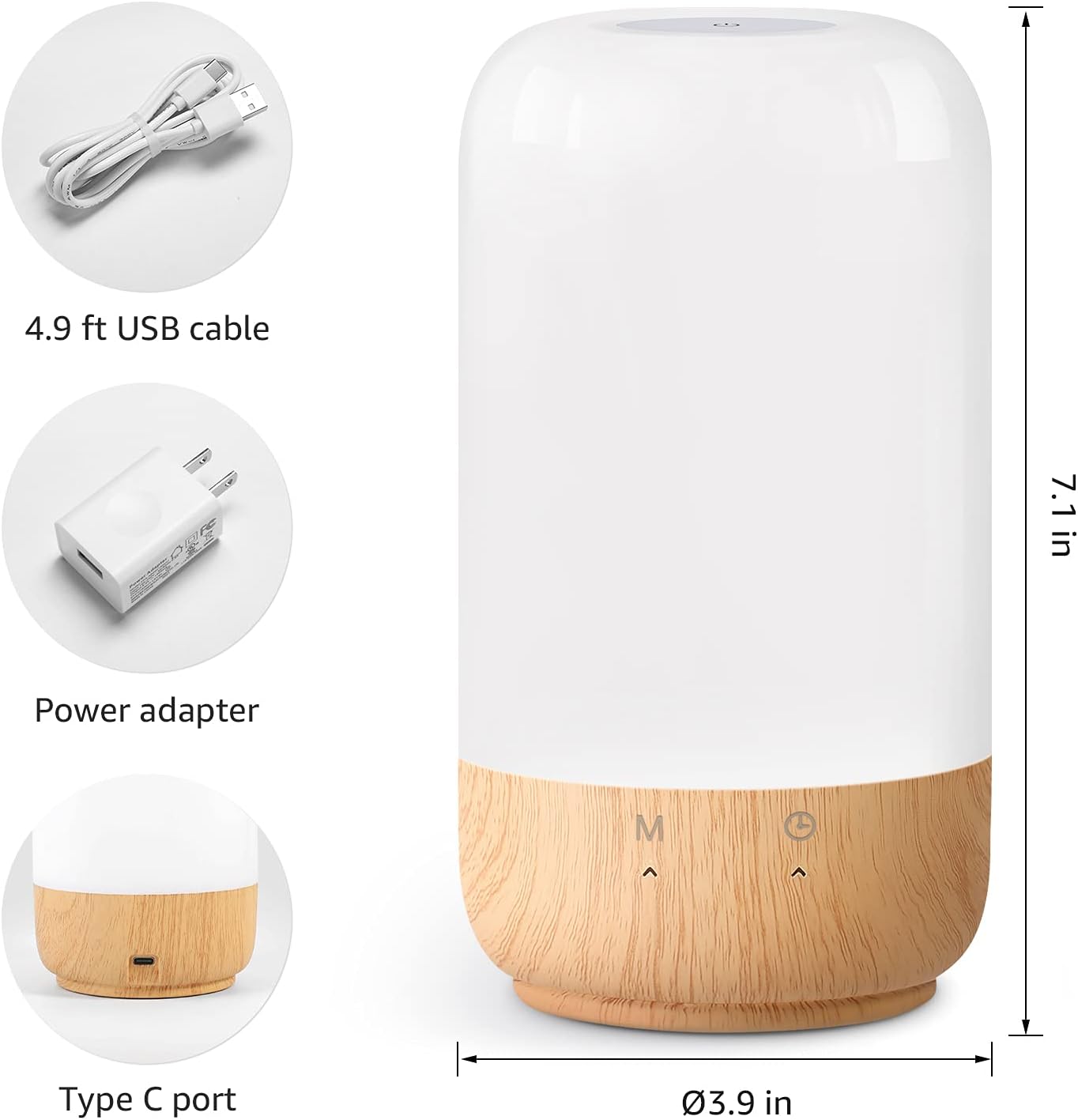
Figuur 2: Ingesluite komponente en produkdimensies.
3. Opstelling
Follow these steps to set up your Lepro Smart Table Lamp:
- Kragverbinding: Koppel die meegeleverde USB-kabel aan die lamp's Type-C port and the power adapter. Plug the power adapter into a standard wall outlet. The lamp sal verlig.
- App aflaai: Download the 'Lepro LampUX' app from your mobile device's App Store (iOS) or Google Play Store (Android).
- Rekeningregistrasie: Open the 'Lepro LampUX' app and register a new account or log in if you already have one.
- Toestelsamestelling:
- Tik in die toepassing op 'Voeg toestel by' of die '+'-ikoon.
- Select 'Table Lamp' from the lighting category.
- Verseker die lamp is powered on. Long press the timer button on the lamp's base for at least 5 seconds until the indicator light blinks rapidly.
- Confirm the indicator light is blinking rapidly in the app and proceed.
- Select your 2.4 GHz Wi-Fi network and enter the password. (Note: The lamp only supports 2.4 GHz Wi-Fi networks. If your router is 5 GHz, please set it to 2.4 GHz during setup.)
- The app will begin adding the device. Once successfully added, you can rename your lamp for easier identification.
Video 1: Detailed steps on how to set up your Lepro Smart Lamp met behulp van die mobiele toepassing.
4. Bedryfsinstruksies
The Lepro Smart Table Lamp can be controlled via touch, the mobile app, or voice commands.
4.1. Raak Kontroles
- Krag aan/af: Short press the power button (marked 'M') on the lampse basis.
- Helderheid aanpassing: Slide your finger along the left side of the lamp's base to adjust brightness.
- Color Change (RGB): Slide your finger along the right side of the lamp's base to cycle through RGB colors.
- Modusskakelaar: Short press the timer button (clock icon) to switch between white light modes (warm white, cool white) and RGB color mode.
4.2. Mobile App Controls
The 'Lepro LampUX' app provides comprehensive control over your lamp:
- Brightness & Color Temperature: Adjust the brightness level and select color temperatures from 2700K (warm white) to 5700K (cool white).
- RGB-kleurkeuse: Choose from 16 million colors using the color wheel in the app.
- Tonele: Select from pre-set scenes like 'Night', 'Read', 'Meeting', 'Leisure', or customize your own scenes with specific colors and effects.
- Timer & Wake-up: Stel skedules vir die lamp to turn on/off automatically. Utilize the 'Sunrise Simulation' feature to gradually increase light for a gentle wake-up.

Figure 3: Mobile application interface for controlling lamp instellings.

Figuur 4: Die lamp's timer and wake-up functions in use.
4.3. Stemkontroles
The Lepro Smart Table Lamp is versoenbaar met Amazon Alexa en Google Assistant. Om stembeheer te aktiveer:
- Verseker jou lamp is successfully paired with the 'Lepro LampUX' app.
- Maak die Amazon Alexa- of Google Home-app oop.
- Navigeer na die afdeling 'Vaardighede en speletjies' (Alexa) of 'Werk saam met Google' (Google Home).
- Soek vir and enable the 'Lepro LampUX' skill/service.
- Link your 'Lepro LampUX' account with your Alexa/Google account.
- Sodra jy gekoppel is, kan jy stemopdragte gebruik soos:
- "Alexa, skakel [L] aan."amp Naam].
- "Hey Google, set [Lamp Name] to warm white."
- "Alexa, change [Lamp Naam] na blou."
- "Haai Google, doof [L"amp Naam] tot 50%.

Figure 5: Voice control integration with Amazon Alexa.
Video 2: Demonstration of the Lepro Smart Table Lamp working with Alexa and Google Home.
5. Onderhoud
To ensure the longevity and optimal performance of your Lepro Smart Table Lamp, volg asseblief hierdie onderhoudsriglyne:
- Skoonmaak: Ontkoppel die krag voor skoonmaak. Gebruik 'n sagte, droë lap om die l af te vee.amp's surface. Avoid using abrasive cleaners, solvents, or harsh chemicals, as these may damage the finish or electronic components.
- Berging: As die lamp for an extended period, ensure it is clean and dry. Store it in a cool, dry place away from direct sunlight and extreme temperatures.
- Hantering: Hanteer die lamp versigtig. Vermy om dit te laat val of aan harde impakte bloot te stel.
6. Probleemoplossing
If you encounter issues with your Lepro Smart Table Lamp, verwys na die volgende algemene probleme en oplossings:
| Probleem | Moontlike oorsaak | Oplossing |
|---|---|---|
| Lamp skakel nie aan nie. | Geen kragtoevoer. | Kontroleer of die kragadapter stewig in die l ingeprop isamp en die muuraansluiting. Maak seker dat die aansluiting funksioneel is. |
| Kan nie aan Wi-Fi koppel nie. | Incorrect Wi-Fi band (5 GHz). Verkeerde wagwoord. Swak Wi-Fi sein. | Ensure your Wi-Fi network is 2.4 GHz. Verify the Wi-Fi password. Move the lamp closer to your router. |
| Stembeheer werk nie. | Skill not enabled/linked. Incorrect device name. | Ensure the 'Lepro LampUX' skill is enabled and linked in your Alexa/Google Home app. Use the exact device name configured in the app. |
| Lamp reageer nie. | Tydelike sagtewarefout. | Ontkoppel die lamp from the power outlet for 10 seconds, then plug it back in to perform a soft reset. |
7. Spesifikasies
| Kenmerk | Detail |
|---|---|
| Handelsmerk | Lepro |
| Modelnommer | PR902103-VS |
| Produk afmetings | 3.9" D x 3.9" B x 7.1" H |
| Item gewig | 1.19 pond |
| Materiaal | Plastiek, hout |
| Ligbrontipe | LED |
| Wattage | 7 watt |
| Helderheid | 350 Lumen |
| Ligte Kleur | RGB + CCT (Tunable White 2700-5700K) |
| Beheer metode | App, Aanraking, Stem (Alexa, Google Assistent) |
| Konnektiwiteit | 2.4 GHz WiFi Only |
| Binne/buiteluggebruik | Binneshuise |
8. Waarborg en Ondersteuning
Lepro products are designed and manufactured to the highest quality standards. For warranty information and technical support, please refer to the contact details provided on the product packaging or visit the official Lepro webwebwerf. Bewaar u aankoopbewys as bewys van aankoop vir waarborgeise.