
Inleiding
This manual provides essential information for the proper installation, operation, and maintenance of your Zebronics Zeb-D370S DVD Player. Please read this manual thoroughly before using the device to ensure safe and efficient operation. Keep this manual for future reference.
Belangrike veiligheidsinligting
- Moenie die toestel aan reën of vog blootstel om brand of elektriese skok te voorkom nie.
- Moenie die c oopmaak nieasing. Verwys alle diens na gekwalifiseerde personeel.
- Verseker behoorlike ventilasie rondom die eenheid. Moenie ventilasie-openinge blokkeer nie.
- Use only the power adapter supplied with the unit or specified by the manufacturer.
- Vermy die plasing van die eenheid op onstabiele oppervlaktes.
- Ontkoppel die kragkabel tydens weerligstorms of wanneer dit vir lang tye nie gebruik word nie.
Pakketinhoud
Verifieer dat alle items in die pakket teenwoordig is:
- Zebronics Zeb-D370S DVD Player Unit
- Afstandbeheer
- AV Cable
- Kragkabel
- Instruksie Handleiding
Produk verbyview
The Zebronics Zeb-D370S is a versatile DVD player featuring a built-in stereo speaker and amplifier, HDMI, USB, and SD card support, and dual karaoke microphone inputs. It supports multiple formats and offers 5.1 channel, coaxial, and optical audio outputs.
Front Panel Controls and Ports
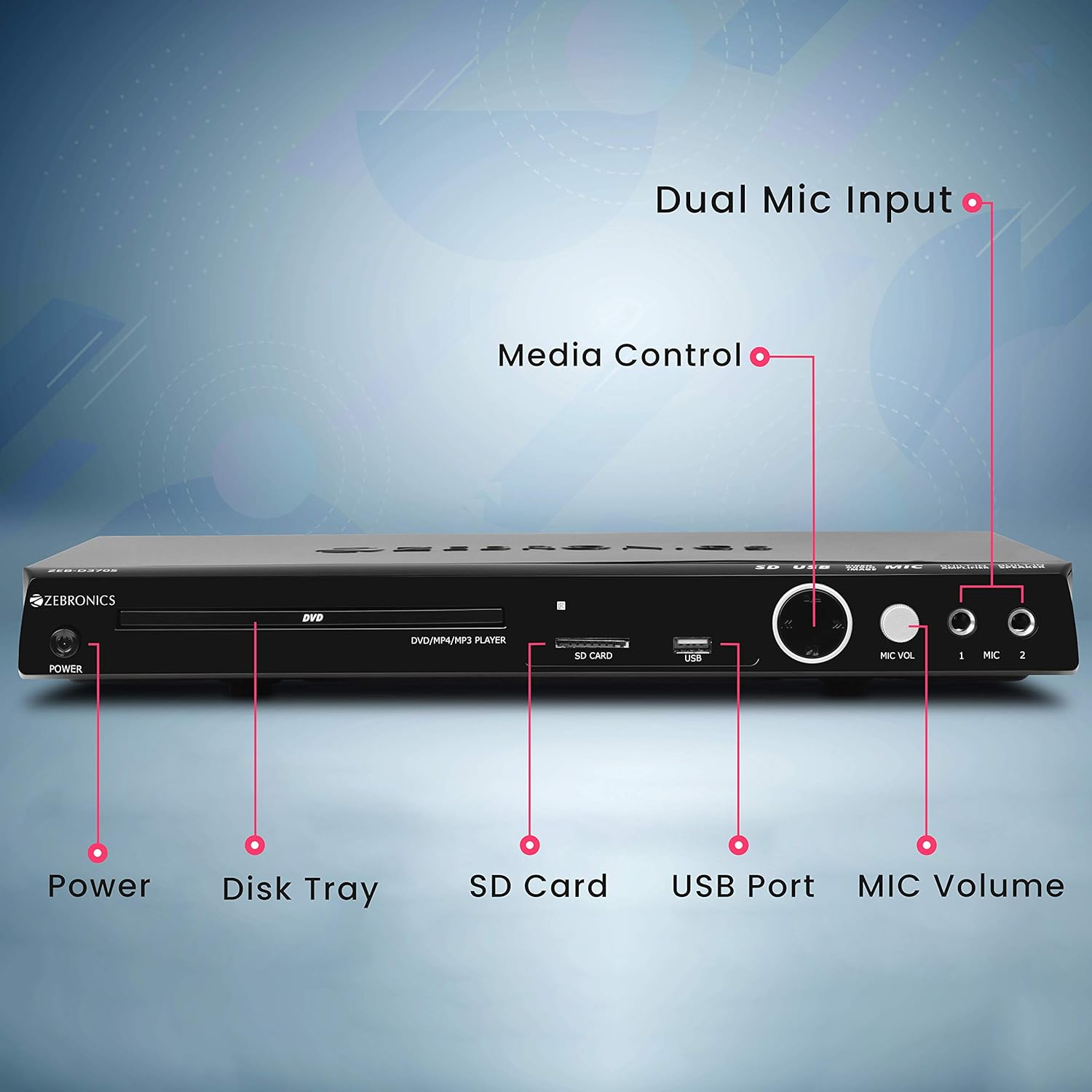
Front panel of the Zebronics Zeb-D370S DVD Player, showing the Power button, Disk Tray, SD Card slot, USB Port, MIC Volume control, and two Microphone inputs (MIC 1, MIC 2).
- Kragknoppie: Skakel die eenheid aan of af.
- Disk Tray: For inserting DVDs, CDs, VCDs, and SVCDs.
- SD-kaartgleuf: Vir die speel van media files vanaf 'n SD-kaart.
- USB-poort: Vir die speel van media files vanaf 'n USB-stasie.
- MIC-volume: Verstel die volume van die gekoppelde mikrofone.
- MIC 1 & MIC 2: Inputs for connecting microphones for karaoke.
- Mediabeheerknoppies: Play/Pause, Stop, Skip, etc.
Agterpaneelverbindings

Rear panel of the Zebronics Zeb-D370S DVD Player, detailing the Coaxial Output, Optical Output, 5.1 Channel Output, HDMI port, Composite video output, Component video output, S-Video output, and Ext-Audio Output.
- HDMI-uitset: For high-definition video and audio connection to a TV or display.
- Saamgestelde video-uitset: Standard definition video output.
- Komponentvideo-uitvoer: Higher quality analog video output (YPbPr).
- S-Video-uitvoer: Improved analog video output.
- Digital Audio Output (Optical & Coaxial): For connecting to external audio receivers or sound systems.
- Analog 5.1 Channel Output: For connecting to a 5.1 channel speaker system.
- Ext-Audio Output: Additional audio output connections.
- Luidspreker Uitset: Terminals for connecting external speakers, utilizing the built-in amplewendiger.

Agter view of the Zebronics Zeb-D370S DVD Player highlighting the built-in amplifier, built-in speaker, and speaker output terminals.
Opstel instruksies
1. Kragverbinding
- Ensure the DVD player is placed on a stable, flat surface with adequate ventilation.
- Connect the power cable to the AC input on the rear of the DVD player.
- Plug the other end of the power cable into a standard electrical outlet (110V - 260V AC).
2. Video Connection to TV/Display
Kies een van die volgende verbindingsmetodes:
- HDMI (Aanbeveel vir beste gehalte): Connect an HDMI cable from the HDMI output on the DVD player to an HDMI input on your TV.
- Komponentvideo: Connect component video cables (Red, Green, Blue) from the DVD player's component outputs to the corresponding inputs on your TV.
- Saamgestelde video: Connect a composite video cable (Yellow) from the DVD player's composite output to the yellow video input on your TV.
- S-video: Connect an S-Video cable from the DVD player's S-Video output to the S-Video input on your TV.
3. Oudioverbinding
Kies een van die volgende oudioverbindingsmetodes:
- HDMI: If using HDMI for video, audio will also be transmitted via the HDMI cable.
- 5.1 Channel Analog Output: Connect RCA cables from the 5.1 channel outputs (Front Left, Front Right, Center, Subwoofer, Surround Left, Surround Right) on the DVD player to a compatible 5.1 channel ampverligter of luidsprekerstelsel.
- Digital Audio (Optical/Coaxial): Connect an optical or coaxial cable from the respective output on the DVD player to a digital audio input on your amplifier or home theater system for surround sound.
- Built-in Speaker Output: If using the built-in speakers, ensure no external speakers are connected to the 5.1 channel outputs unless desired.
4. Microphone Connection (Optional)
- Plug your microphones into the MIC 1 and/or MIC 2 inputs on the front panel.
- Adjust the MIC Volume knob to control microphone audio levels.
Bedryfsinstruksies

Zebronics Zeb-D370S DVD Player with a disc inserted, remote control, and a visual representation of content playing on a screen, illustrating its multimedia capabilities.
1. Skyfweergawe
- Druk die Krag knoppie om die DVD-speler aan te skakel.
- Druk die Maak oop/toe button (usually on the remote or front panel) to open the disc tray.
- Place a compatible disc (DVD Video, DVD+RW/-RW/+R/-R, Dual Layer Disc, CD Audio, CD-R/-RW, VCD, SVCD) onto the disc tray with the label side facing up.
- Druk die Maak oop/toe knoppie weer om die laai toe te maak. Die speler sal outomaties begin met terugspeel of 'n spyskaart vertoon.
- Use the remote control for playback functions such as Play, Pause, Stop, Fast Forward, Rewind, and Chapter Skip.
2. USB/SD Media Playback
- Insert a USB drive into the USB port or an SD card into the SD card slot on the front panel.
- The player should automatically detect the media and display a menu to browse files. If not, select the USB or SD source using the remote control's Bron or Invoer knoppie.
- Navigeer deur jou files (VOB, MP4, DIVX, AVI, MPEG-1, MPEG-2, 3GP, MP3, WMA, AAC, JPEG, TXT) using the remote control and press Speel om afspeel te begin.
3. Karaoke-funksie
- Connect one or two microphones to the MIC 1 and MIC 2 inputs.
- Play a karaoke disc or a media file with instrumental tracks.
- Adjust the MIC Volume knob on the front panel to control the microphone audio level.
4. Gevorderde funksies
- CD Ripping: Convert audio CDs to digital formats (refer to on-screen menu for options).
- Picture Slideshow: View JPEG images from disc, USB, or SD card as a slideshow.
- Progressiewe skandering: Provides a smoother, flicker-free image on compatible displays.
- Zoom IN/OUT: Magnify or reduce the displayed image during playback.
- High Speed Search: Quickly scan through disc or media content.
- Ouerslot: Restrict playback of certain content based on ratings.
- Onmiddellike herhaling: Spring 'n paar sekondes terug tydens terugspeel.
- Disc Resume: Resume playback from where it was last stopped on a disc.
Onderhoud
- Maak die eenheid skoon: Use a soft, dry cloth to clean the exterior of the DVD player. Do not use liquid cleaners or abrasive materials.
- Skyfversorging: Handle discs by their edges. Keep them clean and free of scratches. Use a soft, lint-free cloth to wipe discs from the center outwards.
- Ventilasie: Maak seker dat die ventilasie-openinge nie geblokkeer is nie om oorverhitting te voorkom.
Probleemoplossing
If you encounter issues with your DVD player, refer to the table below for common problems and solutions:
| Probleem | Moontlike oorsaak | Oplossing |
|---|---|---|
| Geen krag nie | Kragkabel nie gekoppel nie; Kragaansluiting werk nie | Kontroleer die kragkabelverbinding; Probeer 'n ander aansluiting |
| Geen video-uitvoer nie | Incorrect video cable connection; Incorrect input selected on TV | Ensure video cables are securely connected; Select the correct input source on your TV (e.g., HDMI 1, AV) |
| Geen oudio-uitvoer nie | Incorrect audio cable connection; TV/amplifier volume too low; Mute activated | Check audio cable connections; Increase volume; Deactivate mute function |
| Skyf speel nie | Disc is dirty or scratched; Disc format not supported; Disc inserted incorrectly | Clean the disc; Ensure disc is compatible; Insert disc with label side up |
| USB/SD media not detected | USB drive/SD card not inserted correctly; Incompatible file format; Corrupted media | Reinsert USB/SD; Check supported file formats; Try a different USB/SD device |
Spesifikasies

Dimensions of the Zebronics Zeb-D370S DVD Player: 360mm (width), 220mm (depth), and 50mm (height).
| Kenmerk | Detail |
|---|---|
| Model Naam | Zeb D370S |
| Handelsmerk | SEBRONIEK |
| Produk afmetings | 28 x 39 x 82 mm (1.4 kg) |
| Resolusie | 1920 x 1080 (Supported resolutions: 480i/576i/480p/576p/720p/1080i/1080p) |
| Spesiale kenmerke | Surround Sound, Built-in Amplifier, Built-in Stereo Speaker, Karaoke Mic Input |
| Klankuitvoermodus | Stereo, Surround (2CH / 5.1CH / Virtual Surround Sound) |
| Luidspreker Surround Sound Kanaalkonfigurasie | 5.1 |
| Ondersteunde oudioformate | Dolby Digital, MP3, WMA, AAC |
| Video Playback System | NTSC / PAL / AUTO |
| Connector Tipe | HDMI, USB, SD Slot, MIC 1 & MIC 2, Composite, Component, S-Video, Digital Audio Output (Optical & Coaxial), Analog 5.1Ch Output, Ext-Audio Output x 2 |
| Media Type (Playback Disc) | DVD Video, DVD+RW/-RW/+R/-R, Dual Layer Disc, CD Audio, CD-R/-RW, VCD, SVCD |
| Media Files Ondersteun | VOB, MP4, DIVX, AVI, MPEG-1, MPEG-2, 3GP, MP3, WMA, AAC, JPEG, TXT |
| Bedryfsvoltage | 110V - 260V WS |
| Funksies | CD Ripping, Picture SlideShow, Progressive scan, Zoom IN/OUT, High speed search, Parental lock, Instant replay, Disc resume |
Waarborg en Ondersteuning
For warranty information, technical support, or service inquiries, please refer to the warranty card included with your product or visit the official Zebronics webwebwerf. Moenie probeer om die toestel self te herstel nie.