
1. Inleiding
Thank you for choosing the HOCO E52 Euphony Wireless Bluetooth Audio Receiver. This manual provides essential information for the safe and efficient use of your device. Please read it thoroughly before operation and retain it for future reference.
2. Produk verbyview
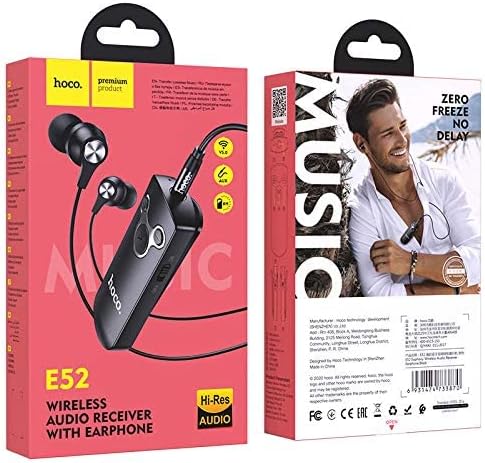
The HOCO E52 is a compact wireless Bluetooth audio receiver designed to convert wired audio devices into Bluetooth-enabled ones. It features an integrated microphone for hands-free calls and comes with a pair of in-ear earphones.

Figure 2.1: HOCO E52 Euphony Wireless Bluetooth Audio Receiver with included earphones.
Figuur 2.2: Gedetailleerd view of the HOCO E52 receiver, highlighting the control buttons and power switch.
3. Pakketinhoud
Maak seker dat alle items in die pakket teenwoordig is:
- HOCO E52 Wireless Bluetooth Audio Receiver
- In-oor oorfone
- Laai kabel
- Oorkussings (verskeie groottes)
- Beskermende saak
- Gebruikershandleiding (hierdie dokument)
4. Opstelling
4.1 Laai die toestel
Before first use, fully charge the HOCO E52 receiver. Connect the provided charging cable to the micro-USB port on the receiver and the other end to a USB power source (e.g., computer USB port, wall adapter). The indicator light will show charging status and turn off or change color when fully charged.
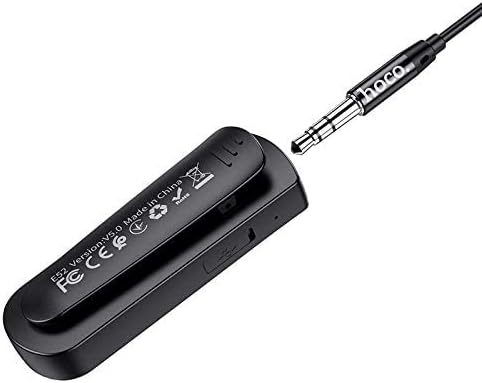
Figuur 4.1: Agter view of the HOCO E52 receiver, illustrating the clip and the micro-USB charging port.
4.2 Bluetooth -koppeling
- Krag aan: Slide the power switch to the 'ON' position. The indicator light will flash, indicating it is in pairing mode.
- Aktiveer Bluetooth: On your smartphone or other Bluetooth-enabled device, go to the Bluetooth settings and ensure Bluetooth is turned on.
- Kies Toestel: Look for 'HOCO E52' (or similar) in the list of available devices and select it to connect.
- Bevestiging: Once successfully paired, the indicator light on the E52 will stop flashing and remain solid, or flash slowly. A voice prompt may also confirm the connection.
- Koppel oorfone: Plug the included earphones (or your own 3.5mm wired headphones) into the 3.5mm audio jack on the HOCO E52 receiver.
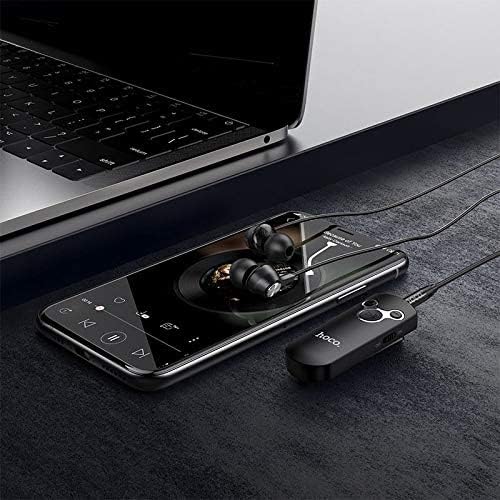
Figure 4.2: The HOCO E52 receiver connected to a smartphone, demonstrating its use with a media device.
5. Bedryfsinstruksies
5.1 Krag aan/af
- Krag aan: Slide the 'ON/OFF' switch to the 'ON' position.
- Skakel af: Slide the 'ON/OFF' switch to the 'OFF' position.
5.2 Musiekweergawe
- Speel/pouse: Druk die sentrale Speel / Pouse knoppie een keer.
- Volgende snit: Druk en hou die Volume op (+) knoppie.
- Vorige snit: Druk en hou die Volume af (-) knoppie.
5.3 Oproepbestuur
With the built-in microphone, you can manage calls directly from the receiver.
- Beantwoord/beëindig oproep: Druk die sentrale Speel / Pouse button once during an incoming call to answer, or during an active call to end.
- Verwerp oproep: Press and hold the central Speel / Pouse button for 2 seconds during an incoming call.
- Herbel laaste nommer: Double-press the central Speel / Pouse knoppie.
5.4 Volumebeheer
- Verhoog volume: Druk die Volume op (+) knoppie.
- Verlaag volume: Druk die Volume af (-) knoppie.
6. Onderhoud
- Hou die toestel droog. Vermy blootstelling aan vog of vloeistowwe.
- Maak die toestel skoon met 'n sagte, droë lap. Moenie harde chemikalieë of skuurmiddels gebruik nie.
- Berg die toestel op 'n koel, droë plek wanneer dit nie gebruik word nie.
- Avoid extreme temperatures, as this can shorten the lifespan of electronic components.
- Moenie probeer om die toestel uitmekaar te haal of te wysig nie, aangesien dit die waarborg ongeldig sal maak en skade kan veroorsaak.
7. Probleemoplossing
| Probleem | Moontlike oorsaak | Oplossing |
|---|---|---|
| Toestel skakel nie aan nie | Lae battery | Laai die toestel ten volle. |
| Kan nie met toestel koppel nie | Bluetooth not enabled on source device; E52 not in pairing mode; too far apart | Ensure Bluetooth is on. Power cycle E52 to enter pairing mode. Keep devices within 10 meters. |
| Geen klank nie | Volume too low; earphones not connected properly; incorrect audio output selected on source device | Increase volume on E52 and source device. Re-plug earphones. Check audio output settings on your phone/computer. |
| Kort batterylewe | Device not fully charged; high volume usage | Ensure full charge. Reduce volume if possible. |
8. Spesifikasies
- Model: E52
- Bluetooth weergawe: 5.0
- Verbindingstegnologie: Draadloos (Bluetooth)
- Music & Talk Time: Ongeveer 6 uur
- Mikrofoon: Geïntegreerde
- Oorfone vorm faktor: In Oor
- Kleur: Swart
- Pakket afmetings: 18.2 x 10.8 x 3.2 cm
- Item gewig: 72 g
- Vervaardiger: HOCO
9. Veiligheidsinligting
- Moenie die toestel blootstel aan uiterste temperature, direkte sonlig of vuur nie.
- Vermy om die toestel te laat val of aan sterk impakte te onderwerp.
- Hou buite bereik van kinders.
- Gooi die toestel en sy battery verantwoordelik weg volgens plaaslike regulasies.
- Do not use the device while driving or in situations where your attention is critical.
10. Waarborg en Ondersteuning
For warranty information and customer support, please refer to the documentation provided at the point of purchase or contact your retailer. HOCO products typically come with a limited warranty against manufacturing defects.