
Coredy R580
Coredy R580 Robot Stofsuier Gebruikershandleiding
Model: R580
1. Inleiding
This manual provides essential information for the safe operation, maintenance, and troubleshooting of your Coredy R580 Robot Vacuum Cleaner. Please read this manual thoroughly before using the product and retain it for future reference.
The Coredy R580 is a versatile robotic vacuum cleaner designed to simplify your cleaning routine. It features powerful 2000Pa suction, Wi-Fi connectivity for app control, and compatibility with voice assistants like Amazon Alexa and Google Assistant. It supports both sweeping and mopping functions (water tank and mop cloth sold separately) and can transition seamlessly from hard floors to carpets, automatically boosting suction when needed. Its slim design allows it to clean under furniture, and it supports virtual boundaries (strips sold separately) to define cleaning areas.
2. Veiligheidsinstruksies
- Lees alle instruksies voordat u die toestel gebruik.
- Moenie toelaat dat kinders met die robot speel nie. Hou toesig oor kinders en troeteldiere wanneer die robot in werking is.
- Gebruik slegs die oorspronklike kragadapter wat deur die vervaardiger verskaf word.
- Moenie die robot in omgewings met oop vlamme of brose voorwerpe gebruik nie.
- Ensure the robot is turned off and unplugged before cleaning or performing maintenance.
- Do not immerse the robot or its charging dock in water.
- Avoid using the robot on wet surfaces or in areas with standing water.
- Remove power cords, small objects, and loose rugs from the floor before operation to prevent entanglement.
3. Pakketinhoud
Nadat u die pakket oopgemaak het, maak asseblief seker dat al die items hieronder gelys ingesluit is en in 'n goeie toestand is:
- Coredy R580 Robotstofsuier
- Laaidok
- Kragadapter
- Syborsels (4x)
- High Efficiency Filter (1x extra)
- Afstandbeheer
- Skoonmaak Borsel
Note: The 300ML water tank, cleaning mop cloth, and boundary strips are sold separately and are not included in the standard package.
4. Produk verbyview

Figuur 4.1: Bo view of the Coredy R580 Robot Vacuum Cleaner with an accompanying smartphone displaying the control application. The robot is black with bronze accents and features a central power button and home button.
Robot komponente
- Boonste paneel: Power/Clean button, Home/Recharge button, Wi-Fi indicator.
- Voorste buffer: Collision sensors.
- Syborsels: Two rotating brushes for edge and corner cleaning.
- Asblik: Collects debris.
- Hoofborsel: Sentrale borsel vir diep skoonmaak.
- Dryfwiele: Vir beweging oor verskeie oppervlaktes.
- Laai kontakte: For automatic charging with the dock.
- Klifsensors: Detects drops to prevent falling down stairs.
5. Opstelling
5.1 Laai die robot
Before first use, fully charge the robot. Place the charging dock against a wall in an open, uncluttered area. Ensure there is at least 1 meter (3 feet) of clear space to the front and 0.5 meters (1.5 feet) to each side of the charging dock. Connect the power adapter to the charging dock and plug it into a wall outlet. Place the robot on the charging dock, ensuring the charging contacts align. The indicator light on the robot will show charging status.
5.2 Installering van syborsels
Attach the side brushes by pressing them onto the square posts at the bottom of the robot until they click into place. Ensure the brushes are securely fastened.
5.3 Verbinding met Wi-Fi en Toepassingopstelling
To utilize smart features, download the Coredy app from your smartphone's app store. Follow the in-app instructions to connect your R580 to your home Wi-Fi network. Note that the robot supports 2.4 GHz Wi-Fi networks only.

Figure 5.1: The Coredy smartphone application allows users to control cleaning, monitor status, schedule cleaning, and access support.
6. Bediening van die robotstofsuier
6.1 Starting/Stopping Cleaning
- Handmatige aanvang: Press the Power/Clean button on the robot or the remote control.
- Toepassing begin: Use the Coredy app to initiate cleaning.
- Stembevel: If connected to Alexa or Google Assistant, use voice commands like "Alexa, ask Coredy to start cleaning."
- To pause cleaning, press the Power/Clean button again. To send the robot back to the charging dock, press the Home/Recharge button.
6.2 Skoonmaakmodusse
- Outomatiese skoonmaak: The robot automatically cleans in a systematic pattern.
- Skoonmaak: The robot cleans a specific area in a spiral pattern.
- Rand skoonmaak: Die robot maak skoon langs mure en meubelrande.
6.3 Using Voice Control
The Coredy R580 is compatible with Amazon Alexa and Google Assistant. Once connected through the Coredy app, you can use simple voice commands to start or stop cleaning.

Figure 6.1: The Coredy R580 can be controlled via voice commands through Amazon Alexa or Google Assistant for hands-free operation.
6.4 Virtual Boundary (Sold Separately)
The R580 supports virtual boundary strips to restrict the robot from entering certain areas. Place the boundary strips on the floor to create invisible barriers. The robot's specialized sensors will detect these strips and avoid crossing them.

Figure 6.2: Virtual boundary strips (sold separately) allow you to define specific areas where the robot vacuum should not clean.
6.5 Sweep and Mop Function (Accessories Sold Separately)
The R580 can perform wet-dry mopping when equipped with the optional 300ML water tank and cleaning mop cloth. Attach the water tank with the mop cloth to the robot for comprehensive cleaning on hard surface floors.
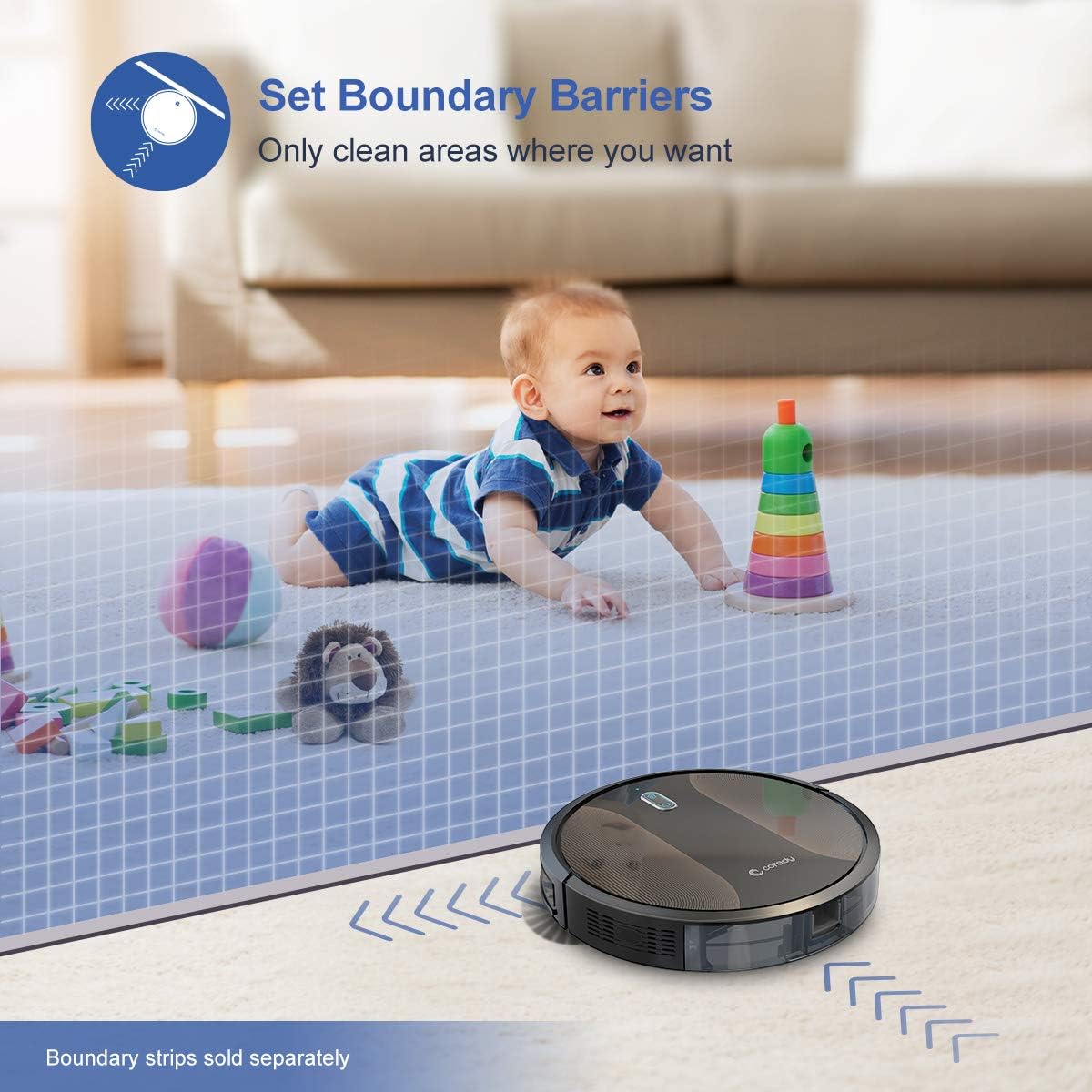
Figure 6.3: The Coredy R580 can be converted for mopping by attaching the optional water tank and mop cloth.
6.6 Boost-Intellect Technology
The robot is equipped with Boost-Intellect Technology, which automatically increases suction power when it detects carpeted surfaces, ensuring a deeper clean across different floor types.

Figure 6.4: Boost-Intellect Technology automatically adjusts suction power when the robot moves from hard floors to carpets.

Figure 6.5: The Coredy R580 provides strong suction power to effectively clean various types of debris from hard floors.
7. Onderhoud
Regular maintenance is crucial for optimal performance and longevity of your robot vacuum. Perform the following cleaning procedures regularly:
7.1 Leegmaak van die vullisdrom
Press the dustbin release button and pull out the dustbin. Open the dustbin cover and empty its contents into a trash can. It is recommended to empty the dustbin after each cleaning cycle.
7.2 Cleaning the Main Brush
Remove the main brush cover and lift out the main brush. Use the provided cleaning tool or a pair of scissors to remove any hair or debris tangled around the brush. Reinstall the main brush and cover.
7.3 Skoonmaak van syborsels
Periodically check the side brushes for tangled hair or debris. Gently pull them off their posts to clean. If they are worn or damaged, replace them with new ones. Push them back onto the posts until they click.
7.4 Skoonmaak van die filter
Remove the filter from the dustbin. Tap the filter against a trash can to remove dust. Do not wash the filter with water, as this can damage it. Replace the filter every 2-3 months, or more frequently depending on usage.
7.5 Skoonmaak van sensors en laaikontakte
Wipe the cliff sensors (located on the bottom of the robot) and the charging contacts (on the robot and charging dock) with a clean, dry cloth. Keeping these clean ensures proper navigation and charging.
8. Probleemoplossing
If your Coredy R580 encounters issues, refer to the following table for common problems and solutions:
| Probleem | Moontlike oorsaak | Oplossing |
|---|---|---|
| Robot skakel nie aan nie | Lae battery; Skakel af | Laai die robot; Skakel die hoofskakelaar aan. |
| Robot laai nie | Laaikontakte vuil; Laaidok nie aangedryf nie | Clean charging contacts on robot and dock; Ensure charging dock is plugged in. |
| Robot sit gereeld vas | Obstacles (cables, rugs); Cliff sensors dirty | Clear obstacles from cleaning path; Clean cliff sensors. |
| Swak skoonmaakprestasie | Vullisdrom vol; Borsels verstrengel; Filter verstop | Maak die stofhouer leeg; Maak die hoof- en syborsels skoon; Maak die filter skoon of vervang dit. |
| Wi-Fi-verbindingskwessies | Incorrect Wi-Fi password; Router too far; 5GHz network | Voer wagwoord weer in; Beweeg robot nader aan router; Maak seker dat die 2.4GHz-netwerk gebruik word. |
If the problem persists after trying the above solutions, please contact Coredy customer support for further assistance.
9. Spesifikasies
| Kenmerk | Detail |
|---|---|
| Handelsmerk | Coredy |
| Model | R580 |
| Spesiale kenmerk | HEPA Filtration, Pet Tools, Vacuums |
| Kleur | Swart |
| Filter tipe | Patroon |
| Vullishouer kapasiteit | 0.3 liter |
| Kragbron | Batteryaangedrewe (1 litiumioonbattery ingesluit) |
| Beheer metode | Remote, Voice (Alexa, Google Home), App |
| Vormfaktor | Robotagtig |
| Afmetings (L x B x H) | 16.89 x 13.66 x 4.57 duim |
| Item gewig | 8.91 pond |
| Suigkrag | Tot 18 000 Pa |
| Geraasvlak | Onder 65dB |
10. Waarborg en Ondersteuning
10.1 Waarborginligting
Coredy products are manufactured to the highest quality standards. For specific warranty details regarding your R580 Robot Vacuum Cleaner, please refer to the warranty card included in your product packaging or visit the official Coredy webterrein. Die waarborg dek tipies defekte in materiale en vakmanskap onder normale gebruik.
10.2 Kliëntediens
If you have any questions, require technical assistance, or need to report an issue with your Coredy R580, please contact Coredy customer support. Contact information can usually be found on the official Coredy website or on the product packaging. Please have your model number (R580) and purchase information ready when contacting support.
Ask a question about this manual
Ask about setup, troubleshooting, compatibility, parts, safety, or missing instructions. Manuals+ will review the question and use this page’s manual context to help answer it.