
1. Inleiding
This manual provides essential information for the installation, operation, maintenance, and troubleshooting of your MAXSUN GeForce RTX 2060 iCraft 6GB graphics card. Please read this manual thoroughly before installing and using the product to ensure proper functionality and safety.
2. Veiligheidsinligting
- Ontkoppel altyd die krag van jou rekenaar voordat jy enige komponente installeer of verwyder.
- Wear an anti-static wrist strap or frequently touch a grounded metal object to prevent electrostatic discharge (ESD) damage to components.
- Hanteer die grafiese kaart aan die kante om sensitiewe komponente nie aan te raak nie.
- Sorg vir voldoende ventilasie binne jou rekenaarkas om oorverhitting te voorkom.
- Do not attempt to repair the graphics card yourself. Refer to qualified service personnel.
3. Pakketinhoud
Verifieer dat jou pakket die volgende items bevat:
- 1 x MAXSUN GeForce RTX 2060 iCraft 6GB Graphics Card
Indien enige items vermis of beskadig is, kontak asseblief u kleinhandelaar.
4. Produk verbyview
The MAXSUN GeForce RTX 2060 iCraft 6GB graphics card is designed for gaming PCs, featuring NVIDIA's Turing GPU architecture, 6GB GDDR6 memory, and a 192-bit memory interface. It includes a triple-fan cooling system and RGB lighting.

Figuur 4.1: Voorkant view of the MAXSUN GeForce RTX 2060 iCraft 6GB graphics card, showing the three cooling fans and RGB lighting elements.

Figuur 4.2: Hoekig view of the graphics card, highlighting its robust design and cooling solution.

Figuur 4.3: Agter view van die grafiese kaart, wysasing the alloy backplate designed for structural integrity and heat dissipation.

Figure 4.4: Display output ports on the graphics card, including DisplayPort (DP), HDMI, and DVI connectors.
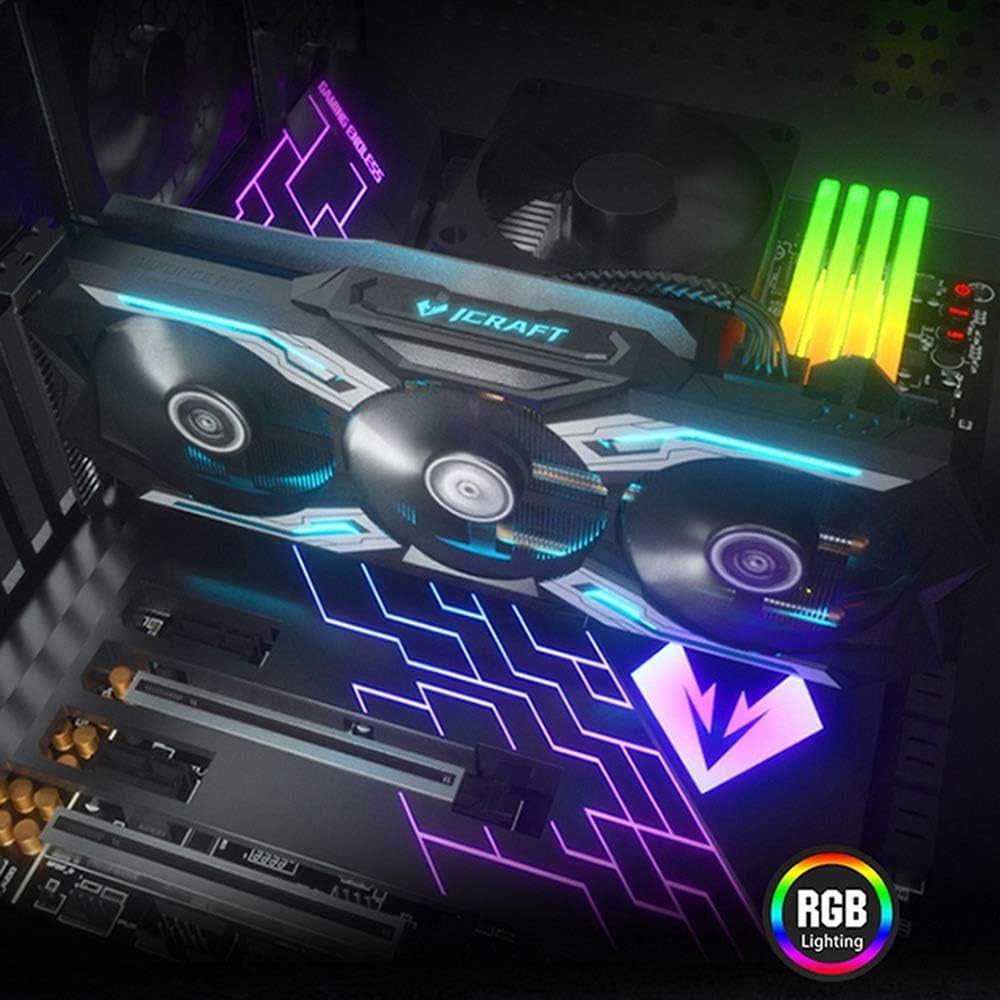
Figure 4.5: The graphics card installed in a PC case, demonstrating its integrated RGB lighting.
Sleutel kenmerke:
- Turing GPU Architecture: Provides enhanced performance for real-time ray tracing and AI capabilities.
- iCraft Series RGB Lighting: Features auto RGB lighting for aesthetic customization within your PC build.
- Triple Fan Cooling: Equipped with 3 MAXSUN Blade II hydro-mechanics low noise fans for efficient heat dissipation.
- Alloy Backplate & Radiator: Includes an alloy backplate and a high-end fin technology radiator with 5 heat pipes for improved thermal performance.
- Prestasie: Boost Clock up to 1680 MHz, 6GB GDDR6 memory, 192-bit memory interface.
5. Opstelling en installering
5.1 Voorinstallasie
- Skakel af: Skakel jou rekenaar af en koppel die kragkabel van die muursok af.
- Oop Saak: Open your computer case to access the motherboard and PCIe slots.
- Statiese beskerming: Ground yourself by touching a metal part of the computer chassis or wearing an anti-static wrist strap to prevent ESD.
- Verwyder ou kaart (indien van toepassing): If replacing an existing graphics card, carefully remove it by unscrewing its bracket and releasing the PCIe retention clip.
5.2 Fisiese installasie
- Vind PCIe-gleuf: Identify an available PCIe x16 slot on your motherboard. This is typically the topmost long slot.
- Voeg grafiese kaart in: Align the graphics card with the PCIe slot and press down firmly until it is securely seated. The PCIe retention clip should click into place.
- Veilige kaart: Bevestig die grafiese kaart aan die rekenaarkas met skroewe.
- Koppel krag: Connect the required PCIe power cables from your power supply to the graphics card. This model typically requires one 8-pin PCIe power connector. Ensure all connections are firm.
- Sluit Saak: Close your computer case and reconnect the power cable.
5.3 Bestuurderinstallasie
- Krag aan: Connect your monitor to one of the graphics card's output ports (HDMI, DisplayPort, or DVI) and power on your computer.
- Laai drywers af: Navigate to the official NVIDIA webwerf (www.nvidia.com/drivers) om die nuutste drywers vir die GeForce RTX 2060 af te laai.
- Installeer drywers: Voer die afgelaaide drywerinstalleerder uit en volg die instruksies op die skerm. 'n Herbegin mag dalk na installasie nodig wees.
Video 5.1: An official video demonstrating the MAXSUN Nvidia Geforce RTX 2060 iCraft 6GB graphics card, showcasindie ontwerp en kenmerke daarvan. Hierdie video bied 'n visuele oorsigview van die produk.
6. Bedryfsinstruksies
6.1 Verbinding van skerms
Connect your monitor(s) to the available display output ports on the graphics card (HDMI, DisplayPort, DVI). The card supports multiple displays simultaneously. Ensure your display cables are securely connected.
6.2 RGB-beligting
The MAXSUN iCraft series graphics card features automatic RGB lighting. The lighting effects are pre-programmed and activate upon system power-on. Please note that dedicated software for controlling the RGB lighting is not typically provided for this model, and it may not be compatible with third-party motherboard RGB software.
7. Onderhoud
7.1 Skoonmaak
- Frekwensie: Clean your graphics card periodically, especially if you notice dust accumulation on the fans or heatsink.
- Prosedure: Disconnect power from your PC. Use compressed air to gently blow dust out of the heatsink fins and fan blades. Hold the fan blades in place while blowing to prevent over-spinning and potential damage.
- Vermy: Do not use liquid cleaners or abrasive materials on the graphics card.
7.2 Onderhoud van waaiers
The Blade II hydro-mechanics fans are designed for durability. If you notice unusual fan noise or reduced cooling performance, ensure there are no obstructions to the fan blades. Do not attempt to lubricate or disassemble the fans.
8. Probleemoplossing
8.1 Geen skermuitvoer nie
- Maak seker dat die monitorkabel stewig aan beide die grafiese kaart en die monitor gekoppel is.
- Verify that the graphics card is fully seated in the PCIe slot and that all power connectors are properly attached.
- Kontroleer of jou monitor op die korrekte invoerbron gestel is.
- Probeer 'n ander skermkabel of monitor indien moontlik.
8.2 Performance Issues or Crashes
- Maak seker dat jy die nuutste NVIDIA-drywers geïnstalleer het.
- Monitor your GPU temperatures using third-party software. High temperatures can lead to throttling or instability. Ensure proper case airflow.
- Verifieer dat jou kragtoevoereenheid (PSU) aan die minimum watt voldoentagvereistes vir jou stelsel, insluitend die grafiese kaart.
- Check for any conflicting software or background applications that might be consuming system resources.
8.3 Waaiersgeraas
- Maak seker dat geen kabels of obstruksies die waaierlemme belemmer nie.
- Clean any dust accumulation from the fans and heatsink.
- Fan speed will increase under load to maintain optimal temperatures. This is normal operation.
9. Spesifikasies
| Kenmerk | Spesifikasie |
|---|---|
| Grafiese medeverwerker | NVIDIA GeForce RTX 2060 |
| Handelsmerk | maxsun |
| Grafiese RAM-grootte | 6 GB GDDR6 |
| Video-uitset-koppelvlak | DVI, DisplayPort, HDMI |
| Grafiese Verwerker Vervaardiger | NVIDIA |
| Produk afmetings | 12.05 x 4.92 x 1.61 duim |
| Item gewig | 3.19 pond |
| Modelnommer | NVIDIA Geforce RTX 2060 iCraft 6G |
10. Waarborg en Ondersteuning
For warranty information and technical support, please refer to the documentation provided with your purchase or visit the official MAXSUN webwebwerf. Bewaar u bewys van aankoop vir waarborgeise.