
1. Inleiding
Dankie vir die aankoopasing the Boytone BT-120MX 12 Channel Bluetooth Studio Audio Mixer. This professional audio mixer is designed for a variety of applications, including studio recording, live performances, and DJ setups. It features 12 channels, Bluetooth connectivity, a USB MP3 player, PC recording capabilities, 48V phantom power, and a 24-bit digital effect processor. This manual provides detailed instructions for setup, operation, and maintenance to ensure optimal performance and longevity of your device.
2. Veiligheidsinligting
- Kragtoevoer: Gebruik slegs die gespesifiseerde kragadapter. Maak seker dat die volumetage pas by jou plaaslike kragtoevoer.
- Water en vog: Do not expose the mixer to water, rain, or excessive moisture. Avoid placing liquid-filled objects on the unit.
- Ventilasie: Verseker voldoende ventilasie rondom die eenheid. Moenie ventilasie-openinge blokkeer nie.
- Hittebronne: Keep the mixer away from heat sources such as radiators, heat registers, stoves, or other heat-producing appliances.
- Skoonmaak: Ontkoppel die krag voor skoonmaak. Gebruik 'n droë, sagte lap. Moenie vloeibare skoonmaakmiddels of aërosols gebruik nie.
- Diens: Moenie probeer om hierdie produk self te onderhou nie. Verwys alle diens na gekwalifiseerde dienspersoneel.
- Fantastiese krag: When using 48V phantom power, ensure condenser microphones are connected before activating to prevent damage.
3. Pakketinhoud
Verifieer dat alle items in die pakket teenwoordig is:
- Boytone BT-120MX Audio Mixer
- Kragadapter
- USB kabel
- Gebruikershandleiding (hierdie dokument)
4. Produk verbyview
The Boytone BT-120MX is a versatile 12-channel mixer designed for comprehensive audio control. It features a robust metal chassis and intuitive controls for various audio sources.

Figuur 4.1: Voorkant view of the Boytone BT-120MX Audio Mixer. This image displays the full layout of the mixer's controls and input/output sections.
4.1 Invoer / Uitset verbindings
The mixer offers a wide range of connectivity options for various audio equipment.

Figuur 4.2: Gedetailleerd view of the input and output ports on the Boytone BT-120MX. This includes XLR/1/4" combo jacks, RCA inputs, 1/4" mono/stereo inputs, send/return jacks, and main outputs.
- XLR/1/4" Combo Inputs (Channels 1-4): For microphones (XLR) or line-level instruments (1/4").
- 1/4" Line Inputs (Channels 5-12): For line-level instruments or audio devices.
- RCA Inputs (Stereo Pairs): For connecting consumer audio devices.
- Main Outputs (1/4" L/R): Koppel aan krag amplewers of aangedrewe luidsprekers.
- Koptelefoonaansluiting (1/4"): For monitoring audio.
- USB-poort: For PC recording/playback and USB MP3 player functionality.
4.2 Beheerpaneelkenmerke
The mixer's control panel provides comprehensive adjustments for each channel and master output.

Figure 4.3: Close-up of the Bluetooth and USB section of the Boytone BT-120MX. This highlights the USB port for media playback and PC connection, and the Bluetooth indicator.
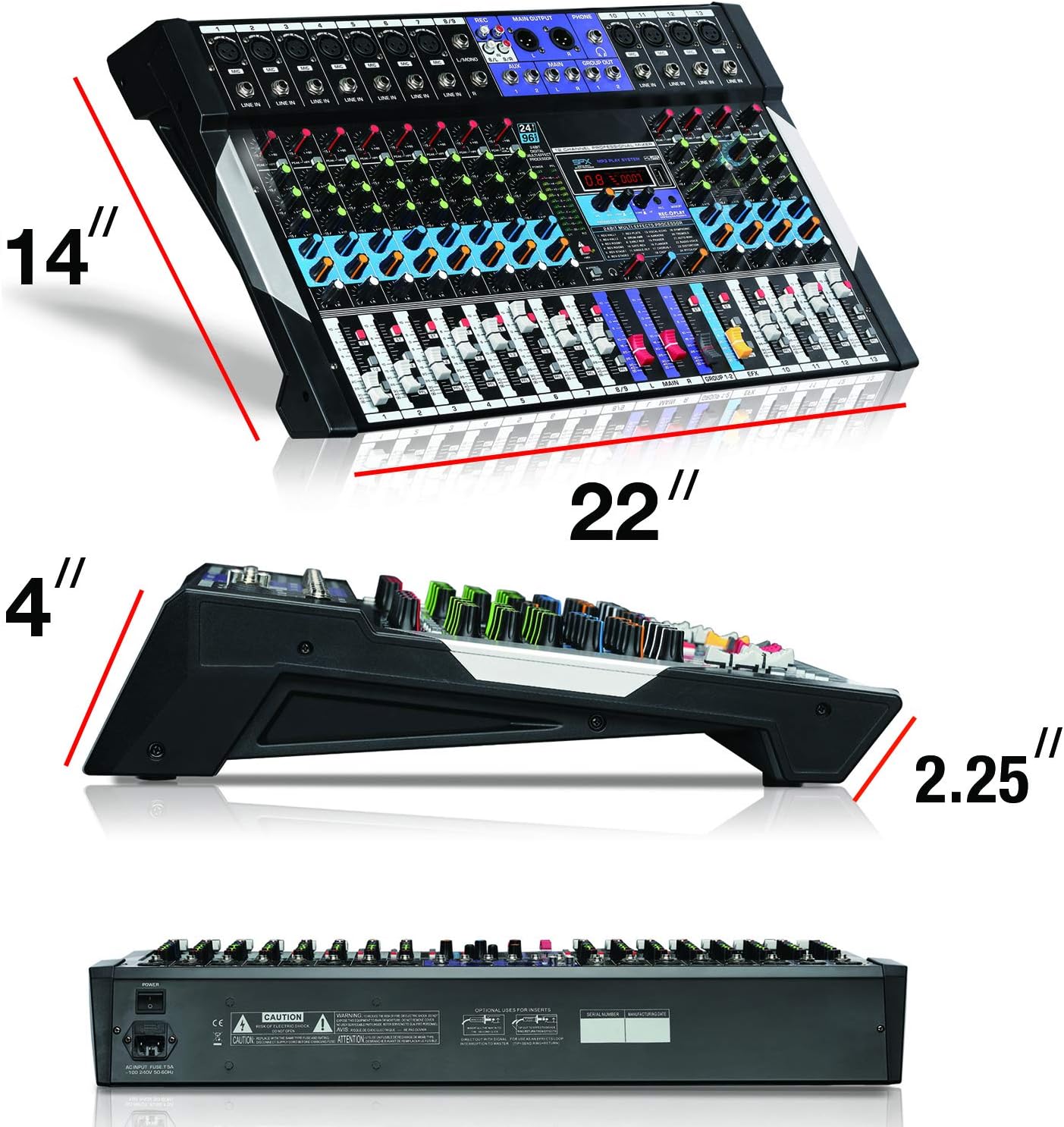
Figure 4.4: Close-up of the 24-bit digital multi-effect processor section. This shows the display, parameter controls, and effect selection options.
- Kry beheer: Pas die invoergevoeligheid vir elke kanaal aan.
- High, Mid, Low EQ: Drieband-gelykmaker vir toonvorming op elke kanaal.
- AUX Send: Controls the level of the channel signal sent to the AUX output for external effects or monitoring.
- Panbeheer: Verstel die stereoposisie van die kanaalsein.
- Channel Faders: Controls the volume level of individual channels.
- Hoofmengselfaders: Beheer die algehele uitsetvolume.
- +48V Fantoomkragskakelaar: Aktiveer fantoomkrag vir kondensormikrofone.
- 24BIT Digital Multi Effect Processor: Provides various digital effects (e.g., reverb, delay) with parameter adjustments.
- USB/MP3 Player Controls: Playback, pause, skip, and mode selection for USB media.
- Bluetooth-aanwyser: Toon Bluetooth-verbindingstatus.
5. Opstelgids
Follow these steps to set up your Boytone BT-120MX mixer.
5.1 Kragverbinding
- Maak seker dat die menger se kragskakelaar in die AF-posisie is.
- Connect the power adapter to the mixer's power input.
- Steek die kragadapter in 'n geskikte elektriese aansluiting.
5.2 Verbinding van klankbronne
- Mikrofone: Connect XLR microphones to the XLR inputs (Channels 1-4). If using condenser microphones, ensure the +48V phantom power is OFF before connecting, then activate it after connection.
- Instruments/Line Devices: Koppel instrumente (bv. klawerborde, kitare met voorversterker)amps) or other line-level devices to the 1/4" line inputs or RCA inputs.
- USB-toestel: Plaas 'n USB-flash drive met MP3 files in die USB-poort vir afspeel.
5.3 Koppeling van Uitvoertoestelle
- Luidsprekers/Amplewendes: Connect the mixer's MAIN OUT (1/4" L/R) to your power ampverligter of aangedrewe luidsprekers.
- Oorfone: Connect headphones to the 1/4" HEADPHONE jack for monitoring.
5.4 PC Connection for Recording/Playback
- Koppel die menger aan jou rekenaar met behulp van 'n USB-kabel.
- Your computer should recognize the mixer as an audio device. Select it as the input/output device in your audio software settings.
6. Bedryfsinstruksies
6.1 Basiese Mengsel
- Turn on the mixer and all connected audio devices.
- Set all channel faders and the main mix faders to their lowest position.
- For each active channel, gradually increase the GAIN control until the PEAK LED flashes only occasionally.
- Adjust the HIGH, MID, and LOW EQ controls to shape the tone of each input.
- Slowly raise the channel fader for each input to the desired level.
- Adjust the MAIN MIX faders to control the overall output volume.
- Use the PAN control to position the sound within the stereo field.
6.2 Bluetooth-konnektiwiteit
- Press the MODE button on the USB/MP3 player section until 'BT' or 'Bluetooth' is displayed.
- Soek op jou Bluetooth-geaktiveerde toestel (slimfoon, tablet, ens.) na beskikbare toestelle.
- Select 'Boytone Mixer' or a similar name from the list to pair.
- Once paired, audio from your device will stream wirelessly to the mixer. Adjust the USB/MP3 channel fader for volume control.
6.3 USB MP3 Playback
- Plaas 'n USB-geheuestokkie wat MP3-klank bevat files in die USB-poort.
- The mixer will automatically switch to USB mode or you may need to press the MODE button.
- Gebruik die SPEEL/PAUSEER, VORIGE en VOLGENDE knoppies om terugspeel te beheer.
- Adjust the USB/MP3 channel fader for volume control.
6.4 Rekenaaropname
- Connect the mixer to your PC via USB.
- Open your preferred Digital Audio Workstation (DAW) software (e.g., Audacity, GarageBand, Ableton Live).
- In your DAW's audio settings, select the Boytone mixer as the input device.
- Arm a track for recording and begin recording. The main mix output of the mixer will be sent to your PC.
6.5 digitale effekte verwerker
- Use the PROGRAM knob to select from the available 24 digital effects (e.g., Reverb, Delay, Chorus). The selected effect number will be displayed.
- Adjust the PARAMETER knob to fine-tune the selected effect (e.g., decay time for reverb, delay time for echo).
- Use the EFX SEND controls on each channel to send a portion of that channel's signal to the effects processor.
- Adjust the EFX RETURN fader to control the overall volume of the applied effect in the main mix.
6.6 +48V Phantom Power
The +48V phantom power supplies voltage to condenser microphones. Ensure dynamic microphones are not connected when phantom power is active, as this may cause damage.
- Connect your condenser microphone(s) to the XLR inputs.
- Locate the +48V PHANTOM POWER switch and activate it. The indicator LED will illuminate.
- Deactivate phantom power before disconnecting condenser microphones.
7. Onderhoud
- Skoonmaak: Regularly wipe the mixer's surface with a soft, dry cloth. Avoid abrasive cleaners or solvents.
- Berging: Wanneer dit nie gebruik word nie, bêre die menger op 'n koel, droë plek, weg van direkte sonlig en uiterste temperature.
- Kabelbestuur: Ensure cables are not tangled or stressed, which can lead to damage.
8. Probleemoplossing
| Probleem | Moontlike oorsaak | Oplossing |
|---|---|---|
| Geen klankuitset nie | Power off; incorrect connections; faders down; gain too low; output device issues. | Check power, all cable connections, channel faders, main mix faders, and gain controls. Verify external amplifier/speakers are on and working. |
| Verwronge klank | Gain too high; input signal too strong; damaged cables. | Reduce GAIN control. Check input source level. Replace faulty cables. |
| Bluetooth verbind nie | Mixer not in Bluetooth mode; device too far; interference; device already paired. | Ensure mixer is in BT mode. Move device closer. Disconnect from other Bluetooth devices. Try re-pairing. |
| USB MP3 not playing | Verkeerd file format; USB drive not recognized; mixer not in USB mode. | Verseker files are MP3 format. Try a different USB drive. Press MODE to select USB. |
| Fantoomkrag werk nie | Switch not activated; faulty microphone/cable. | Ensure +48V switch is ON and indicator is lit. Test with another condenser microphone or XLR cable. |
9. Spesifikasies
| Kenmerk | Detail |
|---|---|
| Handelsmerk | Boytone |
| Model | BT-120MX |
| Aantal kanale | 12 |
| Verbindingstegnologie | Bluetooth, USB |
| Kragbron | Elektries met koord |
| Frekwensierespons | 20 Hz - 20 kHz |
| Uitset Connector Tipe | RCA, TRS (1/4") |
| Oudio-invoertipes | XLR, RCA, 1/4" mono/stereo, USB |
| Voltage | 110 V |
| Fantastiese krag | +48V |
| Digitale effekte | 24-bit Multi Effect Processor |
| Item gewig | 18 pond |
| UPC | 643307992601 |
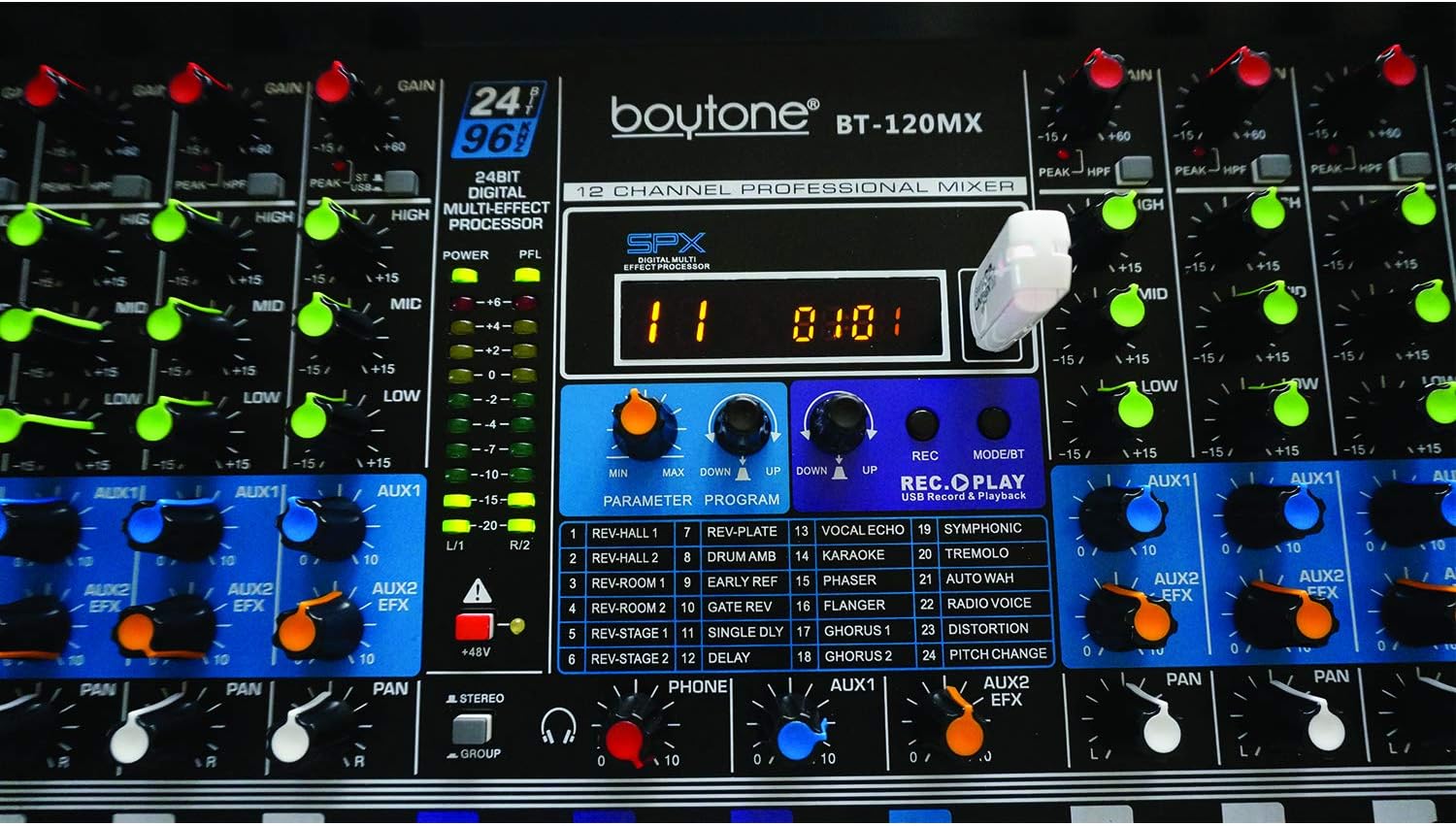
Figure 9.1: Dimensions of the Boytone BT-120MX mixer, showing approximate height, width, and depth.
10. Waarborg en ondersteuning
Boytone products are designed for reliability and performance. This product is covered by a limited warranty against defects in materials and workmanship. For specific warranty terms and conditions, please refer to the warranty card included with your product or visit the official Boytone webwebwerf.
For technical support, troubleshooting assistance, or service inquiries, please contact Boytone customer support through their official website or the contact information provided in your product packaging. Please have your model number (BT-120MX) and purchase information ready when contacting support.