
1. Inleiding
This instruction manual provides comprehensive guidance for the Hanwha Techwin XNP-6400RW 2MP Network 40x IR PTZ Camera. This advanced surveillance camera is designed for outdoor use, offering high-resolution imaging, extensive zoom capabilities, and intelligent features for robust security monitoring. Please read this manual thoroughly before installation and operation to ensure proper use and optimal performance.
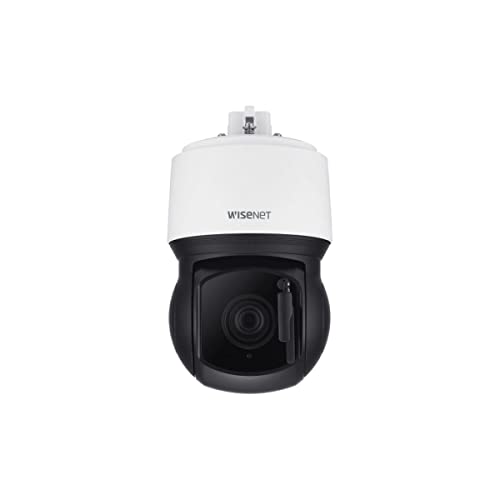
Figuur 1: Voorkant view of the Hanwha Techwin XNP-6400RW PTZ Camera, showcasing its dome design and integrated lens.
2. Produkkenmerke
The Hanwha Techwin XNP-6400RW camera incorporates several key features for advanced surveillance:
- Hoë resolusie: 2MP resolution at 60 frames per second (fps) for clear and detailed video.
- Kragtige zoom: 40X optical zoom lens (4.25mm ~ 170mm) with a wide field of view (65.66° ~ 1.88°).
- Extended IR Range: Infrarooi (IR) viewable length up to 200 meters (656 feet) for monitoring in complete darkness.
- Wide Tilt Range: Features a -20° tilt look-up capability, allowing the camera to see above the horizon.
- Gevorderde videokompressie: Supports H.265, H.264, and MJPEG triple codecs, along with WiseStream II for efficient data management.
- Verbeterde beeldvorming: Day & Night (ICR) functionality, extreme Wide Dynamic Range (WDR), and Digital Image Stabilization (DIS) with a built-in Gyro sensor.
- AI-based Analytics: Includes AI-based Object Auto tracking (Person, Vehicle), target lock tracking, and intelligent video analytics.
- Integrated Wiper: Built-in wiper system to clear water or dust from the lens, complemented by a heater for perfect drying.
- Stewige verbinding: RJ45 connector for simplified installation with a single cable.
- Kuberveiligheid: Enhanced cybersecurity features for data protection.
3. Wat is in die boks
Maak asseblief seker dat alle komponente teenwoordig is tydens uitpak:
- Hanwha Techwin XNP-6400RW PTZ Camera Unit
- Gebruikershandleiding (hierdie dokument)
Note: Additional mounting hardware or power supplies may be sold separately depending on the specific package.
4. Opstelling
4.1 Montering van die kamera
The XNP-6400RW camera is designed for outdoor installation and supports both wall mount and ceiling mount configurations. Ensure the mounting surface is sturdy enough to support the camera's weight and withstand environmental conditions.
- Kies ligging: Choose a strategic location that provides the desired field of view en is binne bereik van krag- en netwerkverbindings.
- Berei oppervlak voor: Drill necessary holes for the mounting bracket (not included, sold separately) according to the bracket's instructions.
- Veilige hakie: Attach the mounting bracket securely to the wall or ceiling using appropriate fasteners.
- Heg kamera aan: Mount the camera unit onto the secured bracket. Ensure all connections are made before final tightening.
Figuur 2: Kant view of the Hanwha Techwin XNP-6400RW PTZ Camera, illustrating its design for mounting.
4.2 Kragverbinding
The camera operates on a Corded Electric power source, requiring 24 Volts (DC). Connect the power cable to the camera's power input and then to a suitable power supply. Ensure the power supply meets the camera's voltage en huidige vereistes.
4.3 Netwerkverbinding
The XNP-6400RW utilizes a single RJ45 connector for network connectivity, simplifying installation. It supports Wi-Fi connectivity protocol. Connect a standard Ethernet cable from the camera's RJ45 port to your network switch or router. Ensure your network is configured to provide an IP address to the camera.
4.4 Aanvanklike konfigurasie
After physical installation and connection, access the camera's web koppelvlak via a web browser using its assigned IP address. Refer to the separate network configuration guide for detailed steps on setting up network parameters, user accounts, and initial camera settings.
5. Operasie
5.1 Pan-, Kantel- en Zoem- (PTZ) Beheer
The camera features Pan, Tilt, and Zoom capabilities, controlled via the network interface or a compatible DVR/NVR system. The 40X optical zoom allows for detailed observation of distant objects, while the -20° tilt look-up capability expands the vertical viewing reeks.
5.2 Beeldinstellings
Adjust image settings such as brightness, contrast, and exposure through the camera's web interface. The camera automatically switches between Day and Night modes using its Infrared Cut-filter Removable (ICR) mechanism. Extreme WDR (Wide Dynamic Range) helps to capture clear images in scenes with both very bright and very dark areas.
5.3 Intelligent Video Analytics
The XNP-6400RW includes AI-based object auto-tracking for persons and vehicles. To utilize this feature:
- Enable Tracking: Access the analytics settings in the camera's web koppelvlak.
- Definieer Sones: Set up detection zones or lines as required for your monitoring area.
- Select Object Type: Choose to track specific object types, such as 'Person' or 'Vehicle'.
- Activate Target Lock: Use the target lock tracking feature to continuously follow a selected object.
The camera also supports motion-only alerts. Configure alert notifications and actions (e.g., recording, email alerts) within the system settings.
5.4 Video-opname
The camera supports H.265, H.264, and MJPEG video compression formats, optimized with WiseStream II for efficient storage. Configure recording schedules and storage destinations (e.g., NVR, NAS, local SD card if supported) through the camera's interface or connected recording device.
6. Onderhoud
6.1 Lensreiniging
The XNP-6400RW features a built-in wiper to remove water and dust from the lens. This system automatically activates a heater to dry any remaining moisture, ensuring clear visibility. For manual cleaning, use a soft, lint-free cloth and a mild lens cleaning solution. Avoid abrasive materials that could scratch the lens.
6.2 Firmware-opdaterings
Regularly check the Hanwha Techwin website for firmware updates. Keeping the camera's firmware up-to-date ensures optimal performance, security enhancements, and access to new features. Follow the provided instructions carefully when performing firmware updates.
6.3 Omgewingsoorwegings
As an outdoor camera with an IP66 waterproof rating, the XNP-6400RW is designed to withstand harsh weather conditions. However, periodically inspect the camera housing and mounting for any signs of wear, damage, or loose connections. Ensure no obstructions are blocking the camera's view or the wiper mechanism.
7. Probleemoplossing
If you encounter issues with your Hanwha Techwin XNP-6400RW camera, refer to the following common problems and solutions:
- Geen krag:
- Check the power cable connection to the camera and the power source.
- Verify the power supply is providing 24V DC and is functioning correctly.
- Geen netwerkverbinding:
- Ensure the RJ45 Ethernet cable is securely connected at both ends.
- Check network switch/router status and cable integrity.
- Verify the camera's IP address and network settings are correct.
- Swak beeldkwaliteit:
- Clean the camera lens using the built-in wiper or manually.
- Adjust image settings (focus, exposure, WDR) in the web koppelvlak.
- Ensure sufficient lighting in the scene, or that IR is functioning correctly in low light.
- PTZ Not Responding:
- Check network connection and camera status.
- Ensure the control software or DVR/NVR is properly configured for PTZ control.
- AI Analytics Not Working:
- Verify that AI analytics features are enabled in the camera's settings.
- Ensure detection zones are correctly defined and not obstructed.
For further assistance, consult the detailed troubleshooting section on the Hanwha Techwin support webwebwerf of kontak tegniese ondersteuning.
8. Spesifikasies
| Kenmerk | Spesifikasie |
|---|---|
| Model Naam | XNP-6400RW |
| Handelsmerk | HANWHA |
| Vervaardiger | Hanwha Techwin |
| Video-opname-resolusie | 1080p (2MP) |
| Raamtempo | 60 fps |
| Optiese zoom | 40X (4.25mm ~ 170mm) |
| IR Viewbekwame Lengte | 200 m (656 voet) |
| Tilt Capability | -20° look-up |
| Videokodeks | H.265, H.264, MJPEG, WiseStream II |
| Spesiale kenmerke | Night Vision, PTZ Technology, Built-in Wiper, AI-based Object Auto Tracking, WDR, DIS |
| Binne/buiteluggebruik | Buitelug |
| Waterdigte gradering | IP66 |
| Verbindingstegnologie | Wired (RJ45), Wi-Fi |
| Kragbron | Elektries met koord |
| Voltage | 24 Volt (DC) |
| Mount Tipe | Muurmontering, Plafonmontering |
| Item afmetings | 7.28 x 7.28 x 12.56 duim |
| Kleur | Wit, Swart |
9. Waarborg en Ondersteuning
9.1 Produkwaarborg
For detailed information regarding the warranty coverage for your Hanwha Techwin XNP-6400RW camera, please refer to the official Hanwha Techwin webwebwerf of die waarborgkaart wat by u aankoop ingesluit is. Waarborgbepalings en -voorwaardes kan per streek en kleinhandelaar verskil.
9.2 Tegniese Ondersteuning
Should you require technical assistance, please contact Hanwha Techwin customer support. Support resources, including FAQs, software downloads, and contact information, are available on the official Hanwha Techwin webwebwerf.
Vervaardiger: Hanwha Techwin