
1. Inleiding
The OttLite Entertain LED Speaker Lamp (Model S83WGW) is a versatile lighting and audio solution designed for various indoor environments. This device integrates an LED lamp with adjustable brightness and color modes, a Bluetooth speaker for wireless audio streaming, and a detachable emergency light feature. This manual provides detailed instructions for the proper setup, operation, and maintenance of your lamp.

Image 1.1: The OttLite Entertain LED Speaker Lamp, wysasing sy geïntegreerde ontwerp.
2. Pakketinhoud
Verifieer dat alle items in die pakket teenwoordig is:
- OttLite Entertain LED Speaker Lamp (S83WGW)
- Kragkabel
3. Opstelling
- Uitpak: Verwyder alle komponente versigtig uit die verpakking.
- Plasing: Plaas die lamp op 'n stabiele, plat oppervlak.
- Kragverbinding: Connect the provided power cable to the lamp's power input port and then plug it into a standard 120V AC wall outlet. The lamp's internal battery will begin charging automatically.
4. Bedryfsinstruksies
4.1. Ligfunksies
Die lamp features touch-activated controls located on the top of the shade for easy adjustment of light settings.
- Krag aan/af: Lightly touch the metallic button on the top center of the lamp shade to turn the light on or off.
- Pas Helderheid aan: With the light on, repeatedly touch the metallic button to cycle through three brightness levels.
- Verander kleurmodus: Press and hold the metallic button for approximately 2 seconds to switch between the three color temperature modes: warm white, bright white, and natural daylight. Release the button when the desired mode is active.
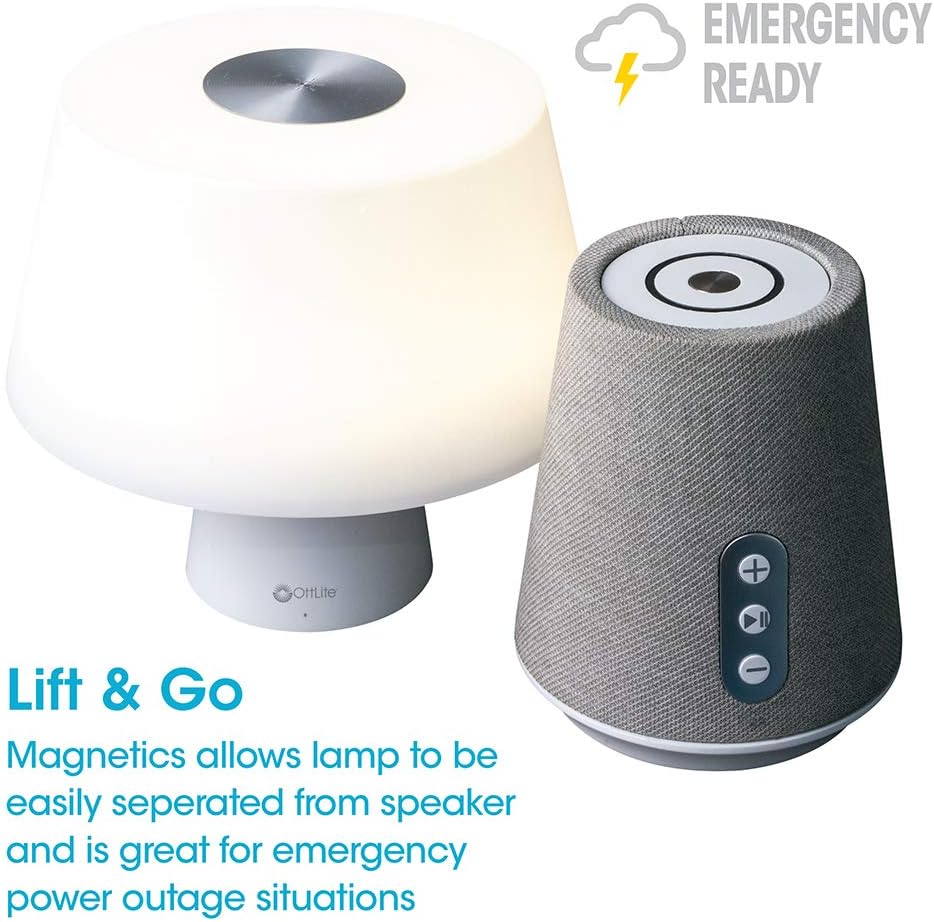
Image 4.1: Activating the lamp's light functions via the touch control on top of the shade.

Beeld 4.2: Die lamp offers three distinct color temperature modes for varied lighting needs.
4.2. Bluetooth-luidspreker
The integrated Bluetooth speaker allows for wireless audio playback from compatible devices.
- Power On Speaker: Press the Play/Pause button on the front of the speaker base to turn the speaker on. A tone will indicate it is ready for pairing.
- Saambinding: On your audio device (e.g., smartphone, tablet), enable Bluetooth and search for available devices. Select "OttLite Entertain" from the list. A confirmation tone will sound upon successful pairing.
- Oudiobeheer:
- Druk die + knoppie om volume te verhoog.
- Druk die - knoppie om volume te verlaag.
- Druk die Speel / Pouse knoppie om klank te speel of te onderbreek.
- Power Off Speaker: Press and hold the Play/Pause button for approximately 3 seconds to turn the speaker off.

Image 4.3: The speaker base with clearly labeled controls for volume and playback.

Image 4.4: The speaker base highlights its Bluetooth connectivity feature.
4.3. Emergency Light Feature (Lift & Go)
Die lamp portion can be detached from the speaker base to function as a portable emergency light.
- Detaching the Light: Lig liggies die lamp shade portion straight up from the speaker base. It is held in place by magnets.
- Using the Emergency Light: The detached light will operate on its internal rechargeable battery. Use the touch control on top of the shade to turn it on/off and adjust brightness as described in Section 4.1. The light can provide illumination for 5 to 30+ hours depending on the brightness setting.
- Herlaai: To recharge the emergency light, simply place it back onto the speaker base. Ensure it is properly seated for charging to commence.

Image 4.5: The 'Lift & Go' feature allows the lamp to be used as a portable emergency light.
5. Onderhoud
To ensure the longevity and optimal performance of your OttLite Entertain LED Speaker Lamp, volg hierdie onderhoudsriglyne:
- Skoonmaak: Ontkoppel die lamp from the power source before cleaning. Use a soft, dry cloth to wipe down the exterior surfaces. Do not use abrasive cleaners, solvents, or harsh chemicals, as these may damage the finish.
- Berging: Wanneer dit nie vir lang tye gebruik word nie, bêre die lamp in 'n koel, droë plek weg van direkte sonlig en uiterste temperature.
- Batterysorg: For the internal rechargeable battery, avoid fully discharging it frequently. Recharge the lamp regularly, even if not in constant use, to maintain battery health.
6. Probleemoplossing
As jy probleme ondervind met jou lamp, verwys na die volgende foutsporingstappe:
| Probleem | Moontlike oorsaak | Oplossing |
|---|---|---|
| Lamp lig gaan nie aan nie. | Nie ingeprop nie; krag aftage; internal battery depleted; faulty connection. | Ensure power cable is securely plugged in. Check power outlet. Recharge the lamp by placing it on the base. |
| Bluetooth speaker does not connect. | Speaker not in pairing mode; device Bluetooth off; already connected to another device. | Ensure speaker is on and in pairing mode. Turn Bluetooth on your device. Disconnect from other devices. |
| Emergency light does not work when detached. | Interne battery is leeg. | Place the light back on the speaker base to recharge its internal battery. |
| Poor audio quality from speaker. | Device too far from speaker; interference; low battery. | Move device closer to speaker. Avoid obstacles. Ensure speaker is charged. |
7. Spesifikasies
| Kenmerk | Detail |
|---|---|
| Modelnommer | S83WGW |
| Handelsmerk | OttLite |
| Produk afmetings | 3.12" D x 3.12" B x 10.87" H |
| Item gewig | 2.6 pond |
| Ligbrontipe | LED |
| Wattage | 3 watt |
| Helderheid | 337 Lumen |
| Kleur temperatuur | 5000 Kelvin (daglig) |
| Beheer metode | Raak |
| Kragbron | Corded Electric (with rechargeable battery for emergency light) |
| Batterye | 1 Litium-ioonbattery (ingesluit) |
| Materiaal | Plastiek |
| UPC | 761712019116 |
8. Waarborg en Ondersteuning
For warranty information or technical support, please refer to the official OttLite webwebwerf of kontak hul kliëntediensafdeling. Bewaar u aankoopbewys as bewys van aankoop vir enige waarborgeise.
Kontakinligting: Besoek gerus OttLite's official store page for current support options and contact details.