
1. Produk verbyview
The Calypso K5801/1 is a versatile digital quartz watch designed for daily use and sports activities. It features a durable plastic strap, a robust polycarbonate case, and is water-resistant up to 100 meters. Key functions include a stopwatch, timer, alarm, and backlight for visibility in low light conditions.
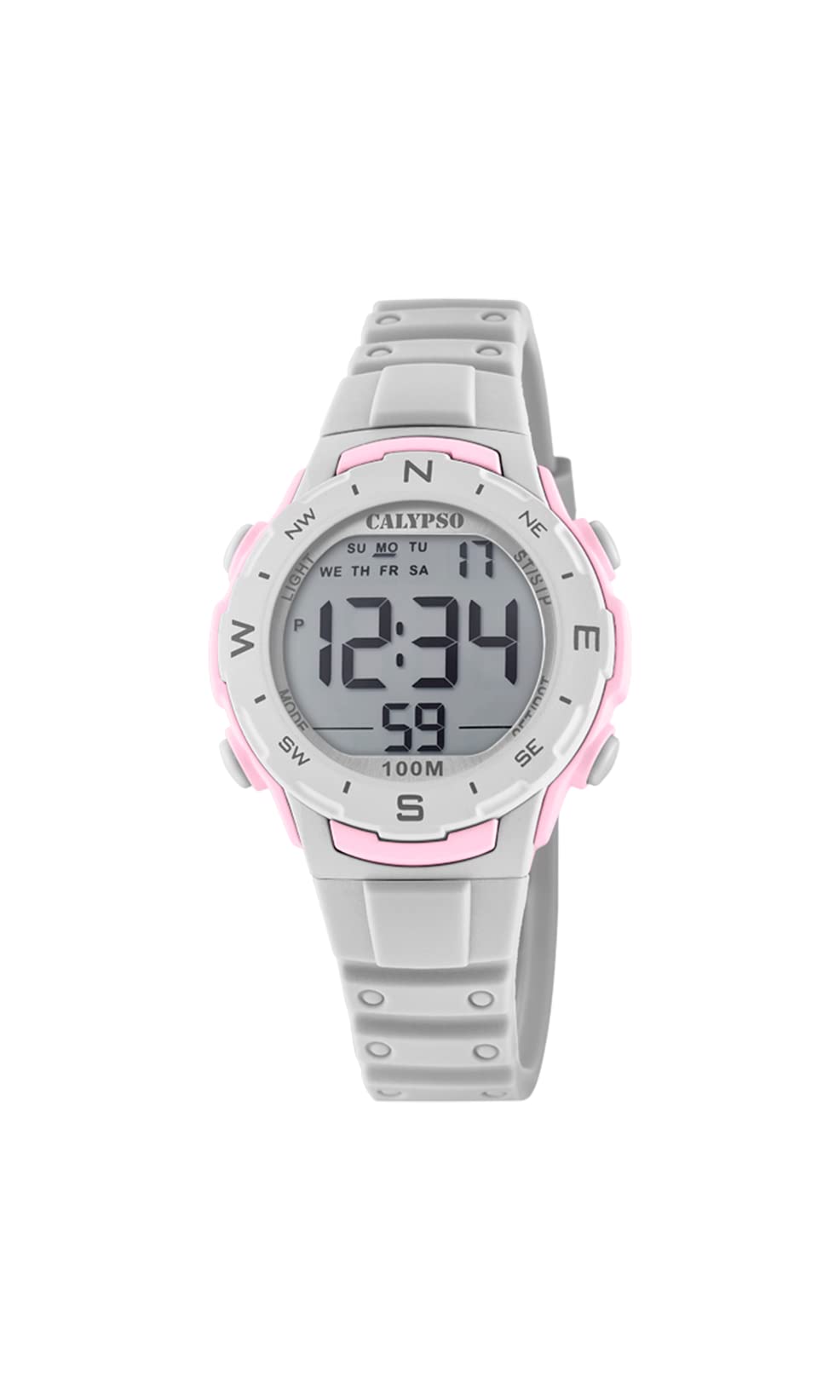
Beeld 1.1: Voorkant view of the Calypso K5801/1 Digital Quartz Watch, displaying the digital screen and control buttons.
2. Veiligheidsinligting
- Vermy die blootstelling van die horlosie aan uiterste temperature (warm of koud) vir lang tydperke.
- Do not expose the watch to strong magnetic fields, as this may affect its accuracy.
- Keep the watch away from strong chemicals, solvents, and detergents, which can damage the case and strap.
- While water-resistant, avoid pressing buttons underwater to prevent water ingress.
- Do not attempt to open the watch case or replace the battery yourself, as this may void the warranty and compromise water resistance.
3. Aanvanklike Opstelling
3.1 Knoppie Funksies
Maak jouself vertroud met die horlosieknoppies:
- WYSE: Cycles through different modes (Time, Alarm, Stopwatch, Timer).
- SET/ADJ: Word gebruik om instellings in te voer en te bevestig.
- ST/LAP/RFL: Starts/stops stopwatch, records lap times, or resets values.
- LIG: Aktiveer die agterlig.
3.2 Stel tyd en datum in
- In Tydhoudingsmodus, druk en hou die SET/ADJ knoppie totdat die sekondes begin flikker. Dit dui die instellingsmodus aan.
- Druk die MODUS button to cycle through the settings: seconds → hour → minute → year → month → day.
- Gebruik die ST/LAP/RFL button to adjust the flashing value (increase or decrease).
- Sodra alle instellings korrek is, druk die SET/ADJ knoppie om die instellingsmodus te verlaat.

Beeld 3.1: Sykant view of the watch, highlighting the position of the control buttons for setting and mode selection.
4. Bedryfsinstruksies
4.1 Tydhoudingsmodus
This is the default mode, displaying the current time (hours, minutes, seconds), day of the week, and date.
4.2 Alarmmodus
- Vanuit Tydhoudingsmodus, druk MODUS een keer om Alarmmodus te betree.
- Druk en hou SET/ADJ totdat die alarmuur flikker.
- Gebruik ST/LAP/RFL om die uur aan te pas. Druk MODUS om na minute te beweeg.
- Gebruik ST/LAP/RFL om die notule aan te pas.
- Druk SET/ADJ om te bevestig en te verlaat.
- Om die alarm AAN/AF te skakel, druk ST/LAP/RFL while in Alarm Mode (not setting mode). An alarm icon will appear/disappear.
4.3 Stophorlosiemodus
- Vanuit Tydhoudingsmodus, druk MODUS twee keer om Stophorlosie-modus te betree.
- Druk ST/LAP/RFL om die stophorlosie te begin.
- Druk ST/LAP/RFL weer om dit te stop.
- To reset the stopwatch, press SET/ADJ terwyl die stophorlosie gestop is.
- Om rondtetye op te neem, druk SET/ADJ while the stopwatch is running. The lap time will display briefly, and the stopwatch continues running in the background. Press ST/LAP/RFL om te stop, dan SET/ADJ om terug te stel.
4.4 Timermodus
- Vanuit Tydhoudingsmodus, druk MODUS three times to enter Timer Mode.
- Druk en hou SET/ADJ until the timer hour flashes.
- Gebruik ST/LAP/RFL om die uur aan te pas. Druk MODUS om na minute, dan sekondes, oor te skakel.
- Gebruik ST/LAP/RFL to adjust the minutes and seconds.
- Druk SET/ADJ om die timerinstelling te bevestig.
- Druk ST/LAP/RFL om die aftelling te begin.
- Druk ST/LAP/RFL weer om die aftelling te onderbreek/hervat.
- When paused, press SET/ADJ to reset the timer to its initial set value.
- An alarm will sound when the timer reaches zero.
4.5 Agtergrondbeligtingsfunksie
Druk die LIG button to illuminate the display for a few seconds, improving visibility in dark environments.
5. Onderhoud
5.1 Skoonmaak
Vee die horlosiekas en -bandjie gereeld af met 'n sagte, damp lap. Vir hardnekkige vuilgoed kan 'n sagte seepoplossing gebruik word, gevolg deur afspoel met skoon water en deeglik afdroog. Vermy die gebruik van harde chemikalieë of skuurmiddels.
5.2 Waterbestandheid (100 meter / 10 OTM)
The Calypso K5801/1 watch is water-resistant up to 100 meters (10 ATM). This means it is suitable for swimming, showering, and snorkeling. However, it is nie suitable for high-impact water sports, diving, or hot water activities like saunas or hot tubs, as steam and rapid temperature changes can compromise the seals. Always ensure the crown (if present, though digital watches typically don't have one in the traditional sense) and buttons are not operated while the watch is wet or submerged.
5.3 Batteryvervanging
Wanneer die skerm dof word of funksies wisselvallig raak, moet die battery moontlik vervang word. Dit word aanbeveel om die battery deur 'n gekwalifiseerde horlosietegnikus te laat vervang om behoorlike verseëling te verseker en waterbestandheid te handhaaf.
6. Probleemoplossing
| Probleem | Moontlike oorsaak | Oplossing |
|---|---|---|
| Die skerm is leeg of dof. | Lae battery. | Vervang die battery (aanbeveel deur 'n professionele persoon). |
| Tyd is verkeerd. | Tyd nie korrek ingestel nie of per ongeluk aangepas. | Refer to Section 3.2 "Setting Time and Date" to reset. |
| Knoppies reageer nie. | Watch may be in a locked mode (unlikely for this model) or internal malfunction. | Try a soft reset by removing and reinserting the battery (professional service recommended). If issue persists, contact support. |
| Water binne-in die horlosie. | Seals compromised due to impact, age, or button operation underwater. | Neem die horlosie onmiddellik na 'n professionele persoon vir inspeksie en herstelwerk om verdere skade te voorkom. |
7. Spesifikasies
- Modelnommer: K5801/1
- Handelsmerk: Calypso
- Vertoon tipe: Digitaal
- Beweging tipe: Kwarts
- Materiaal van die houer: Polycarbonate / Plastic
- Bandmateriaal: Plastiek
- Skakelvenstermateriaal: Plastiek
- Kas deursnee: 36 millimeter
- Kas dikte: 16 millimeter
- Bandwydte: 14 millimeter
- Tipe sluiting: Speldgesp
- Waterweerstand Diepte: 100 meter (10 OTM)
- Spesiale kenmerke: Alarm, Chronograph (Stopwatch), Light Function, Timer
- Kragbron: Battery aangedrewe
- Item gewig: 65 gram
- Produk afmetings: 20 x 20 x 20 cm (benaderde verpakkingsafmetings)
8. Waarborg en Ondersteuning
Specific warranty details for the Calypso K5801/1 watch are not provided in the product information. Please refer to the warranty card included with your purchase or contact your retailer for warranty terms and conditions. For technical support or service inquiries, please contact Calypso customer service or an authorized service center.