
Inleiding
This manual provides detailed instructions for the UBeesize LED Video Light Kit, a versatile lighting solution designed for photography, video recording, game streaming, and online conferencing. Learn how to set up, operate, and maintain your light kit for optimal performance.
Wat is in die boks
The UBeesize LED Video Light Kit includes the following components:
- 2 x LED Panel Lights
- 2 x Adjustable Tripod Stands
- 2 x Universal Ball Heads
- 5 x Color Filters (2 Pcs each)
- 1 x Video Light Manual
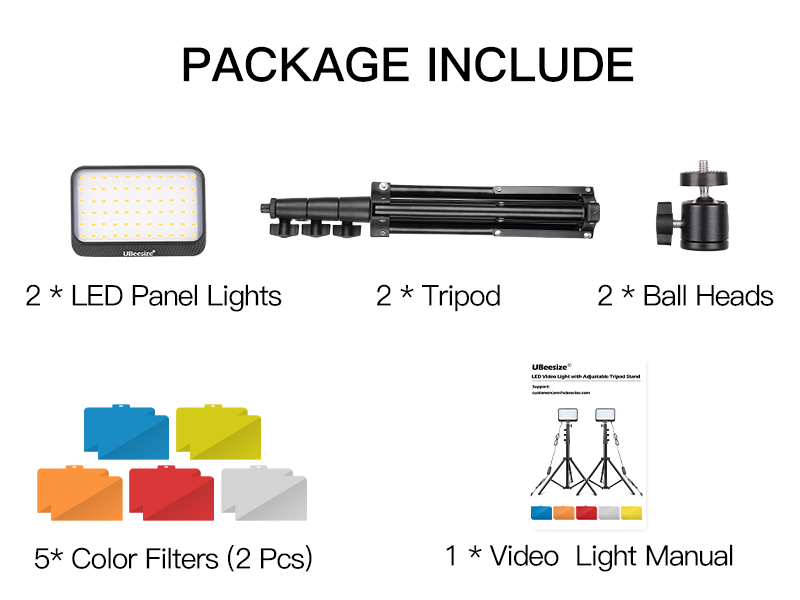
Figure 1: Included components of the UBeesize LED Video Light Kit.
Opstelling
- Monteer die driepootstaander: Extend the tripod legs to a stable position. Loosen the adjustment knobs on the stand to extend the height as desired, then tighten to secure. The tripod can extend from 23.62 inches to 57.68 inches.
- Heg die LED-paneel aan: Screw the universal ball head onto the top of the tripod stand. Then, attach the LED panel light to the ball head.
- Pas paneelhoek aan: Use the universal ball head to adjust the LED panel 180° for various shooting angles. The ball head also allows for 360° rotation.
- Koppel krag: Plug the USB cable from the LED panel into a compatible USB power source. A wall plug (5V 2A) is recommended for continuous lighting.

Figure 2: Adjustable height and angle of the LED panel on the tripod stand.

Figure 3: Connecting the USB power cable to the light panel.
Bedryf
- Krag aan/af: Use the inline remote control on the USB cable to turn the light kit on or off.
- Pas Helderheid aan: The remote control features up and down buttons to adjust the brightness level from 10% to 100%.
- Apply Color Filters: Slide one of the included color filters (red, orange, white, blue) into the designated slot on the LED panel to achieve various photography requirements and visual effects.
- Gebruikscenario's: The versatile design is ideal for tabletop or low-angle shooting, video conferencing, game streaming, YouTube content creation, product photography, and makeup application.

Figure 4: Brightness control buttons on the inline remote.

Figuur 5: Examples of lighting effects using various color filters.

Figure 6: The light kit is suitable for diverse applications.
Onderhoud
To ensure the longevity and optimal performance of your UBeesize LED Video Light Kit, follow these maintenance guidelines:
- Skoonmaak: Use a soft, dry cloth to wipe down the LED panels and tripod stands. Avoid abrasive cleaners or solvents that could damage the surfaces.
- Berging: When not in use, disassemble the light kit and store it in a cool, dry place away from direct sunlight and excessive moisture.
- Hantering: Handle the light panels and tripod stands with care to prevent accidental drops or impacts, which could damage internal components or the exterior.
Probleemoplossing
If you encounter any issues with your UBeesize LED Video Light Kit, refer to the following common troubleshooting tips:
- Lig gaan nie aan nie: Ensure the USB cable is securely plugged into both the LED panel and the power source. Verify that the power source (e.g., wall adapter, computer USB port) is functioning correctly.
- Flikkerende lig: Check the power connection. Ensure the power source provides stable 5V 2A output. Try a different USB port or wall adapter.
- Helderheidsprobleme: Use the up/down buttons on the inline remote to adjust brightness. If the light remains dim, ensure the power source is sufficient.
- Driepoot-onstabiliteit: Ensure all tripod leg locks are securely tightened after adjusting height. Place the tripod on a flat, stable surface.
Spesifikasies
| Kenmerk | Detail |
|---|---|
| Produk afmetings | 17.12 x 2.75 x 10.43 duim |
| Item gewig | 3.39 pond |
| Item Modelnommer | TCB001 |
| Kragbron | USB (5V 2A recommended) |
| Verbindingstegnologie | USB |
| Statief Hoogte | 23.62" tot 57.68" |
| Panel Adjustability | 180° tilt, 360° rotation |
Waarborg & Ondersteuning
For warranty information or technical support, please refer to the contact details provided on the product packaging or visit the official UBeesize webwerf. Hou jou aankoopkwitansie vir waarborgeise.