
1. Inleiding
Thank you for choosing the FREESTYLE FH0955 LED Bluetooth Headphones. This manual provides essential information for the proper setup, operation, and maintenance of your new headphones. Please read it carefully before use to ensure optimal performance and longevity of the product.
2. Produk verbyview
The FREESTYLE FH0955 headphones offer a wireless audio experience with integrated features designed for convenience and style. Key features include Bluetooth 5.0 + EDR connectivity, a built-in microSD card slot for direct music playback, a foldable headband for portability, and subtle LED backlighting on the earcups.

Beeld 2.1: Voorkant view of the FREESTYLE FH0955 LED Bluetooth Headphones, showcasing the over-ear design and LED lighting.

Beeld 2.2: Syprofile of the FREESTYLE FH0955 LED Bluetooth Headphones, highlighting the earcup and headband design.

Image 2.3: A person wearing the FREESTYLE FH0955 LED Bluetooth Headphones, demonstrating typical usage.
3. Opstelling
3.1. Laai die oorfone
Before first use, fully charge the headphones. The FH0955LB model is equipped with a 400 mAh Lithium-ion battery.
- Connect the supplied MicroUSB charging cable to the charging port on the headphones.
- Connect the other end of the cable to a USB power source (e.g., computer USB port, USB wall adapter, or power bank).
- The LED indicator will illuminate during charging and turn off or change color once fully charged.
- A full charge typically takes approximately 2 hours and provides up to 10 hours of continuous music playback.
3.2. Bluetooth-koppeling
Om jou oorfone draadloos aan 'n toestel te koppel:
- Maak seker dat die oorfone gelaai en afgeskakel is.
- Druk en hou die aan/af-knoppie op die oorfone in totdat die LED-aanwyser flikker, wat die paringsmodus aandui.
- Aktiveer Bluetooth op jou toestel (slimfoon, tablet, rekenaar) en soek vir beskikbare toestelle.
- Select "FH0955" or a similar name from the list of found devices.
- Once connected, the LED indicator will stop flashing and remain solid or turn off, depending on the model.
- The Bluetooth 5.0 + EDR technology allows for a stable connection up to 10 meters.
3.3. MicroSD Card Playback
The headphones feature an integrated microSD card slot for direct music playback without a connected device.
- Insert a microSD card (pre-loaded with audio files) into the designated slot on the headphones.
- The headphones should automatically switch to microSD playback mode. If not, use the Mode button (if available) to switch.
- Use the playback controls on the headphones to manage your music.
3.4. Bedrade verbinding (3.5 mm-klankaansluiting)
For devices without Bluetooth or when the battery is depleted, you can use the included 3.5mm audio cable.
- Koppel die een kant van die 3.5 mm-klankkabel aan die klankaansluiting op die oorfone.
- Koppel die ander kant aan die 3.5 mm-klankuitvoer van jou toestel.
- The headphones will operate in passive mode, and Bluetooth functionality will be disabled.
4. Bedryfsinstruksies
4.1. Skakel aan/af
- Krag aan: Druk en hou die aan/af-knoppie vir ongeveer 3 sekondes in totdat die LED-aanwyser aanskakel.
- Skakel af: Druk en hou die aan/af-knoppie vir ongeveer 3-5 sekondes totdat die LED-aanwyser afskakel.
4.2. Musiekweergawe
- Speel/pouse: Druk die Speel/Pause-knoppie een keer.
- Volgende snit: Press the "Next" button (often Volume Up, long press).
- Vorige snit: Press the "Previous" button (often Volume Down, long press).
- Volume op: Druk kort op die Volume Op-knoppie.
- Volume af: Druk kort op die Volume Af-knoppie.
4.3. Oproepbestuur
With the built-in microphone, you can manage phone calls when connected via Bluetooth.
- Beantwoord/beëindig oproep: Press the Play/Pause button once during an incoming call.
- Verwerp oproep: Press and hold the Play/Pause button for approximately 2 seconds during an incoming call.
- Herbel laaste nommer: Dubbeldruk die Speel/Pause-knoppie.
4.4. LED Backlighting
The headphones feature subtle LED backlighting. Refer to the specific controls on your device for toggling or changing LED modes, if available. This feature is primarily aesthetic.
5. Onderhoud
5.1. Skoonmaak
- Use a soft, dry cloth to clean the surface of the headphones.
- Do not use abrasive cleaners, alcohol, or chemical solvents, as these may damage the finish.
- Keep the charging port and audio jack free from dust and debris.
5.2. Berging
- Bêre die oorfone op 'n koel, droë plek weg van direkte sonlig en uiterste temperature.
- When not in use for extended periods, charge the battery at least once every three months to maintain battery health.
- Utilize the foldable headband feature for compact storage and transport.
6. Probleemoplossing
| Probleem | Moontlike oorsaak | Oplossing |
|---|---|---|
| Oorfone skakel nie aan nie. | Lae battery. | Laai die oorfone ten volle. |
| Kan nie via Bluetooth koppel nie. | Oorfone nie in paringsmodus nie; toestel Bluetooth af; te ver van toestel. | Ensure headphones are in pairing mode. Turn device Bluetooth off/on. Move closer to device (within 10m). |
| Geen klank nie. | Volume te laag; verkeerde klankbron; oorfone nie gekoppel nie. | Increase volume on headphones and device. Check Bluetooth connection or 3.5mm cable. Ensure correct mode (Bluetooth/MicroSD). |
| MicroSD card not playing. | Card not inserted correctly; unsupported file format; card corrupted. | Reinsert card. Ensure audio files are in a supported format (e.g., MP3). Try a different microSD card. |
7. Spesifikasies
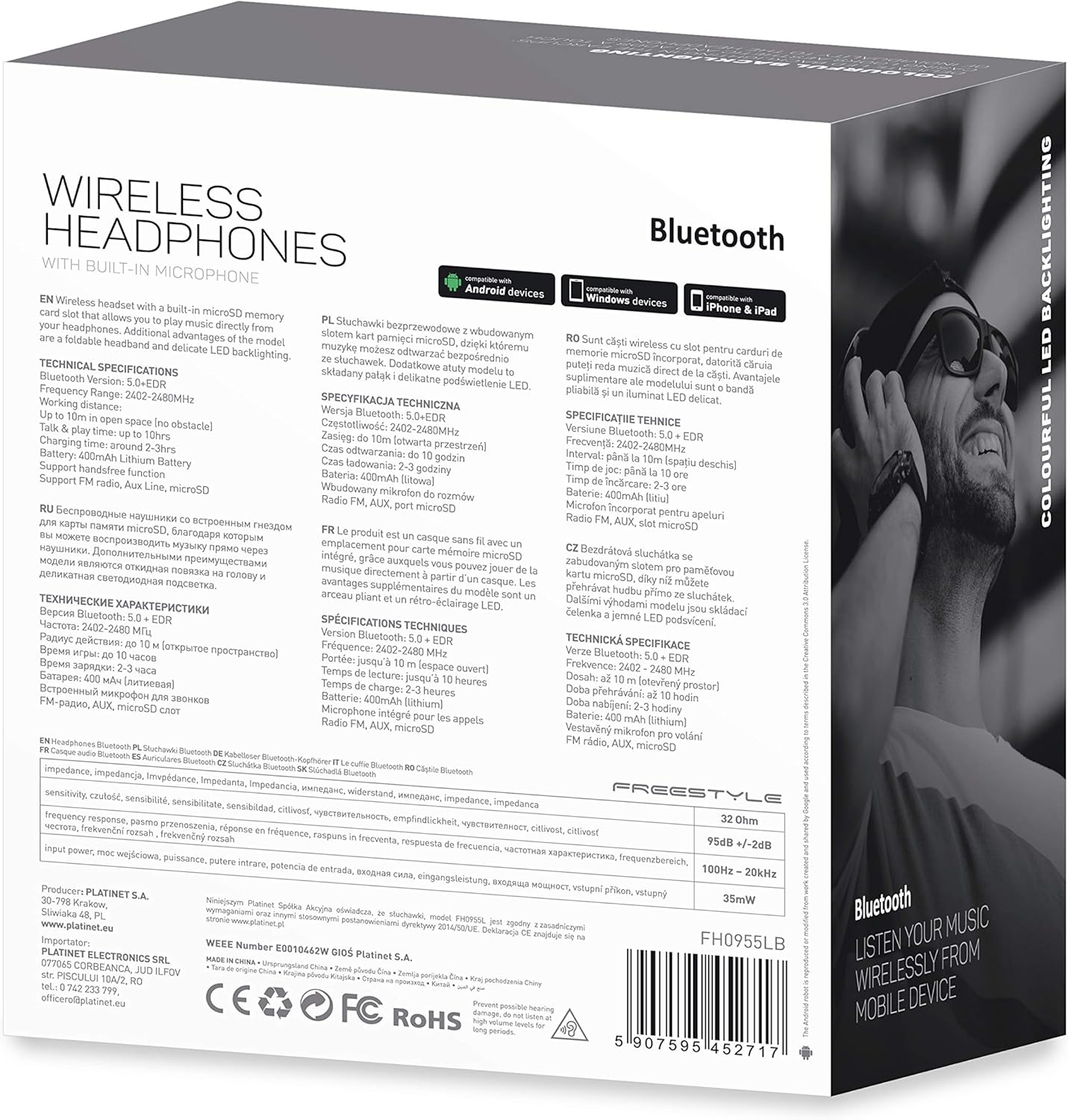
Beeld 7.1: Gedetailleerd view of the product packaging, showing technical specifications and compliance information.
| Kenmerk | Spesifikasie |
|---|---|
| Modelnommer | FH0955LB |
| Handelsmerk | Vryslag |
| Verbindingstegnologie | Wireless (Bluetooth 5.0 + EDR) |
| Wireless Range | Tot 10 meter |
| Klankaansluiting | 3.5 mm |
| Vormfaktor | Over-Ear (Circum-Auricular) |
| Spesiale kenmerke | Noise Cancellation, LED Backlighting, MicroSD Card Slot |
| Battery Tipe | Integrated Lithium-ion (400 mAh) |
| Speeltyd | Tot 10 uur |
| Laai tyd | Ongeveer 2 uur |
| Laaipoort | MikroUSB |
| Kleur | Swart |
| Materiaal | Leather (earpads/headband) |
| Waterweerstandvlak | Waterbestand |
| Ingesluit komponente | 1 paar oorfone |
| Vervaardiger | Platinet |
8. Waarborg en Ondersteuning
Spesifieke waarborgbesonderhede word tipies saam met u aankoopdokumentasie of op die vervaardiger se amptelike webwebwerf. Bewaar asseblief u bewys van aankoop vir enige waarborgeise.
For technical support or inquiries, please refer to the contact information provided by your retailer or the manufacturer, Platinet.
9. Veiligheidsinligting
- Moenie die oorfone aan uiterste temperature, humiditeit of vloeistowwe blootstel nie.
- Vermy om vir lang tye op hoë volume vlakke te luister om gehoorskade te voorkom.
- Do not attempt to disassemble or modify the headphones, as this may void the warranty and cause damage.
- Hou buite bereik van kinders.
- Dispose of the product responsibly according to local electronic waste regulations.