
Clikon CK4320
Clikon CK4320 30 Liter Convection Microwave Oven User Manual
Model: CK4320 | Capacity: 30 Liters
1. Inleiding
Thank you for choosing the Clikon CK4320 30 Liter Convection Microwave Oven. This appliance combines microwave, convection, and grill functions to offer versatile cooking options. Please read this manual thoroughly before operating the appliance to ensure safe and efficient use. Keep this manual for future reference.
2. Belangrike veiligheidsinstruksies
Always follow basic safety precautions when using electrical appliances to reduce the risk of fire, electric shock, injury, or exposure to excessive microwave energy.
- Lees alle instruksies voor gebruik.
- Moenie probeer om hierdie oond met die deur oop te gebruik nie, aangesien dit kan lei tot skadelike blootstelling aan mikrogolfenergie.
- Moenie enige voorwerp tussen die oondvoorkant en die deur plaas nie, of toelaat dat grond of skoonmakerreste op verseëlingsoppervlaktes ophoop.
- Do not operate the oven if it is damaged. Ensure the door closes properly and there is no damage to the door, hinges, or seals.
- Slegs gekwalifiseerde dienspersoneel moet hierdie toestel aanpas of herstel.
- Maak seker dat die toestel behoorlik geaard is.
- Moenie bytende chemikalieë of dampe in hierdie toestel gebruik nie.
- Supervise children closely when the appliance is in use. The appliance features a Kinderveiligheidsslot om onbedoelde werking te voorkom.
- Moenie vloeistowwe of ander kosse in verseëlde houers verhit nie, want dit kan ontplof.
- Do not use the oven for drying clothes, paper, or other non-food items.
3. Produk verbyview
Familiarize yourself with the components and control panel of your Clikon CK4320 microwave oven.

Prent 3.1: Voorkant view of the Clikon CK4320 Convection Microwave Oven, showcasing the sleek black exterior, control panel on the right, and the handle on the door.

Prent 3.2: Gehoekte voorkant view of the microwave oven, highlighting its compact design and the digital display.

Prent 3.3: Close-up of the microwave door slightly ajar, showing the handle and the edge of the interior cavity.

Prent 3.4: Binne view of the microwave oven with the door fully open, revealing the glass turntable and the metal rack for convection/grill cooking.

Prent 3.5: Gedetailleerd view of the glass turntable and the metal grill rack inside the microwave cavity.
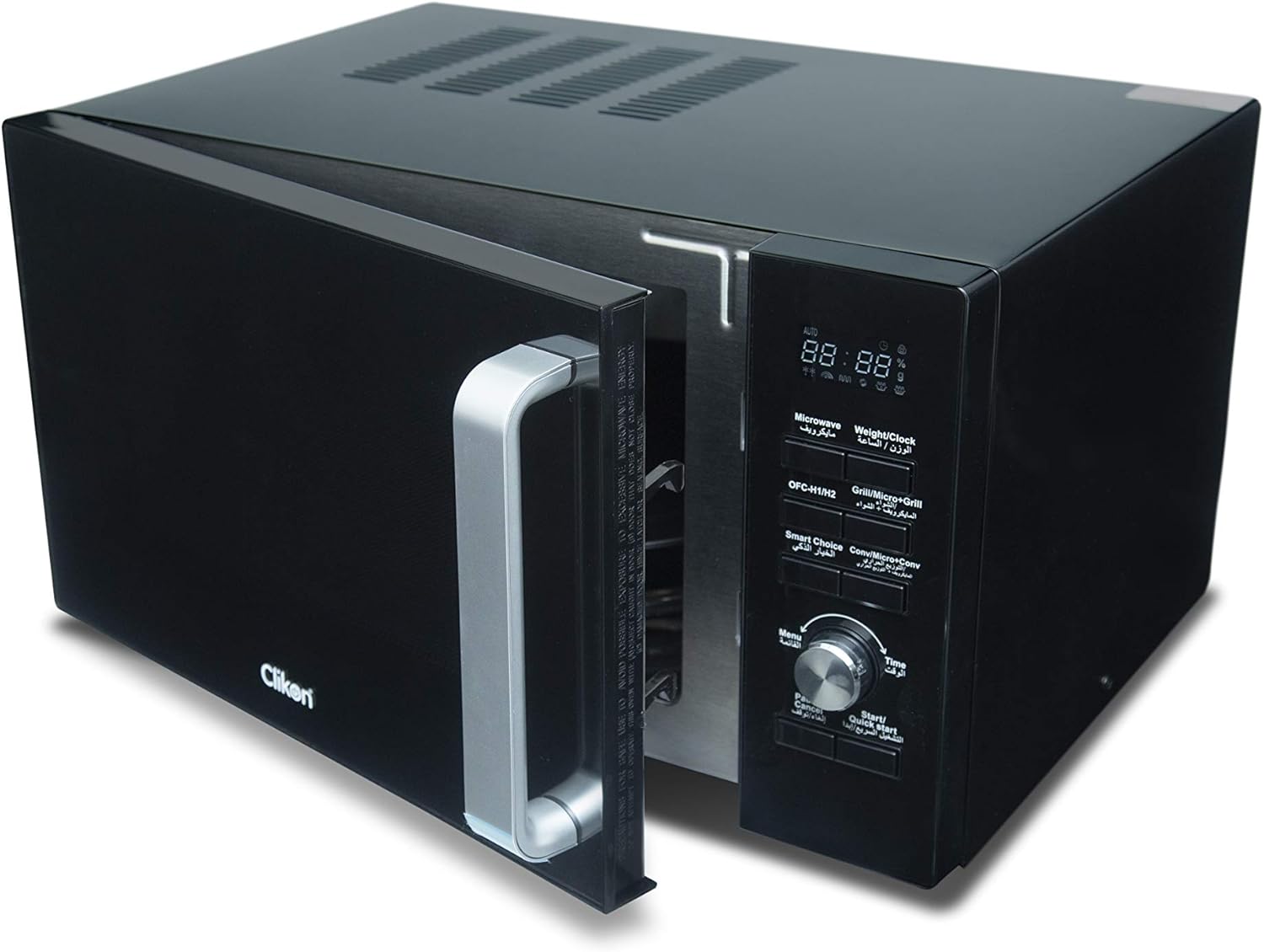
Prent 3.6: Hoekig view of the microwave oven with the door open, providing a clear look at the interior and the control panel.
Beheerpaneelkenmerke:
- Digitale skerm: Shows time, power level, and cooking indicators.
- Microwave / Weight / Clock: Button for setting microwave cooking, weight defrost, and clock.
- Grill / Micro+Grill: Button for selecting grill or combination cooking modes.
- Smart Choice / Conv / Micro+Conv: Button for convection cooking and combination convection modes.
- Spyskaart: Kry toegang tot voorafbepaalde kookmenus.
- Tydskakelaar: Used to adjust cooking time, weight, or menu selections.
- Pause / Cancel: Stop kook of vee instellings uit.
- Start / Quick Start: Starts cooking or initiates quick start cooking.
4. Opstelling en installering
- Uitpak: Verwyder die mikrogolfoond en alle verpakkingsmateriaal versigtig. Kontroleer vir enige skade. Moenie gebruik as dit beskadig is nie.
- Plasing: Place the oven on a flat, stable surface strong enough to hold its weight (approximately 20 kg). Ensure adequate ventilation by leaving at least 10 cm of space at the back, 20 cm at the top, and 5 cm on the sides. Do not block any ventilation openings.
- Kragverbinding: Plug the power cord into a grounded electrical outlet (AC-220-240V, 50-60Hz). Ensure the outlet can support 2200W.
- Installasie van die draaitafel: Plaas die draaitafelring binne-in die oondholte en plaas dan die glas draaitafelplaat stewig bo-op die ring.
5. Bedryfsinstruksies
5.1 Stel die klok
- Press the "Microwave / Weight / Clock" button once.
- Turn the "Time Dial" to set the hour.
- Press the "Microwave / Weight / Clock" button again.
- Turn the "Time Dial" to set the minutes.
- Press the "Microwave / Weight / Clock" button to confirm.
5.2 Mikrogolf kook
- Plaas kos in 'n mikrogolf-veilige houer op die glas draaitafel.
- Maak die oonddeur toe.
- Press the "Microwave / Weight / Clock" button repeatedly to select the desired power level (e.g., P100 for 100% power).
- Turn the "Time Dial" to set the cooking time.
- Press "Start / Quick Start" to begin cooking.
5.3 Grillkook
- Place food on the metal grill rack.
- Maak die oonddeur toe.
- Press the "Grill / Micro+Grill" button once for grill mode.
- Turn the "Time Dial" to set the grilling time.
- Press "Start / Quick Start" to begin grilling.
5.4 Konveksie Kook
- Place food in a heat-resistant container on the metal rack.
- Maak die oonddeur toe.
- Press the "Smart Choice / Conv / Micro+Conv" button repeatedly to select the desired convection temperature.
- Turn the "Time Dial" to set the cooking time.
- Press "Start / Quick Start" to begin convection cooking.
5.5 Ontdooiingsfunksie
Die oond bied ontdooiing volgens gewig of volgens tyd.
Ontdooi volgens gewig:
- Plaas bevrore kos in die oond.
- Press the "Microwave / Weight / Clock" button twice.
- Turn the "Time Dial" to select the food weight.
- Press "Start / Quick Start" to begin defrosting.
Ontdooi op tyd:
- Plaas bevrore kos in die oond.
- Press the "Microwave / Weight / Clock" button three times.
- Turn the "Time Dial" to set the defrosting time.
- Press "Start / Quick Start" to begin defrosting.
5.6 Kinderveiligheidsslot
To activate the child safety lock, press and hold the "Pause / Cancel" button for 3 seconds. A lock indicator will appear on the display. To deactivate, press and hold the "Pause / Cancel" button again for 3 seconds.
5.7 Oil-Free Cooking Feature
The oven includes a feature for oil-free cooking. To utilize this, press the "Pause / Cancel" button during cooking to enable or disable the oil-free cooking function, depending on the specific program selected. Refer to the recipe guidelines for optimal use.
6. Sorg en Onderhoud
Gereelde skoonmaak en behoorlike onderhoud sal die lang lewensduur en optimale werkverrigting van u mikrogolfoond verseker.
- Binne skoonmaak: Vee die oondholte af met advertensieamp lap na elke gebruik. Vir hardnekkige vlekke, gebruik 'n sagte skoonmaakmiddel. Moenie skuurmiddels of skuursponse gebruik nie.
- Skoonmaak van die buitekant: Maak die buite-oppervlaktes skoon met 'n sagte, damp lap. Vermy dat water in die ventilasie-openinge kom.
- draaitafel: Die glas draaitafel en draaitafelring kan in warm seepwater of in 'n skottelgoedwasser gewas word.
- Deurseëls: Hou die deurseëls en aangrensende dele skoon.
- Kragkabel: Regularly inspect the power cord for any damage. If damaged, contact service personnel.
- Ontkoppel altyd die oond voordat dit skoongemaak word.
7. Probleemoplossing
If you encounter any issues, refer to the table below for common problems and solutions. If the problem persists, contact customer support.
| Probleem | Moontlike oorsaak | Oplossing |
|---|---|---|
| Oond begin nie | Kragkabel nie ingeprop nie; Deur nie behoorlik toe nie; Sekering deurgeblaas of stroombreker het geaktiveer. | Maak seker dat die prop stewig in die aansluiting is; Maak die deur stewig toe; Kontroleer die huishoudelike sekering/stroombreker. |
| Kos word nie verhit nie | Verkeerde kooktyd/kragvlak; Deur nie behoorlik toe nie. | Adjust time/power; Ensure door is fully closed. |
| Vonking binne die oond | Metal in oven; Food residue. | Verwyder enige metaalvoorwerpe; Maak die binnekant van die oond deeglik skoon. |
| Draaitafel draai nie | Turntable not correctly placed; Obstruction. | Reposition turntable; Remove any obstructions. |
8. Tegniese spesifikasies
| Kenmerk | Spesifikasie |
|---|---|
| Handelsmerk | Klik |
| Modelnommer | CK4320 |
| Kapasiteit | 30 liter |
| Krag / Wattage | 2200 watt |
| Voltage | 220-240 Volt (WS) |
| Frekwensie | 50-60Hz |
| Produkafmetings (L x B x H) | 59 x 47 x 35 cm |
| Item gewig | 20 kilogram |
| Kleur | Swart |
| Materiaal | Metaal |
| Installasie tipe | Countertop |
| Tipe beheerder | Knoppie |
| Spesiale kenmerke | Timer, Child Safety Lock, Convection Technology, Grill Function |
9. Waarborg en Ondersteuning
The Clikon CK4320 Convection Microwave Oven comes with a 2-year warranty. For any installation, service, or support inquiries, please contact the authorized service center.
Service Support Contact:
- Telefoon: +966 503568714
- Telefoon: +966 500535661
Ask a question about this manual
Ask about setup, troubleshooting, compatibility, parts, safety, or missing instructions. Manuals+ will review the question and use this page’s manual context to help answer it.