
Refoss RGR545
Refoss Draadlose Garagedeur Sleutelbord Gebruikershandleiding
Model: RGR545
Produk verbyview
The Refoss Wireless Garage Door Keypad provides keyless entry for your garage, offering convenience and security. This keypad is designed to work specifically with garage door openers featuring a purple learn button, operating on a 315 MHz frequency. It supports control of up to three individual garage doors with unique PINs.

Image: Refoss Wireless Garage Door Keypad. This image displays the keypad with its protective cover lifted, revealing the numeric buttons and the specific compatibility label for purple learn buttons.
Verenigbaarheid
This Refoss Wireless Garage Door Keypad is only compatible with garage door openers that have a PURPLE learn button. It works with Security+ 315 MHz Chamberlain, LiftMaster, and Craftsman garage openers manufactured between 2006 and 2014. Please verify your garage door opener's learn button color before proceeding with installation or programming.
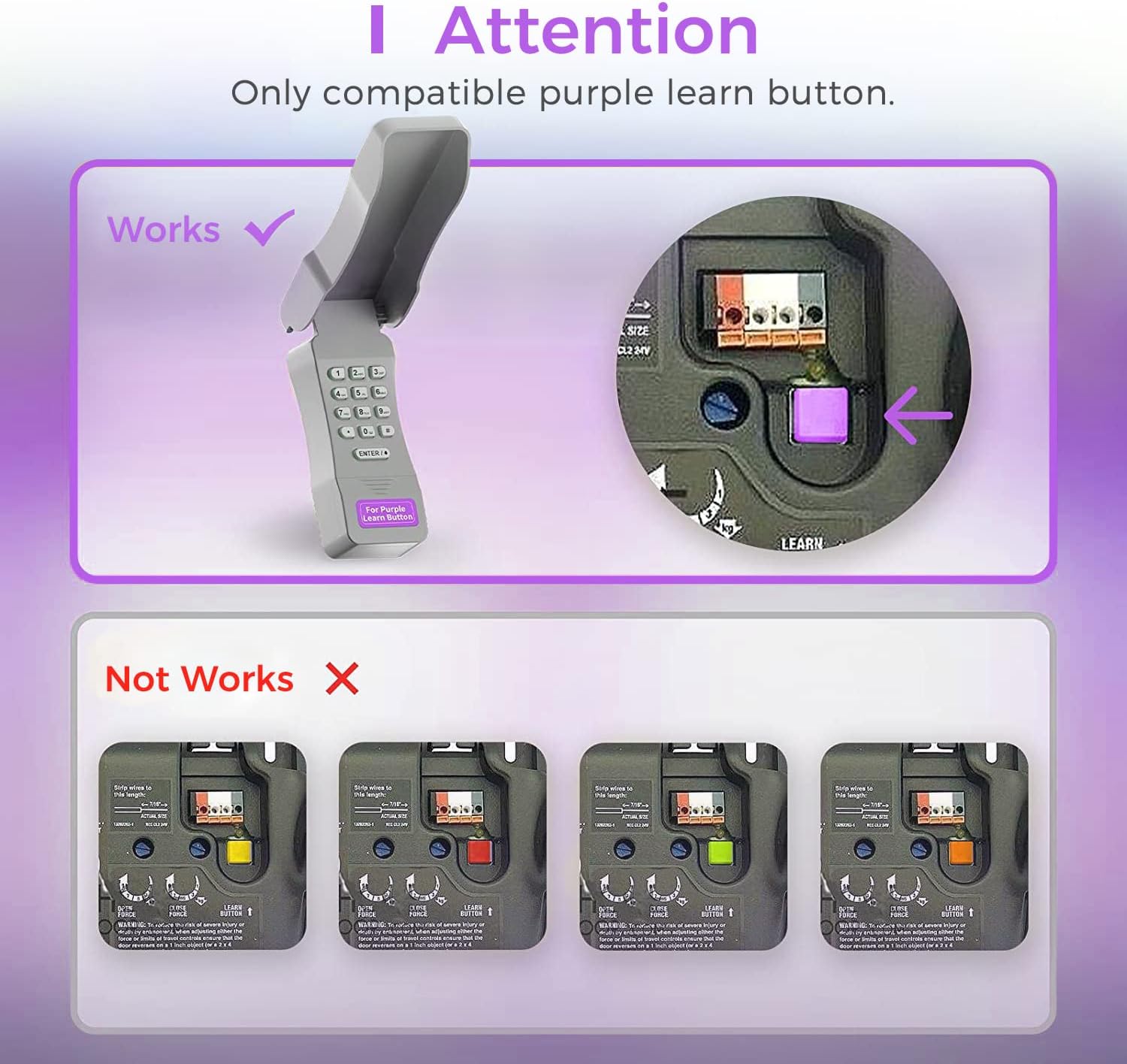
Image: Compatibility Diagram. This visual guide illustrates the correct purple learn button for compatibility and shows examples of incompatible learn button colors (red, orange, green, yellow).
Pakketinhoud
Voordat u met die installasie begin, maak seker dat alle komponente in die pakket teenwoordig is:
- 1 x Refoss Wireless Keypad
- 1 x Gebruikershandleiding (hierdie dokument)
- 4 x skroewe
- 4 x Skroefankers
- 4 x 3M dubbelzijdige band
- 1 x 9V battery

Image: Package Contents. This illustration details all items included in the product box, ensuring users can verify they have everything needed for installation.
Opstelling en programmering
The Refoss Wireless Keypad is designed for easy, wireless programming. Follow these steps carefully to set up your keypad and program it to your garage door opener.
Stap 1: Installeer battery
- Maak die batterykompartement aan die agterkant van die sleutelbord oop.
- Plaas die ingeslote 9V-battery in en maak seker dat die polariteit korrek is.
- Maak die batterykompartement stewig toe.
Stap 2: Programmeer die sleutelbord
This keypad can control up to three garage doors. Each door requires its own unique PIN.
- Vind die PURPLE Learn Button on your garage door opener motor unit. This button is typically found on the back or side panel of the motor.
- Druk en laat dadelik die PURPLE Learn Button. The learn indicator light on the opener will glow steadily for 30 seconds.
- Within 30 seconds, enter your desired 4-digit PIN on the Refoss keypad.
- Druk en hou die ENTER / # button on the keypad until the garage door opener lights flash or two clicks are heard. This indicates successful programming.
- Test the keypad by entering your PIN and pressing ENTER / #. The garage door should activate.
To program additional garage doors (up to three), repeat Step 2 for each door, using a different 4-digit PIN for each.
Bedryfsinstruksies
Opening/Closing a Garage Door
- Enter your 4-digit PIN for the desired garage door.
- Druk die ENTER / # knoppie.
- The garage door will open or close.
Controlling Multiple Doors
The keypad supports individual PINs for up to three garage doors. Simply enter the specific PIN for the door you wish to operate.

Image: One Keypad for Three Doors. This image visually represents the keypad's capability to manage up to three distinct garage doors using individual access codes.
Onderhoud
Battery vervanging
The keypad uses one 9V alkaline battery. When the keypad backlight dims or the keypad becomes unresponsive, it is time to replace the battery.
- Maak die batterykompartement aan die agterkant van die sleutelbord oop.
- Verwyder die ou 9V-battery.
- Plaas 'n nuwe 9V alkaliese battery in en maak seker dat die polariteit korrek is.
- Maak die batterykompartement stewig toe.
Skoonmaak
Wipe the keypad surface with a soft, damp lap. Moenie skuur skoonmaakmiddels of oplosmiddels gebruik nie.
Weerbeskerming
The keypad features a weatherproof protective cover designed to shield it from various weather conditions. Ensure the cover is properly closed when not in use to maximize its protective capabilities.

Image: Weatherproof and Fluorescent Features. This image demonstrates the keypad's durability against outdoor elements and its illuminated keys for visibility in low-light conditions.
Probleemoplossing
| Probleem | Moontlike oorsaak | Oplossing |
|---|---|---|
| Die sleutelbord reageer nie. | Dooie of lae battery. | Vervang die 9V-battery. |
| Die motorhuisdeur maak nie oop/toe na die invoer van die PIN nie. | Keypad not programmed correctly or incompatible opener. |
|
| Keypad backlight is dim. | Lae battery. | Vervang die 9V-battery. |
| Cannot program multiple doors. | Incorrect programming sequence for additional doors. | Ensure you are using a unique PIN for each door and repeating the programming steps for each. |
Spesifikasies
- Model: RGR545
- Verenigbaarheid: Chamberlain, LiftMaster, Craftsman garage door openers with PURPLE learn button (Security+ 315 MHz, manufactured 2006-2014)
- Frekwensie: 315 MHz
- Number of Doors Supported: Tot 3
- Kragbron: 1 x 9V alkaliese battery
- Afmetings: Ongeveer 2 x 6 x 1 duim
- Gewig: Ongeveer 7.8 onse
- Spesiale kenmerke: Weatherproof, Fluorescent Keypad
Waarborg inligting
This Refoss Wireless Garage Door Keypad comes with a 1 jaar waarborg vanaf die aankoopdatum. Hierdie waarborg dek defekte in materiale en vakmanskap onder normale gebruik. Dit dek nie skade wat veroorsaak word deur misbruik, ongeluk, ongemagtigde wysiging of onbehoorlike installasie nie.
Behou asseblief jou aankoopbewys vir waarborgeise.
Kliënte ondersteuning
For any questions, technical assistance, or support regarding your Refoss Wireless Garage Door Keypad, please contact our customer support team. We offer caring customer support 7 days a week.
Refer to the product packaging or the Refoss official webwebwerf vir die mees onlangse kontakinligting.
Ask a question about this manual
Ask about setup, troubleshooting, compatibility, parts, safety, or missing instructions. Manuals+ will review the question and use this page’s manual context to help answer it.