
TENMIYA A13
TENMIYA A13 Portable Bluetooth Speaker User Manual
Model: A13
Inleiding
Dankie vir die aankoopasing the TENMIYA A13 Portable Bluetooth Speaker. This manual provides detailed instructions for the proper use, setup, and maintenance of your speaker. Please read this manual thoroughly before operating the device to ensure optimal performance and longevity.
Veiligheidsinligting
- Moenie die luidspreker blootstel aan uiterste temperature, humiditeit of direkte sonlig nie.
- Vermy om die luidspreker te laat val of aan sterk impakte te onderwerp.
- Moenie die luidspreker self uitmekaar haal, herstel of wysig nie. Raadpleeg gekwalifiseerde dienspersoneel.
- Hou die luidspreker weg van water en ander vloeistowwe.
- Gebruik slegs die gespesifiseerde laaikabel en kragadapter.
- Maak die luidspreker skoon met 'n sagte, droë lap. Moenie skuurmiddels of oplosmiddels gebruik nie.
Pakketinhoud
Kontroleer asseblief die pakket vir die volgende items:
- 1 x A13 Bluetooth-luidspreker
- 1 x Remote control (requires 2*AAA batteries, not included)
- 1 x AUX-kabel
- 1 x USB-kabel
- 1 x Gebruikershandleiding
Produk verbyview
The TENMIYA A13 is a portable Bluetooth speaker designed for versatile audio playback. It features a powerful subwoofer, two tweeters, and a rear heavy bass guide tube for rich sound. Key features include Bluetooth 5.0 connectivity, FM radio, TF/SD card support, USB playback, AUX input, a 3.5mm microphone jack, intelligent remote control, digital display, and colorful RGB lights.
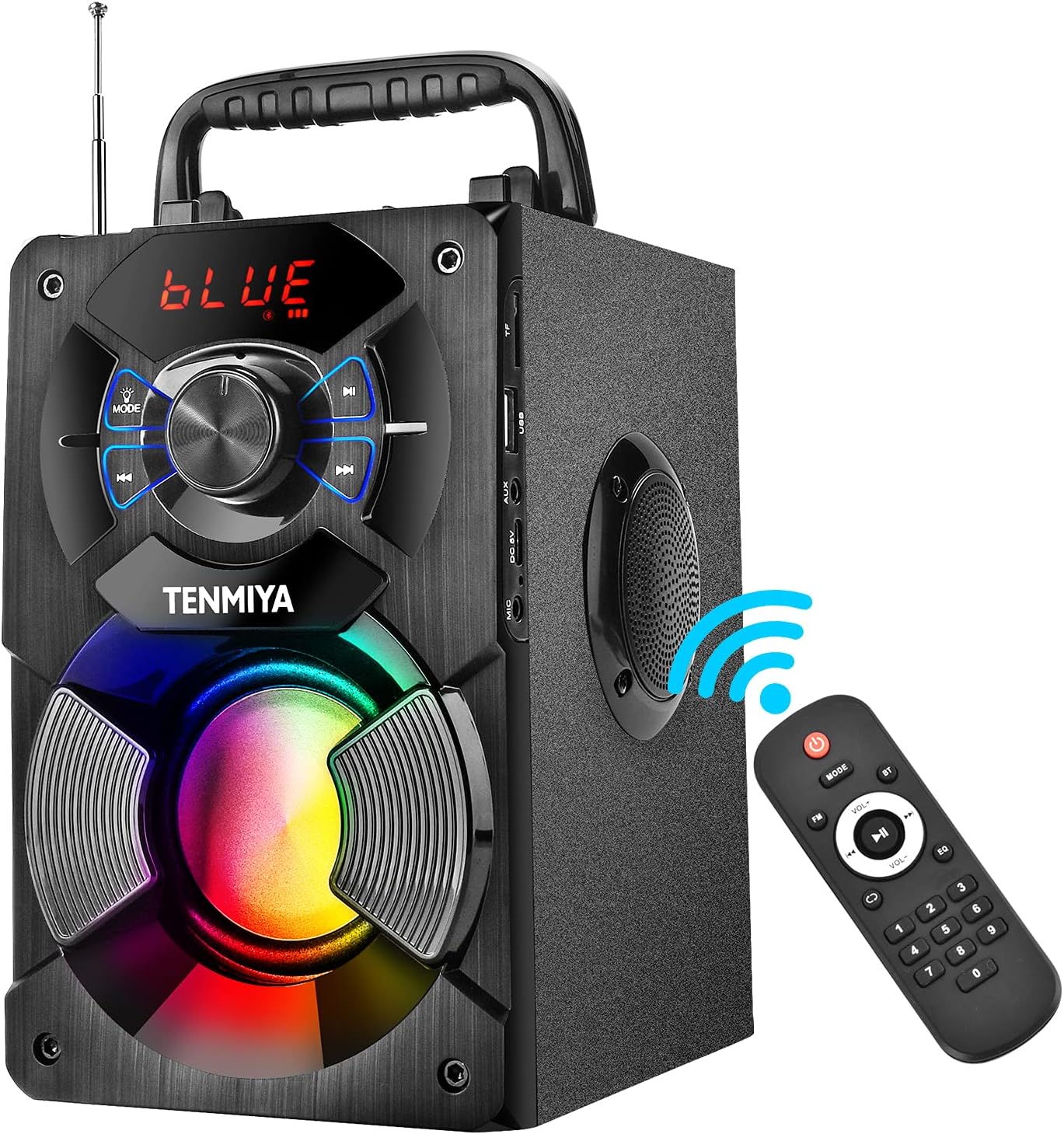
Figure 1: TENMIYA A13 Portable Bluetooth Speaker with included remote control, highlighting wireless connectivity.
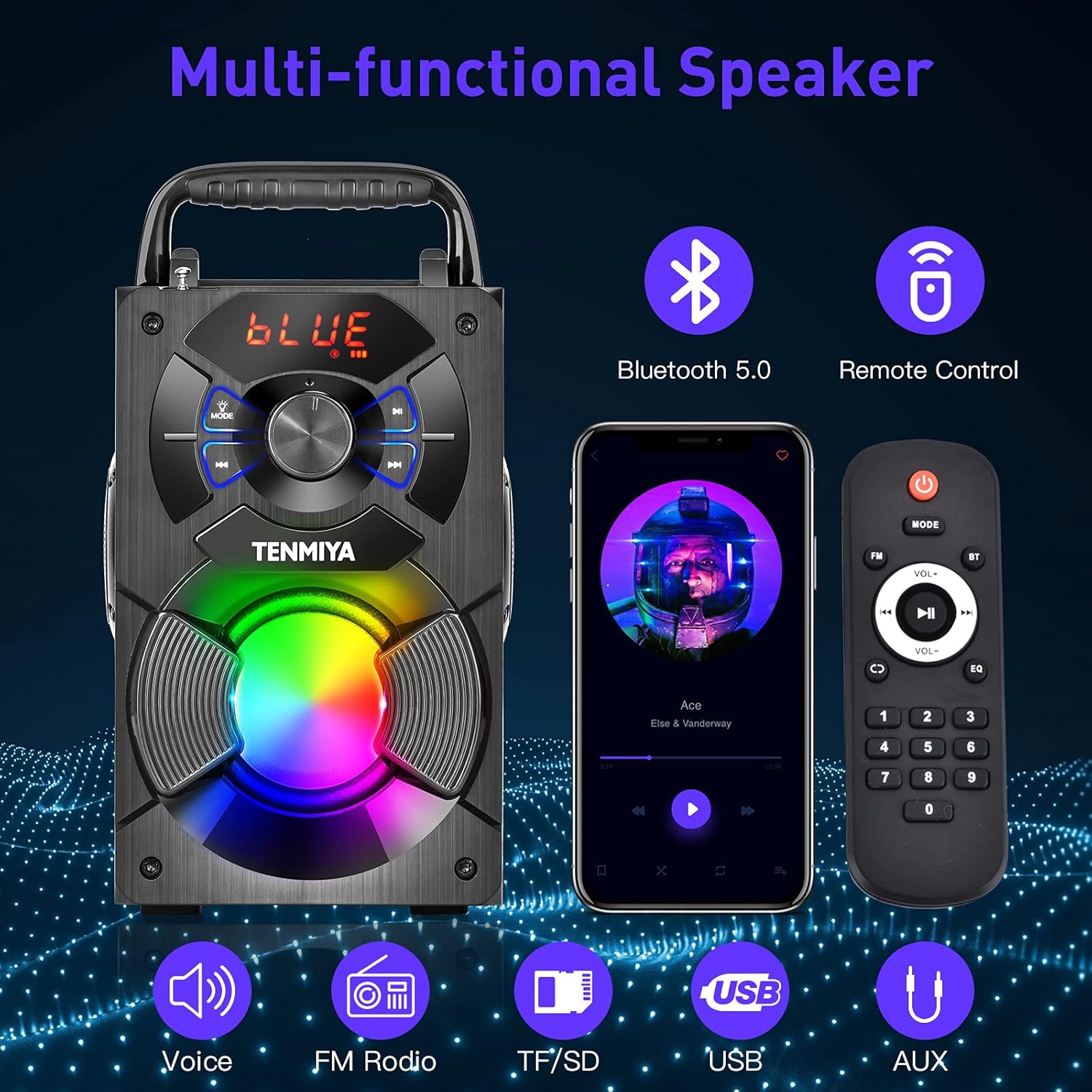
Figuur 2: oorview of the speaker's multi-functional capabilities including Bluetooth 5.0, remote control, voice prompts, FM radio, TF/SD card, USB, and AUX input.

Figure 3: Dimensions of the TENMIYA A13 Portable Bluetooth Speaker, showing its compact size and portability with a handle.
Opstelling
Laai die luidspreker
Before first use, fully charge the speaker. Connect the supplied USB cable to the speaker's DC 5V input port and the other end to a USB power adapter (not included) or a computer's USB port. The charging indicator will illuminate during charging and turn off when fully charged.
Skakel aan/af
To power on the speaker, press and hold the Power button until the digital display illuminates. To power off, press and hold the Power button again until the display turns off.
Bedryfsinstruksies
Bluetooth-koppeling
- Turn on the speaker. It will automatically enter Bluetooth pairing mode, indicated by a flashing "BLUE" on the digital display.
- Aktiveer Bluetooth op jou slimfoon, tablet of ander Bluetooth-toestel.
- Soek vir "A13" in the list of available devices and select it to connect.
- Once successfully paired, the speaker will emit a confirmation tone, and "BLUE" on the display will stop flashing.
- Jy kan nou klank vanaf jou toestel deur die luidspreker speel.
FM-radio werking
- Press the "MODE" button on the speaker or remote control to switch to FM radio mode.
- Verleng die antenna vir beter ontvangs.
- To automatically search and save available stations, long press the "Play/Pause" button. The speaker will scan and store stations.
- Use the "Previous/Next" buttons to navigate between saved stations.
- Alternatively, use the remote control to manually input a station frequency.

Figure 4: The TENMIYA A13 speaker supporting FM radio, shown in an outdoor setting.
TF/SD Card Music Playback
Insert a TF (Micro SD) card into the TF card slot. The speaker will automatically switch to TF card mode and begin playing audio files (MP3, WAV, etc.) from the card.
USB Flash Drive Music Playback
Insert a USB flash drive into the USB port. The speaker will automatically switch to USB mode and begin playing audio files (MP3, WAV, etc.) from the drive.
AUX Line-in Connection
Connect one end of the supplied AUX cable to the speaker's AUX input port and the other end to the audio output jack of your external device (e.g., MP3 player, computer). Press the "MODE" button to switch to AUX mode.
Mikrofoongebruik
Connect a 3.5mm microphone (not included) to the speaker's microphone jack. The speaker will amplify the microphone input, allowing for karaoke or public speaking.
Afstandbeheerfunksies
The included remote control allows for convenient operation of the speaker from a distance. Ensure 2*AAA batteries are inserted correctly. Functions include:
- Krag: Skakel die luidspreker aan/af.
- WYSE: Switch between Bluetooth, FM, TF/SD, USB, and AUX modes.
- Volume +/-: Pas die hoofvolume aan.
- Vorige volgende: Skip tracks or navigate FM stations.
- Speel/pouse: Play or pause audio. Long press for FM auto-scan.
- EQ: Cycle through various equalizer presets (Jazz, Rock, Classical, Pop, etc.).
- Nommerblok: For direct input of FM frequencies.

Figure 5: User operating the TENMIYA A13 speaker with the remote control for convenient audio playback.
RGB kleurvolle ligte
The speaker features built-in RGB colorful lights that enhance the listening experience. These lights typically activate automatically when the speaker is on. Specific controls for light modes may be available via the remote control or a dedicated button on the speaker (refer to the speaker's control panel for details).
EQ Sound Effects
The speaker includes various EQ sound effects to customize your audio experience. Press the "EQ" button on the remote control to cycle through presets such as Jazz, Rock, Classical, Pop, and more, adjusting the audio output to suit different music genres.
Onderhoud
- Skoonmaak: Use a soft, dry, lint-free cloth to clean the speaker's surface. Do not use liquid cleaners, aerosols, or solvents.
- Berging: Wanneer dit nie vir lang tye gebruik word nie, bêre die luidspreker op 'n koel, droë plek weg van direkte sonlig en uiterste temperature.
- Batterysorg: Om die batterylewe te verleng, vermy om die battery gereeld heeltemal te ontlaai. Laai die luidspreker gereeld, selfs al word dit nie gebruik nie.
Probleemoplossing
| Probleem | Moontlike oorsaak | Oplossing |
|---|---|---|
| Luidspreker skakel nie aan nie. | Lae battery. | Laai die luidspreker volledig. |
| Geen klank nie. | Volume te laag; verkeerde modus; toestel nie gekoppel nie. | Increase volume; switch to correct mode (Bluetooth, AUX, etc.); ensure device is paired/connected. |
| Bluetooth-saambinding misluk. | Luidspreker nie in paringsmodus nie; toestel te ver; interferensie. | Ensure speaker is in Bluetooth mode and flashing; move device closer; restart both devices. |
| FM radio staties. | Swak sein; antenna nie uitgestrek nie. | Extend the antenna fully; try auto-scanning for stations again; move to a location with better reception. |
| Afstandbeheer werk nie. | Batteries low or incorrectly inserted; remote out of range. | Replace AAA batteries; ensure correct polarity; point remote directly at the speaker; reduce distance. |
Spesifikasies
| Kenmerk | Detail |
|---|---|
| Produk Tipe | A13 Bluetooth -luidspreker |
| Luidspreker uitset krag | 5W + 3W x 2 (Total 11W) |
| Luidsprekereenheid | 3" (Subwoofer) + 2" x 2 (Tweeters) |
| Frekwensierespons | 80Hz-20KHz |
| Insetimpedansie | 10 kΩ |
| Invoer Voltage | DC 5V |
| Produk afmetings | 6.1 x 4.72 x 7.48 duim (18.52 x 11.51 x 22.5 cm) |
| Speel Tyd | Approx. 6-8 hours (depends on playing volume) |
| Battery kapasiteit | 2500mAh (litiumioon) |
| Bluetooth weergawe | 5.0 |
| Wireless Range | Up to 100 feet (barrier-free environment) |
| Ondersteunde funksies | Bluetooth, MP3 music player, FM radio, TF Card, AUX, USB music player, Remote control, EQ, Karaoke |
| Versoenbare toestelle | Computer, MP3, MP4, Smart Phone, Tablet, Laptop |
| Materiaal tipe | Hout |
Waarborg en Ondersteuning
TENMIYA products are designed and manufactured to the highest quality standards. For information regarding warranty coverage, please refer to the warranty card included with your purchase or visit the official TENMIYA website. If you encounter any issues or have questions about your A13 speaker, please contact our customer service team. Our dedicated support staff will respond to your inquiries within 12 hours to assist you.
For customer service, please refer to the contact information provided on the product packaging or the official TENMIYA webwebwerf.
Ask a question about this manual
Ask about setup, troubleshooting, compatibility, parts, safety, or missing instructions. Manuals+ will review the question and use this page’s manual context to help answer it.