
1. Inleiding
Dankie dat jy die O gekies heturlife Kids Camera OU-630. This digital camera is designed for children, offering 1080p Full HD video recording, 12MP photo resolution, and a unique 60x macro magnification function for exploring the micro-world. It features a 3.5-inch large screen, various creative filters, games, and music playback. Please read this manual carefully to ensure proper use and maintenance of your camera.
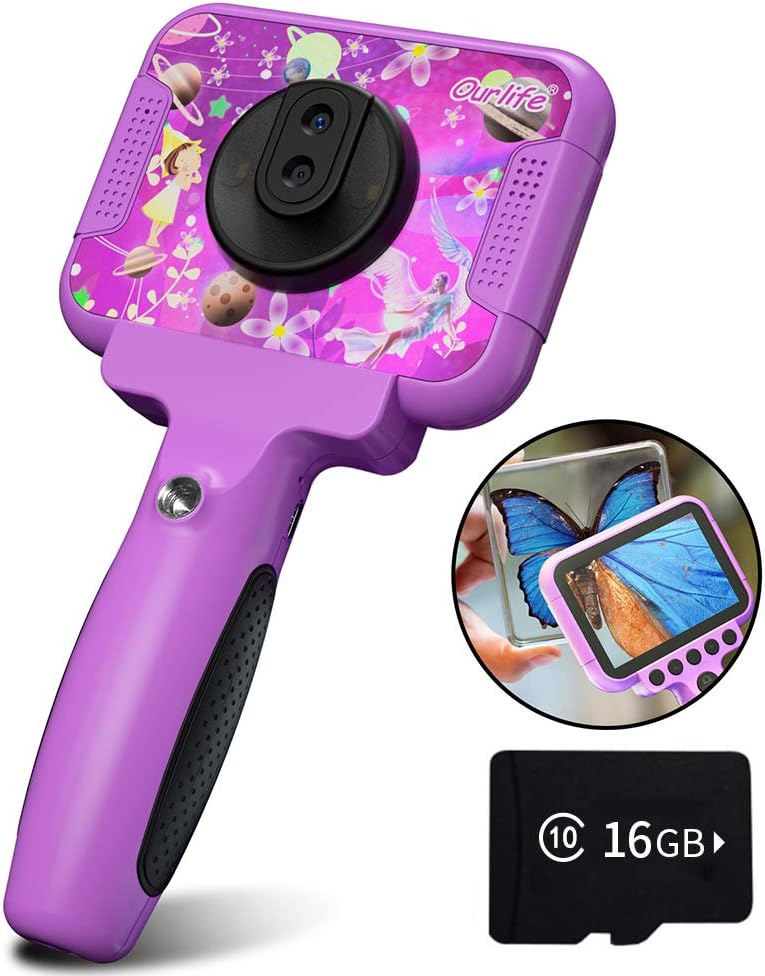
Image 1.1: The Ourlife Kids Camera OU-630, highlighting its design and macro capability.
2. Pakketinhoud
Kontroleer asseblief die pakket om seker te maak dat alle items teenwoordig is:
- Kids Camera x 1
- 16GB TF Card x 1
- Base Bracket x 1
- USB-laaikabel x 1
- Gebruikershandleiding x 1
- Neck Lanyard x 1
- Handband x 1

Image 2.1: Contents of the Ourlife Kids Camera OU-630 package.
3. Produk verbyview
Maak jouself vertroud met die kamera se komponente en kontroles:
- Vertoon skerm: 3.5-inch color screen for viewfoto's en video's neem en deur spyskaarte navigeer.
- Hooflens: For standard photography and video.
- Makro lens: Dedicated lens for 60x magnification.
- Beheerknoppies: M (Menu), Up, OK, Down, Power, Shutter/LED.
- Hanteer: Ergonomically designed for child-friendly grip.
- USB-poort: Vir laai en data-oordrag.
- TF-kaartgleuf: Vir die invoeging van 'n geheuekaart.

Image 3.1: Key features and specifications of the Ourlife Kids Camera OU-630.
Knoppie Funksie Tabel
| Knoppie | Kameramodus | Opnamemodus | Musiekmodus | Spelmodus | Afspeelmodus |
|---|---|---|---|---|---|
| M | Terug na Menu | ||||
| ▲ | Change filters/Frames Long press: Zoom in | Change filters/Frames | Vorige liedjie | Beweeg links | Previous photo |
| OK | Long press: Open/Close LED light | OK | Choose music/story | OK | Speel / Pouse |
| ▼ | Change filters/Frames Long press: Zoom out | Change filters/Frames | Volgende liedjie | Beweeg regs | Volgende foto |
| ⏻ | Switch to Splicing mode | Terug na Menu | NULL | NULL | Vee uit |
| ◎ | Neem Foto | Terug na Menu | NULL | NULL | NULL |
Image 3.2: Detailed functions of each button across different modes.
4. Opstelling
4.1. Laai die kamera
Before first use, fully charge the camera. Connect the included USB charging cable to the camera's USB port and to a compatible USB power source (e.g., computer, wall adapter). The charging indicator light will show the charging status. A full charge provides approximately 3 hours of use.
4.2. Plaas die TF-kaart
The camera requires a TF (MicroSD) card to store photos and videos. A 16GB TF card is included. Locate the TF card slot on the side of the camera. Gently insert the TF card with the metal contacts facing down until it clicks into place. To remove, push the card in again until it springs out.
5. Bedryfsinstruksies
5.1. Skakel aan/af
- Om aan te skakel, hou die Power button (⏻) totdat die skerm brand.
- Druk en hou die. In om uit te skakel Power button (⏻) totdat die skerm afskakel.
5.2. Kieslysnavigasie
Gebruik die Op (▲) en Af (▼) buttons to navigate through menu options. Press the OK knoppie to confirm a selection. Press the M (kieslys) knoppie to return to the previous menu or the main menu.
5.3. Neem foto's
- Van die hoofkieslys, kies die Kamera-ikoon en druk OK.
- Raam jou skoot met behulp van die skerm.
- Druk die Shutter button (◎) om 'n foto te neem.
- Gebruik die Op (▲) en Af (▼) buttons to change filters or frames. Long press Op (▲) om in te zoem, druk lank Af (▼) om uit te zoem.
5.4. Opneem van video's
- Van die hoofkieslys, kies die Video-ikoon en druk OK.
- Druk die Shutter button (◎) om op te neem.
- Druk die Shutter button (◎) weer om op te hou opneem.
- Gebruik die Op (▲) en Af (▼) buttons to change filters or frames during recording.
5.5. Macro Function
The camera features a dedicated macro lens for 60x magnification, ideal for observing small objects. The optimal focal length for macro photography is 20-40mm.
- To switch between the main lens and macro lens, long press the Shutter button (◎).
- When in macro mode, position the camera close to the subject (20-40mm distance).
- Use the included base bracket for stability during macro shots to prevent hand shake.
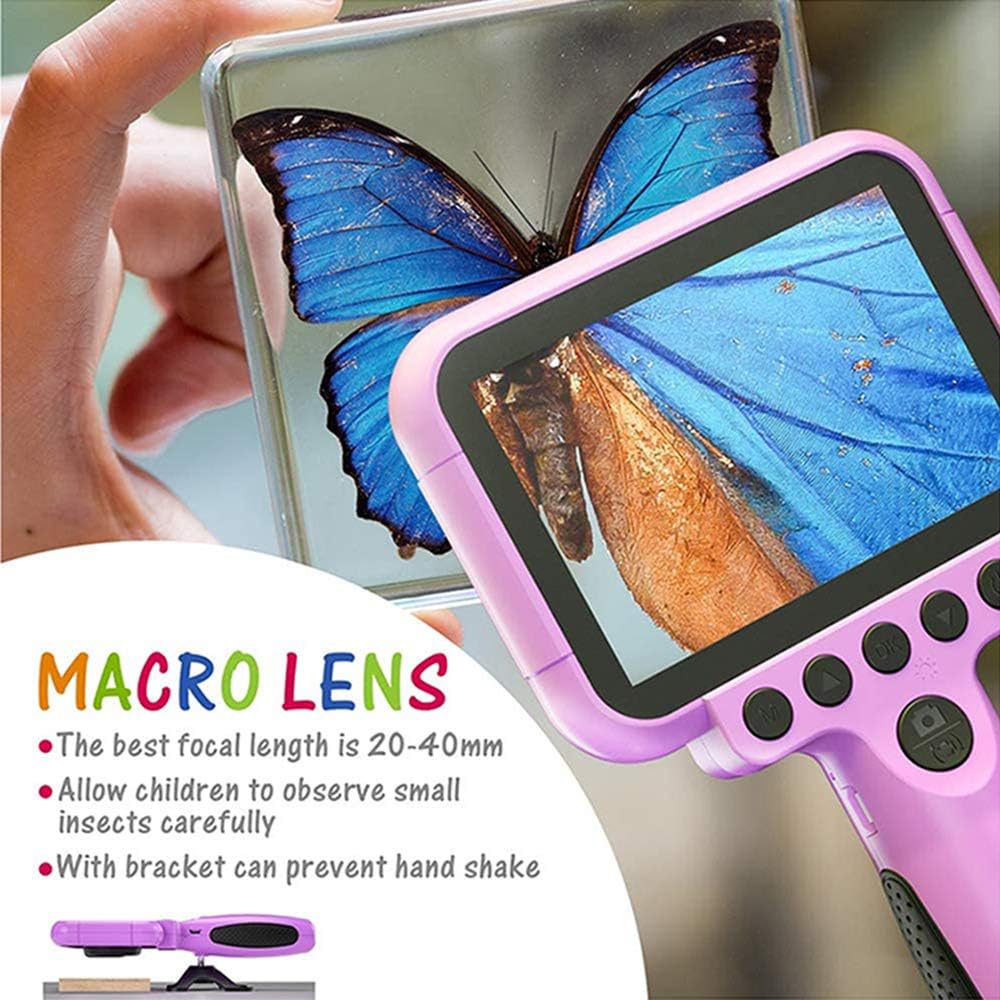
Image 5.1: Demonstrating the macro lens function for detailed observation.

Image 5.2: Switching between HD and Macro lenses.
5.6. Patchwork Mode (Splicing Mode)
This mode allows you to combine two separate photos into one. It includes various border patterns.
- In Camera Mode, press the Power button (⏻) to switch to Splicing (Patchwork) mode.
- Follow the on-screen prompts to take two photos that will be merged.
- Select from 9 available border patterns.

Image 5.3: Using the Patchwork Mode to combine images.
5.7. Musiekmodus
The camera supports MP3 music playback. Store your favorite music files on the TF card. From the main menu, select the Musiek ikoon en druk OK. Gebruik die Op (▲) en Af (▼) buttons to select songs, and OK om te speel/pouse.
5.8. Speletjies
The camera includes pre-installed games for entertainment. From the main menu, select the Game icon en druk OK. Use the navigation buttons to play.
5.9. Afspeelmodus
Om view your captured photos and videos, select the Photos/Video Playback icon vanaf die hoofkieslys en druk OK. Gebruik die Op (▲) en Af (▼) buttons to browse, and OK to play videos or view photos. To delete a file, druk die Power button (⏻) terwyl viewing dit.
5.10. Instellings
Access camera settings by selecting the Instellings-ikoon from the main menu. Here you can adjust various parameters such as date/time, language, resolution, and more.
6. Onderhoud
- Hou die kamera skoon deur dit met 'n sagte, droë lap af te vee.
- Avoid exposing the camera to extreme temperatures, direct sunlight, or moisture.
- Moenie probeer om die kamera self uitmekaar te haal of te herstel nie.
- Ensure the TF card is inserted correctly to prevent data loss.
- Charge the camera regularly to maintain battery health.
7. Probleemoplossing
- Kamera skakel nie aan nie: Maak seker dat die battery gelaai is. Koppel aan 'n kragbron en probeer weer.
- Kan nie foto's/video's neem nie: Check if a TF card is inserted and if it has sufficient storage space.
- Swak beeldkwaliteit: Ensure the lens is clean. Check lighting conditions. For macro shots, ensure correct focal distance (20-40mm).
- Kamera vries: Press and hold the Power button to force a restart.
- TF card error: Reinsert the TF card. If the issue persists, try formatting the card (this will erase all data) or use a different TF card.
8. Spesifikasies
| Kenmerk | Detail |
|---|---|
| Modelnommer | OU-630 |
| Effektiewe stilresolusie | 12 MP |
| Video-resolusie | 1080p |
| Skerm grootte | 3.5 duim |
| Beeldstabilisasie | Digitaal |
| Lens tipe | Macro (60x zoom) |
| Battery Tipe | 1 litiumpolimeer (ingesluit) |
| Verbindingstegnologie | USB |
| Ondersteunde mediatipe | SD kaart |
| Skietmodusse | Loop recording, Continuous shooting, Timed photo, Macro photography, Filter photos |
| Itemafmetings (D x B x H) | 3.94" D x 7.28" B x 0.79" H |
9. Waarborg en ondersteuning
Hierdie Ourlife Kids Camera OU-630 comes with a 12 maande waarborg from the date of purchase. This warranty covers manufacturing defects and workmanship. It does not cover damage caused by misuse, accidents, unauthorized repairs, or normal wear and tear.
For technical support, warranty claims, or any questions regarding your product, please contact Ourlife customer service. Refer to the contact information provided on the product packaging or the official Ourlife webwebwerf.