
Inleiding
This manual provides detailed instructions for the setup, operation, and maintenance of your HXSJ J800 Wired Gaming Mouse. Please read this manual thoroughly to ensure proper use and to maximize your gaming and productivity experience.
Pakketinhoud
- 1 x HXSJ J800 Wired Gaming Mouse
- 1 x Gebruikershandleiding
Opstelling
- Koppel die muis: Insert the USB connector of the HXSJ J800 mouse into an available USB port on your computer.
- Bestuurder installasie: The mouse is plug-and-play. Your operating system will automatically detect and install the necessary drivers. No additional software installation is required for basic functionality.
- Aanvanklike gebruik: Once connected, the mouse is ready for immediate use.

Image: The HXSJ J800 mouse with its braided USB cable, ready for connection to a computer.
Bedryfsinstruksies
1. Mode Switching (Office Mode / Game Mode)
The HXSJ J800 mouse features two operational modes: Office Mode and Game Mode.
- Verstekmodus: The mouse defaults to Office Mode upon connection.
- Skakelmodusse: To switch between Office Mode and Game Mode, press and hold the Scroll Wheel button en die Regs muis knoppie gelyktydig vir 3 sekondes.
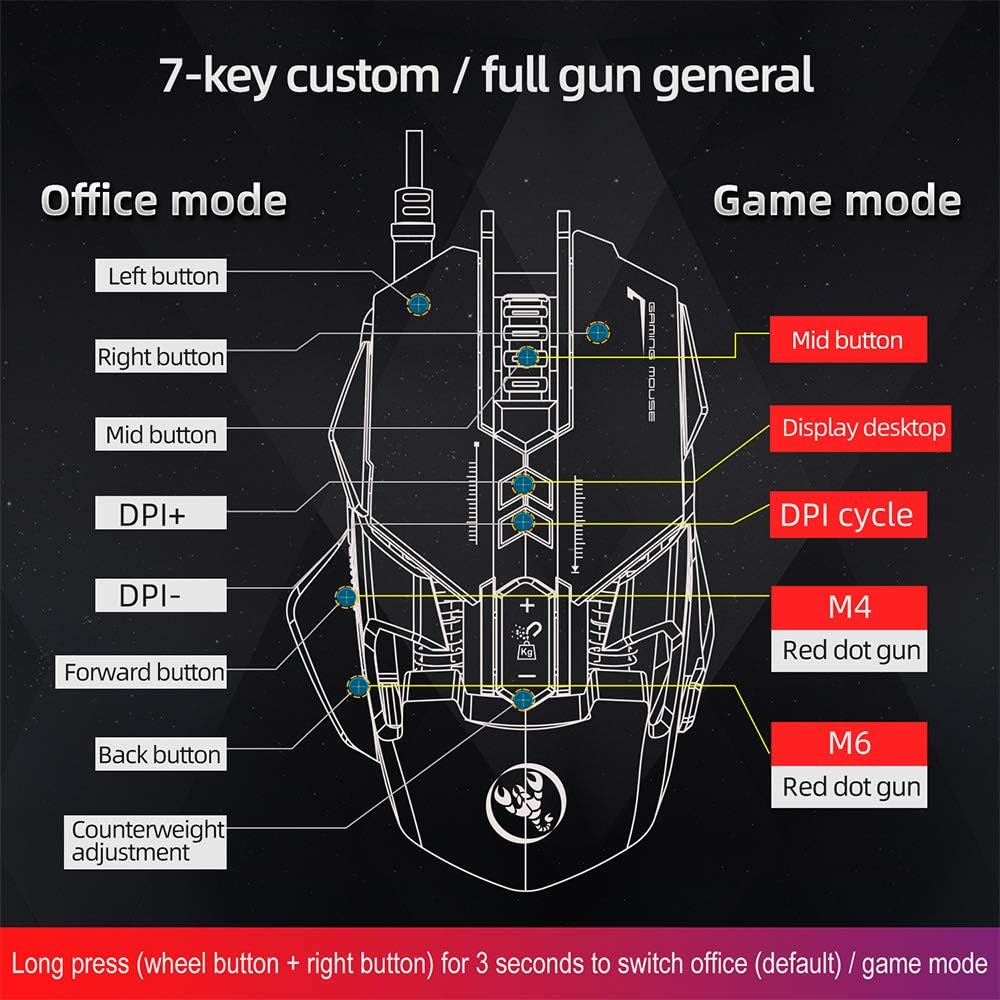
Image: A diagram illustrating the different button assignments for Office Mode (left) and Game Mode (right), including the mode switching instruction.
2. DPI-aanpassing
The mouse supports six adjustable DPI settings for varying cursor sensitivity.
- DPI-vlakke: 800, 1600, 2400, 3200, 4800, 6400 DPI.
- Verandering van DPI: Use the dedicated DPI+ and DPI- buttons located on the top of the mouse to cycle through the available DPI settings.
- Visuele aanwyser: The RGB lighting will flash with a corresponding color when the DPI setting is changed.
3. Makroprogrammering
The HXSJ J800 features an A6653 E-sports Game Chip with onboard storage for hardware macro definition.
- Funksionaliteit: Record and write macro definition commands directly to the mouse.
- Software-Free Operation: Once macros are recorded, no additional software is required for their execution, making it convenient for use across different computers.

Beeld: 'n Gedetailleerde view of the A6653 E-sports Game Chip, highlighting its role in hardware macro definition.
4. RGB Light Effect
The mouse features 16.8 million color RGB backlight modes.
- Pasmaak: The RGB lighting provides various color effects.
- DPI-aanwyser: The light of the corresponding gear will flash every time the DPI changes.

Image: The HXSJ J800 mouse illuminated with vibrant RGB lighting, showcasing its aesthetic features.
5. Removable Weight Adjustment
Customize the mouse's weight for enhanced stability and accuracy.
- Weight System: The mouse incorporates a suction magnet design with two 5g removable weights.
- Aanpassing: The weights can be easily inserted into or removed from the weight chamber. The magnetic design ensures the weights are securely held and not easily lost.

Image: A user adjusting the removable 5g weights in the HXSJ J800 mouse's magnetic weight chamber.
Kenmerke verbyview
- Seven-Key Macro Programming: Supports recording and writing macro definition commands for personalized control.
- Six Adjustable DPI Levels: Easily switch between 800-1600-2400-3200-4800-6400DPI to suit various tasks and games.
- E-sports Game Chip (A6653): Features onboard storage for true hardware macro definition, eliminating the need for software after initial setup.
- Cool RGB Light Effect: 16.8 million color RGB backlight modes with dynamic effects and DPI change indicators.
- Removable Weight Design: Two 5g magnetic weights allow for customization of mouse weight for optimal feel and precision.
- Duursame skakelaars: Gegradeer vir 20 miljoen siklusse.
- Aluminum Alloy Roller: Provides a high-grade feel and comfortable damping.

Beeld: 'n Interne view of the HXSJ J800 mouse, highlighting key components such as the A6653 chip, aluminum alloy roller, and weight counterweights.

Image: A close-up of the HXSJ J800 mouse, focusing on the aluminum alloy scroll wheel and its textured design.
Onderhoud
- Skoonmaak: Gebruik 'n sagte, droë lap om die muisoppervlak skoon te maak. Vir hardnekkige vuiligheid, liggies vee.ampMaak die lap met water skoon. Vermy die gebruik van harde chemikalieë of skuurmiddels.
- Sensor sorg: Hou die optiese sensor aan die onderkant van die muis skoon en vry van stof of puin om akkurate dophou te verseker.
- Kabelbestuur: Vermy skerp buigings of oormatige trek aan die USB-kabel om skade te voorkom.
- Berging: Bêre die muis in 'n skoon, droë omgewing wanneer dit nie gebruik word nie.
Probleemoplossing
- Muis reageer nie:
- - Ensure the USB cable is securely connected to your computer's USB port.
- - Try connecting the mouse to a different USB port.
- - Herbegin jou rekenaar.
- DPI-aanpassing werk nie:
- - Ensure you are pressing the correct DPI+ or DPI- buttons.
- - Check if the mouse is in a mode that supports DPI adjustment (both Office and Game modes support it).
- RGB lighting not functioning:
- - Verify the mouse is properly connected and receiving power.
- - The lighting should activate automatically. If not, ensure no software is overriding the mouse's default lighting settings (though this mouse is designed to be software-free for basic functions).
- Macros not executing:
- - Ensure the macros were correctly recorded and saved to the mouse's onboard memory.
- - Confirm the mouse is in Game Mode if the macros are assigned to Game Mode specific buttons.
Spesifikasies
| Item | Spesifikasie |
|---|---|
| Model | J800 |
| Kleur | Grys |
| Aantal sleutels | 7 |
| DPI-instellings | 800-1600-2400-3200-4800-6400DPI |
| Koppelvlak | USB |
| Verander Lewe | 20 miljoen siklusse |
| Voltage/Stroom | DC 5V/100mA |
| Ondersteunde stelsel | Windows 2000/XP/Win7/Win8/Win10 Vista 32bit, iOS or latest |
| Item Grootte | 13 x 8 x 4 cm (L x B x H) |
| Item gewig | Ongeveer. 154g |
| Chip | A6653 E-sports Game Chip |
| Spesiale kenmerke | Programmable Buttons, Adjustable DPI, RGB Lighting, Removable Weights |
Waarborg en Ondersteuning
For warranty information or technical support, please refer to the retailer where you purchased the HXSJ J800 Wired Gaming Mouse or visit the official HXSJ webwebwerf. Bewaar asseblief u bewys van aankoop vir waarborgeise.