
ELECDER D19
ELECDER D19 Ware Draadlose Oordopjes Gebruikershandleiding
Model: D19 | Brand: ELECDER
1. Inleiding
The ELECDER D19 True Wireless Earbuds are designed to provide a superior audio experience with advanced features such as Bluetooth 5.0 connectivity, noise cancellation, and IPX7 waterproofing. This manual provides comprehensive instructions for setting up, operating, and maintaining your earbuds to ensure optimal performance and longevity.
Sleutel kenmerke:
- Bluetooth 5.0: Fast and stable wireless transmission with CVC8.0 noise cancellation for clear calls.
- Premium Hi-Fi Stereo Audio: APTX audio for lossless transmission, delivering immersive sound with crystal clarity and deep bass.
- IPX7 waterdig: Resistant to sweat, water, and rain, ideal for workouts and outdoor activities.
- Ergonomiese ontwerp: Lightweight (5g per earbud) with flexible silicone ear-fins and S/M/L ear caps for a secure and comfortable fit.
- Quick Pairing Technology: Automatic power-on and pairing upon removal from the charging case.
- USB Quick Charge & Wireless Charging: Up to 4.5 hours of music on a single charge, with an additional 18 hours from the charging case, supporting both USB and wireless charging.
2. Produk verbyview

Figure 2.1: ELECDER D19 True Wireless Earbuds in their charging case. The earbuds are black, sleek, and designed for in-ear use, while the compact charging case is also black with a smooth finish.
Wat is in die boks:
- ELECDER D19 True Wireless Earbuds (Left and Right)
- Laaikas
- USB-laaikabel
- Oorpuntjies (S/M/L groottes)
- Gebruikershandleiding (hierdie dokument)
3. Opstelgids
3.1 Laai die oordopjes en houer
Before first use, fully charge the earbuds and the charging case. The charging case supports both USB cable charging and wireless charging.
- USB-laai: Connect the provided USB cable to the charging port on the case and plug the other end into a USB power source (e.g., computer, wall adapter). The indicator light on the case will show charging status.
- Draadlose laai: Place the charging case on a compatible wireless charging pad. The indicator light will flash to confirm charging.

Figure 3.1: The ELECDER D19 charging case being charged wirelessly on a charging pad, also showing the Micro USB port for wired charging. This image highlights the dual charging capabilities of the case.
A full charge for the earbuds provides approximately 4.5 hours of music playback, and the charging case provides an additional 18 hours of battery life.
3.2 Koppeling met jou toestel
The ELECDER D19 earbuds feature quick pairing technology for seamless connection.
- Stap 1: Open the charging case and take out both earbuds. They will automatically power on and pair with each other.
- Stap 2: Gaan na die Bluetooth-instellings op jou slimfoon of Bluetooth-geaktiveerde toestel.
- Stap 3: Soek vir available devices and select "Elecder D19" from the list to connect.
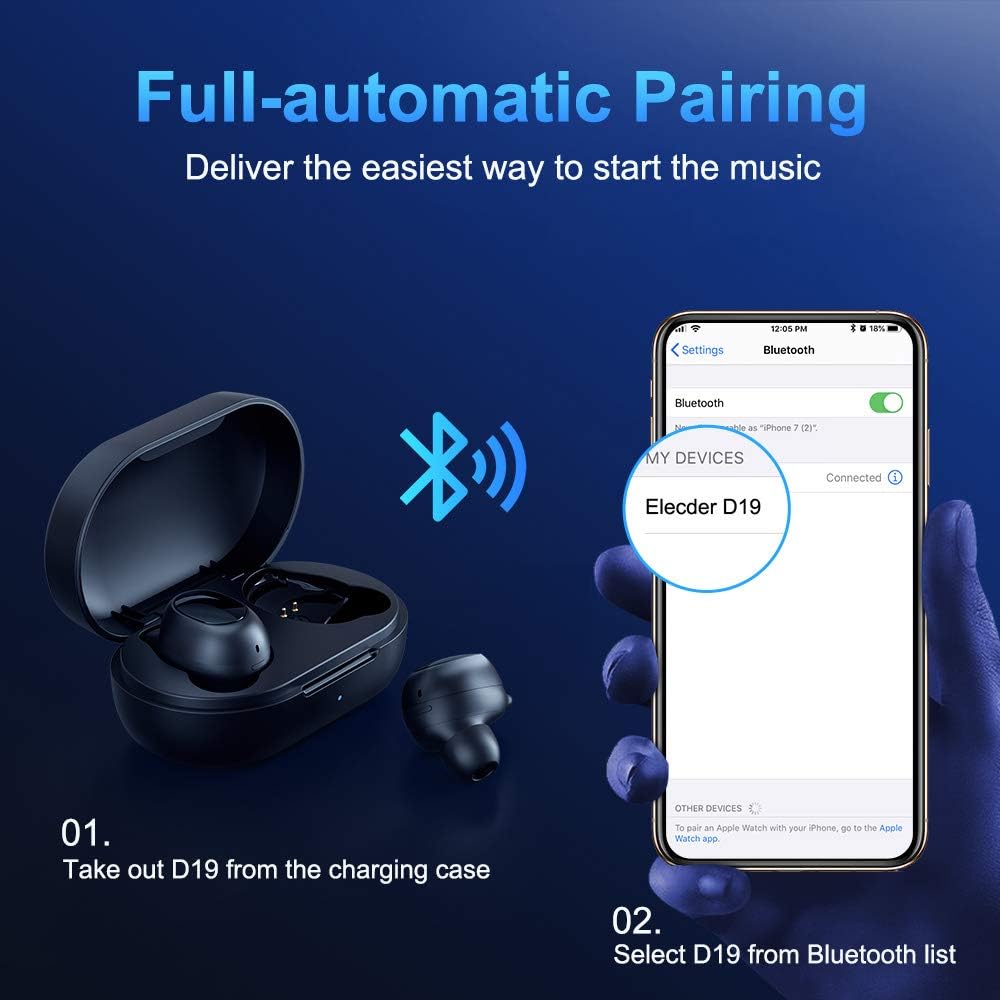
Figure 3.2: A visual guide demonstrating the automatic pairing process. The image shows the earbuds being taken out of the case and then the "Elecder D19" option appearing in a smartphone's Bluetooth settings for connection.
Na die aanvanklike paring sal die oordopjes outomaties aan die laaste gekoppelde toestel koppel wanneer dit uit die laaikas gehaal word.

Figure 3.3: An illustration showing the stable Bluetooth connection between the ELECDER D19 earbuds and various smart devices, including smartphones and tablets.
4. Bedryfsinstruksies
4.1 Dra van die oordopjes
For optimal sound quality and comfort, choose the ear tips that best fit your ears. The earbuds come with S, M, and L sizes. Insert the earbuds into your ears and gently rotate them to find a secure and comfortable fit. The ergonomic ear-fin design helps ensure stability during movement.
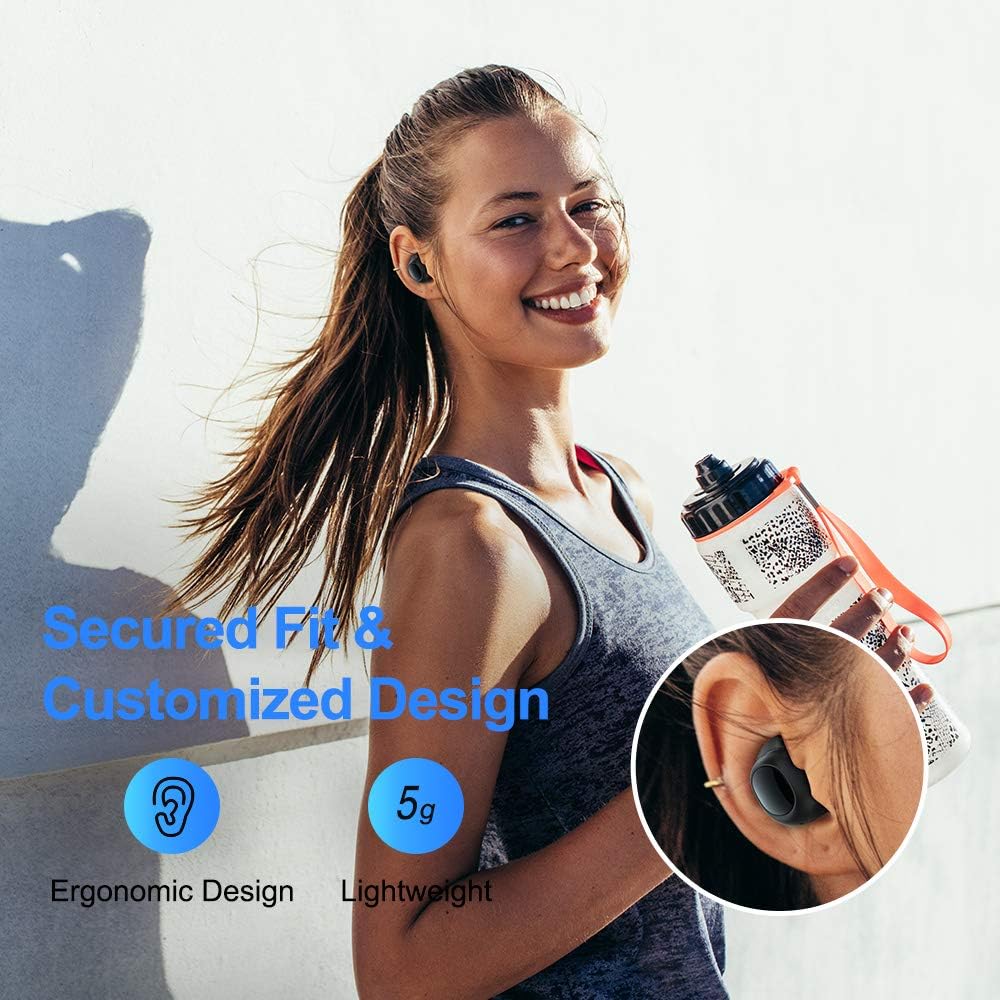
Figure 4.1: A person wearing the ELECDER D19 earbuds during a workout, demonstrating the secure and comfortable fit provided by the ergonomic design and customizable ear tips.
4.2 Mediabeheer
The ELECDER D19 earbuds feature physical buttons for media control. Specific button functions may vary slightly based on the device and operating system, but common controls include:
- Speel/pouse: Druk een keer op enige oordopje.
- Volgende snit: Dubbeldruk op die regter oordopje.
- Vorige snit: Dubbeldruk op die linker oordopje.
- Volume op: Triple press on the right earbud.
- Volume af: Triple press on the left earbud.
4.3 Oproepbestuur
Manage your calls directly from the earbuds:
- Beantwoord/beëindig oproep: Druk een keer op enige oordopje.
- Verwerp oproep: Druk en hou enige oordopjes vir 2 sekondes.
- Aktiveer stemassistent: Druk en hou enige oordopjes vir 3 sekondes in (bv. Siri, Google Assistent).
5. Onderhoud en versorging
Proper maintenance ensures the longevity and optimal performance of your ELECDER D19 earbuds.
5.1 Skoonmaak
- Maak die oordopjes en laaikas gereeld skoon met 'n sagte, droë, pluisvrye lap.
- Verwyder die oordoppe en maak dit skoon met sagte seep en water, droog dit dan deeglik af voordat jy dit weer vasmaak.
- Use a cotton swab or small brush to gently clean the charging contacts on both the earbuds and the case.
- Vermy die gebruik van skuurmiddels, alkohol of chemiese skoonmaakmiddels.
5.2 Waterbestandheid (IPX7)
The ELECDER D19 earbuds are IPX7 waterproof, meaning they can withstand submersion in up to 1 meter of water for 30 minutes. This makes them suitable for protection against sweat, rain, and accidental splashes.

Figure 5.1: The ELECDER D19 earbuds shown with water droplets, illustrating their IPX7 waterproof rating, which protects them from sweat, rain, and splashes.
Let wel: The charging case is not waterproof. Ensure earbuds are dry before placing them back into the charging case.
5.3 Berging
Wanneer dit nie gebruik word nie, bêre die oorfone in hul laaihouer om hulle te beskerm en gelaai te hou. Bêre die houer op 'n koel, droë plek weg van uiterste temperature en direkte sonlig.
6. Probleemoplossing
If you encounter issues with your ELECDER D19 earbuds, refer to the following common solutions:
| Probleem | Moontlike oorsaak | Oplossing |
|---|---|---|
| Oordopjes koppel nie met toestel nie. | Bluetooth is off on device; earbuds not in pairing mode; previously paired device interfering. | Ensure Bluetooth is enabled. Place earbuds back in case, then take them out to re-enter pairing mode. Forget "Elecder D19" from your device's Bluetooth list and re-pair. |
| Slegs een oordoppie werk. | Earbuds not paired with each other; low battery on one earbud. | Place both earbuds back into the charging case, close the lid, wait a few seconds, then open and take them out again. Ensure both earbuds are charged. |
| Geen geluid of lae volume nie. | Device volume too low; ear tips not properly sealed; debris in earbud nozzle. | Increase volume on your device. Adjust earbud position or try different sized ear tips for a better seal. Clean earbud nozzles. |
| Laaikas laai nie. | Faulty cable/charger; improper placement on wireless charger. | Try a different USB cable and power adapter. Ensure the case is correctly aligned on the wireless charging pad. |
| Bluetooth-verbinding onstabiel. | Interference; distance from device; low earbud battery. | Reduce distance between earbuds and device. Avoid environments with strong Wi-Fi or other Bluetooth signals. Ensure earbuds are fully charged. |
7. Spesifikasies
Detailed technical specifications for the ELECDER D19 True Wireless Earbuds:
| Kenmerk | Detail |
|---|---|
| Model Naam | ELECDER D19 |
| Verbindingstegnologie | Draadloos (Bluetooth 5.0) |
| Bluetooth-reeks | 33 Voet |
| Oorplasing | In Oor |
| Vormfaktor | In Oor |
| Geraasbeheer | Active Noise Cancellation (CVC8.0) |
| Mikrofoon | Ingesluit |
| Waterweerstandvlak | IPX7 waterdig |
| Batterylewe (Oorfone) | Up to 4.5 hours (music) / 4 hours (calling) |
| Laaikas Bykomende speeltyd | 18 uur |
| Laai tyd | Ongeveer 2 ure |
| Laai-koppelvlak | Micro USB, Wireless Charging |
| Item gewig | 1.92 ounces (total) / 5g (each earbud) |
| Produk afmetings | 3.89 x 3.89 x 1.65 duim |
| Versoenbare toestelle | iOS and Android Smartphones |
| Materiaal | Silikoon (oorpunte) |
| Kleur | Swart |

Figure 7.1: An infographic detailing the battery life of the ELECDER D19 earbuds and charging case, showing 4 hours for calls, 4.5 hours for music, and a total of 18 hours with the 500mAh charging case.
8. Waarborg en Ondersteuning
ELECDER products are manufactured to high quality standards. For information regarding warranty coverage, technical support, or service inquiries, please refer to the contact information provided with your product packaging or visit the official ELECDER webwebwerf.
Vir verdere hulp kan u ook die kleinhandelaar kontak waar u die produk gekoop het.
Ask a question about this manual
Ask about setup, troubleshooting, compatibility, parts, safety, or missing instructions. Manuals+ will review the question and use this page’s manual context to help answer it.