
Inleiding
This manual provides detailed instructions for the operation and maintenance of your GTMEDIA Z3 Portable DAB+/FM RDS Radio. Please read this manual thoroughly before using the device to ensure proper functionality and to maximize your listening experience.
Belangrike veiligheidsinligting
- Moenie die toestel aan reën, vog of uiterste temperature blootstel nie.
- Vermy om die toestel te laat val of aan sterk impakte te onderwerp.
- Moenie probeer om die eenheid self uitmekaar te haal of te herstel nie. Verwys alle diens na gekwalifiseerde personeel.
- Gebruik slegs die gespesifiseerde laaikabel en kragadapter.
- Hou buite bereik van kinders.
Pakketinhoud
Maak seker dat alle items in die pakket teenwoordig is:
- 1 x GTMEDIA Z3 DAB+/FM Radio
- 1 x USB-laaikabel
- 1 x Gebruikershandleiding

Image: The GTMEDIA Z3 radio, its retail box, USB charging cable, and user manual.
Produk verbyview
The GTMEDIA Z3 is a portable DAB+/FM RDS radio featuring a 2.4-inch TFT-LCD screen. It supports 60 preset stations for both DAB+ and FM, and includes functions such as clock, alarm, and sleep timer. The device is powered by a rechargeable 18650 lithium battery.
Voorpaneelkontroles en skerm
- Aan/af-/bystandknoppie: Turns the radio on/off or puts it in standby mode.
- Skandeer-knoppie: Initiates station scanning.
- DAB/FM-knoppie: Switches between DAB+ and FM modes.
- Kieslys-knoppie: Verkry toegang tot die hoofkieslys.
- EQ-knoppie: Pas gelykmakerinstellings aan.
- Vooraf ingestelde knoppie: Accesses preset stations.
- Volume/Kiesknoppie: Adjusts volume and navigates/selects menu options.
- 2.4-inch TFT-LCD Display: Wys stasie-inligting, tyd en kieslysopsies.
Agterpaneel en poorte
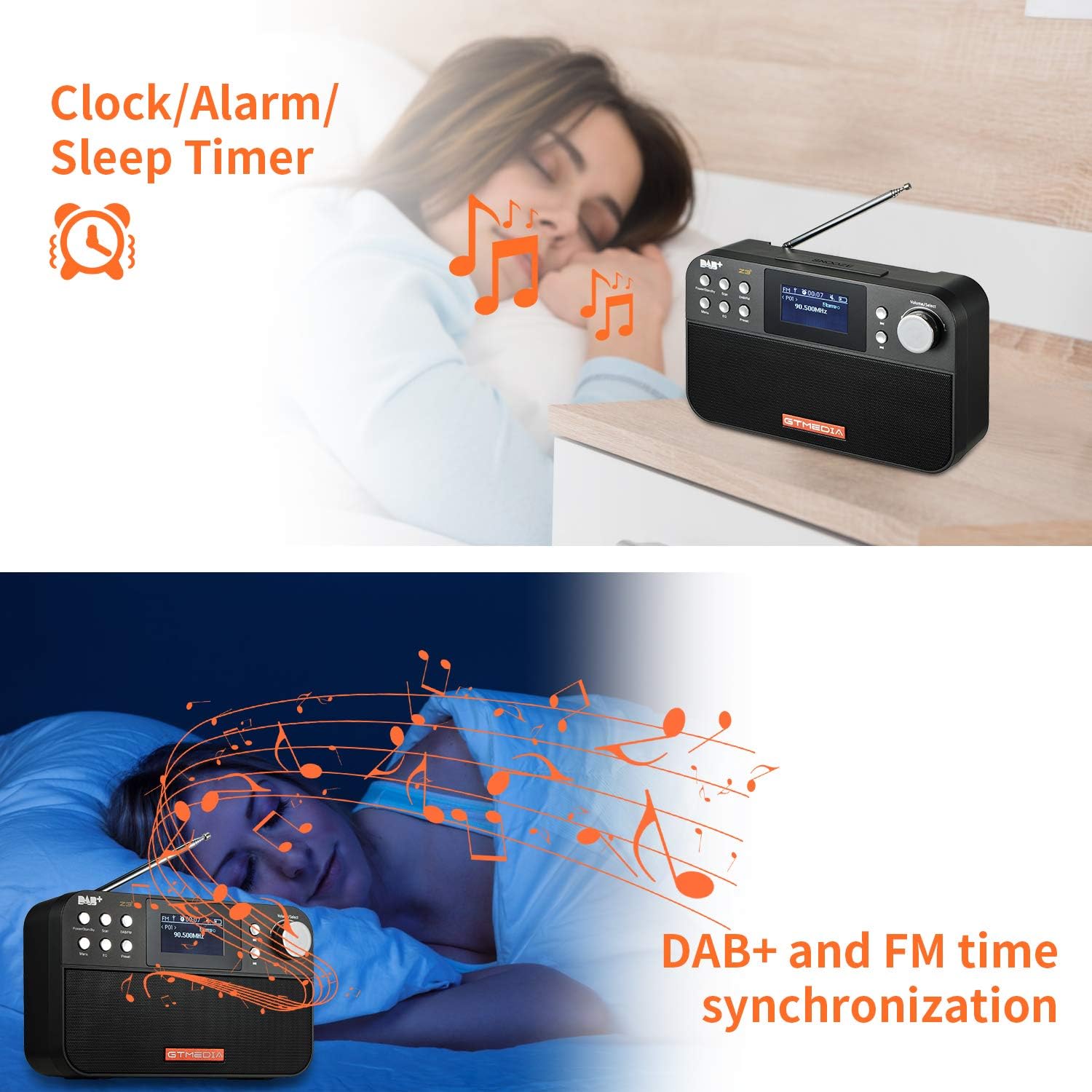
Image: The back of the GTMEDIA Z3 radio, highlighting the 18650 lithium battery compartment and the DC 5V USB charging port.
- 18650 Lithium Battery Compartment: Huisves die herlaaibare battery.
- DC 5V USB Charging Port: Vir die laai van die toestel.
Opstelgids
1. Laai die battery
- Locate the USB charging port on the rear of the radio.
- Connect the provided USB charging cable to the radio and to a compatible USB power adapter (DC 5V, ≥1500mA) or a computer USB port.
- The battery indicator on the display will show charging status. A full charge typically provides 4-7 hours of operation.
Image: The GTMEDIA Z3 radio's rear panel, illustrating the USB charging port and battery specifications.
2. Aanvanklike aanskakeling en taalkeuse
- Druk en hou die Krag/bystand knoppie om die radio aan te skakel.
- Upon first use, you may be prompted to select a language. Use the Volume/Selekteer knob to navigate and press to confirm your choice. English is the default language.
3. Tydsinchronisasie
The clock can be set manually or synchronized automatically with DAB+ or FM signals.
- Outomatiese sinchronisasie: When tuned to a DAB+ or FM station that broadcasts time information, the radio will automatically update its clock.
- Handmatige aanpassing: Access the system settings via the Spyskaart button to manually set the time and date.
Bedryfsinstruksies
1. Radio Modes (DAB+/FM)
Skakelmodusse:
Druk die DAB / FM button to switch between DAB+ and FM radio modes.
Skandeer vir stasies:
- Auto Scan (FM): In FM-modus, druk die Skandeer button to automatically search for and store available stations.
- Local Scan (DAB+): In DAB+-modus, druk die Skandeer button to perform a local scan for DAB+ stations. Manual tuning is also supported.
Voorafstelling van stasies:
The radio supports 60 preset stations for both FM and DAB+ (10 quick access presets). To save a station:
- Stem na die verlangde stasie.
- Druk en hou die Vooraf ingesteld knoppie.
- Gebruik die Volume/Selekteer knob to choose a preset number and press to confirm.
Om 'n voorafbepaalde stasie te herroep, druk kortliks die Vooraf ingesteld knoppie en gebruik die Volume/Selekteer knop om te kies.
FM RDS Station Name Display:
When tuned to an FM station broadcasting RDS (Radio Data System) information, the 2.4-inch TFT-LCD screen will display the station name and other relevant data.
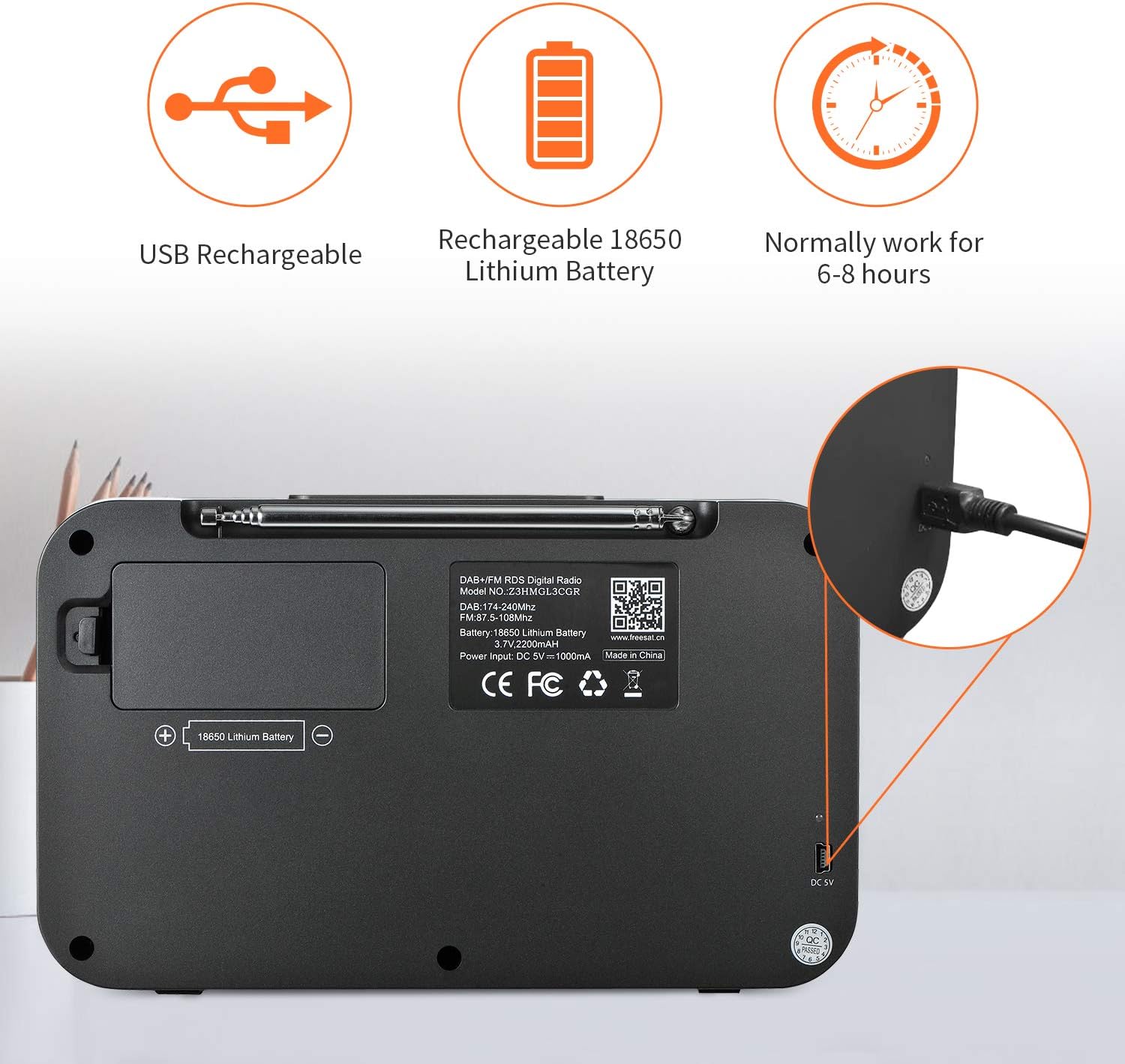
Image: The GTMEDIA Z3 radio's display showing "FM" and "90.500MHz" along with a station name, demonstrating the RDS feature.
2. Clock, Alarm, and Sleep Timer
The GTMEDIA Z3 radio includes integrated clock, alarm, and sleep timer functions for enhanced convenience.

Image: The GTMEDIA Z3 radio with icons representing clock, alarm, and sleep timer functions, depicted in a bedroom setting.
Stel die wekker in:
- Druk die Spyskaart button and navigate to the "Alarm" settings.
- Gebruik die Volume/Selekteer knob to set the alarm time, duration, and alarm source (e.g., buzzer, DAB+, FM).
- Bevestig jou instellings.
Stel die slaaptimer in:
- Druk die Spyskaart button and navigate to the "Sleep Timer" settings.
- Gebruik die Volume/Selekteer knob to choose the desired sleep duration (e.g., 15, 30, 60 minutes).
- Die radio sal outomaties na die vasgestelde tyd afskakel.
3. Musiekweergawe
The GTMEDIA Z3 supports playback of various music formats including MP3, FLAC, and WAV. Playback modes include single play, repeat, and shuffle. Specific instructions for accessing and controlling music playback are typically found within the device's menu system.
Onderhoud
Skoonmaak:
- Vee die radio af met 'n sagte, droë lap.
- Moenie vloeibare skoonmaakmiddels of skuurmiddels gebruik nie.
Batterysorg:
- Om die batterylewe te verleng, vermy om die battery gereeld heeltemal te ontlaai.
- Charge the battery regularly, even if the radio is not in frequent use.
- Bêre die radio op 'n koel, droë plek wanneer dit nie vir lang tye gebruik word nie.
Probleemoplossing
| Probleem | Moontlike oorsaak | Oplossing |
|---|---|---|
| Geen krag nie | Battery is ontlaai. | Laai die battery met die meegeleverde USB-kabel. |
| Swak radio-ontvangs | Swak sein; antenna nie uitgestrek nie. | Extend the telescopic antenna fully. Try repositioning the radio. Perform a new scan for stations. |
| Geen klank nie | Volume too low; Mute activated. | Verhoog die volume deur die Volume/Selekteer knob. Check if mute is active in settings. |
| Vertoon nie duidelik nie | Helderheidinstelling te laag. | Adjust LCD brightness in the system settings. |
Spesifikasies
| Kenmerk | Detail |
|---|---|
| Handelsmerk | GTMEDIA |
| Model | Z3 |
| Tuner Tegnologie | DAB Plus, FM RDS |
| Ondersteunde radiobande | DAB+ (174.92-239.20 MHz), FM (87.5-108 MHz) |
| Vertoon | 2.4-inch TFT-LCD (240 x 320 pixels) |
| Vooraf ingestelde stasies | 60 FM, 60 DAB+ |
| Kragbron | Battery aangedrewe |
| Battery Tipe | 18650 Lithium Battery (3.7V 2200mAh) |
| Bedryfsure | 4-7 hours (typical) |
| Laai-invoer | DC 5V, ≥1500mA (via USB) |
| Verbindingstegnologie | USB |
| Spesiale kenmerk | Portable, Clock, Alarm, Sleep Timer, USB Upgradeable |
| Item gewig | 620 g |
| Produk afmetings | 20 x 5 x 12 cm |
| Bedryfstemperatuur | 0~+45°C |
| Bergingstemperatuur | -10~+60°C |
| Musiek Formate | MP3, FLAC, WAV |

Image: Dimensions of the GTMEDIA Z3 radio, showing approximate measurements of 200mm x 120mm x 50mm.
Firmware-opgradering
The GTMEDIA Z3 radio supports firmware upgrades via a USB connection to a PC. For the latest firmware and detailed instructions, please visit the official support webwebwerf.

Image: The GTMEDIA Z3 radio connected to a laptop via a USB cable, indicating its upgradeable feature.
Waarborg en Ondersteuning
For technical support, warranty information, or any questions regarding your GTMEDIA Z3 radio, please visit the official GTMEDIA support webwebwerf: