
REDSTORM ESM-4108
REDSTORM Switch Controllers User Manual
This manual provides detailed instructions for the REDSTORM Wireless Switch Controller, compatible with Nintendo Switch, Switch Lite, Switch OLED, and PC. Learn about its features, setup, operation, maintenance, and troubleshooting.
1. Produk verbyview
The REDSTORM Switch Controller is designed to enhance your gaming experience across multiple platforms. It offers wireless compatibility with Nintendo Switch, Switch Lite, and Switch OLED consoles, and can also be connected via cable to Windows PC operating systems. This controller features advanced functionalities such as adjustable dual vibration, a Turbo function for rapid button presses, and precise 6-axis motion control.

Image: The REDSTORM Switch Controller featuring a unique graffiti design.
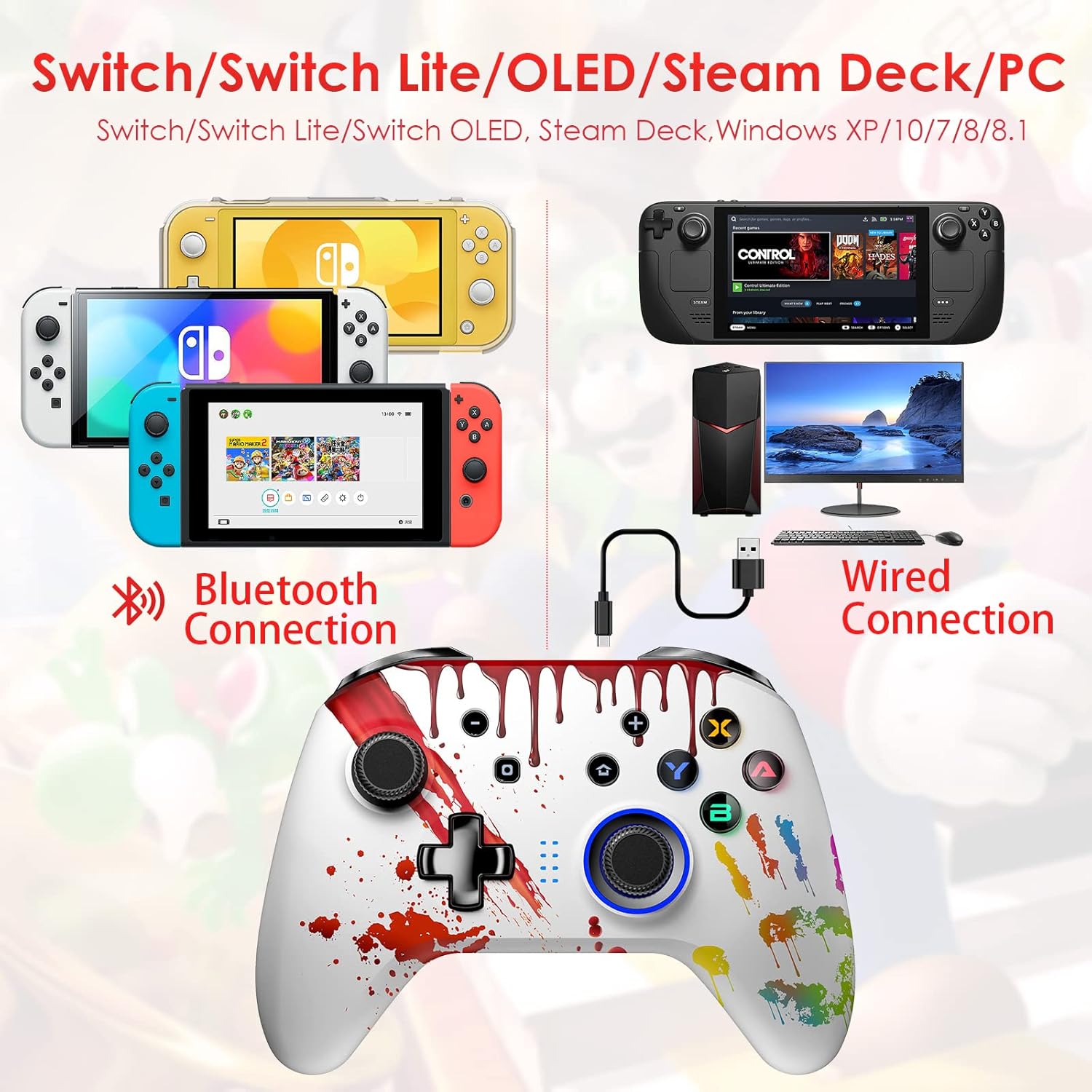
Image: Visual representation of the controller's compatibility with various Nintendo Switch models and PC via Bluetooth and wired connections.
Video: 'n Oorview of the REDSTORM Switch Controller's key features including Turbo, Double Shock, and 6-Axis motion control.
2. Sleutel kenmerke
2.1 Ergonomiese Ontwerp
The REDSTORM controller is engineered for maximum grip and comfort during extended gaming sessions. Its ergonomic shape and non-slip handles ensure a sturdy and comfortable hold, while the joysticks provide a natural in-hand feel.

Image: Detail of the controller's non-slip textured grip on the handles, designed for enhanced comfort and control.
2.2 Precise Motion Control
Equipped with built-in 6-axis motion sensors, the controller provides a precise gaming experience, crucial for motion-compatible games such as Mario Kart 8 Deluxe, The Legend of Zelda, Splatoon 2, and Super Mario Odyssey. This feature allows for smoother and faster aiming and movement.

Image: Diagram illustrating the 6-axis somatosensory technology for precise motion control.

Beeld: Ontplof view showing Hall Sensor Joysticks and Trigger Keys, ensuring no deadzone and no drifting for accurate input.
2.3 Adjustable Dual Vibration
Customize your immersive gaming experience with 5 levels of dual vibration intensity. This allows you to fine-tune the haptic feedback to your preference, enhancing realism in games.

Image: The controller shown with visual cues of vibration during a racing game, highlighting the dual vibration feature.
Video: Tutorial demonstrating how to adjust light, vibration, and Turbo settings on the ESM-4108 controller.
2.4 Turbo-funksie
Gain an edge in arcade, action, and fighting games with the Turbo function. This feature allows you to trigger a series of rapid and separate button presses, providing faster action and smoother combos.

Image: Visual explanation of the Turbo function, showing how it enhances performance with different speed settings.
2.5 Lang batterylewe
The controller is equipped with a built-in 600 mAh rechargeable lithium battery, providing up to 20 hours of continuous use. The high-capacity battery can be fully recharged in under 2 hours. The controller automatically switches to sleep mode when idle to conserve power.

Image: Diagram showing the internal 600mAh Lithium Polymer Battery, highlighting its capacity for extended gameplay.
3. Opstelling en verbinding
3.1 Wireless Pairing with Nintendo Switch
Follow these simple steps to connect your REDSTORM controller wirelessly to your Nintendo Switch, Switch Lite, or Switch OLED console:
- On your Switch, select the "Controllers" icon from the HOME Menu.
- Choose "Change Grip/Order".
- Press and hold the Y button and the HOME button on the controller simultaneously for more than two seconds.
- The LED lights on the controller will flash, indicating successful connection when they remain solid on the corresponding player number.

Image: A visual step-by-step guide demonstrating the wireless pairing process for the REDSTORM controller with a Nintendo Switch console.
3.2 Wired Connection with PC
The controller can be connected to most PC and Laptop Windows operating systems via the included charge cable. Simply plug the USB data cable into an available USB port on your PC and the Type-C port on the controller. The controller will be recognized automatically.
Video: A tutorial demonstrating the steps for wired connection of the REDSTORM ESM-4108 controller to a Nintendo Switch.
4. Bediening van die beheerder
4.1 Knoppie-uitleg
The REDSTORM controller features a standard layout with responsive buttons and joysticks for optimal gameplay. Key components include A/B/X/Y buttons, joysticks with 360-degree movement, fast response triggers, and a pressure-sensitive D-Pad.

Beeld: Nabyskoot views of the controller's buttons (A/B/X/Y), joysticks, triggers, and D-Pad, highlighting their design for improved control.
4.2 Adjusting Features
For detailed instructions on adjusting vibration intensity, setting up the Turbo function, and configuring button backlights, please refer to the tutorial video below. These adjustments allow for a personalized gaming experience.
Video: Comprehensive tutorial on adjusting light, vibration, and Turbo settings for the ESM-4108 controller.
5. Onderhoud en versorging
- Laai: Connect the controller to a power source using the provided USB-C cable. The battery indicator will show charging status. A full charge typically takes less than 2 hours.
- Skoonmaak: Gebruik 'n sagte, droë lap om die beheerder skoon te maak. Vermy die gebruik van harde chemikalieë of skuurmiddels.
- Berging: Bêre die beheerder op 'n koel, droë plek weg van direkte sonlig en uiterste temperature.
6. Probleemoplossing
- Beheerder koppel nie:
Ensure the Switch console is updated to the latest firmware. Try restarting the Switch console and then re-attempt the pairing process. For wired connection, ensure the cable is securely plugged into both the controller and the PC/Switch dock.
Video: Guide on how to troubleshoot connection issues if the controller cannot connect to the Switch, including restarting the console.
- Controller not responding or drifting:
Perform a controller calibration. This can resolve issues with joystick drifting or inaccurate input.
Video: Instructions for calibrating the REDSTORM ESM-4108 Switch controller.
- Low vibration intensity:
Adjust the vibration intensity settings as shown in the "Adjusting Features" section. Note that vibration effect may be less obvious when the battery drains.
Vir meer gedetailleerde probleemoplossing, verwys asseblief na die amptelike Probleemoplossingsgids (PDF).
7. Produkspesifikasies
| Spesifikasie | Detail |
|---|---|
| Handelsmerk | ROOISTORM |
| Model | ESM-4108 |
| Versoenbare toestelle | Nintendo Switch, rekenaar |
| Tipe beheerder | Gamepad |
| Verbindingstegnologie | Bluetooth |
| Kleur | White (Graffiti Design) |
| Item gewig | 10.2 onse |
| Produk afmetings | 4.17 x 2.4 x 5.98 duim |
| Batterye | 1 Lithium Ion battery required (600 mAh built-in) |
8. Waarborg en Ondersteuning
REDSTORM is committed to providing high-quality gaming accessories and excellent customer service. For any inquiries, technical support, or warranty information, please refer to the official REDSTORM support channels or the provided troubleshooting guide.
Amptelike probleemoplossingsgids: Laai PDF af
Visit the REDSTORM Store: REDSTORM Store on Amazon